Canon Viewer - Sheet music

Canon Viewer - Sheet music

Herunterladen auf App Store
Spark by MWM logo
Logo von Canon Viewer - Sheet music

Canon Viewer - Noten: Die ultimative digitale Bibliothek für moderne Musiker

Greifen Sie auf über 8.000 professionelle Partituren zu, mit sofortiger Transponierung, automatischem Umblättern und Apple Pencil-Unterstützung. Üben Sie intelligenter, zeichnen Sie Ihre Fortschritte auf und nehmen Sie Ihre gesamte Musiksammlung überallhin auf Ihrem iPad mit.

Herunterladen auf App Store

Herausgeber

Funtap Co. Ltd.

Kategorie

Music

Downloads

57K+

Bewertung

4.6/5

Bewertungen gesamt

700

Sprachen

2

Noten, weiterentwickelt

Entdecken Sie die Oberfläche, die von 57K+ Nutzern verwendet wird.

Ein iPad zeigt digitale Noten aus der Canon Viewer App auf einem Klaviernotenständer, während eine Person spielt.

Ein iPad zeigt digitale Noten aus der Canon Viewer App auf einem Klaviernotenständer, während eine Person spielt.

Eine Frau spielt Klavier, wobei ein „Play“-Textoverlay die digitale Notenfunktion hervorhebt

Eine Frau spielt Klavier, wobei ein „Play“-Textoverlay die digitale Notenfunktion hervorhebt

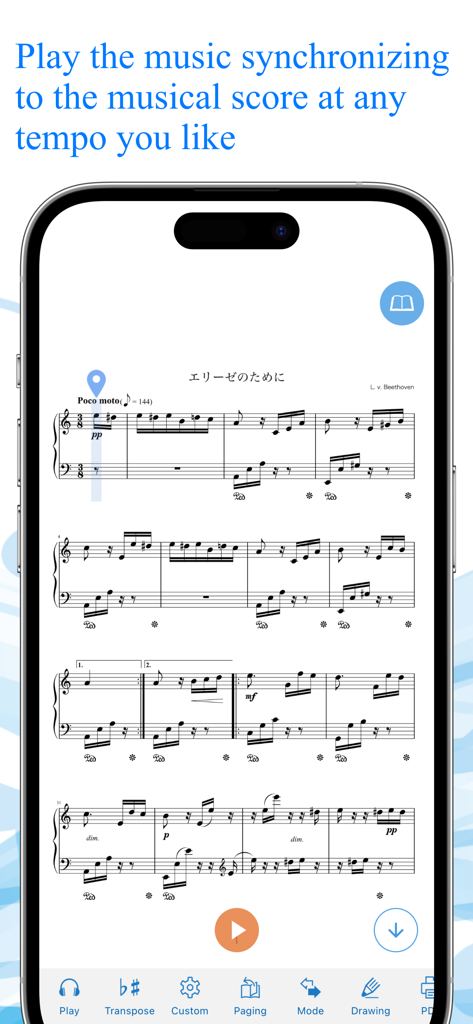
Canon Viewer App zeigt synchronisierte Notenwiedergabe auf einem Smartphone.

Canon Viewer App zeigt synchronisierte Notenwiedergabe auf einem Smartphone.

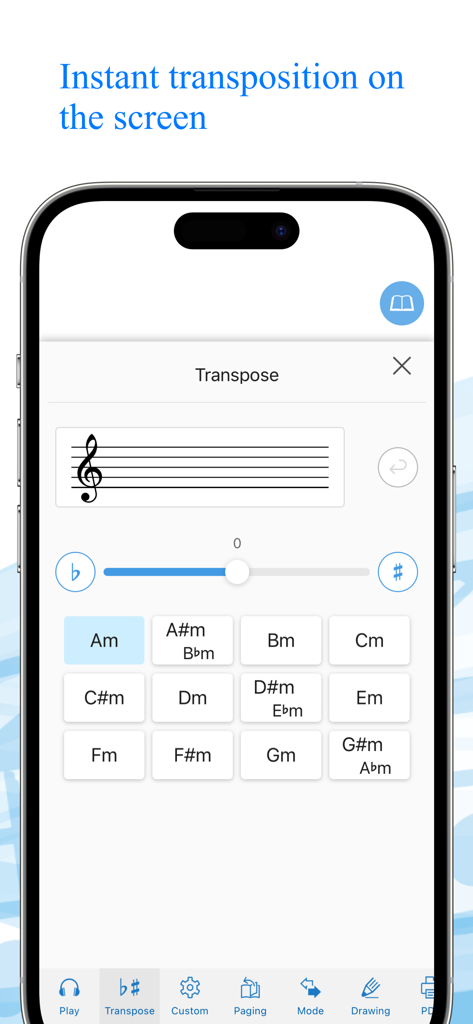
Smartphone-Bildschirm, der die sofortige Transpositions-Oberfläche in der Canon Viewer App mit einem Gitter von Klaviertasten und einem Transpositions-Schieberegler zeigt.

Smartphone-Bildschirm, der die sofortige Transpositions-Oberfläche in der Canon Viewer App mit einem Gitter von Klaviertasten und einem Transpositions-Schieberegler zeigt.

Oberfläche der Canon Viewer App, die die Funktion zum Importieren persönlicher Noten über PDF- oder Fotodateien zeigt.

Oberfläche der Canon Viewer App, die die Funktion zum Importieren persönlicher Noten über PDF- oder Fotodateien zeigt.

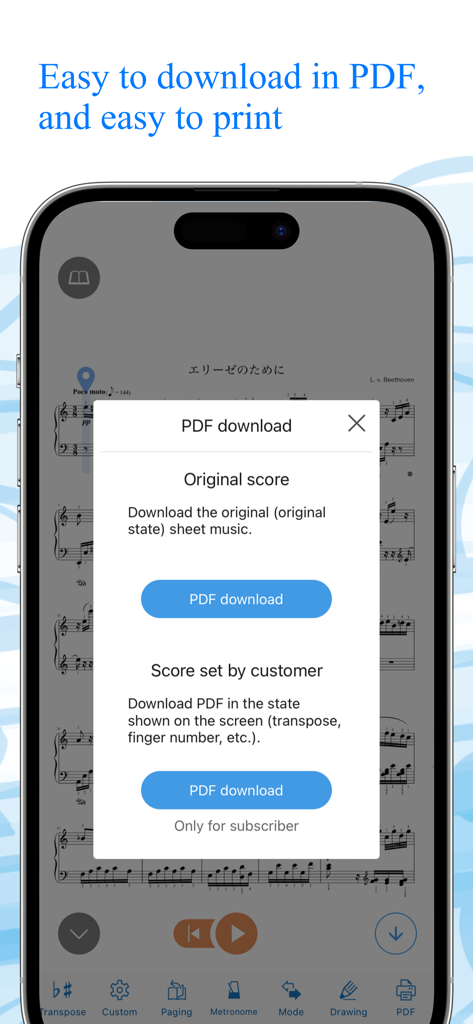
Canon Viewer App zeigt ein PDF-Download-Menü für Original- und angepasste Notenpartituren

Canon Viewer App zeigt ein PDF-Download-Menü für Original- und angepasste Notenpartituren

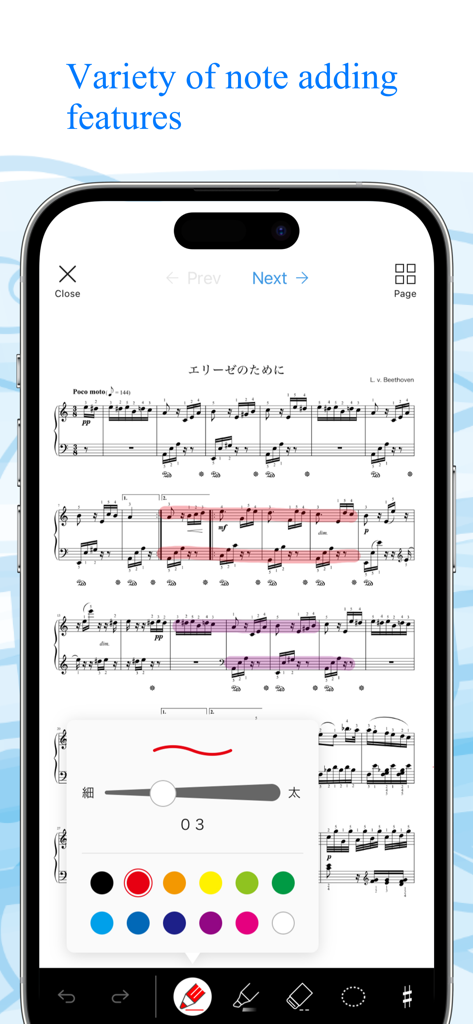
Ein Handybildschirm zeigt die Canon Viewer App mit Klaviernoten und einem Menü zum Hinzufügen digitaler Notizen und Hervorhebungen in verschiedenen Farben.

Ein Handybildschirm zeigt die Canon Viewer App mit Klaviernoten und einem Menü zum Hinzufügen digitaler Notizen und Hervorhebungen in verschiedenen Farben.

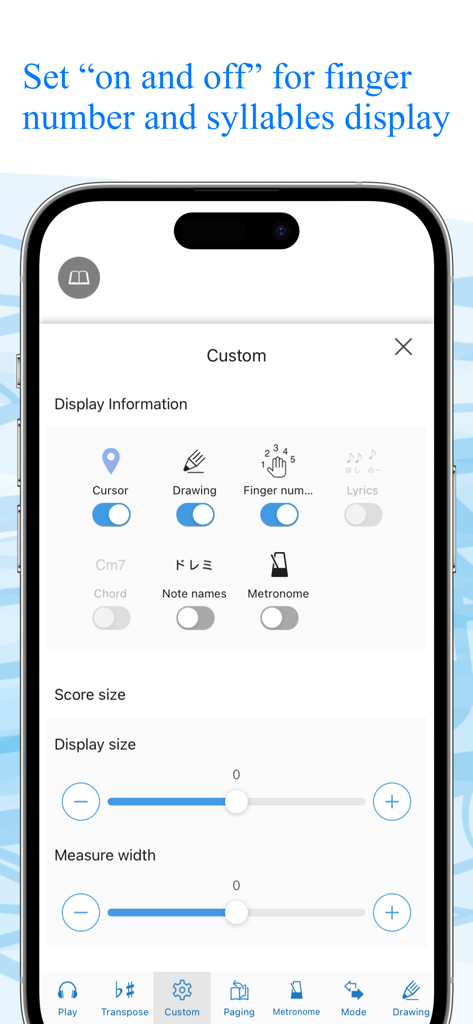
Einstellungsbildschirm der Canon Viewer App zum Anpassen der Notendarstellung mit Schaltern für Fingersätze und Notennamen

Einstellungsbildschirm der Canon Viewer App zum Anpassen der Notendarstellung mit Schaltern für Fingersätze und Notennamen

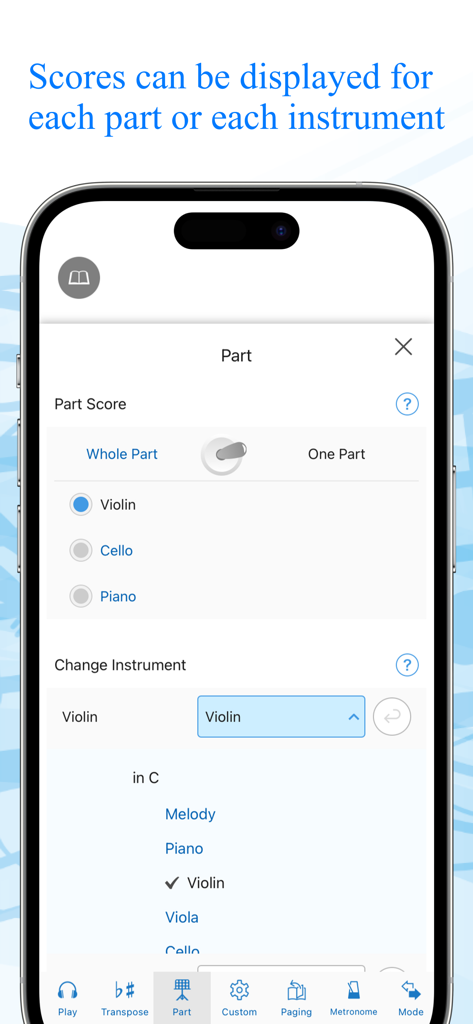
App-Oberfläche zur Auswahl bestimmter Instrumentalteile und Partituren

App-Oberfläche zur Auswahl bestimmter Instrumentalteile und Partituren

Smartphone-Bildschirm, der den Canon Viewer Store mit einer Suchleiste und einer Rangliste von digitalen Notentiteln zum Download zeigt.

Smartphone-Bildschirm, der den Canon Viewer Store mit einer Suchleiste und einer Rangliste von digitalen Notentiteln zum Download zeigt.

Meistern Sie jedes Stück mit digitaler Präzision

Die Tools, die diese App auszeichnen, gewählt von 57K+ Nutzern.

✍️

Intelligente Markierung & Apple Pencil-Unterstützung

Verabschieden Sie sich von Papier und Stift. Kommentieren Sie Ihre Partituren natürlich mit Ihrem Apple Pencil und exportieren Sie Ihre bearbeiteten Blätter als PDFs für volle Flexibilität.

🎹

Sofortige Transponierung per Fingertipp

Passen Sie jedes Stück mit einem einzigen Fingertipp an Ihre Gesangslage oder Ihr Instrument an. Transponieren Sie sofort in alle 12 Tonarten, ohne manuelles Umschreiben.

🚀

Freihändiges automatisches Umblättern

Halten Sie Ihre Hände auf Ihrem Instrument. Nutzen Sie anpassbares automatisches Scrollen oder die Unterstützung von Bluetooth-Pedalen, um während jeder Aufführung im Fluss zu bleiben.

Weltweit von Nutzern geliebt

Vertraut von 57K+ Menschen, die diese App lieben.

"

"Diese App ist ein absolutes Muss für jeden Musiker, der ein iPad benutzt. Die Möglichkeit, Partituren mit meinem Apple Pencil zu markieren und sie dann während der Proben sofort für meine Sänger zu transponieren, hat mir stundenlange Arbeit erspart. Es ist bei weitem der beste digitale Notenbetrachter, den ich je benutzt habe."

Samantha L., Kollaborative Pianistin
"

"Die automatischen Scroll- und Umblätterfunktionen sind makellos, besonders in Verbindung mit einem Bluetooth-Pedal. Ich liebe es, dass ich bestimmte Instrumentalteile isolieren und meine Übungssessions aufzeichnen kann, um meine Fortschritte zu verfolgen – es ist wie ein persönlicher Coach auf meinem Tablet."

Jason K., Professioneller Flötist

Über die App

Alles, was Sie über wissen müssen Canon Viewer - Sheet music.

Beschreibung

This is a [free musical score application] with selection of 8,000 titles, where users can download their favorite tiles individually and can find many user-friendly features. “My score” can be used off-line. Users can customize their musical scores by using the functions such as [Automatic page turner] [Adding notes] [Play a musical score] and [background change]. When a user wants to play the melody line with wind instruments or stringed instruments, musical scores that correspond to the selected instruments will be automatically displayed. Another function transposes a whole musical score for those who want to play at the most appropriate key for a certain instrument. ”This is the very musical score application that all the music lovers have wanted!” Please discover what our application offers that may change your music life with its impressive user-friendly features. ◆◇ Point 1 : You can PLAY the musical scores ◇◆ You can listen to the sound, so that makes it easier to read musical sheets with complicated melody or rhythm. You can also change the tempo and play only the selected part, like only the right hand part of the piano scores, or only the alto and tenor parts of the chorus scores. This useful function will surely make your practice more efficient. ◆◇ Point 2 : Instant transposition with one click of a button ◇◆ With only one click of a button, you can transpose to any of 12 keys. If you want to play an instrument at a half lower key to accompany a singer, you can transpose instantly! You can also optimize your scores with “Change of Sound Range” function. Transposed musical scores can be downloaded in PDF format and printed. ◆◇ Point 3 : Perfect command of page turner ◇◆ The greatest feature of Canon Musical Score Viewer is the advanced page turner function. Users can set the speed and timing such as “At which measure to turn the page” for each score. If the display is set for “Scroll display” mode, the score will be shown as a single score flow from the beginning to the end, meaning users do not have to turn pages at all. It also works with external “Page turner pedal”. ◆◇ Point 4 : Scores can be displayed exclusively for favorite parts and instruments ◇◆ Users can change the parts other than piano as “Your favorite instrument”. According to the selection of the instrument, the score will be automatically altered. Display of “All parts” and “Each part” can be switched automatically. ◆◇ Point 5 : Free writing on the screen ◇◆ Users can freely add notes and codes to the scores on the screen, and download the edited scores in PDF format to print. For iPad, the use of Apple Pencil will make the editing easier. ◆◇ Point 6 : 2 kinds of practice mode ◇◆ [Repeat practice mode] Users can select the part of the score to play repeatedly. [Record practice mode] Users can record their performance and play it with the corresponding score. ◆◇ Point 7 : Customized display function ◇◆ Users can select any necessary information to be displayed including [Finger numbers] [Syllables] [Codes] and [Lyrics] by setting ON/OFF. Background image can also be customized with your favorite one. ** About Digital Musical Score Canon Digital Musical Score Canon is an online musical score delivery service. It delivers and sells more than 8,000 titles, majorly popular and trendy titles. All the scores are produced by professionals. All the purchased scores can be displayed and used on “Canon Musical Score Viewer” that can be operated on a Web browser or application of smartphones and tablets. https://www.canon-score.com/support

Neueste Version

3.15.13

Größe

130.3 MB

Erstveröffentlichung

3. März 2020

Ihre gesamte Musikbibliothek, perfektioniert.

Schließen Sie sich über 50.000 Musikern an, die professionelle Werkzeuge nutzen, um über 8.000 Partituren direkt auf Ihrem iPad zu transponieren, zu kommentieren und zu meistern.

Herunterladen auf App Store