Larix Broadcaster: Live Stream

Larix Broadcaster: Live Stream

Herunterladen auf App StoreHerunterladen auf Google Play
Spark by MWM logo
Logo von Larix Broadcaster: Live Stream

Larix Broadcaster: Professionelles mobiles Streaming für die Produktion vor Ort

Verwandeln Sie Ihr Gerät in eine sendefähige Kamera. Streamen Sie mit felsenfester Stabilität über SRT-, RTMP- und NDI-Protokolle, mit manuellen Steuerungen, die für mobilen Journalismus und anspruchsvolle Live-Events entwickelt wurden.

Herausgeber

Furtree Systems, Inc.

Kategorie

Photo & Video

Downloads

38K+

Bewertung

3.8/5

Bewertungen gesamt

400

Sprachen

1

Professionelles Interface

Entdecken Sie die Oberfläche, die von 38K+ Nutzern verwendet wird.
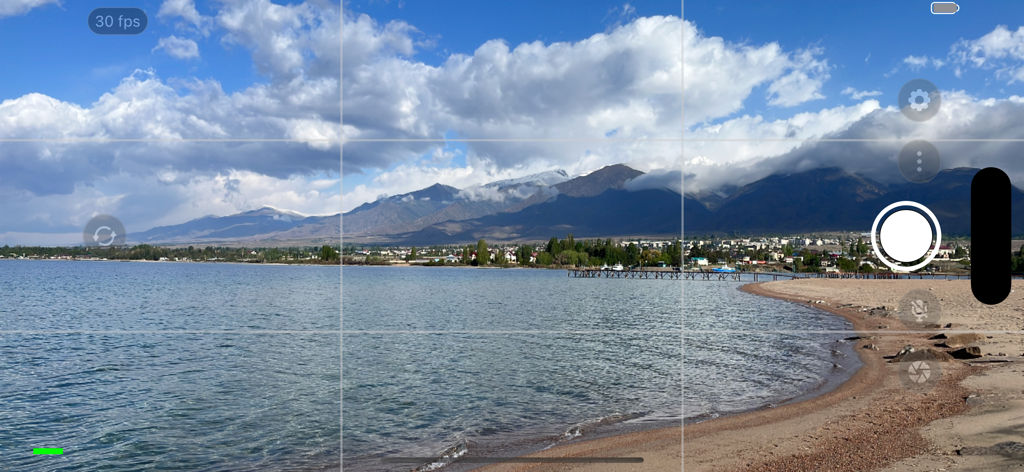
Larix Broadcaster Kamera-Interface mit professionellen manuellen Steuerungen und Gitternetzlinien über einer Gebirgslandschaft

Larix Broadcaster Kamera-Interface mit professionellen manuellen Steuerungen und Gitternetzlinien über einer Gebirgslandschaft

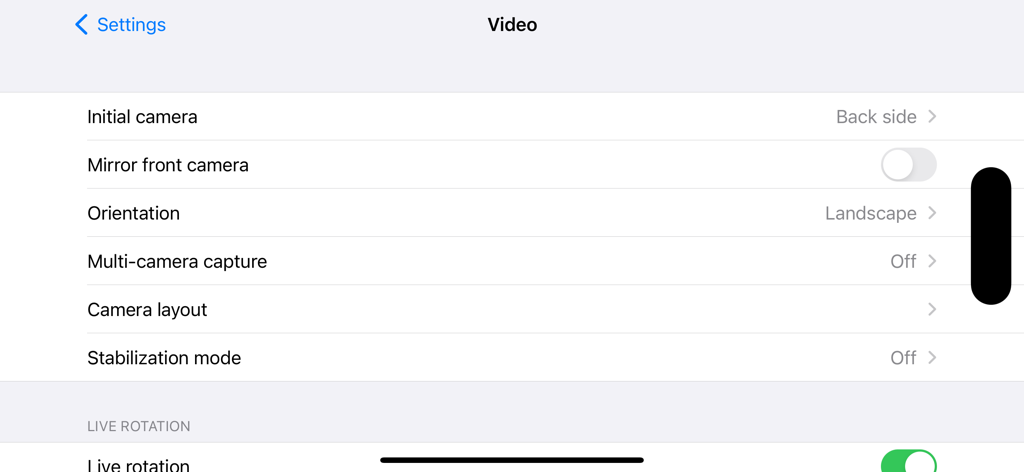
Video-Einstellungsmenü in Larix Broadcaster mit Kamera- und Ausrichtungsoptionen

Video-Einstellungsmenü in Larix Broadcaster mit Kamera- und Ausrichtungsoptionen

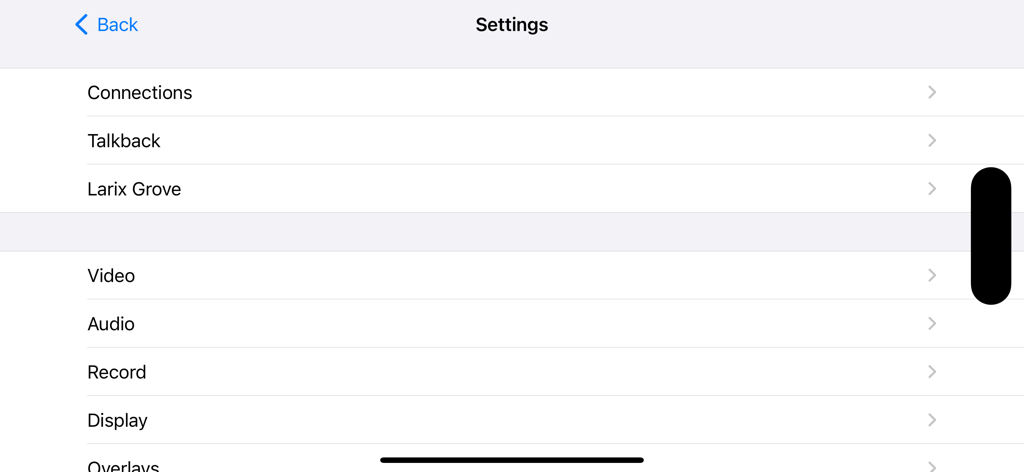
Einstellungsmenü der Larix Broadcaster App mit Konfigurationskategorien

Einstellungsmenü der Larix Broadcaster App mit Konfigurationskategorien

Exzellente Übertragung direkt aus Ihrer Tasche

Die Tools, die diese App auszeichnen, gewählt von 38K+ Nutzern.

📡

Zuverlässige Konnektivität vor Ort

Gewährleisten Sie einen felsenfesten Stream selbst in schwankenden Mobilfunknetzen mit dem Industriestandard-SRT-Protokoll und Adaptive Bitrate (ABR) Technologie.

🎥

Vollständige kinematografische Kontrolle

Steuern Sie Ihre Aufnahme mit manuellem ISO, Weißabgleich und Belichtungssperren oder nutzen Sie die Multi-Kamera-Unterstützung für professionelle Bild-in-Bild-Layouts.

🎧

Profi-Remote-Workflow

Koordinieren Sie sich nahtlos mit Ihrem Studio über den integrierten Talkback-Audiorückkanal und NDI® Tally-Light-Unterstützung für echte Synchronisation in Broadcast-Qualität.

Weltweit von Nutzern geliebt

Vertraut von 38K+ Menschen, die diese App lieben.

"

"Larix ist ein absolutes Muss für meine Berichterstattung vor Ort. Die SRT-Unterstützung ist selbst bei unvorhersehbaren 5G-Verbindungen grundsolide, und die Möglichkeit, Weißabgleich und Belichtung zu sperren, verleiht meinen mobilen Übertragungen einen wirklich professionellen Look, den Standard-Apps einfach nicht bieten können."

Marcus Thorne
"

"Die Integration meines iPhones in meinen vMix-Workflow über NDI war noch nie so einfach. Die niedrige Latenz und die Unterstützung der HEVC-Kodierung bedeuten, dass ich hochwertige 4K-Inhalte streamen kann, ohne mein Gerät zu überhitzen. Es ist das leistungsstärkste Broadcasting-Tool in meiner Tasche."

Sarah Chen

Bewertungsanalyse

Erkenntnisse aus Nutzerbewertungen.

Stimmungswert

20%
Negativ

Zusammenfassung

The Larix Broadcaster app receives predominantly negative feedback, primarily due to its transition from a free service to an expensive subscription model. Users frequently complain about the introduction of obtrusive watermarks and time limits that render the app unusable without payment, with many finding the monthly or annual fees excessively high for the features offered. While some users praise the app's core streaming quality, customization options, and features like image stabilization and UVC support, these positive aspects are overshadowed by numerous reported bugs. Several users highlight issues in recent updates, such as dropped RTMP connections, NDI problems, audio crashes, and broken web widgets, especially affecting version 1.6.1 and subsequent builds.

Häufige Themen

Subscription Pricing(25)
Loss of Free Version(15)
Bugs & Instability(10)
Streaming Quality & Customization(9)
Obtrusive Watermark(8)
Missing Features(5)
Customer Support(1)

Über die App

Alles, was Sie über wissen müssen Larix Broadcaster: Live Stream.

Beschreibung

Larix Broadcaster is a professional streaming camera app for video and audio contribution using SRT, RTMP, Zixi, NDI, WebRTC, RTSP, and RIST protocols. It is built for mobile journalism, IRL streaming, remote production, and other live broadcasting workflows. The app supports live streaming from iOS devices with high performance and flexibility. It offers H.264 and HEVC (H.265) video encoding, and AAC or Opus audio depending on protocol. It supports SRT in Caller, Listener, and Rendezvous modes (libsrt v1.5.3), with multipoint listener functionality. RTMP and RTSP are available with SSL (RTMPS/RTSPS). WebRTC is supported through WHIP signaling. Zixi integration provides AVC/HEVC support, SEI metadata, and Grove compatibility. NDI HX2 offers preview, Discovery Server support, and metadata setup with SDK 6.2.0. RIST streaming is supported in Push mode with Main and Simple profiles via librist v0.2.7. You can configure multiple connection profiles and stream to several destinations simultaneously. The app includes a stand-by stream mode to launch in a paused state with different overlay settings. Pause is also supported to send muted sound and replace camera with alternate content. Talkback is available via SRT, RTMP, Icecast, and SLDP, enabling audio return. NDI tally light is supported for preview and on-air feedback from NDI-powered software. Larix supports UltraHD resolution and Dolby Vision HDR (via the HDR video menu). Both front and back cameras are supported, with live flipping, rotation between portrait and landscape, and hot switching. Multi-camera capture with picture-in-picture and side-by-side modes is available on iPhone XR, XS, and newer devices. It supports dual/triple camera setups including wide and telephoto lenses. Center Stage for iPads is also supported. Camera controls include auto-exposure lock, white balance lock, manual color temperature, and pinch-to-zoom. Adaptive bitrate streaming (ABR) is supported for SRT, with options for logarithmic descent, ladder ascent, and hybrid adjustment. Variable frame rate is also supported. ABR is disabled by default and can be enabled in the Video settings. Bluetooth audio input and audio-only streaming are supported. USB camera input is available on iPadOS 17 and later. You can record streams as MP4 files, take screenshots, and save to iCloud. Recording customization allows higher resolution, alternate compatibility settings, and input gain control. SEI metadata can be inserted into SRT, WebRTC, and RTMP streams for NTP sync using the Advanced menu. Overlay features include GPS-based HTML overlays (requires Larix Premium), image, text, HTML layers, date/time overlays using Unicode LDML, and web widgets. You can assign specific overlays to live, paused, or stand-by states, and enable or disable layers while streaming. Larix Grove enables easy sharing via deep links or QR codes. Visit https://softvelum.com/larix/grove/ for details. Larix Broadcaster supports streaming to any media destinations including Nimble Streamer, Wowza, Red5, Flussonic, vMix, OBS Studio, and others. It works with major platforms like YouTube Live, Facebook Live, Twitch, Kick, Restream.io, Dacast, Cloudflare Stream, and more. Larix Tuner cloud service support adds remote control, configuration backup, and session statistics. Visit the Larix Tuner website for more information. Many features require a Larix Premium subscription. Premium removes the default overlay. It also unlocks multiple simultaneous outputs, Talkback, advanced overlays, ABR streaming, and others. Learn more at https://softvelum.com/larix/premium/ Tutorials and documentation: ~ https://softvelum.com/larix/docs/ ~ https://www.youtube.com/watch?v=Dhj0_QbtfTw ~ https://www.youtube.com/watch?v=4jOJm0XNxZc Join public beta: https://testflight.apple.com/join/mdxzNOxZ Larix Broadcaster uses Apple’s Standard License Agreement: https://www.apple.com/legal/internet-services/itunes/dev/stdeula/

Neueste Version

1.7.5

Größe

30.0 MB

Erstveröffentlichung

17. Okt. 2015

Bereit für mobile Beiträge in Profiqualität?

Schließen Sie sich dem Elite-Netzwerk von Mobiljournalisten und Feldproduzenten an. Laden Sie Larix Broadcaster noch heute für grundsolides SRT-, NDI- und RTMP-Streaming herunter.

Herunterladen auf App StoreHerunterladen auf Google Play