LYNX Whiteboard

LYNX Whiteboard

Herunterladen auf App Store
Spark by MWM logo
Logo von LYNX Whiteboard

LYNX Whiteboard: Die ultimative kollaborative Leinwand für moderne Pädagogen und hybride Teams

Verwandeln Sie Ihr Brainstorming und Ihren Unterricht in interaktive Erlebnisse. Egal ob im Klassenzimmer oder im Konferenzraum, arbeiten Sie in Echtzeit zusammen mit Multi-Touch-Unterstützung, Cloud-Synchronisation und nahtloser Integration Ihrer vorhandenen Dokumente – alles in einer professionellen, werbefreien Umgebung.

Herunterladen auf App Store

Herausgeber

SAHARA PRESENTATION SYSTEMS LTD

Kategorie

Education

Downloads

2K+

Bewertung

4.0/5

Bewertungen gesamt

0

Sprachen

-

Sehen Sie Ihre Ideen in Aktion

Entdecken Sie die Oberfläche, die von 2K+ Nutzern verwendet wird.
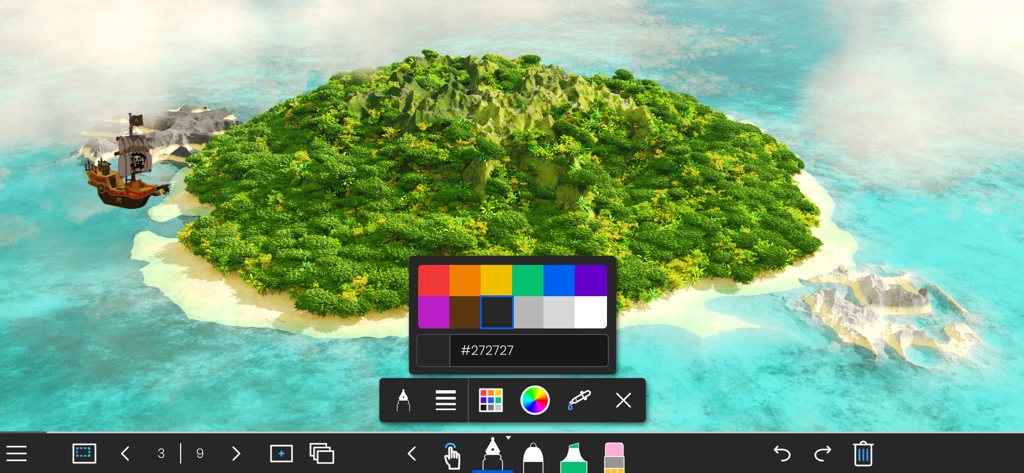
LYNX Whiteboard App-Oberfläche mit einem 3D-Insel-Hintergrund mit Farbauswahl und Zeichenwerkzeugen

LYNX Whiteboard App-Oberfläche mit einem 3D-Insel-Hintergrund mit Farbauswahl und Zeichenwerkzeugen

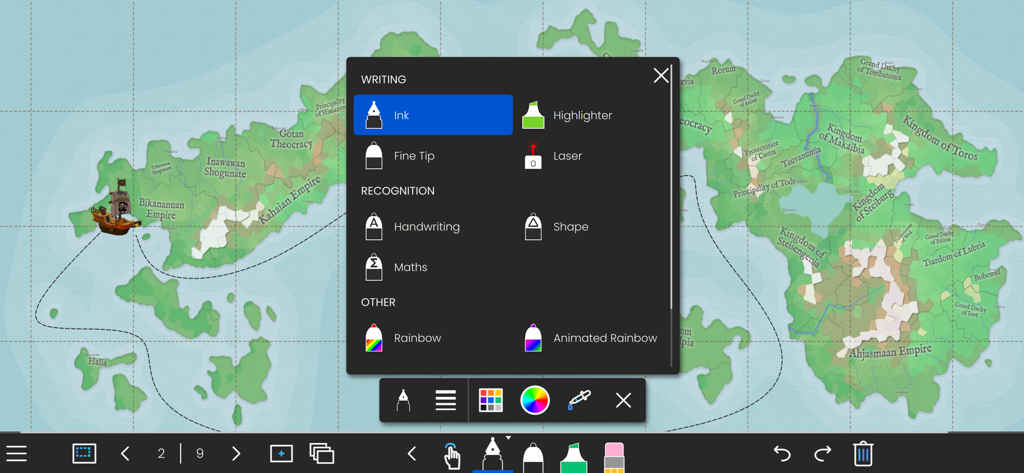
LYNX Whiteboard-Anwendung zeigt Schreib- und Erkennungswerkzeugoptionen über einem interaktiven Kartenhintergrund an

LYNX Whiteboard-Anwendung zeigt Schreib- und Erkennungswerkzeugoptionen über einem interaktiven Kartenhintergrund an

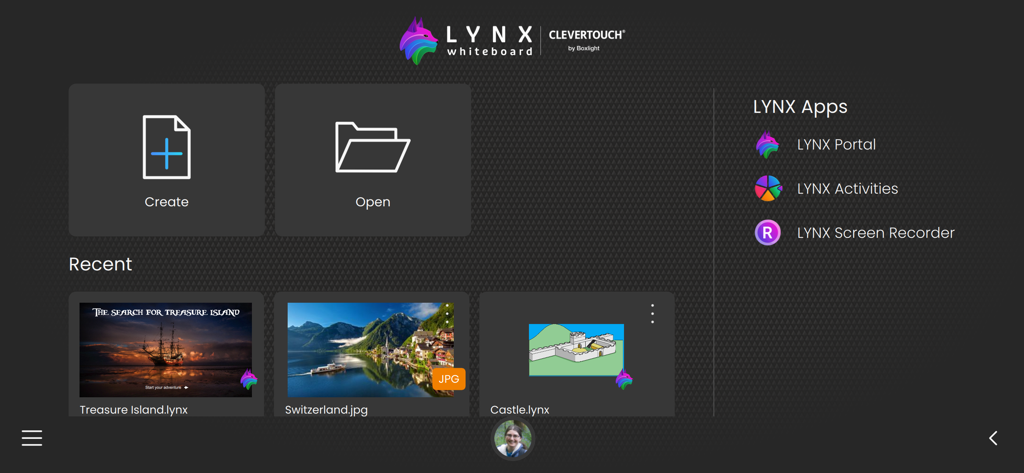
LYNX Whiteboard App-Startbildschirm mit Schaltflächen zum Erstellen oder Öffnen von Projekten und einem Bereich für kürzlich verwendete Dateien

LYNX Whiteboard App-Startbildschirm mit Schaltflächen zum Erstellen oder Öffnen von Projekten und einem Bereich für kürzlich verwendete Dateien

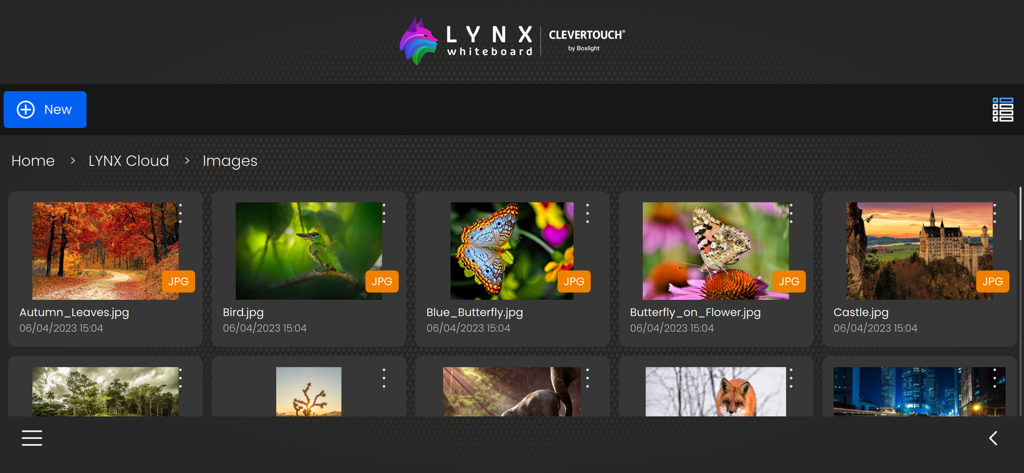
Die LYNX Whiteboard App-Oberfläche zeigt eine Sammlung von Bildern an, die in der LYNX Cloud-Galerie gespeichert sind.

Die LYNX Whiteboard App-Oberfläche zeigt eine Sammlung von Bildern an, die in der LYNX Cloud-Galerie gespeichert sind.

Verwandeln Sie Ihre Ideen in die Tat

Die Tools, die diese App auszeichnen, gewählt von 2K+ Nutzern.

📂

Universelle Dateintegration

Hören Sie auf, bei Null anzufangen. Importieren und bearbeiten Sie nahtlos Ihre vorhandenen SMART Notebook-, PowerPoint- und Google Docs-Dateien mit voller Kompatibilität.

👥

Live Multi-Touch-Synergie

Fördern Sie aktives Engagement, indem Sie bis zu 10 Benutzern gleichzeitig beim Brainstorming und Zeichnen zusehen. Perfekt für Gruppenarbeiten und Huddle Sessions.

☁️

Reibungslose Cloud-Synchronisation

Greifen Sie von jedem Ort aus auf jedem Gerät auf Ihre Arbeit zu. Ihre Whiteboards bleiben sicher mit der LYNX Cloud synchronisiert, sodass Sie genau dort weitermachen können, wo Sie aufgehört haben.

Weltweit von Nutzern geliebt

Vertraut von 2K+ Menschen, die diese App lieben.

"

"LYNX Whiteboard hat die Beteiligung in meinem Klassenzimmer vollständig verändert. Die Möglichkeit, meine alten SMART Notebook-Dateien zu importieren und interaktive Multimedia-Elemente hinzuzufügen, hat mir Stunden bei der Unterrichtsvorbereitung erspart. Meine Schüler lieben die Multi-Touch-Kollaboration während Gruppenprojekten, und die Cloud-Synchronisation bedeutet, dass ich zu Hause vorbereiten und im Unterricht nahtlos präsentieren kann."

Sarah Jenkins, K-12-Lehrerin
"

"Es war schwierig, ein Tool zu finden, das komplexes Brainstorming ermöglicht und sich in meinen professionellen Workflow integriert, bis ich LYNX fand. Die werbefreie Erfahrung und die umfangreiche Dateisynchronisation für PDFs und PowerPoints machen es zu meinem Favoriten für hybride Strategiesitzungen. Es ist das Nächstliegende, was ich für mein Remote-Team gefunden habe, das einem physischen Whiteboard entspricht."

Marcus Chen, Senior Product Manager

Über die App

Alles, was Sie über wissen müssen LYNX Whiteboard.

Beschreibung

Introducing LYNX Whiteboard, the ultimate tool for idea sharing and collaboration with your team or classmates. LYNX Whiteboard is designed to enhance your productivity and creativity by providing you with a virtual whiteboard that you can access from anywhere. With LYNX Whiteboard, you can easily sketch, draw, write, and erase just like you would on a physical whiteboard. Whether you’re working on a project, presenting an idea, or teaching a class, LYNX Whiteboard has everything you need to make your collaboration sessions more effective. -- LYNX for Business -- Brainstorming sessions: Collaborate with colleagues to generate new ideas and strategies, and capture them all on your virtual whiteboard. Presentations: Use LYNX Whiteboard to create engaging presentations that showcase your ideas and data, and share them with your team or clients. Project planning: Organize your thoughts, tasks, and timelines on a virtual whiteboard, and collaborate with your team to stay on track. -- LYNX for Education -- Lesson planning: Use LYNX Whiteboard to create interactive lessons that engage students with multimedia, diagrams, and games, and collaborate with other teachers to share your best practices. Group projects: Work with classmates to brainstorm, plan, and create projects using a virtual whiteboard, and collaborate in real-time from anywhere. Virtual tutoring: Use LYNX Whiteboard to provide virtual tutoring sessions, and collaborate with students to help them learn and solve problems. -- LYNX for Families -- Creative projects: Use LYNX Whiteboard to sketch out ideas for art, design, or writing projects, and collaborate with friends or family members to refine your vision. Organization: Keep track of schedules, grocery lists, and other important information by creating a shared whiteboard for your family to access from anywhere. Virtual game nights: Use LYNX Whiteboard to play charades and other drawing games with friends and family. FEATURES -- Easy to Use Interface -- LYNX Whiteboard has an intuitive interface that makes it easy to start using right away. You can create a new board with just a few taps, and start sketching, drawing, or writing immediately. -- Variety of Pen Styles and Sizes -- From ink pens, handwriting recognition and highlighters to rainbow pens and erasers, LYNX Whiteboard has everything you need to create a stylish and engaging presentation. -- Multi-touch -- LYNX Whiteboard supports up to 10 people all collaborating simultaneously on the board. -- Customizable Backgrounds -- You can choose from a range of backgrounds for your whiteboard, including plain white, gridlines, music score or an image from the media search. This makes it easy to tailor your whiteboard to your specific needs. -- Sharing and Collaboration -- LYNX Whiteboard makes it easy to share your whiteboard with others, whether you’re working on a project with colleagues, teaching a class, or presenting an idea. You can invite others to view your board, or share it as a PDF. -- LYNX Cloud Storage -- Whiteboards can be saved to LYNX Cloud, so you can access them from anywhere, anytime. This means you can pick up right where you left off, even if you switch devices or locations. -- Multi-Device Support -- LYNX Whiteboard works across multiple devices, including smartphones, tablets, and computers. This means you can start working on one device, and pick up where you left off on another. -- Extensive File Support -- Use all your existing presentation files and documents. LYNX Whiteboard supports PowerPoint, MS Word, Google Docs, SMART Notebook, PDF and more. -- No Ads -- LYNX Whiteboard is completely ad-free. LYNX Whiteboard is perfect for teams, students, teachers, and anyone who needs to collaborate and share ideas. With its intuitive interface, and comprehensive features, it’s the ultimate tool for boosting productivity and creativity. Try LYNX Whiteboard today, and take your collaboration sessions to the next level.

Neueste Version

8.5.11

Größe

200.5 MB

Erstveröffentlichung

16. Okt. 2017

Bereit, Ihre Ideen in die Tat umzusetzen?

Schließen Sie sich noch heute Tausenden von Pädagogen und Fachleuten an. Laden Sie LYNX Whiteboard herunter, um nahtlose, werbefreie Zusammenarbeit auf jedem Gerät zu erleben, vom Klassenzimmer bis zum Konferenzraum.

Herunterladen auf App Store