Midiflow Motion (Audiobus)

Midiflow Motion (Audiobus)

Herunterladen auf App Store
Spark by MWM logo
Logo von Midiflow Motion (Audiobus)

Midiflow Motion (Audiobus): Bewegung in pure Expression verwandeln

Verwandeln Sie Ihr iPad in einen professionellen Motion-Controller. Weisen Sie die Geräterotation jedem MIDI-Parameter zu – von Filtern bis zum Pitch-Bend – und bringen Sie organische, physikalische Dynamik in Ihre Audiobus 3-Sessions.

Herunterladen auf App Store

Herausgeber

Johannes Doerr

Kategorie

Music

Downloads

1K+

Bewertung

4.4/5

Bewertungen gesamt

0

Sprachen

1

Performance in Bewegung

Entdecken Sie die Oberfläche, die von 1K+ Nutzern verwendet wird.
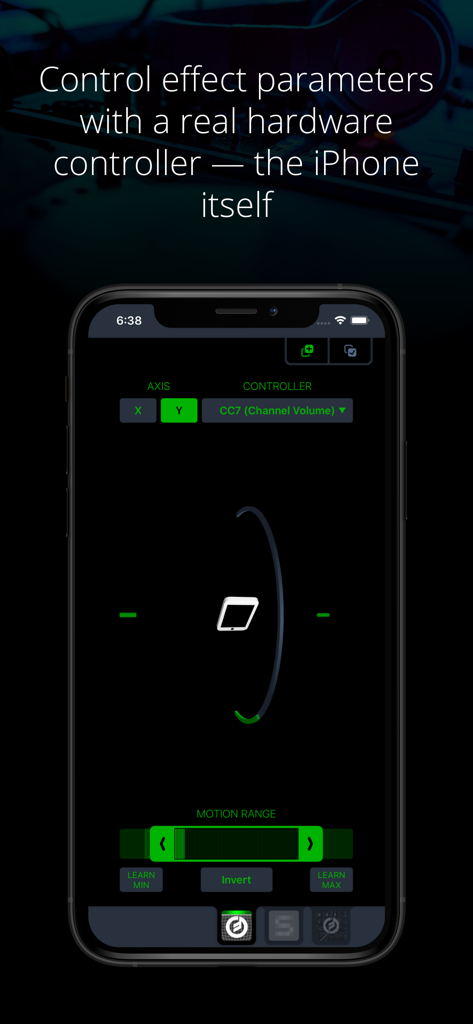
Midiflow Motion Benutzeroberfläche auf dem iPhone, die bewegungsbasierte MIDI-Steuerungseinstellungen zeigt

Midiflow Motion Benutzeroberfläche auf dem iPhone, die bewegungsbasierte MIDI-Steuerungseinstellungen zeigt

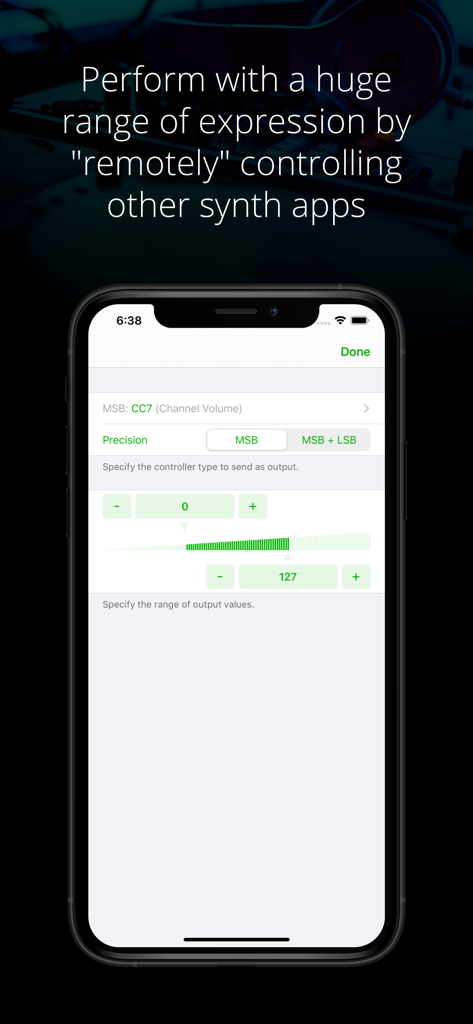
Benutzeroberfläche der Midiflow Motion App zur Konfiguration von MIDI-Steuerungsparametern wie Kanallautstärke und Präzision.

Benutzeroberfläche der Midiflow Motion App zur Konfiguration von MIDI-Steuerungsparametern wie Kanallautstärke und Präzision.

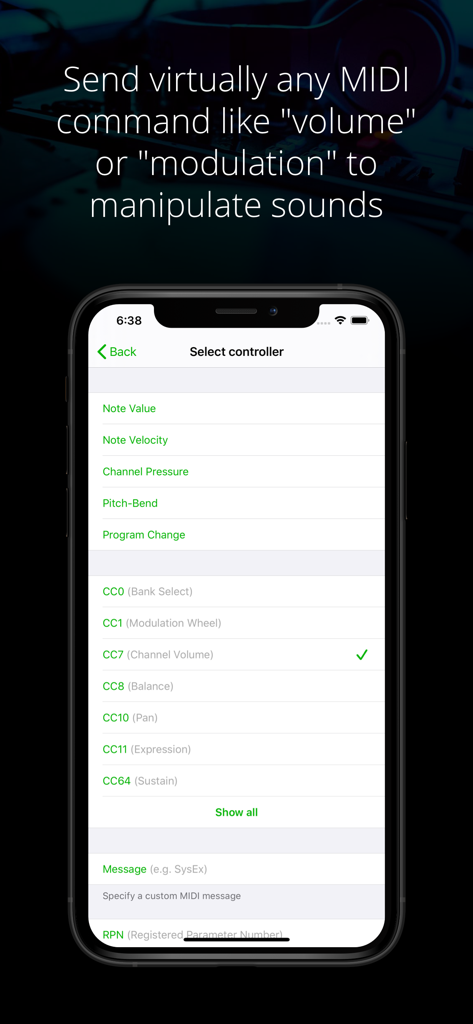
App-Bildschirm von Midiflow Motion mit einem Menü zur Auswahl von MIDI-Controllern und Control-Change-Parametern wie Lautstärke und Modulation

App-Bildschirm von Midiflow Motion mit einem Menü zur Auswahl von MIDI-Controllern und Control-Change-Parametern wie Lautstärke und Modulation

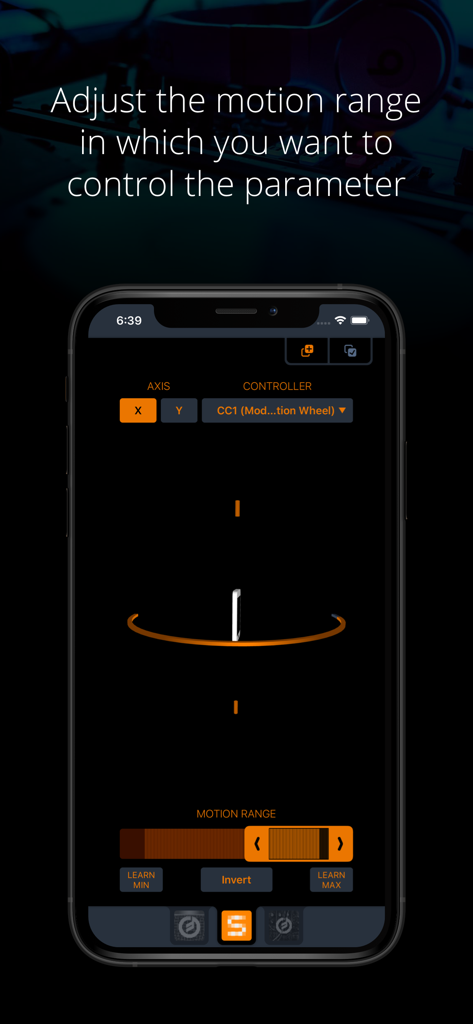
Benutzeroberfläche der Midiflow Motion App auf einem iPhone, die die Einstellungen zur Anpassung des Bewegungsbereichs eines MIDI-Controller-Parameters zeigt

Benutzeroberfläche der Midiflow Motion App auf einem iPhone, die die Einstellungen zur Anpassung des Bewegungsbereichs eines MIDI-Controller-Parameters zeigt

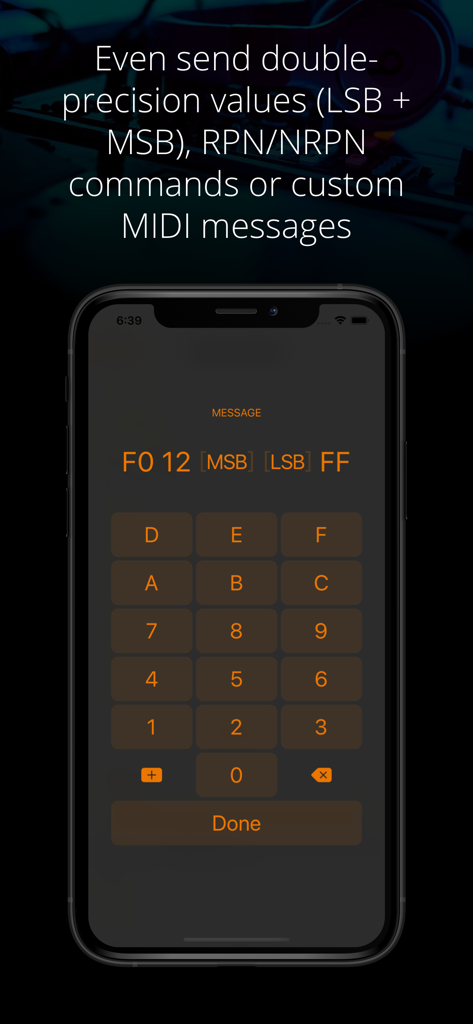
Benutzeroberfläche der Midiflow Motion App zur Eingabe von benutzerdefinierten MIDI-Nachrichten und Werten mit doppelter Präzision über ein Hex-Keypad

Benutzeroberfläche der Midiflow Motion App zur Eingabe von benutzerdefinierten MIDI-Nachrichten und Werten mit doppelter Präzision über ein Hex-Keypad

Bewegung in musikalischen Ausdruck verwandeln

Die Tools, die diese App auszeichnen, gewählt von 1K+ Nutzern.

📱

Gestenbasierte Steuerung

Nutzen Sie die Geräterotation, um Filter, Pitch oder Lautstärke zu manipulieren. Es ist eine organische Art der Performance, die Touchscreens allein nicht replizieren können.

🎯

Chirurgische MIDI-Präzision

Senden Sie hochauflösende 14-Bit-Befehle, NRPN oder benutzerdefinierte MIDI-Nachrichten mit einstellbaren Bewegungsbereichen und intelligenten Learn-Buttons.

⛓️

Integrierte Signalketten

Entwickelt für Audiobus 3. Setzen Sie mehrere Instanzen ein, um verschiedene Apps und Parameter gleichzeitig für eine komplexe, sich entwickelnde Klanglandschaft zu steuern.

Weltweit von Nutzern geliebt

Vertraut von 1K+ Menschen, die diese App lieben.

"

"Midiflow Motion hat meine Live-Sets komplett verändert. Anstatt auf einen Bildschirm zu starren und meine Finger zu bewegen, bewege ich das gesamte iPad, um den Sound zu formen. Dadurch fühlt sich die Performance organisch und für das Publikum visuell ansprechend an – als würde ich tatsächlich ein Instrument spielen, anstatt nur Samples auszulösen."

Eli S., Experimental-Produzent
"

"Als Power-User liebe ich die technische Tiefe hier. Die Möglichkeit, X- und Y-Achsen-Rotation gleichzeitig auf mehrere MIDI CC-Parameter zu mappen – mit chirurgischer Präzision über den Bewegungsbereich – ist unglaublich. Es ist das stabilste und expressivste MIDI-Utility, das ich seit Jahren zu meiner Audiobus-Signalkette hinzugefügt habe."

Sarah J., Sounddesignerin

Über die App

Alles, was Sie über wissen müssen Midiflow Motion (Audiobus).

Beschreibung

This MIDI sender app for Audiobus 3 lets you control effect parameters of other apps – in a way that no touch screen can replace – by moving the device. Set any kind of MIDI command like volume or modulation as output and fine-tune it to the exact motion range you want to perform with. You can even control multiple effects simultaneously. + Use device rotation around the X or Y axis + Adjust the range of motion for controlling a parameter + Adjust the range of output values + Send virtually any MIDI command (e.g. pitch-bend, any Control Change like modulation or expression, and even custom MIDI messages) + Control multiple parameters and/or multiple apps at the same time by inserting this app multiple times in Audiobus NOTE: This app requires Audiobus 3. Insert it into one or more MIDI sender ports to control the synth apps in the MIDI output ports of the respective pipelines. THE IPAD IS YOUR CONTROLLER Without a doubt, the iPad's touch screen is a revolutionary tool for musicians. However, it also comes with sensors that can track how you move your device around two axes. Using those sensors to control effect parameters allows you to perform with a huge amount of expression. CONTROL ALL KINDS OF PARAMETERS Many synth apps allow you to "remotely" control their parameters via MIDI messages. For that purpose, Midiflow Motion can send virtually any MIDI command to those apps, through Audiobus. Just select from the list of available parameters and the app starts sending messages when you move the device. Not only can you use basic Control Changes for "volume" or "modulation", you can also use double-precision commands (LSB + MSB), RPN/NRPN commands or custom MIDI messages. If you want to play notes, you might want to add Midiflow Scales behind this app in the Audiobus MIDI routing in order to map the notes to a scale. ADJUST MOTION RANGE The range selector at the bottom allows you to narrow down the motion range in which you want to control the parameter. The maximum range goes from -90 to +90 degrees. Use either the slider or the learn buttons to adjust the range according to your needs. CONTROL MULTIPLE PARAMETERS You can insert Midiflow Motion in Audiobus multiple times. That way, you can send multiple MIDI commands simultaneously. Each of them can be configured independently. For example, you can control the cutoff of a synth by rotation around the x-axis, and use the y-axis for the resonance parameter. It is like an x/y-pad, but with the whole iPad as the controller. You can also control parameters of different synths at the same time.

Neueste Version

1.0.6

Größe

4.7 MB

Erstveröffentlichung

3. Apr. 2017

Bereit für grenzenlose Performance?

Verwandeln Sie Ihr Gerät in einen professionellen Motion-Controller. Laden Sie Midiflow Motion herunter und bringen Sie expressive physikalische Bewegungen in Ihre Audiobus 3 Signalkette.

Herunterladen auf App Store