Norton Family Companion App

Norton Family Companion App

Herunterladen auf App Store
Spark by MWM logo
Logo von Norton Family Companion App

Norton Family Companion App: Eltern befähigen, sicherere Online-Gewohnheiten aufzubauen

Verwalten Sie die Bildschirmzeit, blockieren Sie ungeeignete Inhalte und sorgen Sie dafür, dass sich Ihre Kinder auf die Schularbeiten konzentrieren – mit den professionellen Tools, die Sie für absolute Sorgenfreiheit benötigen.

Herunterladen auf App Store

Herausgeber

Gen Digital Inc.

Kategorie

Utilities

Downloads

46K+

Bewertung

1.4/5

Bewertungen gesamt

600

Sprachen

23

Sorgenfreiheit, visualisiert

Entdecken Sie die Oberfläche, die von 46K+ Nutzern verwendet wird.
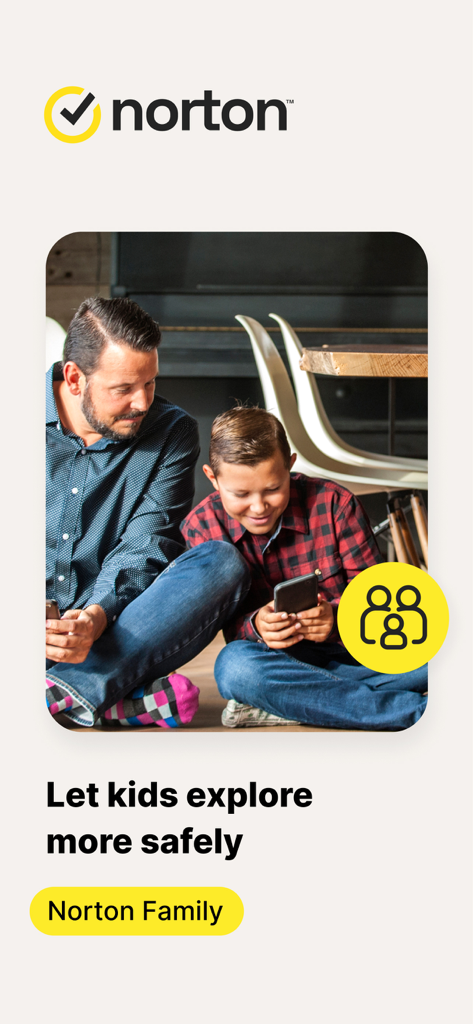
Vater und Sohn benutzen gemeinsam ein Smartphone mit dem Norton Family App-Logo und einer Sicherheitsmeldung

Vater und Sohn benutzen gemeinsam ein Smartphone mit dem Norton Family App-Logo und einer Sicherheitsmeldung

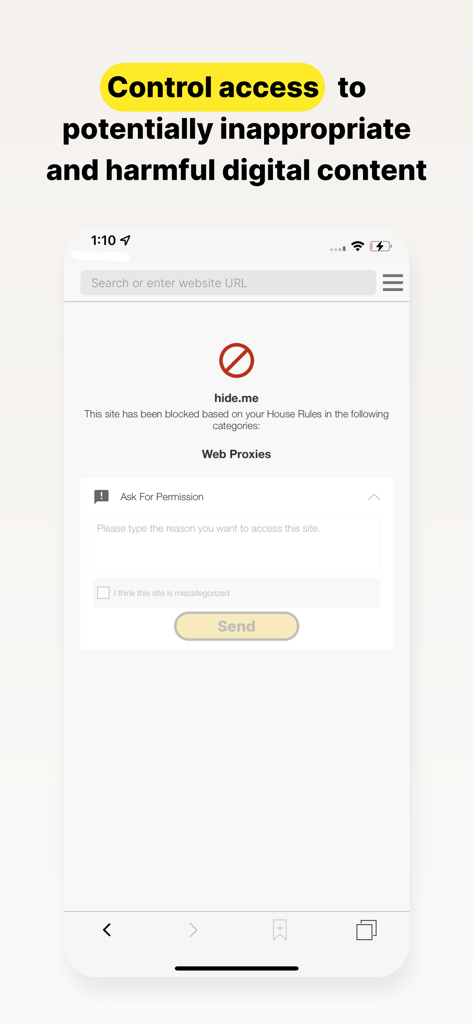
Norton Family App-Screenshot zeigt einen gesperrten Website-Bildschirm mit der Option für das Kind, um Erlaubnis für den Zugriff auf den Inhalt zu bitten.

Norton Family App-Screenshot zeigt einen gesperrten Website-Bildschirm mit der Option für das Kind, um Erlaubnis für den Zugriff auf den Inhalt zu bitten.

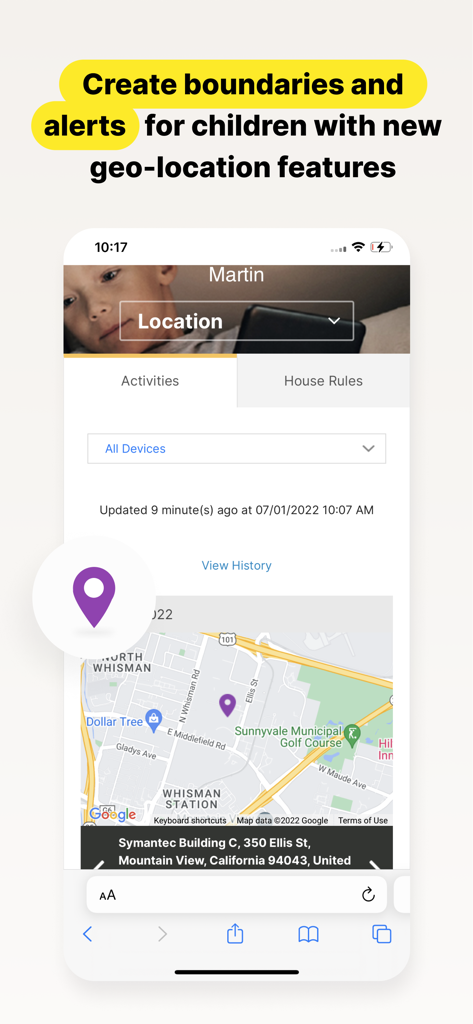
Norton Family App-Oberfläche zeigt eine Karte mit dem Standort eines Kindes und Funktionen für Standortbenachrichtigungen für Eltern.

Norton Family App-Oberfläche zeigt eine Karte mit dem Standort eines Kindes und Funktionen für Standortbenachrichtigungen für Eltern.

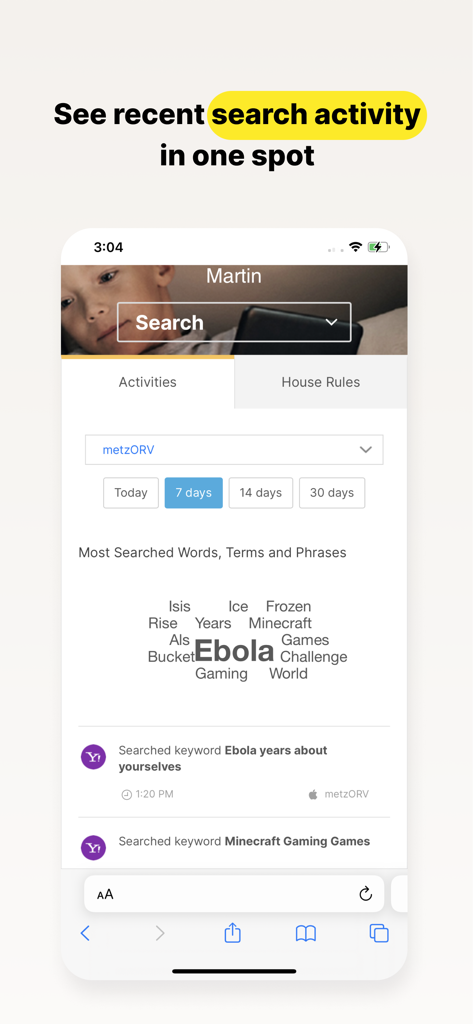
Norton Family App-Dashboard zeigt eine Wortwolke und eine Liste der letzten Suchaktivitäten eines Kindes an

Norton Family App-Dashboard zeigt eine Wortwolke und eine Liste der letzten Suchaktivitäten eines Kindes an

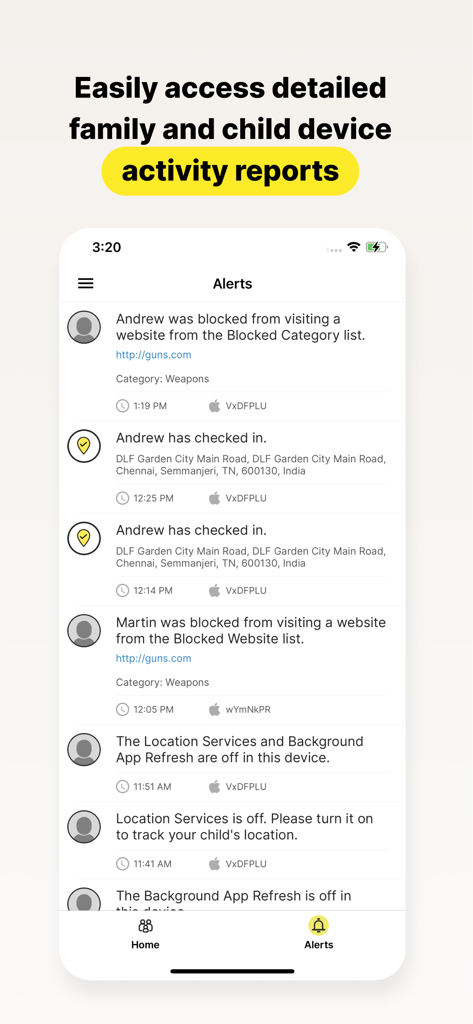
Norton Family App-Bildschirm zeigt detaillierte Aktivitätsberichte und Warnmeldungen für Kindergeräte an

Norton Family App-Bildschirm zeigt detaillierte Aktivitätsberichte und Warnmeldungen für Kindergeräte an

Stärken Sie Ihre Erziehung im digitalen Zeitalter

Die Tools, die diese App auszeichnen, gewählt von 46K+ Nutzern.

🎓

Konzentration auf die Schule maximieren

Aktivieren Sie die „Schulzeit“, um digitale Ablenkungen wie soziale Medien und Spiele zu blockieren, während wichtige Bildungsressourcen für das Fernlernen zugänglich bleiben.

🛡️

Erweiterte Web-Überwachung

Ermöglichen Sie Ihren Kindern, das Internet frei zu erkunden, während unsere branchenführenden Filter ungeeignete Inhalte blockieren und Ihnen detaillierte Einblicke in die Suche geben.

Stressfreie Grenzen

Legen Sie gesunde Zeitlimits für den Bildschirm fest oder nutzen Sie die „Sofortsperre“, um Geräte für Familienmahlzeiten zu pausieren, tägliche Reibereien zu reduzieren und Ihrem Kind zu helfen, kluge Gewohnheiten aufzubauen.

Weltweit von Nutzern geliebt

Vertraut von 46K+ Menschen, die diese App lieben.

"

"Norton Family hat die Lerngewohnheiten meines Sohnes grundlegend verändert. Die Schulzeit-Funktion stellt sicher, dass er sich auf seine Aufgaben konzentriert, ohne während des Schultags von Spielen oder YouTube abgelenkt zu werden. Es gibt mir so viel Sorgenfreiheit zu wissen, dass er sicher ist, während er die digitale Welt erkundet."

Sarah M.
"

"Ich vertraue der Marke Norton seit Jahren, daher war die Wahl dieser App für das iPad meiner Tochter eine einfache Entscheidung. Die Sofortsperre-Funktion ist perfekt für die Abendessenszeit, und die wöchentlichen Berichte geben mir die nötige Transparenz, um ihr zu helfen, kluge Online-Gewohnheiten aufzubauen."

David L.

Bewertungsanalyse

Erkenntnisse aus Nutzerbewertungen.

Stimmungswert

17%
Negativ

Zusammenfassung

Users express significant dissatisfaction with this parental control app, citing numerous issues. A major complaint revolves around the app's tendency to delete or disorganize other applications on the device after screen time limits expire, making phones unusable and causing data loss for some. Many reviews highlight the app's over-restrictiveness, blocking legitimate apps like school-related tools and Gmail, and note specific compatibility problems with iOS 26, such as the "instant lock" feature failing. Despite these widespread criticisms, a small number of parents praise the app for its effectiveness in setting limits and ensuring child safety.

Häufige Themen

App Blocking & Disappearance(16)
Over-Restrictiveness(14)
Bugs & Glitches(8)
Difficulty of Use/Management(8)
Annoying Notifications(4)
Parental Control Effectiveness(4)
iOS Compatibility Issues(2)

Über die App

Alles, was Sie über wissen müssen Norton Family Companion App.

Beschreibung

This app should be installed on the child’s iOS device(s). Keeping your kids safer online requires more than managing screen time. Norton Family helps you supervise and manage your kids’ online activities. • Helps you manage your child’s remote learning environment, so you can keep your child focused on schoolwork during the school day. • It helps block unsuitable sites while your kids are surfing the Internet • Let’s you see what websites they’re visiting • Let’s you see what they’re searching for, and so much more… And while Norton Family lets you set online time limits, it also helps you start open and ongoing conversations about how to build safe and smart online habits. As a parent, it’s important to have insight into what your kids are doing. Our helpful tools allow you to monitor kids’ online activities at a glance or be notified by email alerts, so you know when it’s time to talk. IMPORTANT NOTICE: To use the features of Norton Family on your family’s iOS devices, this Norton Family app should first be installed on your child’s iOS device. Parents can configure household policies, manage alerts and reports from family.norton.com. To do this on iOS devices, please download the Norton Family for Parents app. Help your kids explore, learn, and enjoy their connected world more safely with the following features: School Time: Remote learning requires the internet, so pausing the internet on your child’s device is not an option. Norton Family School Time is a feature to help parents manage their child’s remote learning environment, so you can keep your child focused on schoolwork and avoid other internet distractions during the school day. Web Supervision: Let your kids explore the Web freely, with tools that help you block unsuitable websites while keeping you in the know about which sites they’re visiting. Time Supervision: Stay on top of how much time your kids spend on their devices. Search Supervision: See words, terms, and phrases your kids are searching for to gain insights into their interests and help protect them from inappropriate content. Video Supervision*: See a list of the YouTube videos your kids watch on their PCs or iOS devices and even view a snippet of each video, so you know when you need to talk. Instant Lock: Parents can help kids take a break by locking the device so they can re-focus, or join the family at dinner. Individual devices can be unlocked with a PIN. Parents and children can still contact each other while the device is in lock mode. Email Alerts: Receive an email when your kids attempt to visit a blocked site so that you can start a conversation about appropriate content. Access Request: Open the lines of communication by enabling your kids to send you a note from within Norton Family if they disagree with a blocked site or a house rule. Monthly/Weekly Reports: Opt to receive detailed reports of what your kids are doing online, right in your email in-box. Any questions? Send us an email nortonfamily.support@gendigital.com *Video Supervision monitors videos that your kids view on YouTube.com. It does not monitor or track YouTube videos that have been embedded in other websites or blogs. Mobile app must be downloaded separately. An account is required to use the Norton Family app. To set up, review, manage and customize your House Rules and Settings for each child you’ve added, sign in to your account at my.norton.com using the credentials you created.

Neueste Version

1.16.0

Größe

31.9 MB

Erstveröffentlichung

23. Nov. 2015

Ihr Partner für sicherere, intelligentere digitale Erziehung

Verändern Sie die Art und Weise, wie Ihre Familie mit Technologie interagiert. Installieren Sie Norton Family noch heute auf dem Gerät Ihres Kindes, um Konzentration zu fördern, Ablenkungen zu blockieren und die Sorgenfreiheit zu gewinnen, die Sie verdienen.

Herunterladen auf App Store