Notebooks – Write and Organize

Notebooks – Write and Organize

Herunterladen auf App Store
Spark by MWM logo
Logo von Notebooks – Write and Organize
Notebooks – Der professionelle Arbeitsbereich für Ihr Schreiben, Ihre Projekte und Ihr digitales Leben

Bauen Sie Ihr zweites Gehirn mit einem leistungsstarken Markdown-Editor, Aufgabenmanager und Dateiorganizer in einem auf. Übernehmen Sie die volle Kontrolle über Ihre Daten mit Standarddateiformaten und ohne proprietäre Bindung.

Herausgeber

Alfons Schmid

Kategorie

Productivity

Downloads

124K+

Bewertung

4.7/5

Bewertungen gesamt

2K+

Sprachen

4

Ihr Wissen, visualisiert

Entdecken Sie die Oberfläche, die von 124K+ Nutzern verwendet wird.
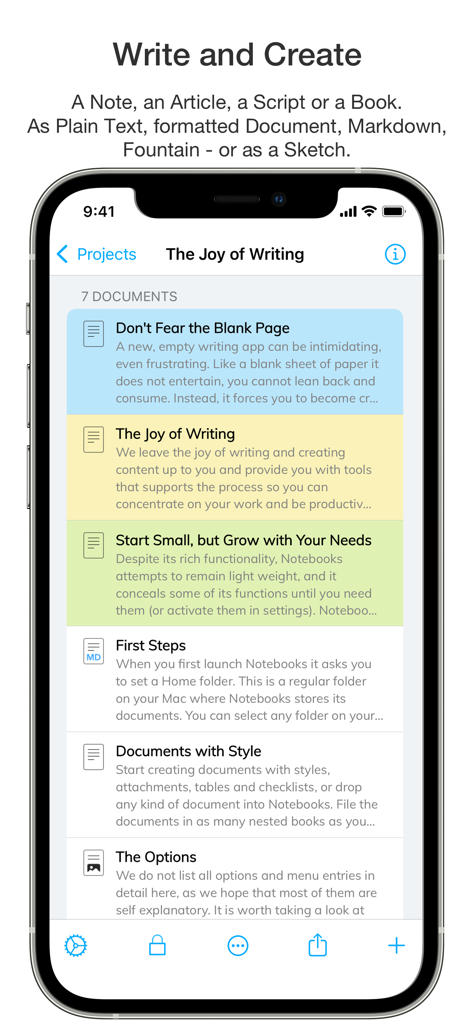
iPhone-Bildschirm, der eine Liste organisierter Dokumente und Notizen in der Notebooks-App mit farbkodierten Kategorien zeigt.

iPhone-Bildschirm, der eine Liste organisierter Dokumente und Notizen in der Notebooks-App mit farbkodierten Kategorien zeigt.

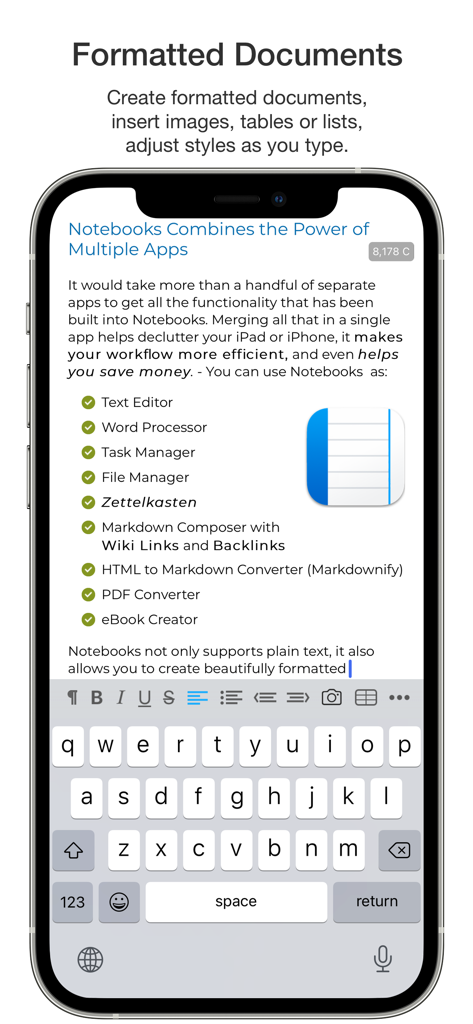
Ein mobiler Bildschirm, der die Benutzeroberfläche der Notebooks-App mit einem formatierten Dokument und einer Checkliste mit Funktionen wie Aufgabenmanager und Markdown-Komponist zeigt.

Ein mobiler Bildschirm, der die Benutzeroberfläche der Notebooks-App mit einem formatierten Dokument und einer Checkliste mit Funktionen wie Aufgabenmanager und Markdown-Komponist zeigt.

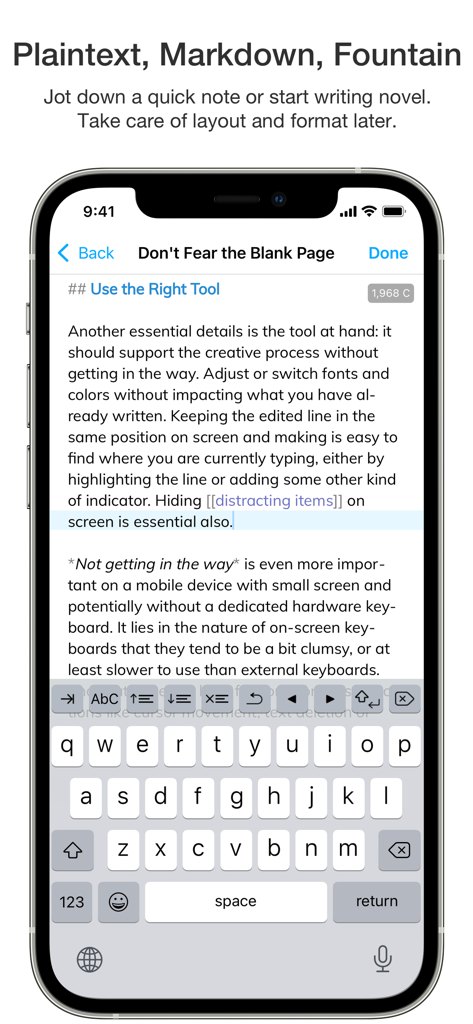
iPhone-Bildschirm, der die Benutzeroberfläche der Notebooks-App mit einem Markdown-Texteditor und einer Bildschirmtastatur anzeigt

iPhone-Bildschirm, der die Benutzeroberfläche der Notebooks-App mit einem Markdown-Texteditor und einer Bildschirmtastatur anzeigt

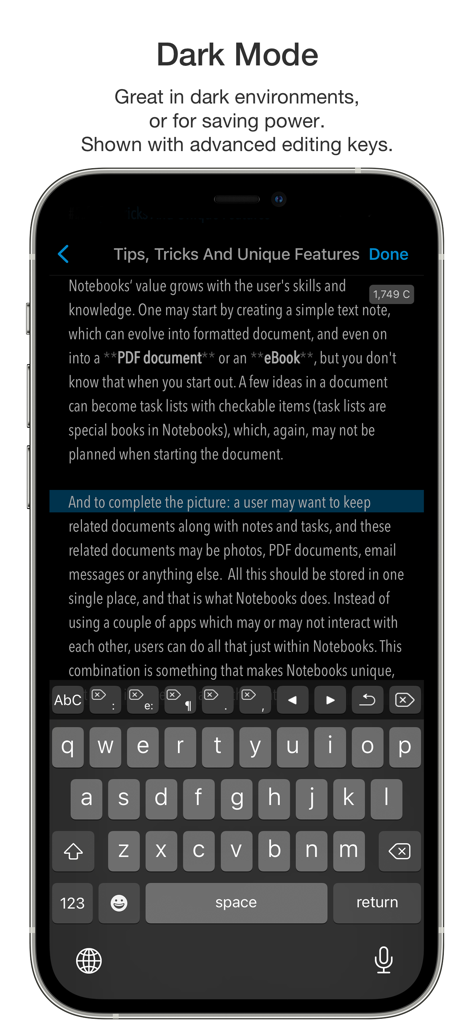
iPhone-Screenshot der Notebooks-App im Dark-Mode, der den Texteditor und die erweiterte Bearbeitungs-Tastatur zeigt

iPhone-Screenshot der Notebooks-App im Dark-Mode, der den Texteditor und die erweiterte Bearbeitungs-Tastatur zeigt

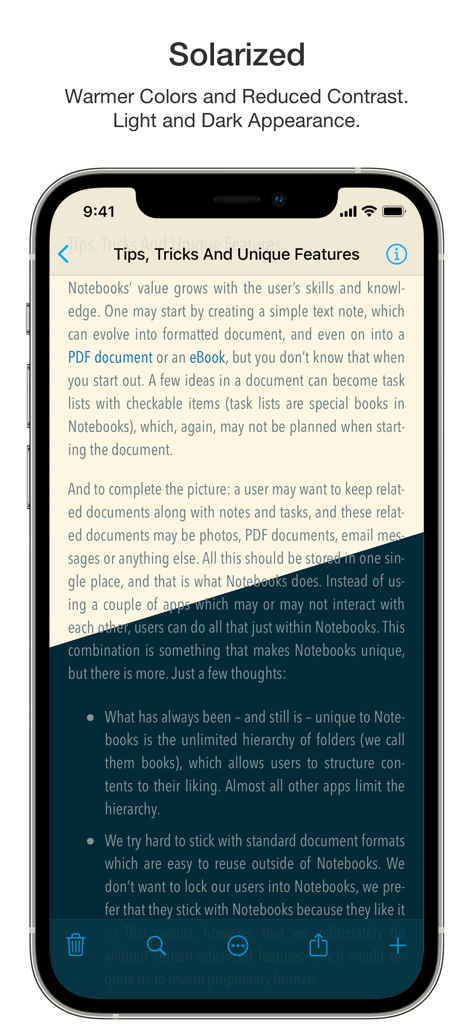
Die Notebooks-App zeigt ein Dokument mit dem Titel 'Tips, Tricks And Unique Features' im Solarized-Farbdesign zur besseren Lesbarkeit.

Die Notebooks-App zeigt ein Dokument mit dem Titel 'Tips, Tricks And Unique Features' im Solarized-Farbdesign zur besseren Lesbarkeit.

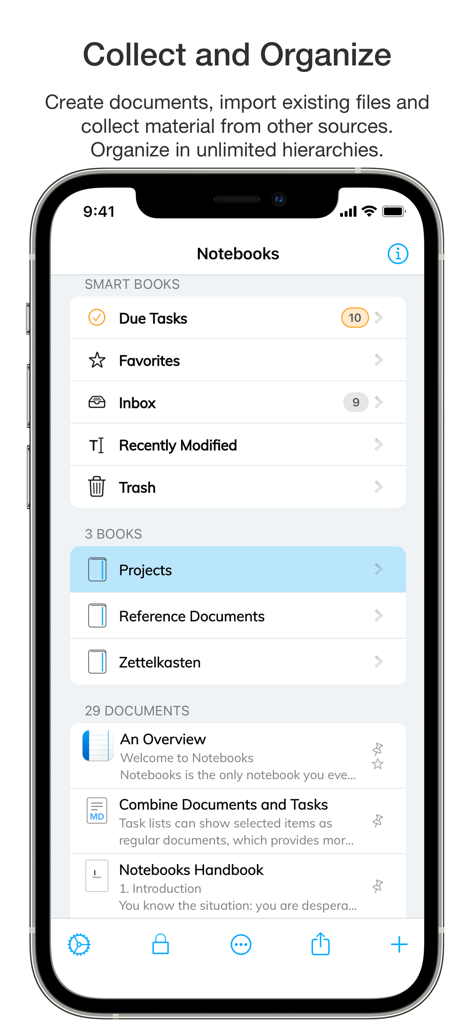
Hauptbildschirm der Notebooks-App mit intelligenten Büchern und Dokumentenorganisation auf einem iPhone

Hauptbildschirm der Notebooks-App mit intelligenten Büchern und Dokumentenorganisation auf einem iPhone

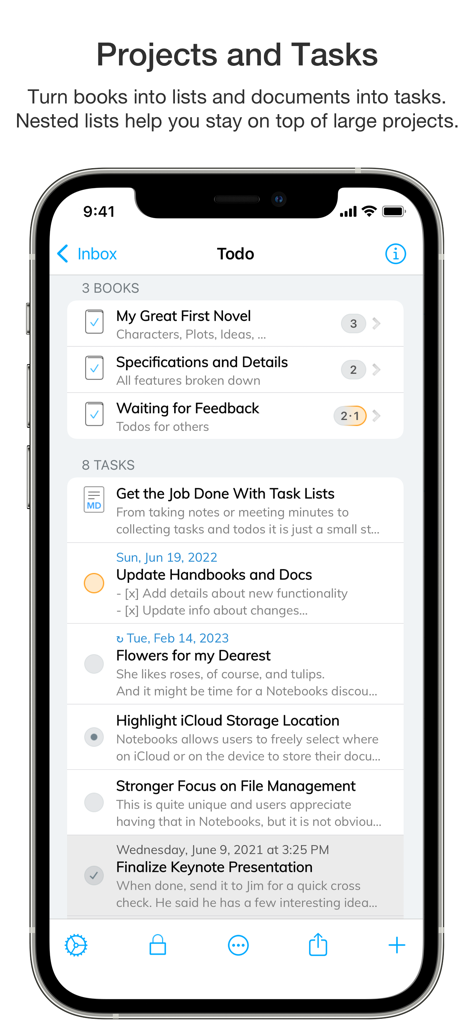
Smartphone-Bildschirm, der Projektorganisation und Aufgabenlisten in der Notebooks-App zeigt

Smartphone-Bildschirm, der Projektorganisation und Aufgabenlisten in der Notebooks-App zeigt

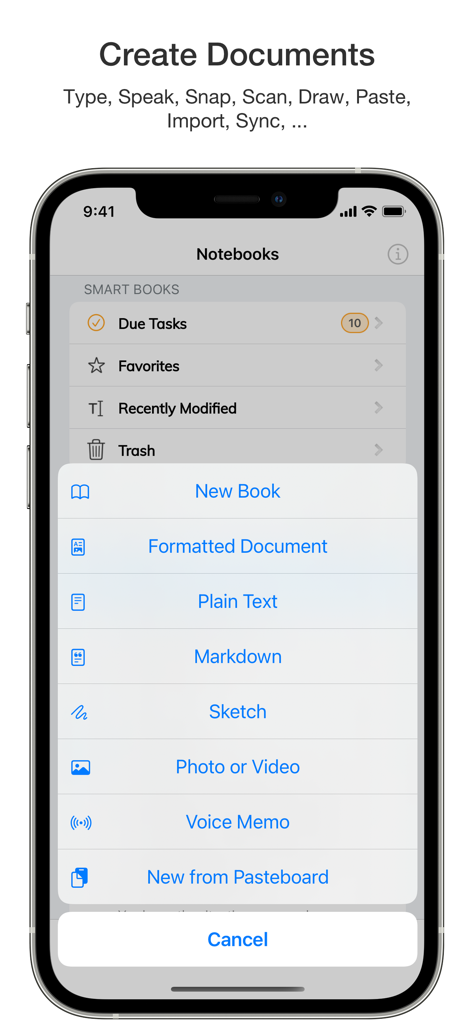
iPhone-Bildschirm, der das Erstellungsmenü in der Notebooks-App mit Optionen für neue Bücher, formatierte Dokumente und Markdown-Dateien zeigt

iPhone-Bildschirm, der das Erstellungsmenü in der Notebooks-App mit Optionen für neue Bücher, formatierte Dokumente und Markdown-Dateien zeigt

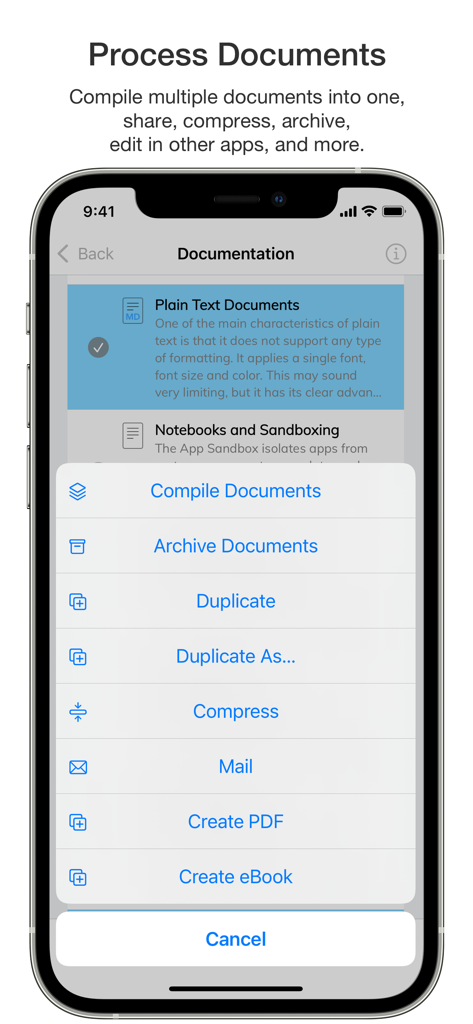
Ein mobiler Bildschirm, der das Dokumentenverarbeitungsmenü der Notebooks-App mit Optionen zum Kompilieren, Archivieren und Erstellen von PDFs zeigt.

Ein mobiler Bildschirm, der das Dokumentenverarbeitungsmenü der Notebooks-App mit Optionen zum Kompilieren, Archivieren und Erstellen von PDFs zeigt.

Eine Suchliste in der Notebooks-App, die verschiedene unterstützte Dateiformate anzeigt, darunter E-Mail, Excel, HTML und Markdown.

Eine Suchliste in der Notebooks-App, die verschiedene unterstützte Dateiformate anzeigt, darunter E-Mail, Excel, HTML und Markdown.

Der ultimative Arbeitsbereich für Wissensprofis

Die Tools, die diese App auszeichnen, gewählt von 124K+ Nutzern.

📂

Zukunftssichere Datenhoheit

Besitzen Sie Ihre Daten für immer. Alle Dokumente werden in Standardformaten wie Plain Text und Markdown gespeichert, um sicherzustellen, dass Ihre Dateien auf jedem Gerät oder jeder Plattform zugänglich und lesbar bleiben, ohne herstellerbedingte Bindung.

🧠

Fortschrittliches Wissensmanagement

Konstruieren Sie Ihr persönliches Wiki oder Zettelkasten mit Wiki-ähnlichen Links, tief verschachtelten Ordnern und Volltextsuche. Verbinden Sie disparate Ideen und organisieren Sie komplexe Recherchen mit professioneller Präzision.

Integriertes Aufgaben-Ökosystem

Schließen Sie die Lücke zwischen Ideen und Handlungen. Wandeln Sie jedes Dokument in eine Aufgabe um, weisen Sie Fälligkeitstermine zu und verwalten Sie GTD-ähnliche Projekte direkt in Ihrem Arbeitsbereich für einen nahtlosen, ablenkungsfreien Workflow.

Weltweit von Nutzern geliebt

Vertraut von 124K+ Menschen, die diese App lieben.

"

"Als Akademiker, der jahrelange Forschung verwaltet, habe ich jedes verfügbare Zettelkasten-Tool ausprobiert. Notebooks ist das einzige, das mir die Leistungsfähigkeit von Markdown und die Sicherheit gibt, dass meine Dateien nicht in einer proprietären Cloud gefangen sind. Die Möglichkeit, Dokumente zu einem persönlichen Wiki zu verknüpfen, hat meine Literaturrecherchen und meine professionelle Organisation völlig verändert."

Dr. Elena Richardson
"

"Notebooks ist die erste App, die wirklich die Lücke zwischen tiefem Schreiben und umsetzbarem Aufgabenmanagement schließt. Ich kann einen Projektvorschlag entwerfen und meine Notizen sofort in geplante Aufgaben umwandeln, ohne die App wechseln zu müssen. Es ist mein gesamtes 'Getting Things Done'-System an einem Ort – unauffällig, leistungsstark und unglaublich effizient für meinen täglichen Workflow."

Marcus Thorne

Über die App

Alles, was Sie über wissen müssen Notebooks – Write and Organize.

Beschreibung

Notebooks is a comprehensive writing app with a powerful text and Markdown editor, which you can use as personal Wiki, Zettelkasten, file and document organizer, task manager, PDF/eBook creator and much more—all in one place. You can seamlessly transform quick notes into actionable tasks, combine text fragments into chapters of a book, organize research material, and keep business documents separate from personal diaries without ever switching apps. Stay focused and unleash your creativity with Notebooks’ versatile and intuitive features. - You'll quickly come to appreciate this unique combination of features. • Notebooks stores all your documents as regular files in standard formats. You are always in control of your documents, never need to worry about how to export them, and they remain compatible across devices and over time. • Create formatted documents with styles, attachments, tables or checklists, and add a table of contents if you like. Choose between a variation of ready made document styles, or create your own, if you want. • Write your documents in plain text and allow Notebooks to automatically handle lists, highlight and center the current line on screen, automatically insert closing characters for (, {, [, " and more. - Plain text is a universal format which can be used on any device without any specific software. • Use Markdown to create formatted documents from plain text. Notebooks supports *MultiMarkdown* and its own flavor of *Discount*. – Click any word in a formatted Markdown text and start writing at that position. You can even create checklists (- [ ]) and tick them off in formatted view. Syntax highlighting and a set of dedicated extra keyboard keys make Markdown editing easy. • Use your Apple Pencil to sketch ideas or annotate images and PDF documents. • Use Notebooks' advanced editing capabilities to work on documents which are stored in other apps. • Compile selected documents or the contents of whole books into a single document, an eBook or a PDF document. • Link between documents in Notebooks. In Markdown you can even use Wiki style links ([[ ]]). When clicking a link to a document which does not yet exist, Notebooks suggests to create it. And when you move or rename documents, Notebooks makes sure the links remain intact. • Create as many books as you need to structure your projects and details. Nest books as deep as you like, there is no limit in Notebooks. If you ever loose track, Notebooks' full text search helps you quickly turn up even the most hidden document. • Turn books into task lists to display document as tasks which can be ticked off. Assign due dates and alerts, and divide projects into nested sub projects, which makes them easier to handle. • For simple lists you can use checklists in formatted documents and Markdown. • Assign Context tags to books and documents to create shortcuts that are accessible for a smart book at Notebooks' top level. – Notebooks can even extract context tags from the contents of documents as you create them. • Import all documents and files you want to keep close at hand, no matter whether PDF, email, web pages, MS Office or iWorks, photos, videos, music and more. • Scan documents and extract text using OCR (iOS 13) • Sync files between iPads, iPhones, Mac or PC. With all these features, Notebooks may quickly become your go-to repository for everything you want to keep close at hand. User Comments: “Notebooks is a wonderful App, which is so much better than the dozen other note apps I tried. It is sophisticated, in an unassuming way, so that you find yourself greatly rewarded and being productive without sacrificing time/effort to the App. I cannot tell you how much productivity I have gained. I am having a huge amount of fun, I use it constantly, more than the phone on my iPhone in fact." “You are GTD in every way that makes it efficient and makes me efficient.”

Neueste Version

12.8.4

Größe

45.1 MB

Erstveröffentlichung

20. Jan. 2020

Meistern Sie Ihren Workflow, besitzen Sie Ihre Daten

Schließen Sie sich über 124.000 Fachleuten an, die den ultimativen zukunftssicheren Hub für Notizen, Aufgaben und Recherche nutzen. Beginnen Sie noch heute mit dem Aufbau Ihres zweiten Gehirns mit Notebooks.

Herunterladen auf App Store