Qlone 3D Scanner

Qlone 3D Scanner

Herunterladen auf App StoreHerunterladen auf Google Play
Spark by MWM logo
Logo von Qlone 3D Scanner

Qlone 3D Scanner: Verwandeln Sie reale Objekte in professionelle 3D-Modelle

Das ultimative mobile Toolkit für 3D-Druck, AR-Erstellung und MINT. Scannen Sie alles mit Ihrem Smartphone, bearbeiten Sie es in der App und exportieren Sie es mit einem einmaligen Kauf auf jede Plattform – keine Abonnements erforderlich.

Herunterladen auf App Store

Herausgeber

EyeCue Vision Technologies LTD

Kategorie

Graphics & Design

Downloads

1M+

Bewertung

3.9/5

Bewertungen gesamt

1K+

Sprachen

17

Realität in 3D eingefangen

Entdecken Sie die Oberfläche, die von 1M+ Nutzern verwendet wird.
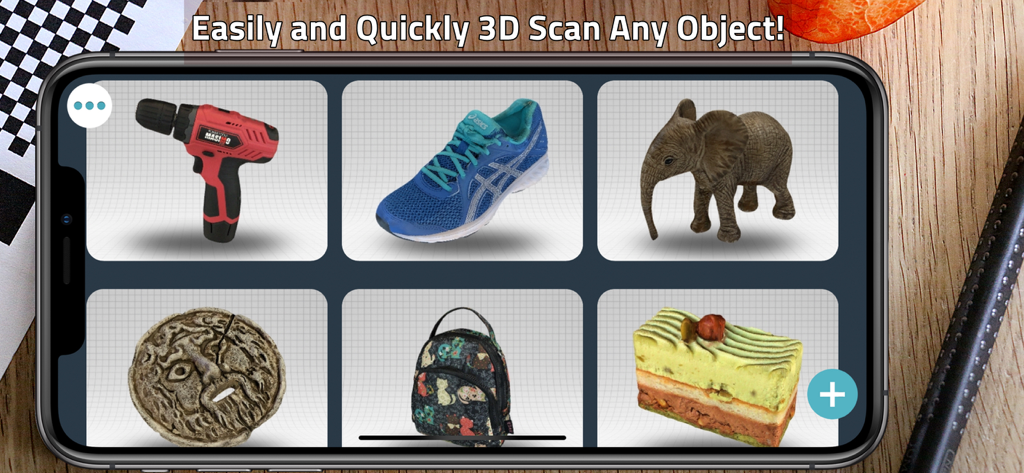
Eine Galerie verschiedener 3D-gescannter Modelle, darunter ein Bohrhammer, ein Turnschuh und ein Elefant in einer mobilen App-Oberfläche.

Eine Galerie verschiedener 3D-gescannter Modelle, darunter ein Bohrhammer, ein Turnschuh und ein Elefant in einer mobilen App-Oberfläche.

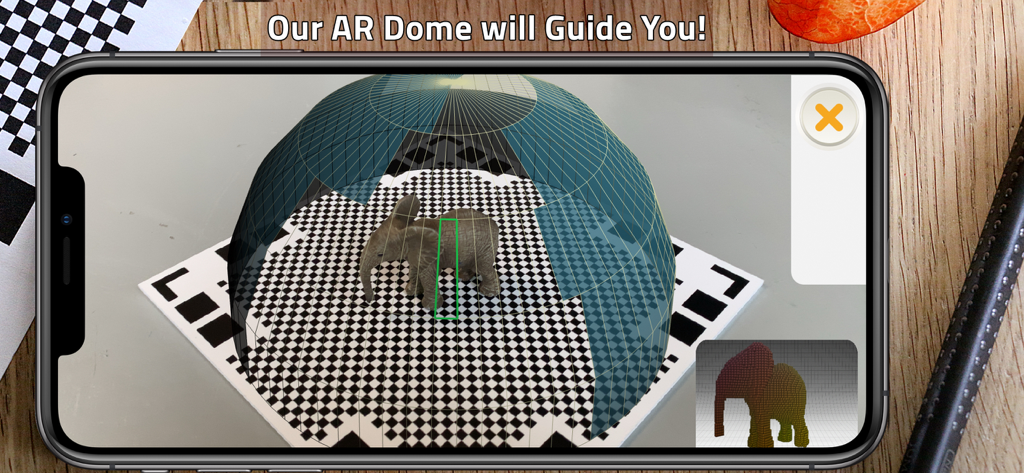
Smartphone-Bildschirm, der die Qlone 3D-Scanner-App zeigt, die mit ihrer AR-Dome die Aufnahme einer kleinen Elefantenfigur auf einer karierten Matte anleitet.

Smartphone-Bildschirm, der die Qlone 3D-Scanner-App zeigt, die mit ihrer AR-Dome die Aufnahme einer kleinen Elefantenfigur auf einer karierten Matte anleitet.

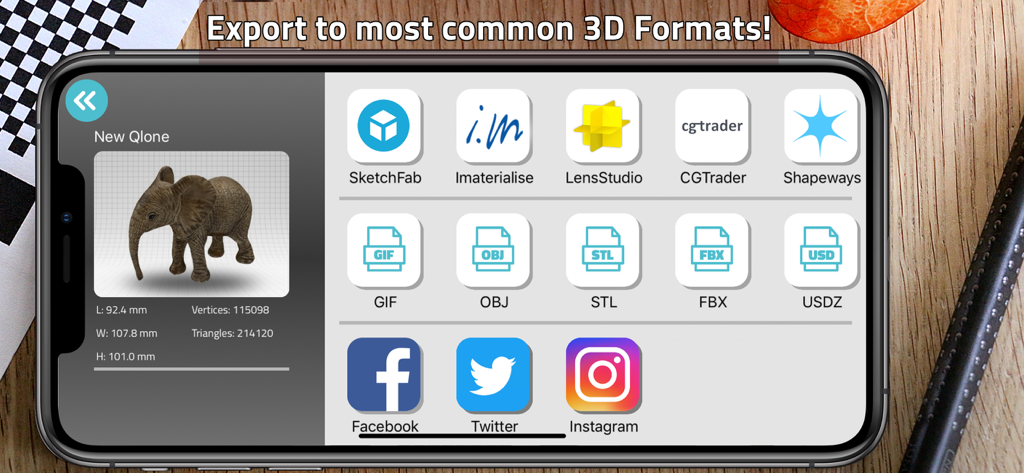
Oberfläche der Qlone 3D Scanner App, die Exportoptionen für 3D-Modelle in den Formaten OBJ, STL und USDZ zeigt.

Oberfläche der Qlone 3D Scanner App, die Exportoptionen für 3D-Modelle in den Formaten OBJ, STL und USDZ zeigt.

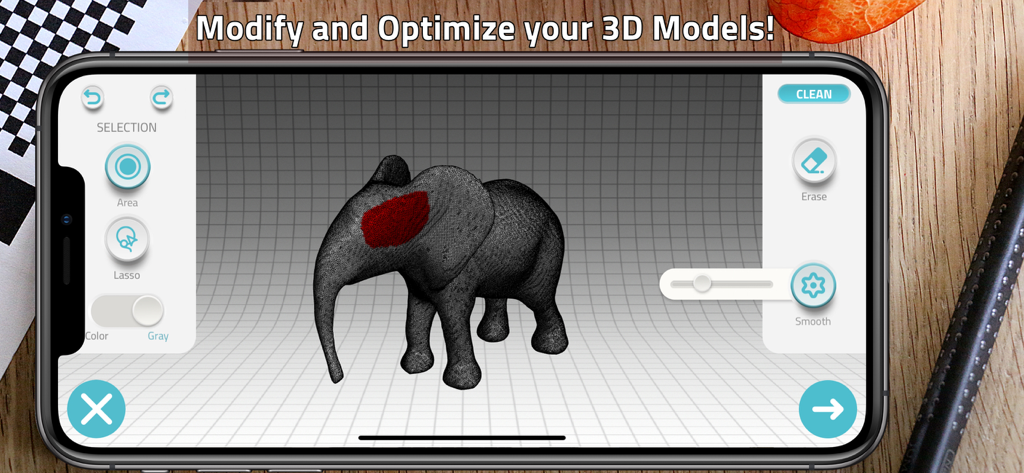
Smartphone-Bildschirm, der die Oberfläche der Qlone 3D Scanner App zur Bearbeitung und Optimierung eines 3D-Elefantenmodells zeigt.

Smartphone-Bildschirm, der die Oberfläche der Qlone 3D Scanner App zur Bearbeitung und Optimierung eines 3D-Elefantenmodells zeigt.

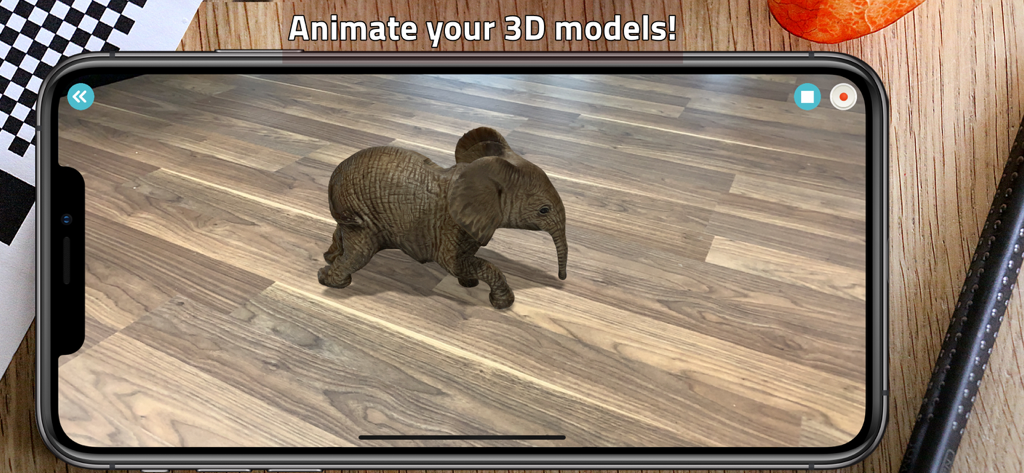
Eine Augmented-Reality-Ansicht eines 3D-gescannten Elefantenmodells, das mit der Qlone-App auf einem Holzboden animiert wird.

Eine Augmented-Reality-Ansicht eines 3D-gescannten Elefantenmodells, das mit der Qlone-App auf einem Holzboden animiert wird.

Verwandeln Sie physische Objekte in digitale Assets

Die Tools, die diese App auszeichnen, gewählt von 1M+ Nutzern.

🎯

Sofortige AR-Aufnahme

Geführt von unserer patentierten AR-Dome, scannen Sie Objekte in Echtzeit mit 4K-Auflösung. Keine Wartezeiten und keine teure Ausrüstung – nur professionelle Ergebnisse von Ihrem iPhone.

🛠️

Studio auf dem Gerät

Bereinigen, formen und texturieren Sie Ihre Modelle direkt in der App. Optimieren Sie Meshes für den 3D-Druck oder verwenden Sie automatisches Rigging, um Ihre Scans mit AR-Animationen zum Leben zu erwecken.

🚀

Universeller Export

Exportieren Sie nahtlos in STL, OBJ oder USDZ für 3D-Drucker, Spiele-Engines und AR/VR. Genießen Sie ein einmaliges Premium-Upgrade – keine monatliche Abo-Müdigkeit.

Weltweit von Nutzern geliebt

Vertraut von 1M+ Menschen, die diese App lieben.

"

"Qlone hat meinen 3D-Druck-Workflow komplett verändert. Die Möglichkeit, ein physisches Teil zu scannen und eine saubere STL-Datei direkt von meinem iPhone zu exportieren, ist unglaublich. Außerdem ist das Einmalkaufmodell eine willkommene Abwechslung im Vergleich zu anderen abonnementslastigen Apps."

Marcus V.
"

"Ich benutze Qlone in meinem MINT-Labor, um den Schülern 3D-Modellierung näherzubringen. Die AR-Dome macht den Scanvorgang intuitiv, und die Echtzeit-Verarbeitung ermöglicht es uns, Projekte innerhalb einer einzigen Unterrichtsstunde abzuschließen. Es ist zweifellos das zugänglichste Werkzeug für jedes moderne Klassenzimmer."

Dr. Elena R.

Bewertungsanalyse

Erkenntnisse aus Nutzerbewertungen.

Stimmungswert

10%
Negativ

Zusammenfassung

The app receives overwhelmingly negative feedback from users, primarily due to its aggressive monetization strategy and a critical lack of a free trial, which prevents users from testing core functionalities before purchase. Many reviews highlight intrusive "buy premium" ads and countdown timers, including persistent notifications in the Dynamic Island on newer iPhones (like the iPhone 17 Pro), even after the app is closed. Furthermore, users frequently report poor and imprecise 3D scan quality, with results often deemed unsuitable for 3D printing. While some users appreciate the user-friendly interface, local processing, and easy transfer to Mac, these positive aspects are overshadowed by the pervasive issues related to forced payments and low-quality output.

Häufige Themen

User-Friendly Interface(2)
Export & Transfer(1)
Local Processing(1)
Speed(1)
Scan Quality Options(1)
Premium Impression(1)

Über die App

Alles, was Sie über wissen müssen Qlone 3D Scanner.

Beschreibung

Qlone is an all-in-one 3D scanner app. We have made it easy and fast to create 3D models from real objects, edit them with built-in editing tools and seamlessly export the result to popular platforms, 3D file formats and 3D printers. You can even animate your models in Augmented Reality! A perfect tool for AR/VR content creation, 3D Printing, STEM Education, eCommerce showcase and many other uses. SCANNING If you choose to scan with the Qlone mat, simply print it from the included mat file, place your object in the middle of the mat and let the AR dome guide you through the scanning process. You can also scan the object from two different angles and it will be automatically merged for a better overall result which includes areas such as the bottom of the object. You can now also scan without a mat in two different modes - AR mode which makes it easy to scan with our familiar AR dome or Photo mode, which takes higher quality 4K images in both manual or automatic modes. When scanning with the mat, there is no waiting time, all processing is done in real time on your phone in seconds. In the new option to scan without a mat, processing is done in minutes on our blazing fast Qlone Cloud but we value your privacy so we don't store or view any of your models! MODIFYING With the integrated tools in the app you can optimize and modify your 3D model without needing to export them to other sophisticated software. Texture - Change the Brightness, Saturation and Sharpness of the 3D model. Pick colors from the scanned object and apply them by painting directly on the 3D model. Blur areas or transitions for smoother results. Clean - Fill holes in the model, erase unwanted areas such as the background surface or smooth certain parts. Sculpt - Improve or alter the shape of your object by pressing or pulling a selected area and adjust the transition. Shape - Fix the orientation, enhance the mesh details or set the scale size of your model for 3D printing. You can also simplify the mesh for lower file size export. Art - Turn your object into scaled cubes or meshed objects of art, ready to be printed. AR View + ANIMATION: You can beam your 3D models back to reality and bring them to life with automatic rigging and animation. EXPORTING and IMPORTING: Export your model directly to platforms like SketchFab, i.materialise, Lens Studio, Shapeways and CGTrader. Models can be exported in a variety of formats for use in other 3D tools – OBJ, STL, FBX, USDZ, GLB (Binary glTF) which includes animation, PLY, X3D.  Share your models with friends as an image, video or GIF through Facebook, Twitter, Instagram, WhatsApp, Email and iMessage. You can import any 3D model into Qlone. Import in any 3D format (40+ formats) to view, modify or bring it to life in AR with our automatic animation! PREMIUM UPGRADE (ONE-TIME PURCHASE): Qlone is free to download and scan but exporting the 3D models, AR view with Animations and scanning in 4K resolution are premium features that require an upgrade to premium. Such upgrade is a one-time purchase fee and is not based on an annoying subscription. Also, there is a new premium feature that allows scanning without a mat! Since processing for scanning without the mat takes place on our Qlone Cloud, when you upgrade to premium you unlock this new option and receive 50 cloud credits for 50 such scans. You can later purchase more credits in highly affordable packs if needed. When you upgrade to premium, all models in your gallery and future models will be unlocked for unlimited exports in any format and it will work across all your Apple devices. PRIVACY POLICY: http://eyecue-tech.com/index.php?option=com_content&view=article&id=143 TERMS OF USE: http://eyecue-tech.com/index.php?option=com_content&view=article&id=142

Neueste Version

6.5.7

Größe

130.9 MB

Erstveröffentlichung

15. Juni 2017

Professionelles 3D-Scannen. Keine Abonnements.

Schließen Sie sich über 1 Million Maker, Pädagogen und Unternehmern an. Scannen Sie in 4K, bearbeiten Sie mühelos und exportieren Sie mit einem einzigen Einmalkauf auf jede Plattform.

Herunterladen auf App StoreHerunterladen auf Google Play
FAQ

Häufig gestellte Fragen

Alles, was Sie über wissen müssen Qlone 3D Scanner

Was ist der Qlone 3D Scanner?

Der Qlone 3D Scanner ist eine All-in-One-App, die 3D-Modelle aus realen Objekten erstellt. Sie verfügt über integrierte Bearbeitungswerkzeuge, unterstützt den Export auf gängige Plattformen und Formate und ermöglicht Augmented Reality-Animationen.

Wie scannt Qlone Objekte?

Qlone scannt Objekte entweder mit einer gedruckten Matte mit AR-Dome-Führung oder in mattenlosen Modi wie AR und Foto. Das Scannen mit Matte erfolgt auf dem Gerät, während das mattenlose Scannen die Qlone Cloud nutzt.

Kann ich 3D-Modelle in der Qlone-App bearbeiten?

Ja, Qlone enthält integrierte Werkzeuge zur Optimierung und Modifizierung von 3D-Modellen. Benutzer können Texturen anpassen, unerwünschte Bereiche bereinigen, Formen formen, die Ausrichtung korrigieren und Druckskalen direkt in der App festlegen.

Welche Dateiformate unterstützt Qlone für den Export von 3D-Modellen?

Qlone unterstützt den Export von 3D-Modellen in verschiedenen Formaten, darunter OBJ, STL, FBX, USDZ, GLB (mit Animation), PLY und X3D. Es exportiert auch auf Plattformen wie SketchFab und Shapeways.

Ist der Qlone 3D Scanner eine kostenlose App?

Qlone kann kostenlos heruntergeladen und zum Scannen verwendet werden. Premium-Funktionen wie der Export von 3D-Modellen, die AR-Ansicht mit Animationen, 4K-Scans und mattenloses Scannen erfordern jedoch einen einmaligen Kauf.

Welche Premium-Funktionen schaltet das Qlone-Upgrade frei?

Das Qlone Premium-Upgrade schaltet den Export von 3D-Modellen, die AR-Ansicht mit Animationen, 4K-Scans und mattenloses Scannen (mit 50 Cloud-Credits) frei. Es handelt sich um einen einmaligen Kauf, der auf allen Apple-Geräten gültig ist.

Kann Qlone 3D-Modelle in Augmented Reality animieren?

Ja, Qlone kann 3D-Modelle in Augmented Reality animieren. Benutzer können ihre Kreationen zurück in die Realität beamen und sie mit automatischen Rigging- und Animationsfunktionen in der App zum Leben erwecken.

Speichert Qlone meine 3D-Modelle in seiner Cloud?

Nein, Qlone legt Wert auf die Privatsphäre der Benutzer. Obwohl das mattenlose Scannen die Qlone Cloud zur Verarbeitung verwendet, gibt das Unternehmen an, keine Ihrer Modelle zu speichern oder einzusehen.

Ermöglicht Qlone den Import bestehender 3D-Modelle?

Qlone ermöglicht den Import beliebiger 3D-Modelle. Es unterstützt über 40 3D-Formate, damit Benutzer sie in der App in AR anzeigen, modifizieren oder animieren können.

Welche Arten von Objekten kann ich mit Qlone scannen?

Qlone kann verschiedene reale Objekte scannen, wie in der Galerieansicht der App gezeigt wird. Beispiele sind Bohrer, Schuhe, Elefanten und andere Gegenstände.