Zoho Sheet: Spreadsheet App

Zoho Sheet: Spreadsheet App

Herunterladen auf App Store
Spark by MWM logo
Logo von Zoho Sheet: Spreadsheet App
Zoho Sheet: Tabellenkalkulations-App – Die KI-gestützte, datenschutzorientierte Alternative

Steigern Sie Ihre mobile Produktivität mit intelligenter OCR-Dateneingabe, Echtzeit-Kollaboration und fortschrittlichen KI-Einblicken. Sicher, werbefrei und für den modernen Profi unterwegs konzipiert.

Herausgeber

Zoho Corporation

Kategorie

Productivity

Downloads

56K+

Bewertung

4.8/5

Bewertungen gesamt

1K+

Sprachen

44

Ihr Workflow, visualisiert

Entdecken Sie die Oberfläche, die von 56K+ Nutzern verwendet wird.
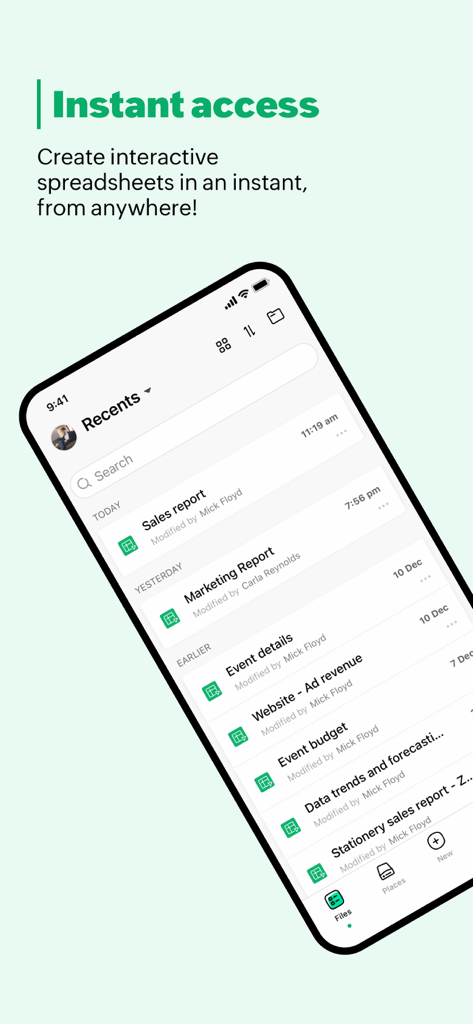
Zoho Sheet Mobile App-Oberfläche, die eine Liste aktueller Tabellenkalkulationsdateien anzeigt, darunter Verkaufs- und Marketingberichte.

Zoho Sheet Mobile App-Oberfläche, die eine Liste aktueller Tabellenkalkulationsdateien anzeigt, darunter Verkaufs- und Marketingberichte.

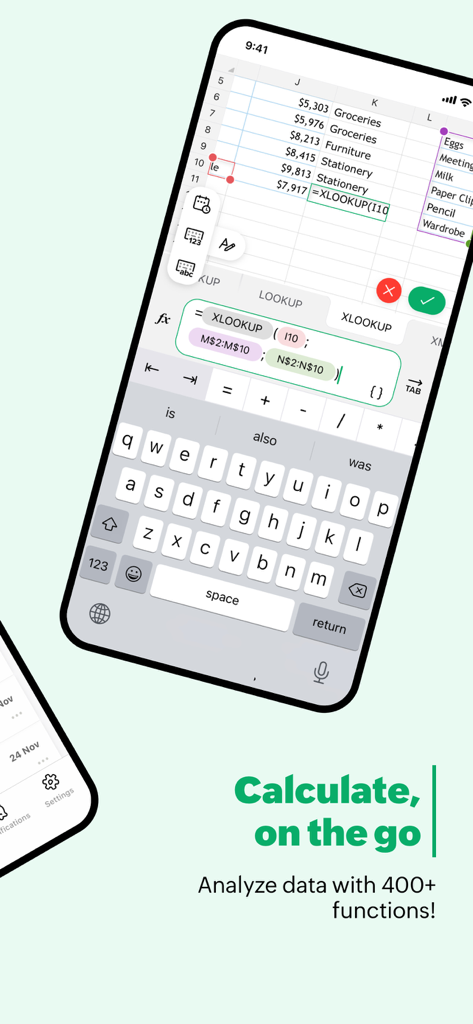
Zoho Sheet Mobile App-Oberfläche, die eine Tabellenkalkulation mit einer bearbeiteten Formel und Datenanalysefunktionen auf einem Smartphone-Bildschirm zeigt.

Zoho Sheet Mobile App-Oberfläche, die eine Tabellenkalkulation mit einer bearbeiteten Formel und Datenanalysefunktionen auf einem Smartphone-Bildschirm zeigt.

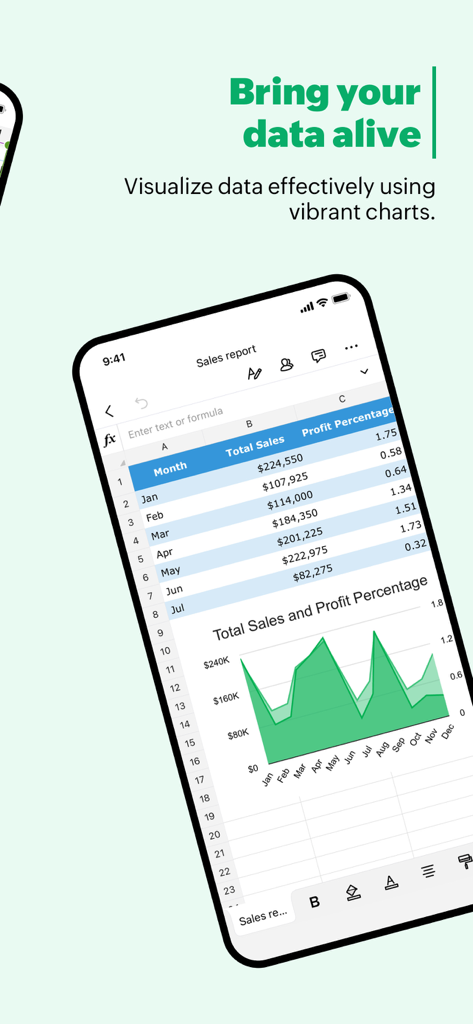
Eine mobile Tabellenkalkulations-App, die einen Verkaufsbericht mit einer Tabelle und einem Bereichsdiagramm anzeigt

Eine mobile Tabellenkalkulations-App, die einen Verkaufsbericht mit einer Tabelle und einem Bereichsdiagramm anzeigt

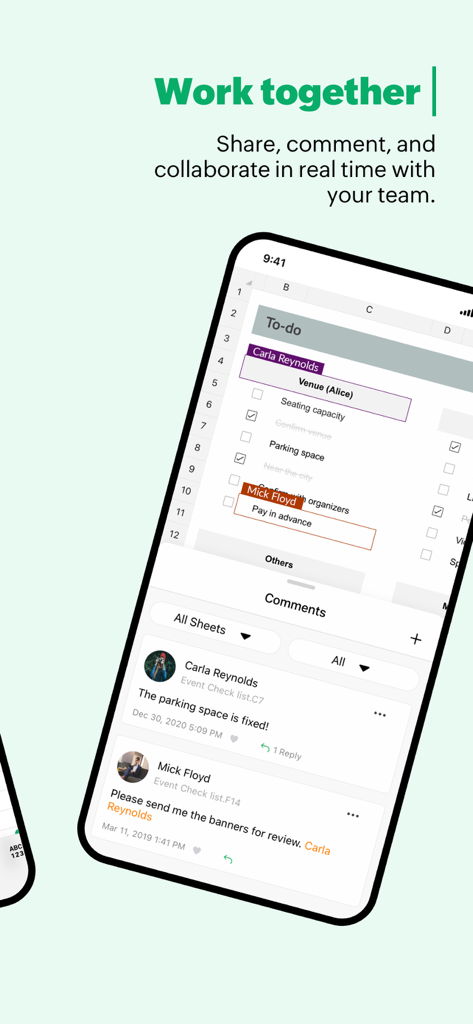
Zoho Sheet Mobile App-Oberfläche, die die Echtzeit-Teamzusammenarbeit und Kommentare zu einer Tabellenkalkulations-Checkliste zeigt

Zoho Sheet Mobile App-Oberfläche, die die Echtzeit-Teamzusammenarbeit und Kommentare zu einer Tabellenkalkulations-Checkliste zeigt

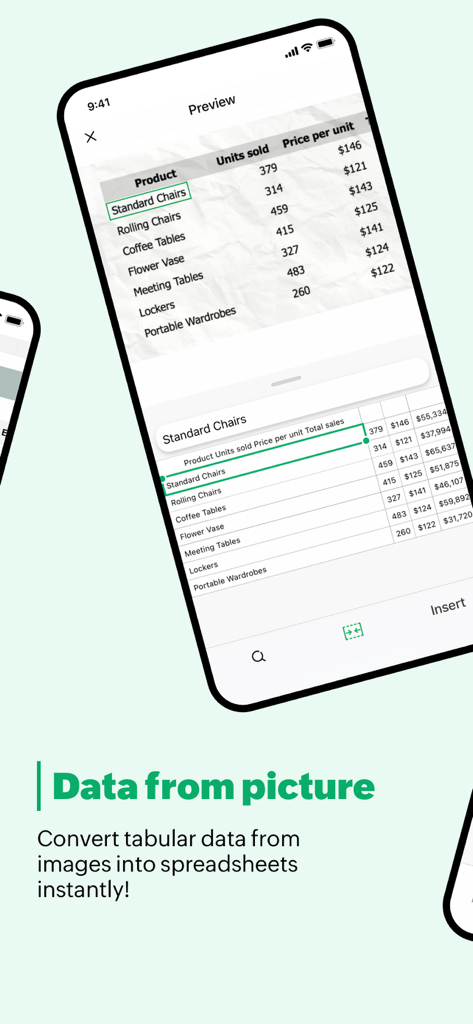
Zoho Sheet Mobile App-Oberfläche, die zeigt, wie eine gedruckte Tabelle aus einem Foto mithilfe von OCR-Technologie in eine digitale Tabellenkalkulation umgewandelt wird.

Zoho Sheet Mobile App-Oberfläche, die zeigt, wie eine gedruckte Tabelle aus einem Foto mithilfe von OCR-Technologie in eine digitale Tabellenkalkulation umgewandelt wird.

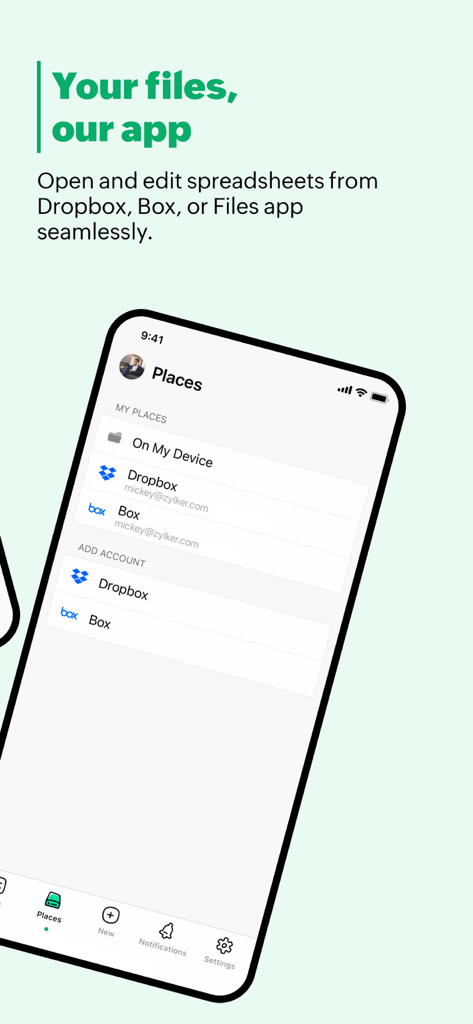
Zoho Sheet Mobile App-Oberfläche, die die Cloud-Speicherintegration mit Dropbox und Box für die Verwaltung von Tabellenkalkulationen zeigt

Zoho Sheet Mobile App-Oberfläche, die die Cloud-Speicherintegration mit Dropbox und Box für die Verwaltung von Tabellenkalkulationen zeigt

Meistern Sie Ihren Workflow unterwegs

Die Tools, die diese App auszeichnen, gewählt von 56K+ Nutzern.

📸

Sofortige Datenerfassung

Hören Sie auf zu tippen und fangen Sie an zu scannen. Konvertieren Sie physische Tabellen und gedruckte Belege mit leistungsstarker OCR in Sekunden in perfekt formatierte Tabellenkalkulationen.

🤖

KI-gestützte Analysen

Erhalten Sie sofortige Antworten. Nutzen Sie Zia, Ihren integrierten KI-Assistenten, um Diagramme, Pivot-Tabellen und komplexe Einblicke über einfache Sprach- oder Textbefehle zu generieren.

🛡️

Datenschutz an erster Stelle, immer

Arbeiten Sie ohne Ablenkungen oder Datenverfolgung. Genießen Sie eine saubere, werbefreie Umgebung, in der Ihre sensiblen Geschäftsdaten streng Ihr Eigentum bleiben und geschützt sind.

Weltweit von Nutzern geliebt

Vertraut von 56K+ Menschen, die diese App lieben.

"

"Als Immobilienberater, der ständig unterwegs ist, ist die Funktion „Scannen und Einfügen“ ein absoluter Gamechanger. Ich kann ein Foto einer physischen Inventarliste machen und es in Sekundenschnelle perfekt formatiert in eine Tabellenkalkulation umwandeln. Das spart mir jede Woche Stunden an manueller Dateneingabe."

Marcus T.
"

"Ich habe jede Tabellenkalkulations-App ausprobiert, aber Zoho Sheet gewinnt sowohl bei Leistung als auch bei Datenschutz. Die Möglichkeit, komplexe Formeln auszuführen und Zia KI für sofortige Einblicke zu nutzen, ohne sich Sorgen machen zu müssen, dass meine Daten für Werbung verkauft werden, ist eine Wohltat. Es ist mein Go-to für sicheres, professionelles Arbeiten."

Sarah J.

Über die App

Alles, was Sie über wissen müssen Zoho Sheet: Spreadsheet App.

Beschreibung

Create a new spreadsheet or import an Excel file to work on, break down data with collaborators in real time, and share your spreadsheets with the free Zoho Sheet app for iOS. With this spreadsheet app on your iPhone, you can: Import files from your device or cloud apps Bring in .csv, .tsv, and .xlsx files from your device and continue where you left off. You can also open, edit, and save spreadsheets from Dropbox and Box in Zoho Sheet or simply sync the changes back to your files stored in the cloud. Scan and insert data from pictures Save time on data entry with an effortless, two-step process. Scan data from printed materials or from images saved in your iPhone Photos app. Preview and insert the data into your worksheets. Collaborate on your spreadsheets Track budgets, stocks, manage projects, create monthly reports, calendars, or generate charts for your next big presentation—all with the power of real-time collaboration. Add cell- or range-specific comments and use @mentions to tag collaborators for seamless teamwork. Export files Choose the optimal format for each spreadsheet and download them as Microsoft Excel (.xlsx, .xls), PDF or other supported file formats to access them offline, store hard copies, or share the finished results of your work. Analyze and visualize Crunch numbers with more than 350 functions and formulas and visualize your findings with more than 35 types of charts. Increase productivity with AI Get suggestions for analyzing your data and automatically generate charts and pivot tables instantly with Zia, our in-house artificial intelligence. Even better, use voice commands to ask Zia your data-related questions. Build spreadsheets faster with templates Solve your use cases quickly with our gallery of ready-made spreadsheet templates like inventory tracker, invoice, and more. Get a unified experience across devices Access and manage your spreadsheets with ease, whether you are on your iPhone or using Zoho Sheet on the web. Your data is automatically synced every time you make a change, allowing you to switch between the two platforms whenever you want. Assure the privacy of your data Zoho prioritizes privacy because we know it's important to our users, especially in the productivity and collaboration app segment. We have never shared our users' information with anyone for advertising purposes, nor have we generated revenue by displaying ads from other sources. The Zoho advantage for businesses Zoho Sheet is part of the Zoho Office Suite, which also includes Writer, an online word processor, and Show, our online presentation software. This means when you sign up for Zoho Sheet, you'll get access to a full set of tools to manage your worksheets, presentations, and word documents in one place. It's even possible to integrate across apps to automatically add the latest data to the graphs in your upcoming presentation or report. Zoho's single sign-on account means you can easily access all the Zoho apps you need. Our ecosystem currently offers 55+ apps across business categories like sales, marketing, email and collaboration, finance, HR, and more. For more details visit: https://www.zoho.com/sheet/mobile.html If you have questions before you try the app or while using it, please write to us at ios-support@zohosheet.com.

Neueste Version

3.0.51

Größe

384.7 MB

Erstveröffentlichung

8. März 2021

Bereit, Ihre mobile Produktivität zu steigern?

Schließen Sie sich Tausenden von Profis an, die Zoho Sheet nutzen, um Daten mit KI zu analysieren, Tabellen sofort zu scannen und sicher zusammenzuarbeiten – alles ohne Werbung oder Datenverfolgung.

Herunterladen auf App Store