Audio Jam - AI for musicians

Audio Jam - AI for musicians

Download on App Store
Spark by MWM logo
Logo of Audio Jam - AI for musicians

Audio Jam — Master Any Song 3x Faster with AI

Isolate instruments with studio-grade accuracy, slow down tricky riffs without pitch distortion, and create the perfect practice environment on all your devices.

Download on App Store

Publisher

Mega e Limited

Category

Music

Downloads

144K+

User Rating

4.7/5

Total Ratings

2K+

Locales

6

Master Every Detail

Discover the interface used by 144K+ users.
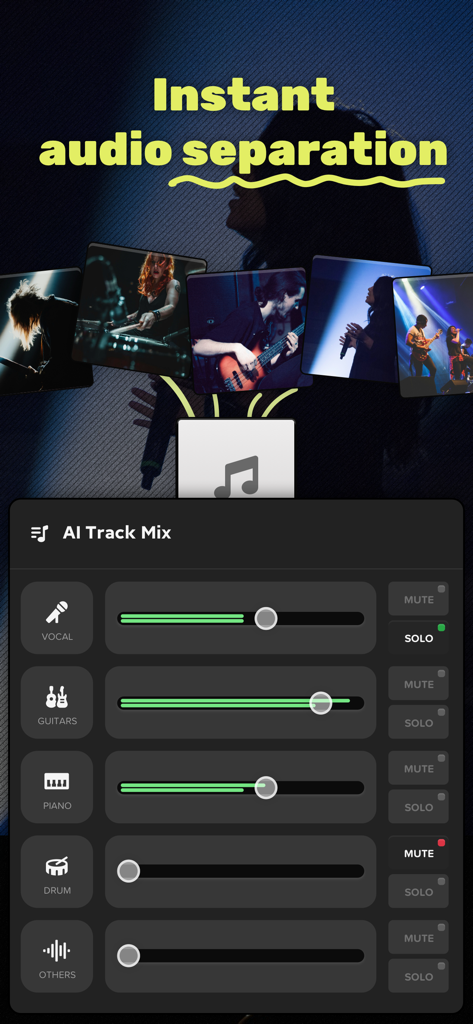
Audio Jam app showing AI track separation for vocals and instruments with independent volume sliders

Audio Jam app showing AI track separation for vocals and instruments with independent volume sliders

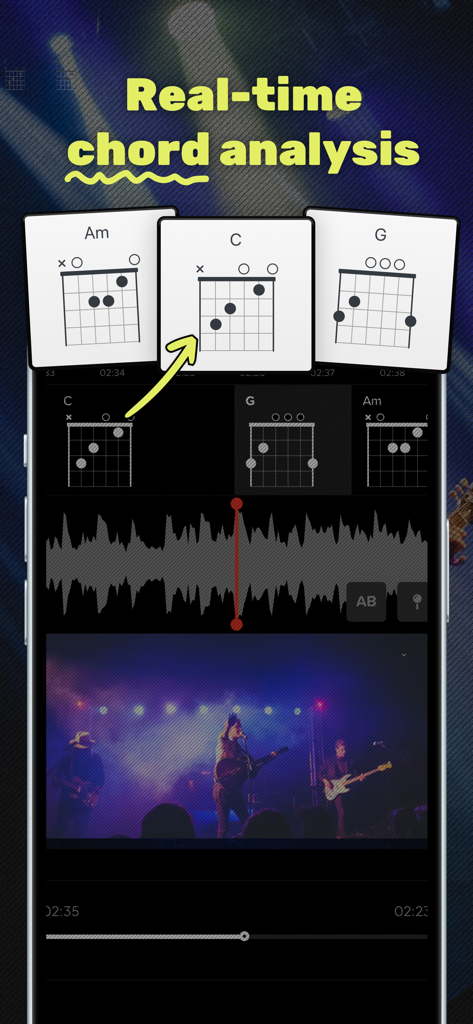
A smartphone screen showing real-time guitar chord analysis and diagrams during a song performance.

A smartphone screen showing real-time guitar chord analysis and diagrams during a song performance.

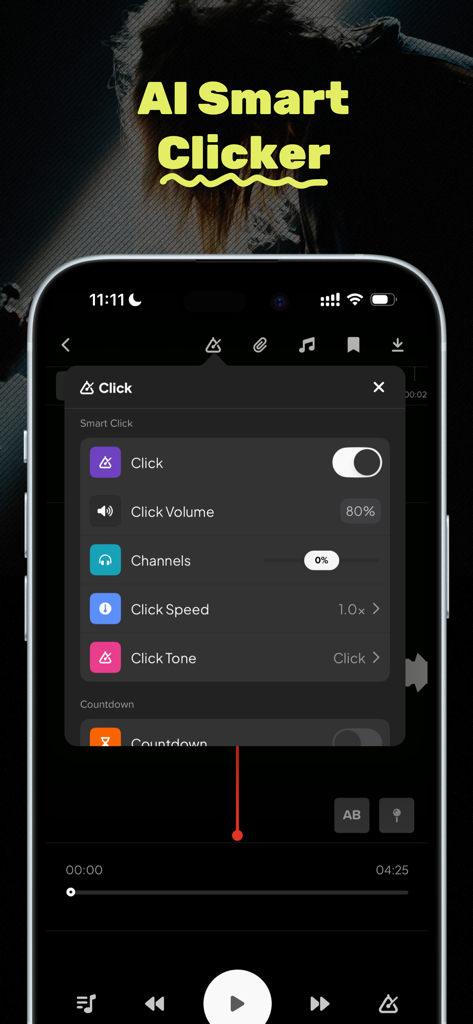
Interface showing AI Smart Clicker settings in Audio Jam app including metronome speed and volume.

Interface showing AI Smart Clicker settings in Audio Jam app including metronome speed and volume.

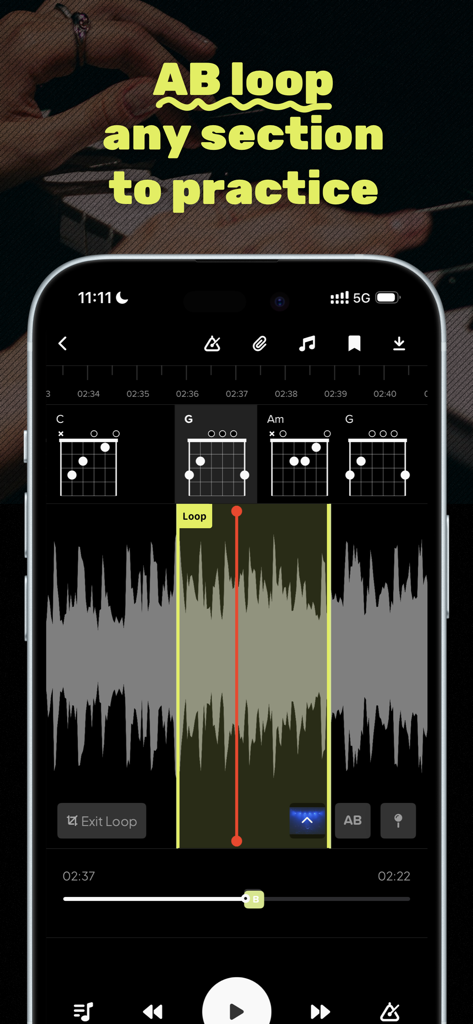
Audio Jam app interface displaying the AB loop feature for music practice with visible guitar chord diagrams and waveform

Audio Jam app interface displaying the AB loop feature for music practice with visible guitar chord diagrams and waveform

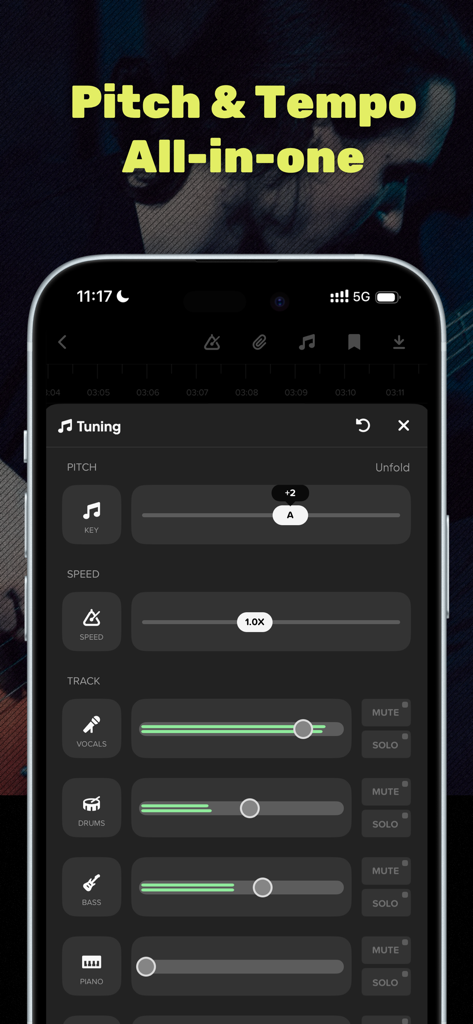
Audio Jam app interface showing pitch and speed adjustment sliders along with track separation for vocals and instruments

Audio Jam app interface showing pitch and speed adjustment sliders along with track separation for vocals and instruments

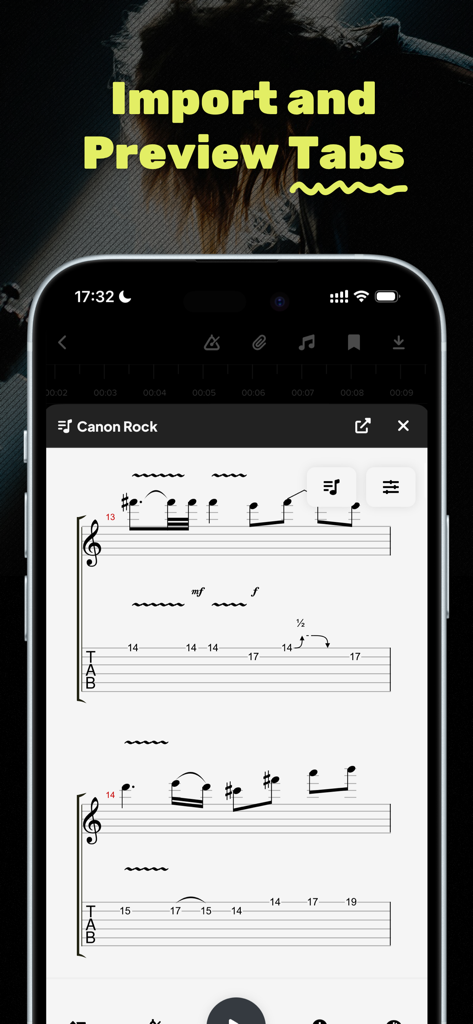
A mobile screen showing the import and preview tabs feature with guitar notation for Canon Rock in the Audio Jam app

A mobile screen showing the import and preview tabs feature with guitar notation for Canon Rock in the Audio Jam app

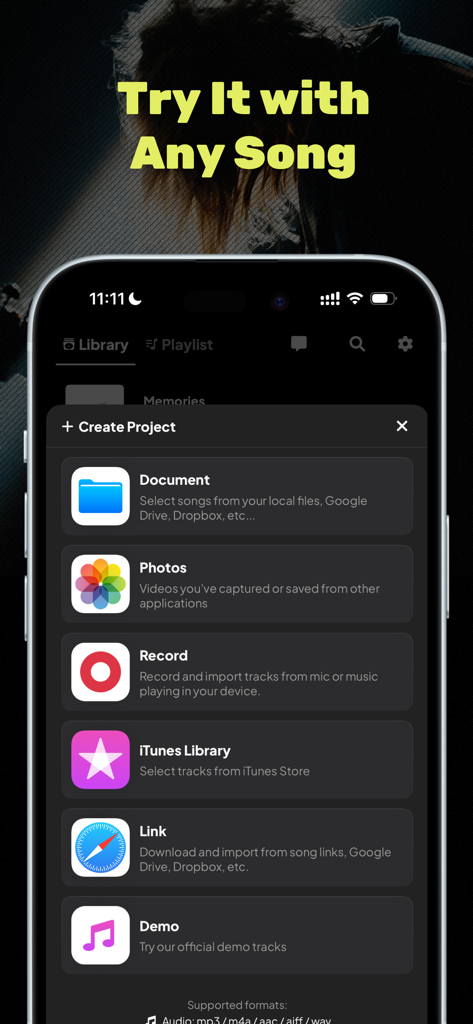
Interface of Audio Jam app showing diverse options to import music for projects from cloud storage and iTunes

Interface of Audio Jam app showing diverse options to import music for projects from cloud storage and iTunes

Practice Smarter, Not Harder

The tools that make this app stand out, trusted by 144K+ users.

🪄

Studio-Grade Track Isolation

Extract vocals, guitar, or bass with 96% AI accuracy. Mute any instrument to create custom backing tracks or isolate parts to hear every nuance.

🐢

Precision Learning Tools

Slow down tracks to 50% without pitch distortion and use A/B looping to perfect difficult licks until they are stage-ready.

🎸

Pro-Ready Workflow

Sync projects across all your devices, use built-in EQ for live prep, and export your edited stems directly to your DAW for high-quality content creation.

Loved by users worldwide

Trusted by 144K+ people who love this app.

"

"Audio Jam has completely changed how I prep for gigs. Being able to isolate the bass line and loop difficult riffs at half-speed makes learning new songs three times faster. It is like having a studio engineer and a music teacher right in my pocket."

Marcus T., Session Bassist
"

"The AI separation is actually mind-blowing. I use it to create high-quality backing tracks for my social media covers. Muting the original vocals while keeping the drum and guitar clarity is a total game-changer for my workflow as a content creator."

Chloe Rivera, Music Producer & TikToker

About the app

Everything you need to know about Audio Jam - AI for musicians.

Description

# Designed for musician Master any song 3x faster with studio-grade track separation and smart practice tools. ## Key Features: **Isolate & Remix** → Extract vocals, drums, guitar tracks instantly with 96% accuracy AI → Remix tracks: Boost bass, mute vocals, or create custom instrument combos **Precision Training** → A/B Loop tricky 10-second licks endlessly → Bookmark key moments & jump between solos/riffs → Slow down to 50% speed without pitch distortion **Studio-Ready Toolkit** → 3-band EQ for live gig preparation → Guitar Pro/MusicXML score syncing → Beat-synced countdown for seamless transitions **Cloud Power** →Sync projects across all your devices→ Practice anywhere We are perfect match if you are: * Music lovers who want to get better * Band members syncing practice * Cover artists preparing gigs * Producers analyzing hit songs * Teachers creating lesson materials * Content creators To get the best out of AudioJam, you can also upgrade to our Pro membership. Pro membership benefits: - 100x More AI Power: Up to 100 AudioAI splits/month - Longer Tracks: Work with songs up to 20 minutes - Unlimited Projects: Create your entire music library - Export Your Edits: Take your work to any DAW - Ad-Free Experience - Access Everywhere Additional Subscription Notice * Annual / semi-annual / monthly subscription plans * Payment will be made through your iTunes account after confirmation of purchase. * By default, the subscription will automatically renew at the same price and period after the subscription expires according to the original plan. To cancel your subscription, you must cancel at least 24 hours in advance of the expiration of your existing subscription plan. * You can cancel your subscription plan at any time through the subscription settings in your personal iTunes account (find Settings on your device, click iTunes and App Store > Apple ID > View Apple ID > Enter Password > Subscriptions > Manage App Subscriptions > Click the Cancel Subscription button at the bottom of the page). # Legal * For more information, please visit: http://audiojam.app/ * Privacy Policy: https://audiojam.app/privacy * Terms of Service: https://audiojam.app/terms # Questions? If you have any suggestions or feedback, please email our production team at focus-feedback#foxmail.com

Latest Version

3.8.5

Size

106.3 MB

First Released

May 31, 2025

Ready to Master Your Next Set in Record Time?

Join 144,000+ musicians using studio-grade AI to isolate tracks, loop tricky solos, and practice smarter. Download Audio Jam and start leveling up today.

Download on App Store
FAQ

Frequently Asked Questions

Everything you need to know about Audio Jam - AI for musicians

What is Audio Jam - AI for musicians?

Audio Jam is an app designed for musicians to master songs faster. It offers studio-grade track separation, smart practice tools like A/B looping, and a studio-ready toolkit including EQ and score syncing.

How accurate is Audio Jam's AI for track separation?

Audio Jam's AI extracts vocals, drums, and guitar tracks instantly with 96% accuracy. This allows users to isolate and remix specific instruments effectively for practice or analysis.

Can I slow down songs without pitch distortion in Audio Jam?

Yes, Audio Jam allows users to slow down songs to 50% speed without pitch distortion. This feature is part of its precision training tools for detailed practice.

Does Audio Jam support A/B looping for practice?

Yes, Audio Jam supports A/B looping, allowing users to endlessly loop tricky 10-second licks. This feature aids precision training for specific musical sections.

What are the benefits of Audio Jam Pro membership?

Audio Jam Pro membership provides 100x more AI power, longer tracks up to 20 minutes, unlimited projects, ad-free experience, and the ability to export edits to any DAW.

How can I cancel my Audio Jam subscription?

Users can cancel their Audio Jam subscription through the subscription settings in their personal iTunes account. Cancellation must occur at least 24 hours before the existing plan expires.

Does Audio Jam allow project syncing across multiple devices?

Yes, Audio Jam uses cloud power to sync projects across all your devices. This enables users to practice anywhere and access their work consistently.

What audio file formats does Audio Jam support for import?

Audio Jam supports importing audio files in mp3, m4a, aac, aiff, and wav formats. Users can import from various sources like local files, iTunes Library, or links.

Can I export my edited tracks from Audio Jam to a DAW?

Yes, Audio Jam Pro membership allows users to export their edited tracks. This feature enables transferring work to any Digital Audio Workstation (DAW).

Does Audio Jam provide real-time chord analysis?

Yes, Audio Jam offers real-time chord analysis. This feature displays chord diagrams (e.g., Am, C, G) as the music plays, assisting with learning and understanding.

What is the maximum track length supported by Audio Jam Pro?

Audio Jam Pro membership supports working with songs up to 20 minutes in length. This is an upgrade from the standard version's track length limitations.

Does Audio Jam include a beat-synced metronome or clicker?

Yes, Audio Jam features an "AI Smart Clicker" that provides a beat-synced countdown. Users can adjust click volume, speed, and tone for seamless transitions.