Logo
Logo de App

Audyssey MultEQ Editor app: Precision Calibration for the Ultimate Home Cinema

Go under the hood of your Denon or Marantz receiver to visualize, edit, and master your room's acoustics. Take total control of your soundstage with professional-grade tools designed for the true audiophile perfectionist.

App Store

Publisher

D&M Holdings Inc.

Category

Music

Downloads

266K+

User Rating

3.2/5

Total Ratings

600

Locales

11

A Glimpse Under the Hood

Join over 266K+ musicians using our pro interface.

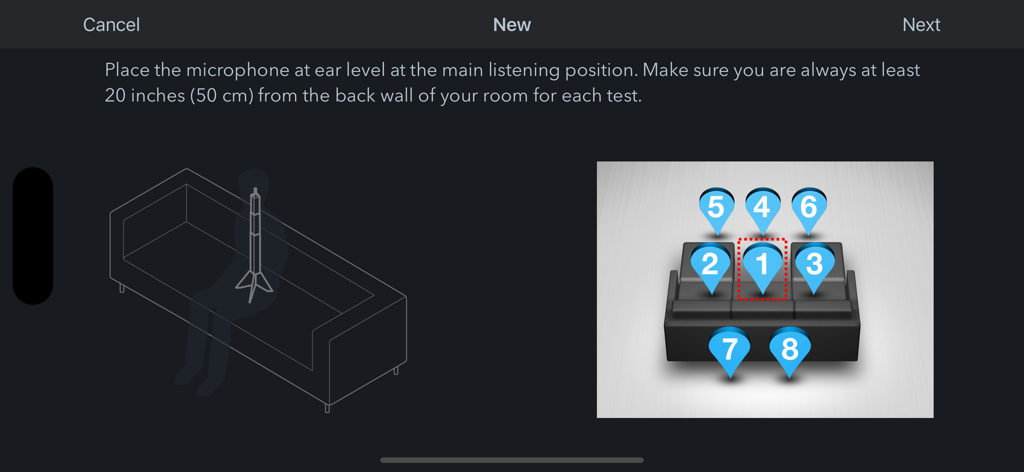
Diagram showing eight numbered microphone positions for room audio calibration in the Audyssey MultEQ Editor app.

Diagram showing eight numbered microphone positions for room audio calibration in the Audyssey MultEQ Editor app.

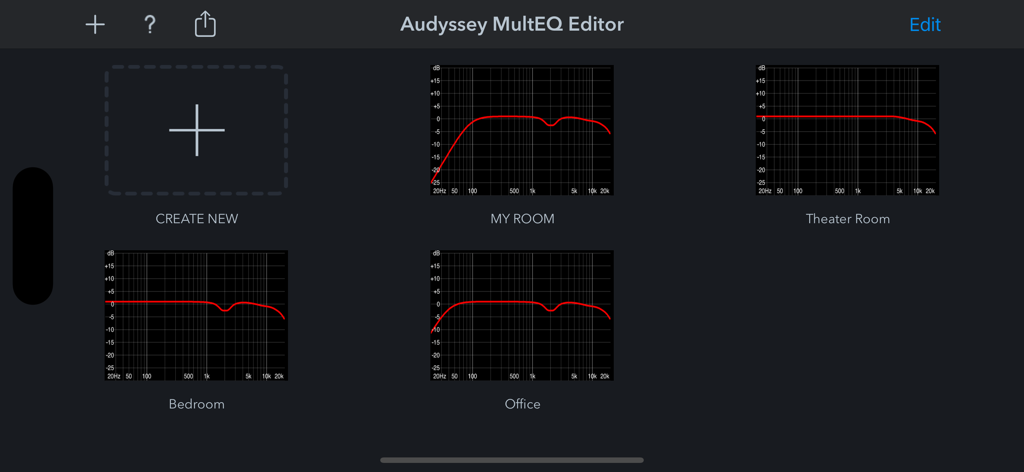
Dashboard of the Audyssey MultEQ Editor app displaying saved room audio calibration profiles

Dashboard of the Audyssey MultEQ Editor app displaying saved room audio calibration profiles

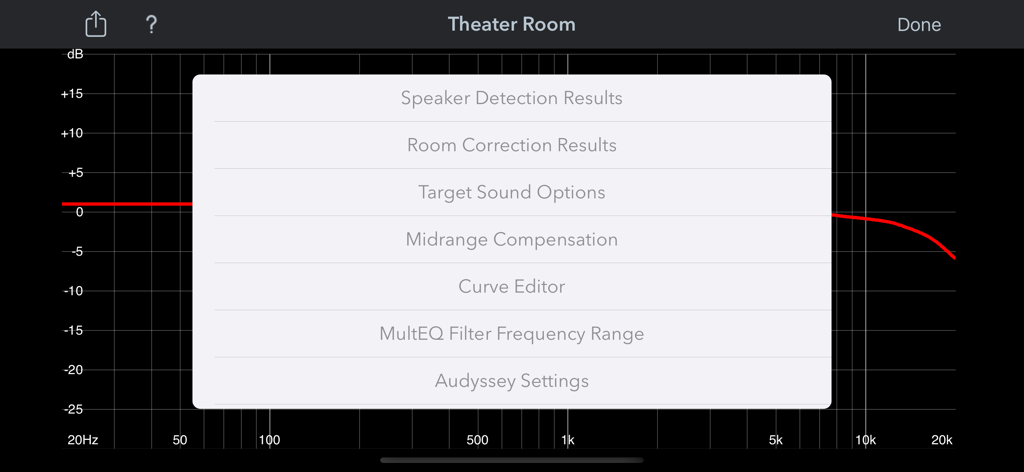
Settings menu for audio calibration in the Audyssey MultEQ Editor app showing options like room correction and curve editor.
Settings menu for audio calibration in the Audyssey MultEQ Editor app showing options like room correction and curve editor.

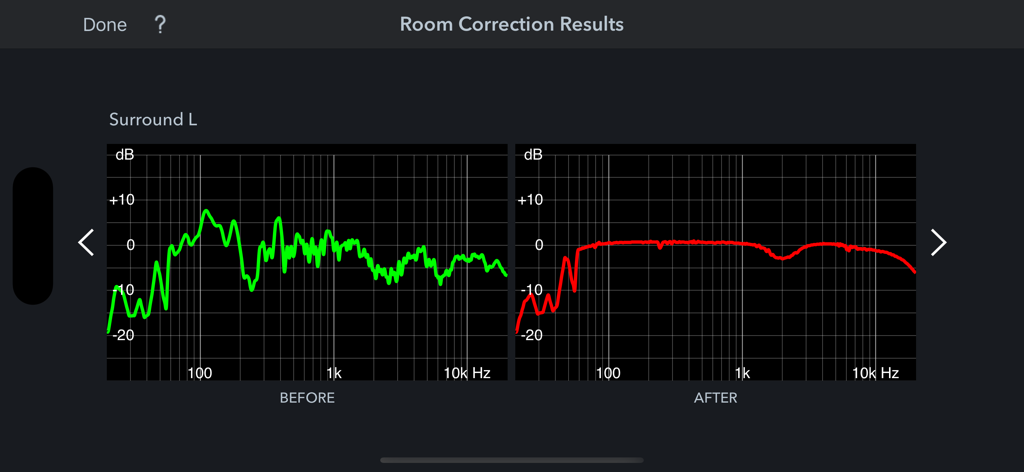
Comparison of before and after frequency response graphs for room correction in the Audyssey MultEQ Editor app

Comparison of before and after frequency response graphs for room correction in the Audyssey MultEQ Editor app

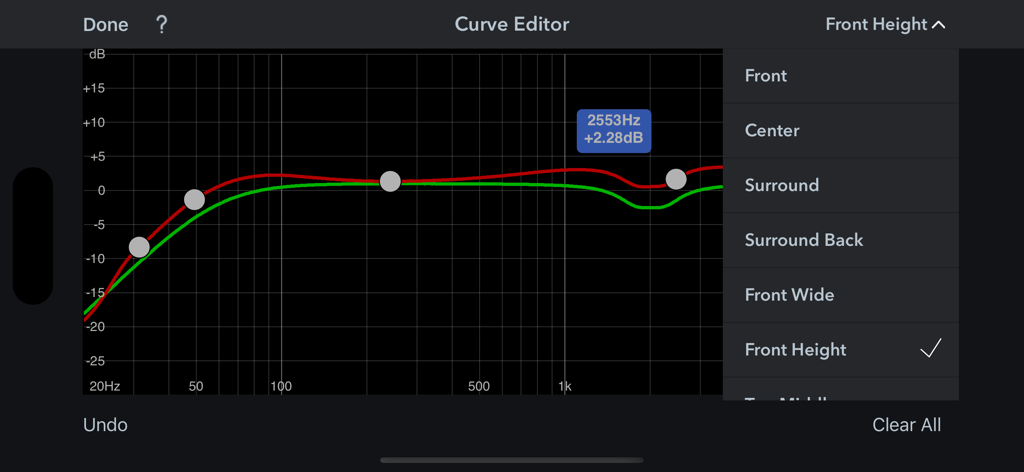
Audyssey MultEQ Editor app screen showing frequency response curve editing for home theater speakers

Audyssey MultEQ Editor app screen showing frequency response curve editing for home theater speakers

Precision Tuning for Audio Perfectionists

Join 266K+ users who mastered their instrument with these tools.

📈

Visual Room Analysis

Inspect before-and-after calibration graphs to pinpoint acoustic issues and verify your system's performance.

🎚️

Custom Target Curves

Take total control by editing frequency responses for each channel pair, tailoring the sound to your exact taste.

🛠️

Pro-Level Adjustments

Toggle midrange compensation and customize high-frequency roll-off to achieve a truly professional soundstage.

Loved by users worldwide

Trusted by 266K+ people who have transformed their experience with this app.

"

"The Audyssey MultEQ Editor app is a must-have for anyone serious about their home theater. Being able to toggle the midrange compensation and customize target curves on my iPad made a massive difference in how my Denon AVR-X3800H handles my room's tricky acoustics. It is the best $20 I have spent on my audio setup to truly unlock its potential."

Mark T., Home Theater Enthusiast
"

"This app provides the surgical precision I need for my Marantz setup. The visual feedback on frequency response before and after calibration is incredibly helpful for identifying room issues. I was able to perfectly align my subwoofers and smooth out the high-frequency roll-off exactly to my taste. Truly professional results."

James R., Audiophile & Homeowner

About the app

Everything you need to know about Audyssey MultEQ Editor app.

Description

The latest Denon Marantz audio video products use Audyssey MultEQ for simple, accurate set-up calibration of your system to the room in which it’s used. But, now you can go further with the Audyssey MultEQ Editor app, going ‘under the hood’ to view and adjust settings for detailed tuning – allowing you to customize the sound more precisely to the specific problems in your room, and tailor the sound to your personal preferences. With this comprehensive app, you can harness the power of Audyssey MultEQ to take total control of the way your home cinema sounds. This app will allow you to: •View the speaker detection results, to check correct installation •View before and after results of the Audyssey calibration, making it easy to identify room problems. •Edit the Audyssey target curve for each channel pair to suit your tastes •Adjust the overall EQ frequency rolloff for each channel pair •Switch between 2 high frequency rolloff target curves •Enable/Disable midrange compensation to make the sound brighter or smoother •Save and load calibration results This app requires specific hardware in your product to function: please double-check that your Denon or Marantz model is supported - see list below - before purchasing. •Multi-Language Support (English, French, German, Spanish, Italian, Dutch, Swedish, Polish, Russian, Japanese and Simplified Chinese. The OS language setting is automatically detected; when not available, English is selected.) Compatible models: (Product availability varies depending on regions.) Denon AV Receiver: AVR-X6300H, AVR-X4300H, AVR-X3300W, AVR-X2300W, AVR-X1300W, AVR-S920W, AVR-S720W, AVR-S730H, AVR-S930H, AVR-X1400H, AVR-X2400H, AVR-X3400H, AVR-X4400H, AVR-X6400H, AVR-X8500H, AVR-S740H, AVR-S940H, AVR-X1500H, AVR-X2500H, AVR-X3500H, AVR-X4500H, AVR-X6500H, AVR-X1600H, AVR-X2600H, AVR-X3600H, AVR-S750H, AVR-S950H, AVR-A110, AVR-X6700H, AVR-X4700H, AVR-X3700H, AVR-X2700H, AVR-S960H, AVR-X8500HA, AVR-X1700H, AVR-S760H, AVR-A1H, AVR-X4800H, AVR-X3800H, AVR-X2800H, AVR-S970H, AVR-X1800H, AVR-S770H, AVR-X6800H, AVR-A10H Marantz AV Receiver: AV7703, SR7011, SR6011, SR5011, NR1607, NR1608, SR5012, SR6012, SR7012, SR8012, AV7704, AV8805, NR1609, SR5013, SR6013, SR7013, AV7705, NR1710, SR5014, SR6014, SR8015, SR7015, SR6015, SR5015, NR1711, AV7706, AV8805A, AV 10, CINEMA30, CINEMA 40, CINEMA 50, CINEMA 60, CINEMA 70s, AV 20 Not compatible with Denon and Marantz models other than those listed above.

Latest Version

1.13.5

Size

49.4 MB

First Released

Apr 4, 2017

Master Your Home Theater Sound

Go under the hood of your Denon or Marantz receiver to unlock professional-grade tuning and achieve the perfect acoustic response for your room.

App Store

More like this

Discover other top-ranked apps in the Music category.