
Connect & Pay



Skip the line and fuel your day with seamless, contactless payments. Pay instantly at Canteen micro-markets and vending machines, track your nutrition, and manage your snack budget right from your phone.
Publisher
Category
ShoppingDownloads
809K+User Rating
Total Ratings
8K+Locales
10Discover the interface used by 809K+ users.
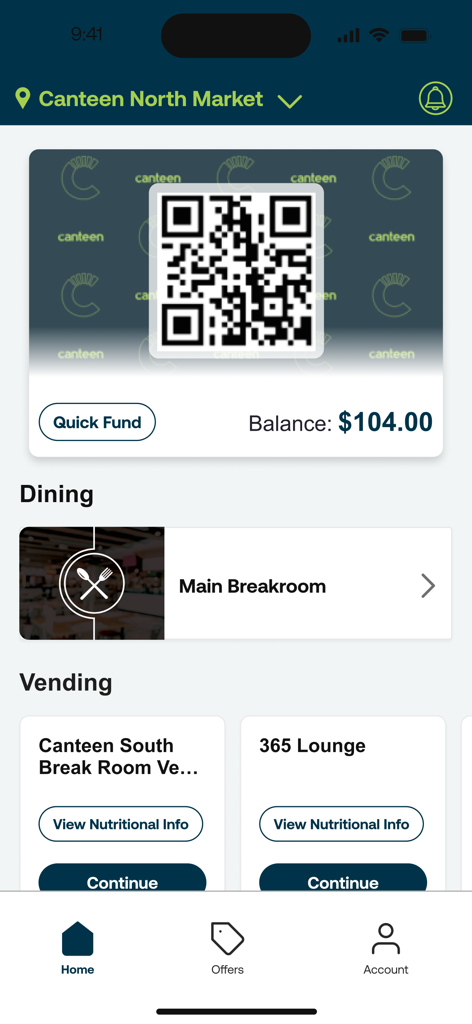
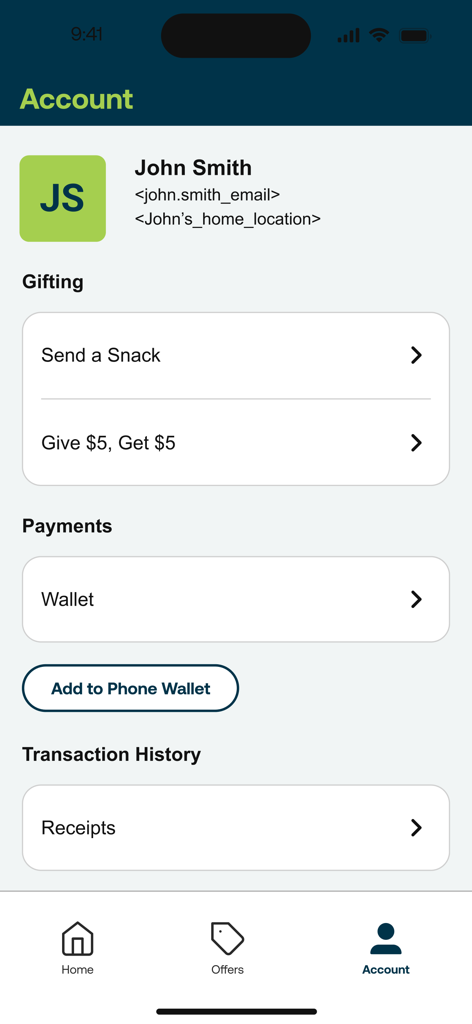
The tools that make this app stand out, trusted by 809K+ users.
Skip the line and ditch the wallet. Pay for vending and micro-market items instantly with a single tap on your iPhone for ultimate convenience.
Make informed choices even when you are busy. View detailed nutritional info and calorie counts directly in the app before you make a purchase.
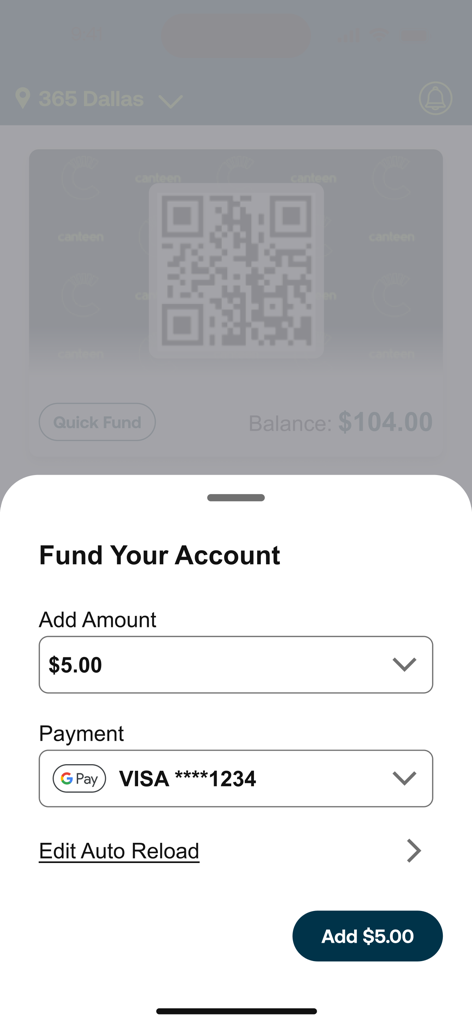
Fund your account and track every cent with real-time purchase history. Perfect for managing your weekly snack budget without the guesswork.
Trusted by 809K+ people who love this app.
"This app is a total game-changer for my office breaks. I never carry my wallet around the building anymore since I can just scan and pay for my coffee or snacks directly from my phone. It is incredibly fast, and the purchase history feature really helps me stay on top of my monthly lunch budget."
"Working the night shift at the hospital means the main cafeteria is usually closed when I need a break. Connect & Pay makes it so easy to grab a quick, healthy snack from the micro-market without fumbling for change. I especially love being able to check the nutrition facts right in the app before I buy."
Everything you need to know about Connect & Pay.
Description
Latest Version
20.18.1
Size
85.0 MB
First Released
Feb 21, 2017
Join over 800,000 professionals who skip the line and pay with a tap. Download Connect & Pay today to fuel your workday with ease.
Everything you need to know about Connect & Pay
Connect & Pay is Canteen’s new app for convenient shopping at their service locations. It allows users to create and fund accounts, pay for purchases, access nutrition information, request service, and view purchase history.
Yes, you can pay for purchases using the Connect & Pay app. Users pay by scanning a QR code at Canteen micro markets and vending machines after funding their account.
Yes, users can fund their Connect & Pay account directly within the app. The "Fund Your Account" interface allows adding specific amounts and managing payment methods like Visa, with an option for auto-reload.
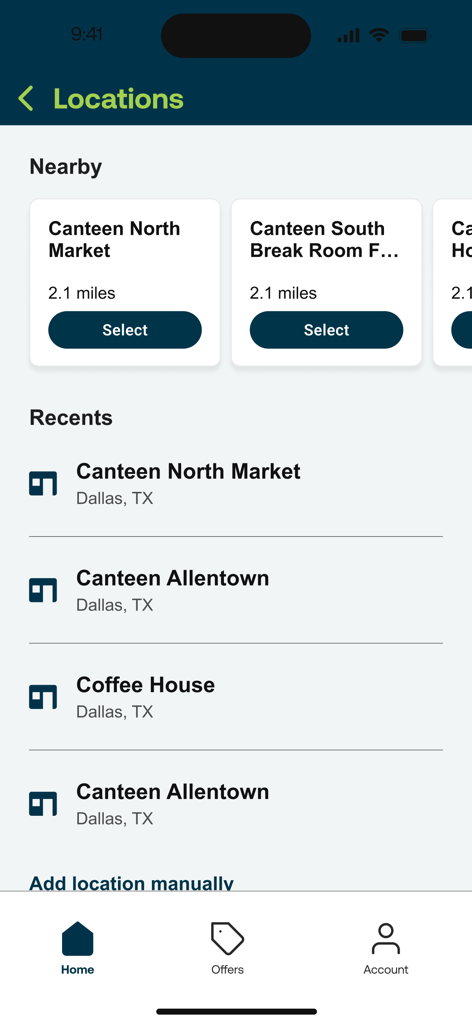
Connect & Pay is accepted at Canteen micro markets and vending machines. The app helps users find nearby and recent Canteen locations, and provides an option to manually add new locations.
Yes, the Connect & Pay app provides nutritional information for products. Users can access the Connect feature to see nutrition details for items available at Canteen locations, such as vending machines.
Yes, you can view your purchase history in the Connect & Pay app. The "Account" section includes a "Transaction History" area where users can access their receipts directly.
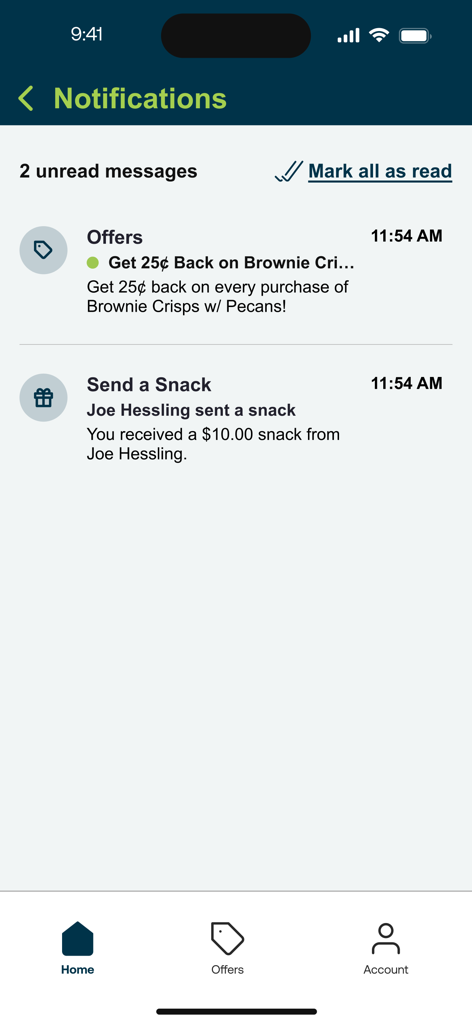
Yes, the Connect & Pay app offers gifting features. Users can "Send a Snack" to others or participate in a "Give $5, Get $5" program, both accessible from the Account section.
The Connect & Pay app helps users find Canteen service locations through its "Locations" menu. It displays nearby markets and vending locations, lists recent visits, and allows manual addition.
Yes, the Connect & Pay app provides offers and promotions to users. The "Notifications" screen shows deals like "Get 25¢ back on every purchase of Brownie Crisps" for eligible transactions.
Users can add money to their Connect & Pay account balance by tapping the "Quick Fund" button or accessing "Fund Your Account." This process allows selecting an amount and choosing a payment method.
Apps with similar features and user experience

Alliance Laundry Systems, LLC

NEXT INNOVATION INC.

LAUNDRY YOU PUBLIC COMPANY LIMITED
VM TECNOLOGIA LTDA

La Boite a Encas

PayRange Inc.

CSC ServiceWorks Holdings, INC.

Matipay S.r.l.

Michael Grinman