Coordinates – GPS Converter

Coordinates – GPS Converter

Download on App Store
Spark by MWM logo
Logo of Coordinates – GPS Converter
Coordinates – GPS Converter: Precision Tools for Field Experts

The ultimate professional toolkit to convert, manage, and navigate with 50+ coordinate formats. Reliable, offline-ready, and built for high-stakes fieldwork and backcountry exploration.

Publisher

Mapnitude Company Limited

Category

Navigation

Downloads

2M+

User Rating

4.7/5

Total Ratings

7K+

Locales

17

Precision in Every View

Discover the interface used by 2M+ users.
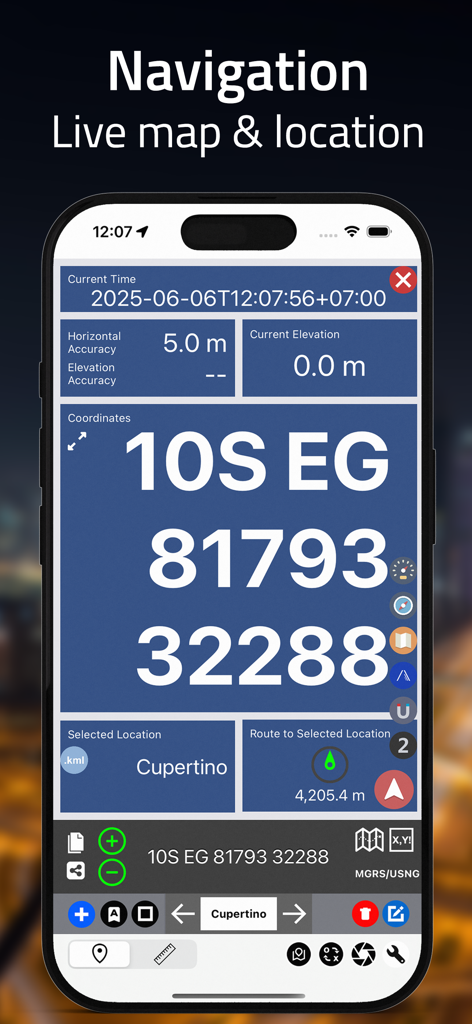
Live navigation screen showing MGRS coordinates and location accuracy.

Live navigation screen showing MGRS coordinates and location accuracy.

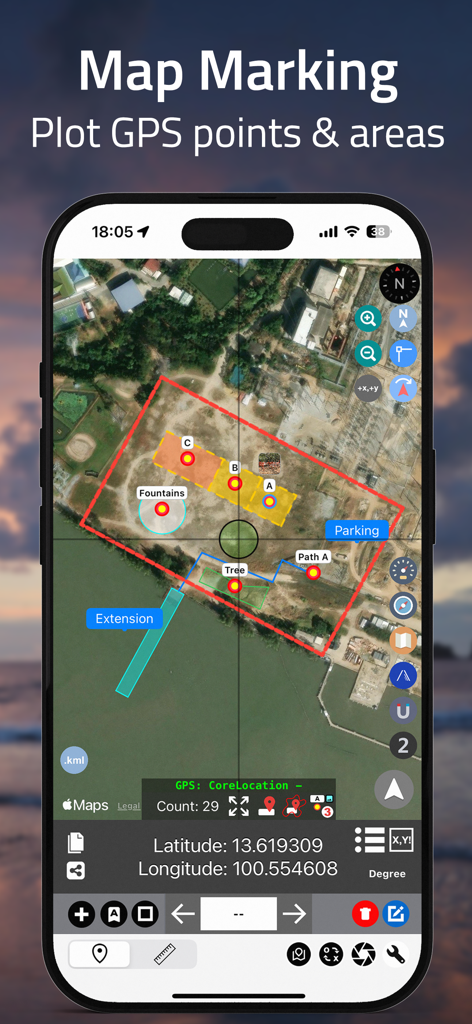
Coordinates app interface showing satellite map marking with plotted GPS points and color coded land areas

Coordinates app interface showing satellite map marking with plotted GPS points and color coded land areas

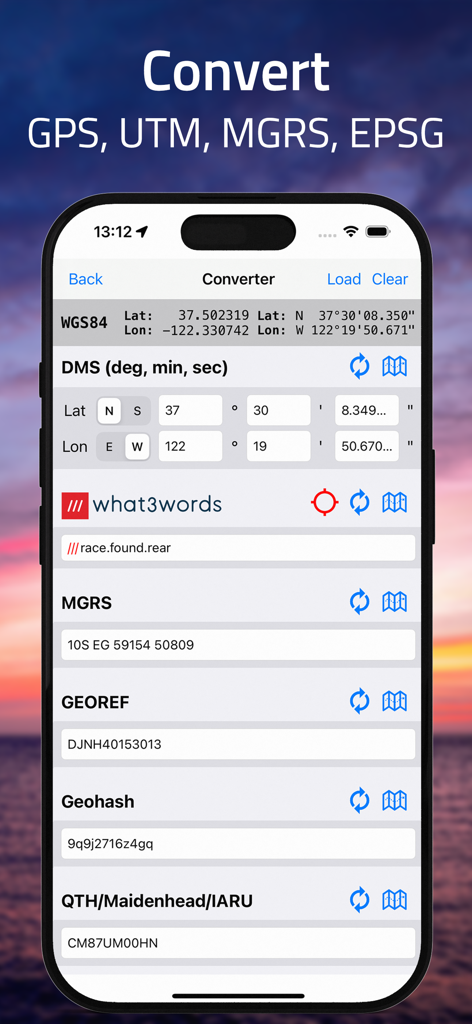
iPhone screen showing coordinate conversion between DMS MGRS and what3words formats

iPhone screen showing coordinate conversion between DMS MGRS and what3words formats

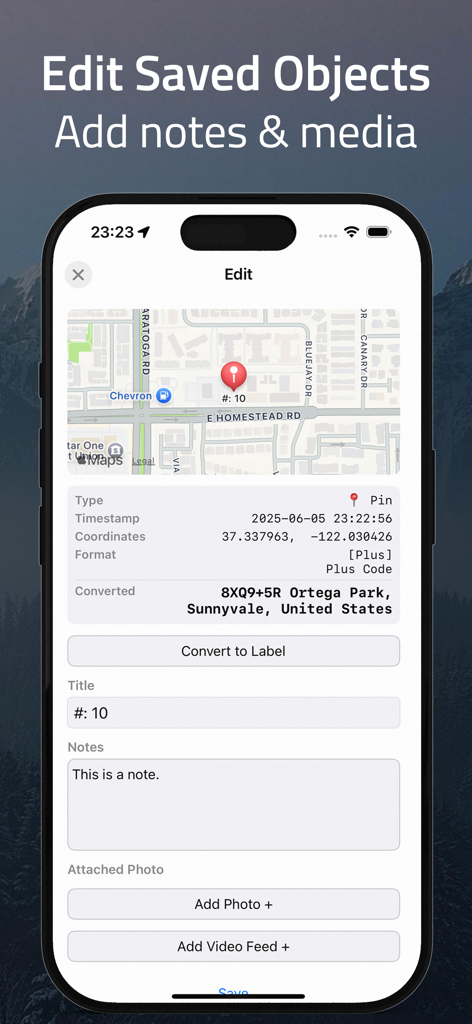
Interface of the Coordinates app showing how to edit saved objects by adding notes and attaching media to GPS pins.

Interface of the Coordinates app showing how to edit saved objects by adding notes and attaching media to GPS pins.

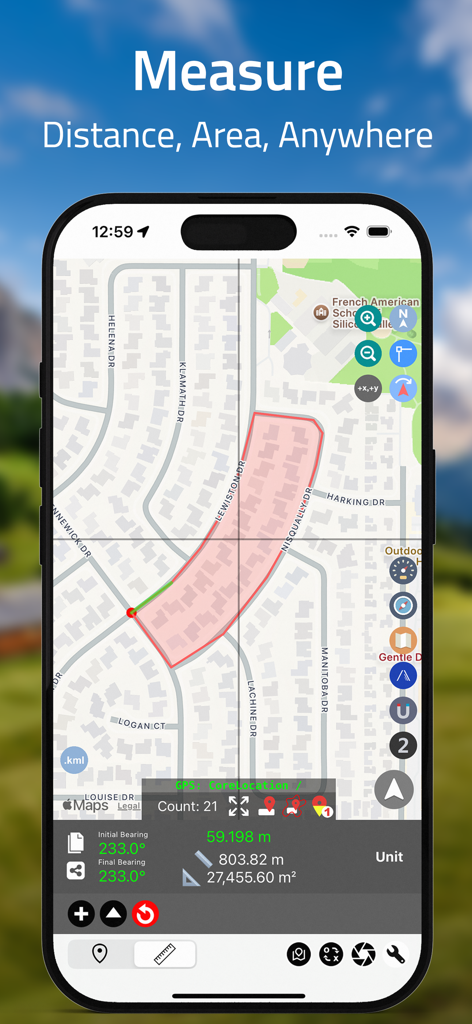
iPhone screen showing Coordinates app measuring land area and distance on a residential map.

iPhone screen showing Coordinates app measuring land area and distance on a residential map.

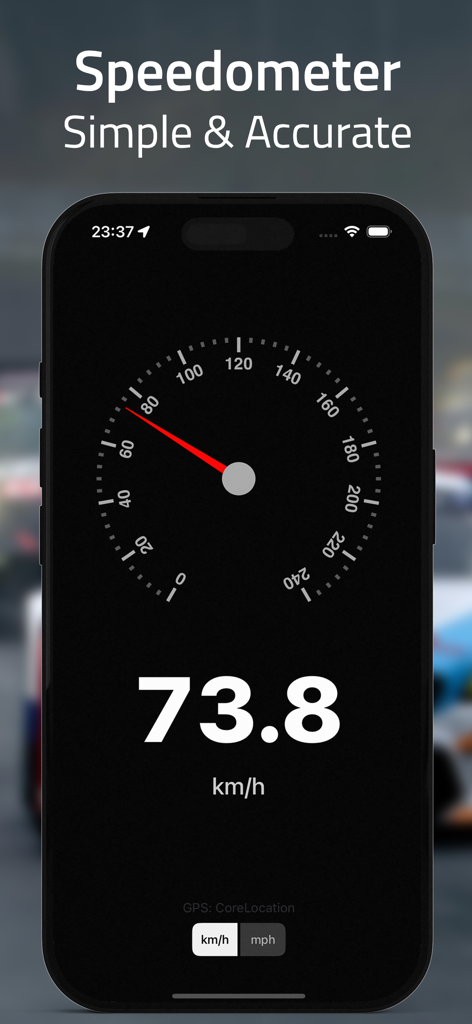
A screenshot of the Coordinates app displaying a precise digital and analog speedometer showing 73.8 kilometers per hour.

A screenshot of the Coordinates app displaying a precise digital and analog speedometer showing 73.8 kilometers per hour.

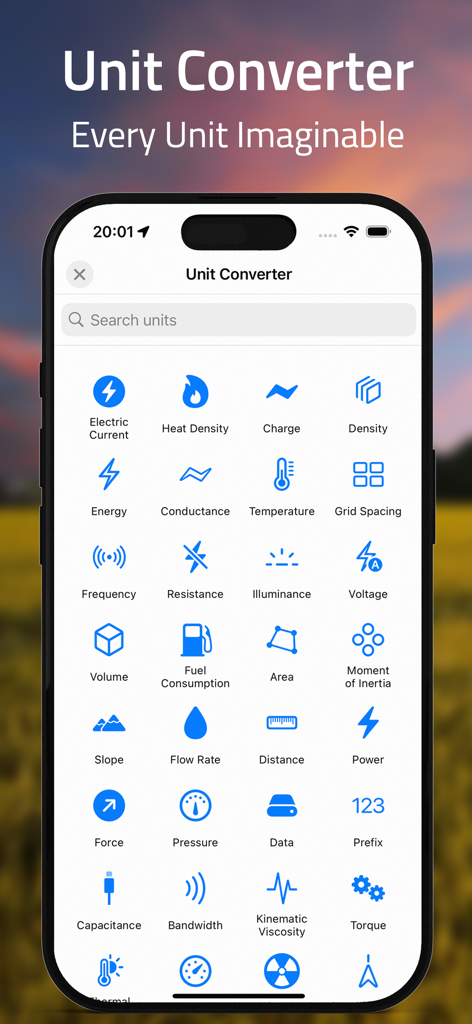
A mobile app interface for unit conversion showing categories like pressure, energy, and distance.

A mobile app interface for unit conversion showing categories like pressure, energy, and distance.

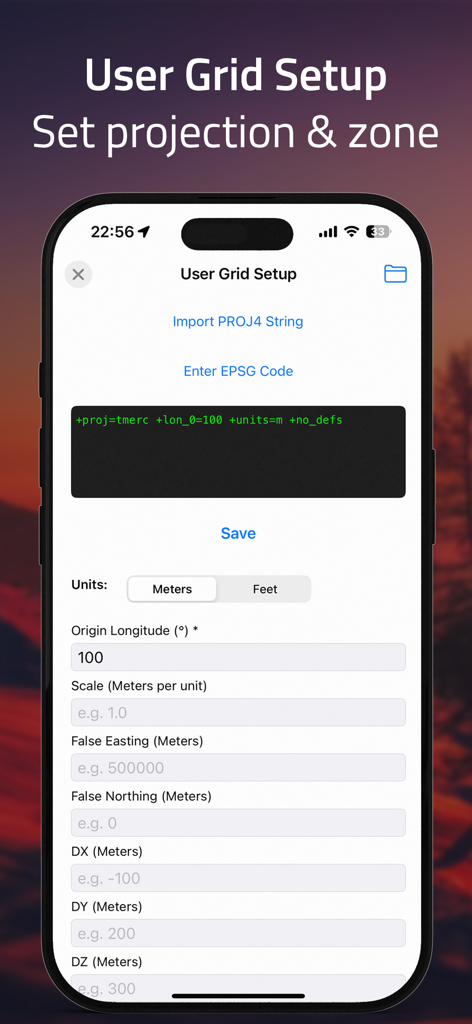
User grid setup screen for setting custom projections and zones in the GPS converter app.

User grid setup screen for setting custom projections and zones in the GPS converter app.

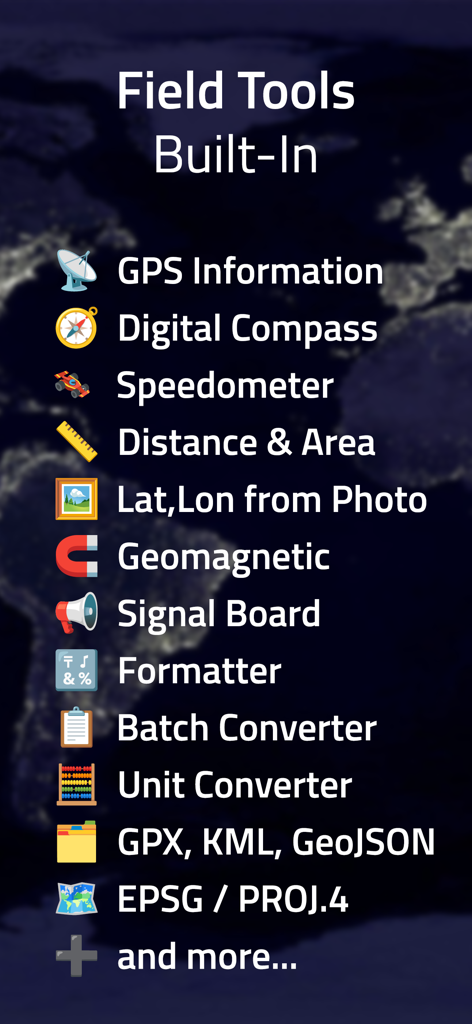
A list of built-in professional field tools including a digital compass, speedometer, and batch coordinate converter.

A list of built-in professional field tools including a digital compass, speedometer, and batch coordinate converter.

Professional-Grade Precision in Your Pocket

The tools that make this app stand out, trusted by 2M+ users.

🔄

Universal Coordinate Conversion

Instantly switch between UTM, MGRS, USNG, Lat/Long, and over 50 global datums. The ultimate translator for any professional grid system.

🗺️

Mission-Critical Offline Tools

Navigate with confidence in dead zones. Download offline map tiles, track real-time elevation, and use the speedometer without a cell signal.

📂

Advanced GIS Data Export

Streamline your workflow by attaching photos and notes to saved pins, then export your data in .kml, .gpx, or .geojson formats for professional analysis.

Loved by users worldwide

Trusted by 2M+ people who love this app.

"

"As a civil engineer working across different state plane systems, this app is an absolute lifesaver. The batch converter and support for datum shifting are professional-grade features that I haven't found anywhere else in a mobile interface. It has completely replaced my dedicated GPS handheld for quick field verifications and site documentation."

Marcus Thorne
"

"I use this for backcountry overlanding where reliability isn't optional. The offline map tiles and MGRS support are flawless, even in the deepest parts of the Moab desert. Being able to attach photos and notes directly to coordinate pins makes scouting and trail reporting incredibly efficient for our entire group."

Sarah Jenkins

About the app

Everything you need to know about Coordinates – GPS Converter.

Description

Coordinates is a powerful and user-friendly tool for anyone working with geographic locations — from travelers and surveyors to engineers and GIS professionals. Instantly view, convert, and manage coordinates in a wide range of global formats and datums, all within a clean and intuitive interface. Whether in the field or at the desk, Coordinates is your all-in-one solution for precise location work. # User-friendly Design Your current location is displayed at the intersection of two grey lines, with clear latitude and longitude readouts. You can manually set the location using map taps, coordinate input, or place search. Intuitive buttons give quick access to measurement tools, map layers, location bookmarking, shape drawing, and annotation — all from a clean, compact interface. # Various Coordinate Formats Supports formats like UTM, MGRS, Georef, and more alongside Longitude/Latitude. # Batch Converter Quickly convert multiple coordinates or files in one streamlined action. # Rich Object Details Add notes, photos, and media to any saved object — pins, shapes, or measurements — to keep your data organized and context-rich. Easily share your saved content across devices using backup and export tools. # Datum Conversion Transform coordinates using EPSG, ESRI, and IAU2000 references. Supports X/Y, geodetic, and projected systems. # PROJ.4 Calculator Convert coordinates between systems using the PROJ.4 library, with support for datum shifting and custom projections. # Navigation & Tracking Real-time bearing and distance updates are provided with a large coordinate readout, ideal for on-the-field usage. # Speedometer Track your current speed in real time. # Unit Converter Convert 40+ unit types (distance, pressure, radiation, etc.) # Signal Board Send big bold messages on-screen # Elevation Support Altitude data is available for land areas. # Import / Export - .gpx .geojson .kml file supported # Distance, Bearing & Area Mark points or draw lines to measure distance, bearings, and area. # Offline Map Tiles Download tiles for offline use. Pick a city or define your own area. # Custom Map Tile Selector Choose from Apple Maps, OSM, or add your own tile server with {z}/{x}/{y} format. # Supported Input / Output # Latitude and Longitude DD/DM/DMS Standard UTM NATO UTM MGRS / USNG Georef QTH Locator / Maidenhead (WGS84) World Mercator (WGS84) Web Mercator Geohash what3words Global Area Reference System (GARS) Ordnance Survey National Grid [BNG] OSGB36 ISO 6709 Natural Area Code Irish Grid Reference / Coordinates Plus Code (Open Location Code) Mapcode Dutch Grid ECEF Indian Kalianpur 1975 Open Postcode Geohash-36 Guatemala GTM RT90 SWEREF99 Indian 1975 QND95 / Qatar National Grid IRENET95 / Irish Transverse Mercator KOSOVAREF01 HD 72 / EOV Kertau (RSO) / RSO Malaya Timbalai 1948 / RSO Borneo EST97 Estonian 1997 LKS92 / Latvia TM NZGD49 NZGD2000 CH1903/+ GGRS87 ETRS89-extended / LAEA Europe NTF (Paris) / Lambert zone II French DFCI Grid ARINC 424 FMS ARC1950 Pulkovo 1942 / SK42 PZ-90 H3 Placekey GDM2000 JGD2011 KUDAMS/KTM World Magnetic Model / WMM 2015/WMM 2015v2 Search by name Photo metadata Proj.4 formats Street Address # Subscriptions # “Coordinates – GPS Converter” including most of its features, is completely FREE to use. You can subscribe to this application to remove ads Price may vary by location. Payment for subscriptions will be charged to your iTunes Account at confirmation of purchase Subscription automatically renews unless auto-renew is turned off at least 24-hours before the end of the current period. Subscriptions may be managed by going to your iTunes Account Settings after purchase or by clicking the “Purchase / Manage Subscription. Auto-renewal may be turned off by going to Account Settings after purchase. Subscription cannot be cancelled during the active subscription period Privacy policy: https://mapnitude.com/privacy-policy Terms of use: https://mapnitude.com/terms-of-service

Latest Version

9.11.3

Size

116.3 MB

First Released

Jan 18, 2012

Master Every Coordinate System

Join over 2 million professionals and explorers using the most powerful, offline-ready GPS tool for mission-critical precision.

Download on App Store
FAQ

Frequently Asked Questions

Everything you need to know about Coordinates – GPS Converter

What is Coordinates – GPS Converter used for?

Coordinates – GPS Converter is a powerful tool for viewing, converting, and managing geographic locations. It supports a wide range of global coordinate formats, datums, and offers features for navigation, measurement, and field work.

Which coordinate formats does Coordinates – GPS Converter support?

Coordinates – GPS Converter supports numerous formats, including UTM, MGRS, Georef, Latitude/Longitude (DD/DM/DMS), what3words, Geohash, and many others. It handles various geodetic and projected systems.

Can Coordinates – GPS Converter be used offline?

Yes, Coordinates – GPS Converter supports offline use. Users can download map tiles for specific cities or define custom areas to access maps without an internet connection.

Is Coordinates – GPS Converter free to use?

Yes, Coordinates – GPS Converter is completely free to use for most of its features. A subscription is available to remove ads. Price may vary by location.

Can Coordinates – GPS Converter convert multiple coordinates at once?

Yes, Coordinates – GPS Converter includes a Batch Converter feature. This allows users to quickly convert multiple coordinates or files in one streamlined action.

Does Coordinates – GPS Converter support datum conversion?

Yes, Coordinates – GPS Converter supports datum conversion. It can transform coordinates using EPSG, ESRI, and IAU2000 references, including X/Y, geodetic, and projected systems.

What measurement tools are available in Coordinates – GPS Converter?

Coordinates – GPS Converter offers tools to measure distance, bearings, and area. Users can mark points or draw lines directly on the map to perform these measurements.

Does Coordinates – GPS Converter integrate with PROJ.4?

Yes, Coordinates – GPS Converter features a PROJ.4 Calculator. This allows conversion between systems, supporting datum shifting and custom projections using the PROJ.4 library.

Can users add notes and media to saved locations in Coordinates – GPS Converter?

Yes, Coordinates – GPS Converter allows users to add notes, photos, and media to any saved object like pins, shapes, or measurements. This helps keep data organized and context-rich.

What file types can Coordinates – GPS Converter import and export?

Coordinates – GPS Converter supports importing and exporting .gpx, .geojson, and .kml file types. This enables easy sharing and data management for location data.

Does Coordinates – GPS Converter include a speedometer?

Yes, Coordinates – GPS Converter features a built-in speedometer. It tracks and displays the user's current speed in real-time directly within the application.

What kind of units can be converted using Coordinates – GPS Converter?

Coordinates – GPS Converter includes a Unit Converter that handles over 40 unit types. These categories include distance, pressure, radiation, electric current, heat density, and many others.