
Focus timer - time keeper



Combine the Pomodoro technique with immersive ambient soundscapes. Elevate your desk setup and reach your flow state with our minimalist, distraction-free interface.
Publisher
Category
ProductivityDownloads
734K+User Rating
Total Ratings
24K+Locales
33Discover the interface used by 734K+ users.



The tools that make this app stand out, trusted by 734K+ users.
Leverage 25-minute focus blocks to crush your to-do list and eliminate procrastination without the burnout.
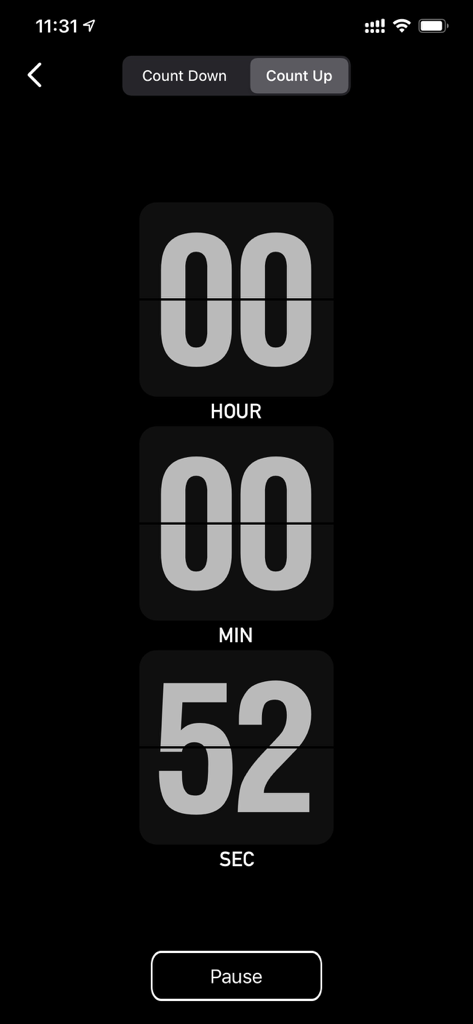
A sleek flip-clock interface that transforms your device into a beautiful piece of digital decor for your workspace.
Drown out distractions with curated ambient soundscapes, from crackling bonfires to gentle rain, designed for flow.
Trusted by 734K+ people who love this app.
"This app has completely transformed my study sessions. The minimalist flip clock looks amazing on my desk, and the ambient rain sounds are perfect for getting into the zone. The 25-minute intervals make huge assignments feel way less intimidating!"
"As a freelance designer working from home, I often struggle with staying on task. This is the first focus timer that actually stays out of the way while being beautiful enough to keep open. The background support is a lifesaver for when I need to check my references."
Everything you need to know about Focus timer - time keeper.
Description
Latest Version
3.2
Size
44.2 MB
First Released
May 23, 2017
Join over 734,000 students and professionals who have traded digital distraction for mindful focus. Download the minimalist timer designed for your flow state.
Everything you need to know about Focus timer - time keeper
Focus timer - time keeper is a Pomodoro timer app designed to improve concentration on work and study. It uses timed intervals and offers environmental sounds like beach or bonfire to create a comfortable focus environment.
Yes, Focus timer - time keeper provides various background environments such as beaches, trains, rainy days, bonfire, and country cricket sounds. Users select these to aid concentration during their focus sessions.
Yes, Focus timer - time keeper supports custom time settings. Users can easily set their preferred focus time, short break time, and long break time, deviating from the traditional 25-minute intervals.
Yes, Focus timer - time keeper supports background running. This feature ensures that users' focus sessions continue uninterrupted even when the app is not actively open in the foreground.
Focus timer - time keeper allows users to set reminders with a variety of sounds after the timer ends. It also includes an option for a vibration reminder to signal session completion.
The default focus interval in Focus timer - time keeper is 25 minutes, adhering to the traditional Pomodoro technique. This setting can be adjusted by the user.
Yes, Focus timer - time keeper offers both countdown and count-up timer functionalities. Users can set custom durations for these timers for various timing needs beyond Pomodoro.
Focus timer - time keeper offers a "PRO FEATURES" option to "Get the full version without ads." This indicates that the standard version of the app includes advertisements.
Apps with similar features and user experience

Shanghai Paitui Technology Co., Ltd.
Shenzhen Tomato Software Technology Co., Ltd.

Beijing Fingertip Fusion Technology Co., LTD

bondavi Inc.
PIXO Incorporation

StonicSolution
Yugen GmbH
Thomson Inc.
Denys Ievenko