Guitar Pro

Guitar Pro

Download on App StoreDownload on Google Play
Spark by MWM logo
Logo of Guitar Pro

Guitar Pro: Your Ultimate Mobile Practice Partner

Master every song with the industry-standard tablature player. Practice, loop, and capture your musical ideas with professional precision, right from your pocket.

Publisher

Arobas Music

Category

Music

Downloads

608K+

User Rating

4.0/5

Total Ratings

11K+

Locales

11

Mastery at Your Fingertips

Discover the interface used by 608K+ users.
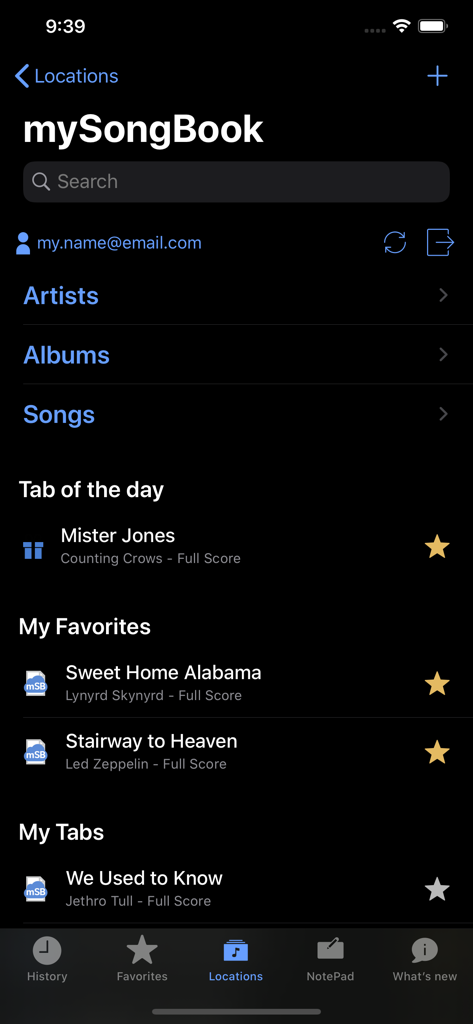
Guitar Pro mobile app mysongbook library screen showing favorite tabs and songs

Guitar Pro mobile app mysongbook library screen showing favorite tabs and songs

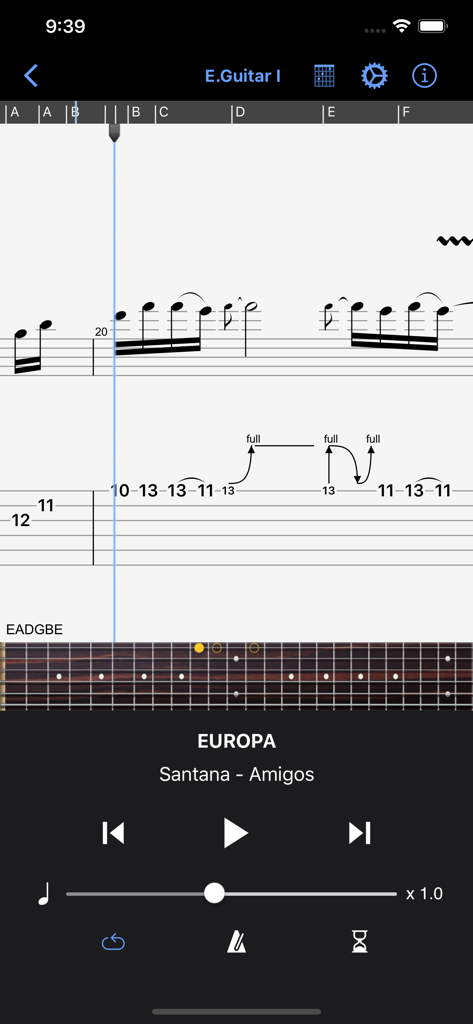
Guitar Pro app interface showing Santana Europa tablature and virtual fretboard player

Guitar Pro app interface showing Santana Europa tablature and virtual fretboard player

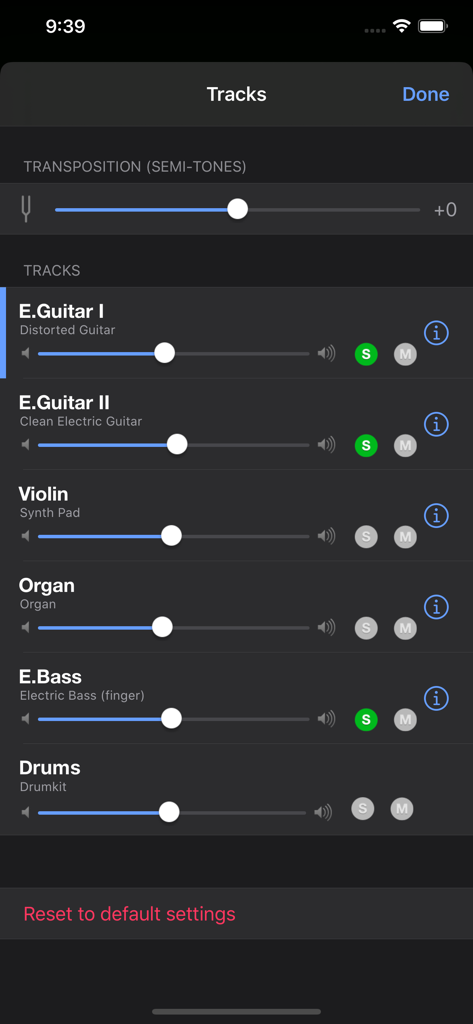
Guitar Pro app interface showing the multitrack mixer with volume sliders, solo and mute buttons, and transposition settings.

Guitar Pro app interface showing the multitrack mixer with volume sliders, solo and mute buttons, and transposition settings.

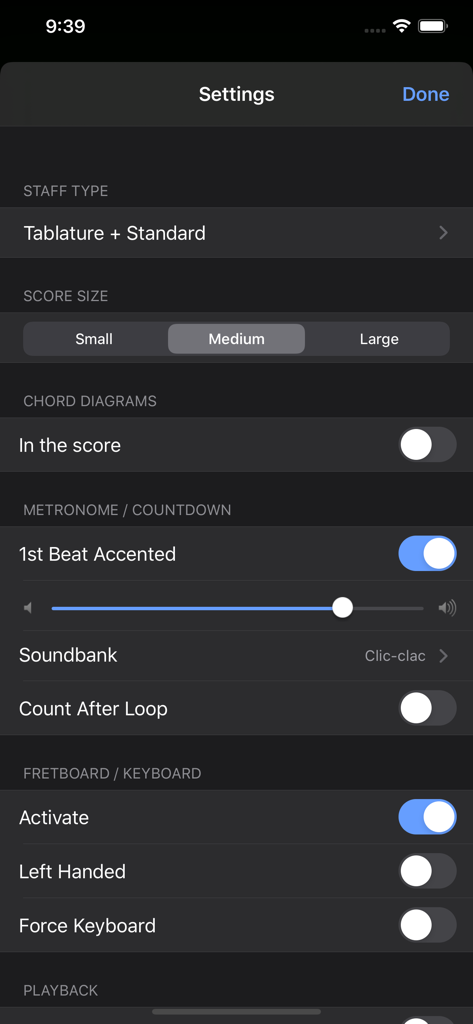
Settings interface in the Guitar Pro app showing configuration for metronome, score size, and fretboard display.

Settings interface in the Guitar Pro app showing configuration for metronome, score size, and fretboard display.

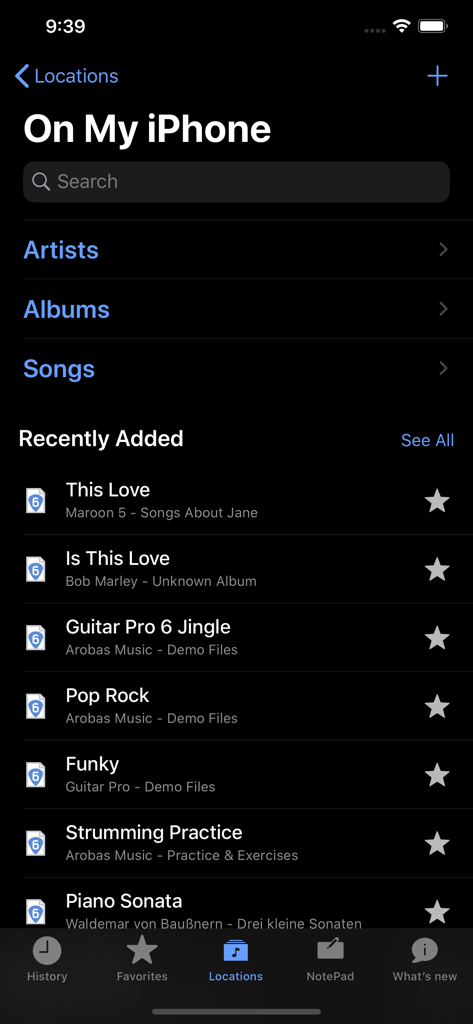
Guitar Pro mobile app interface showing the local file library and recently added songs on an iPhone.

Guitar Pro mobile app interface showing the local file library and recently added songs on an iPhone.

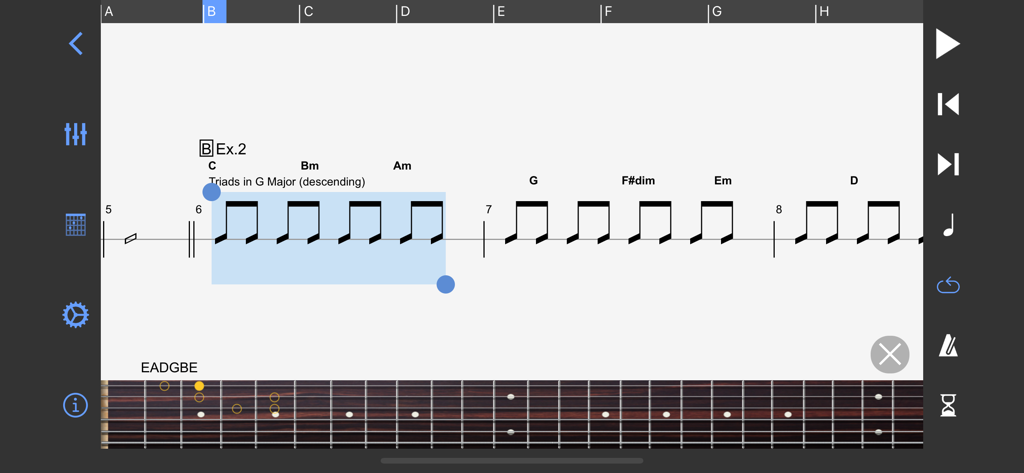
Guitar Pro mobile app interface showing a musical score with chord labels and a virtual guitar fretboard for practice

Guitar Pro mobile app interface showing a musical score with chord labels and a virtual guitar fretboard for practice

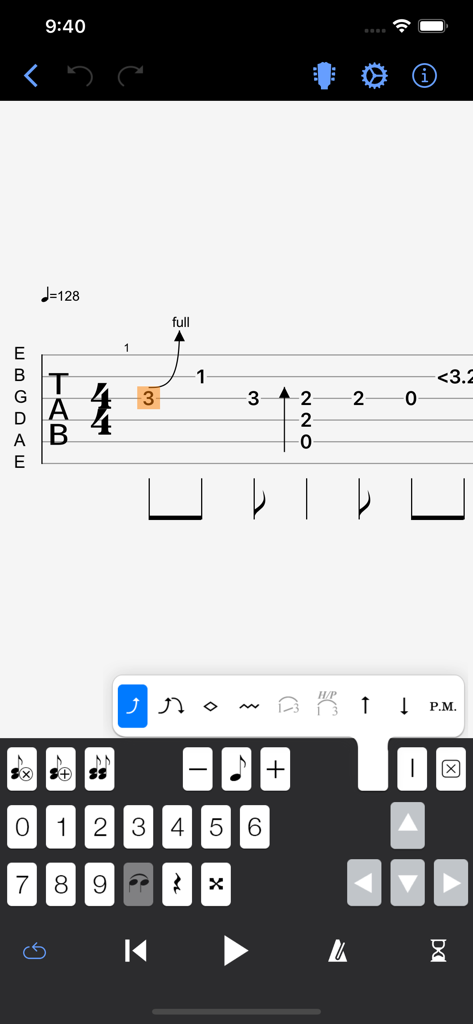
The Guitar Pro mobile app NotePad tool showing a guitar tablature editor with a numeric keypad and musical notation symbols.

The Guitar Pro mobile app NotePad tool showing a guitar tablature editor with a numeric keypad and musical notation symbols.

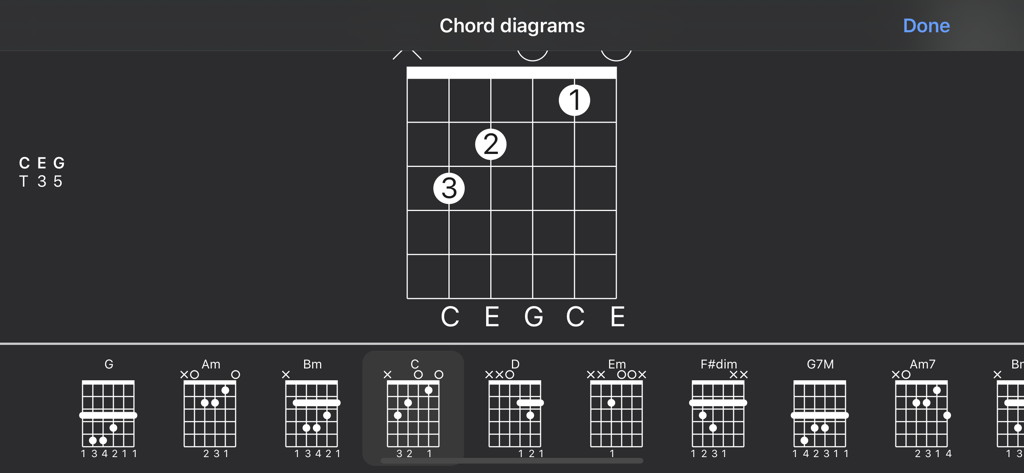
Library of guitar chord diagrams with finger positions in the Guitar Pro app interface.

Library of guitar chord diagrams with finger positions in the Guitar Pro app interface.

Elevate Your Musical Practice

The tools that make this app stand out, trusted by 608K+ users.

🎸

Master Every Riff

Loop challenging sections and use on-the-fly tempo changes to build speed and accuracy at your own pace.

📱

Your Digital Music Stand

Access your entire library of GP3 to GP8 files anywhere. The perfect portable solution for rehearsals and live gigs.

✍️

Capture Ideas Instantly

Use the NotePad tool to sketch out new song ideas or riffs on the go, then sync them with your desktop for final editing.

Loved by users worldwide

Trusted by 608K+ people who love this app.

"

"As a gigging guitarist in a progressive rock band, I can't always lug my laptop to rehearsals. This app is a game-changer. Being able to pull up my complex multitrack arrangements on my iPad and use the loop and slow-down features to nail difficult harmonies during practice is essential. It is the most professional digital music stand I have ever used."

Mark S., Semi-Professional Musician
"

"The NotePad tool is a lifesaver for my songwriting. I often come up with riffs while traveling, and being able to quickly note them down on a single-track tab and then export them to the desktop version later is seamless. It has completely replaced my messy notebooks and transformed how I capture creative sparks on the go."

Sarah L., Music Student & Songwriter

Review Analysis

Insights from user reviews.

Sentiment Score

22%
Negative

Summary

The mobile app receives largely negative feedback, primarily for its significant limitations compared to the desktop version and an outdated user interface. Users frequently criticize the lack of essential editing features, such as creating or transcribing tabs, precise tempo input, and advanced effects. Many feel the app offers poor value for money, citing hidden costs for content, mandatory subscriptions, and a perceived "rip-off" for an app that primarily functions as a basic tab reader. Furthermore, version 1.11.x is specifically noted for sync issues, and other users report problems with file corruption and inconsistent tempo in exported files, highlighting general unreliability. While some users appreciate its utility for basic practice tasks like isolating instruments and adjusting speed, the overwhelming sentiment highlights a strong desire for a more robust, modern, and feature-rich mobile experience.

Common Themes

Limited Functionality(22)
Monetization & Value(13)
File Management & Reliability(12)
Outdated User Interface (UI)(8)
Desktop App Disparity(8)
Practice and Learning Tools(3)

About the app

Everything you need to know about Guitar Pro.

Description

The Guitar Pro application allows all musicians to view and play sheet music and tablature created with the famous Guitar Pro tab-editing program for Windows and Mac. This mobile version is the ideal companion for you to practice your favorite songs and share them any time, anywhere! Coming up with some arpeggio, a riff, a chord sequence? You can now note and save it all on the single-track tablature NotePad. Powerful score player • Supporting GP3/4/5/6/7/8 (.gp) and PowerTab (.ptb) file formats,
 • Tab (with rhythmics), slash, and standard notations, • Compatible with mySongBook portal to sheet music (monthly subscription and single buying), • Switch between Dark and Light viewing modes, • Load files via WiFi and web browser, iTunes, e-mail, • Integrated sheet-music library with search, filters, and favorites, • Multitrack player with soundboard: volume / solo-mute / soundbanks, • Metronome and visual countdown,
 • 3 zooming levels, • Guitar or bass fretboard (for right- and left-handers), and virtual keyboard, • On-the-fly tempo changes,
 • On-the-fly global transposing by half-tones, • Playing any selection in loops, • Simplified navigation between sections, • E-mailing files directly from the application, • Exporting files to PDF, • Compatible with the Fretlight Wireless Guitar. NotePad tool to create a tablature • Use the NotePad to edit a single-track tablature for guitar, bass, banjo, ukulele, and mandolin, • Tablature for 4- to 8-string instruments, • 19 built-in sounds, • Customizable tuning and tempo, • Export your ideas into Guitar Pro 6 and 7 formats so as to later carry on with your composition on the Guitar Pro desktop version. ———————————————————————- The app is updated frequently, so feel free to contact our team to ask any question or give your feedback. For more info: Need help: https://support.guitar-pro.com Facebook: http://www.facebook.com/arobas.music Twitter: http://www.twitter.com/arobasmusic Instagram: https://www.instagram.com/guitarpro_official FAQ: Q: Can I create or edit sheet music with this app? A: Unlike Guitar Pro for Windows and Mac, this app does not let you change the notation in an existing Guitar Pro file, or create sheet music in standard notation. It is however possible to edit a single-track tablature with the NotePad tool and export your work into .gpx and .gp formats to finish your composition in Guitar Pro 6 or 7. Editing a drum track is not available with the NotePad tool.

Latest Version

1.11.2

Size

27.9 MB

First Released

Jan 15, 2011

Master Every Riff, Anywhere You Go.

Join over 600,000 musicians using the industry standard for tablature and practice. Download Guitar Pro today and turn your mobile device into your most powerful rehearsal partner.

Download on App StoreDownload on Google Play
FAQ

Frequently Asked Questions

Everything you need to know about Guitar Pro

Can Guitar Pro mobile edit existing sheet music or tablature?

No, the Guitar Pro mobile application does not allow users to change notation in existing Guitar Pro files or create sheet music in standard notation. It provides a NotePad tool for single-track tablature editing.

What file formats does the Guitar Pro app support?

The Guitar Pro application supports GP3, GP4, GP5, GP6, GP7, and GP8 (.gp) file formats. It also supports PowerTab (.ptb) files, ensuring broad compatibility for users.

Can I create my own tablature using the Guitar Pro app?

Yes, the Guitar Pro app includes a NotePad tool. This tool allows users to create single-track tablatures for instruments like guitar, bass, banjo, ukulele, and mandolin.

Does Guitar Pro mobile offer a metronome feature?

Yes, the Guitar Pro app provides a built-in metronome and a visual countdown feature. These tools assist musicians with timing and practice during playback sessions.

How can I load music files into the Guitar Pro application?

Users can load files into the Guitar Pro application via WiFi, web browser, iTunes, or e-mail. It also integrates with a comprehensive sheet-music library.

Does the Guitar Pro app support transposing music?

Yes, the Guitar Pro app supports on-the-fly global transposing by half-tones. Users can adjust the pitch of the entire score directly within the player settings.

Can I use a virtual fretboard in the Guitar Pro app?

Yes, the Guitar Pro app features both a virtual guitar or bass fretboard and a virtual keyboard. It accommodates both right-handed and left-handed players for practice.

What instruments can the NotePad tool in Guitar Pro support for tablature creation?

The NotePad tool in the Guitar Pro app supports single-track tablature editing for guitar, bass, banjo, ukulele, and mandolin. It covers instruments with 4 to 8 strings.

Does Guitar Pro mobile integrate with mySongBook?

Yes, the Guitar Pro mobile application is compatible with the mySongBook portal. This provides access to sheet music through monthly subscriptions or single purchases for users.

Can I export my tablature from the Guitar Pro mobile app?

Yes, users can export files created or managed in the Guitar Pro app to PDF format. Additionally, NotePad ideas export to Guitar Pro 6 and 7 formats for desktop use.