
MIT App Inventor



Join over a million young creators and students using our intuitive blocks-based platform to turn your ideas into real mobile applications in an instant.
Publisher
Category
EducationDownloads
1M+User Rating
Total Ratings
1K+Locales
1Discover the interface used by 1M+ users.
The tools that make this app stand out, trusted by 1M+ users.
Build complex logic by snapping together intuitive blocks, eliminating frustrating syntax errors while teaching core computational thinking.
Connect your device via QR code to see your changes in real-time. Debug, refine, and perfect your app’s performance as you build.
Go beyond the screen by integrating your phone’s GPS, accelerometer, and camera to create interactive projects that solve real-world problems.
Trusted by 1M+ people who love this app.
"I never thought I could make my own apps until I tried this. The block-based coding makes everything so clear, and the feeling of seeing my project live on my phone is incredible. It turned my iPhone into a real innovation lab for my school projects!"
"This is the most powerful tool in my STEM classroom. It moves students from passive consumers to active creators. Watching them solve real-world problems by building functional apps is why I love teaching computer science."
Insights from user reviews.
Sentiment Score
Summary
This mobile application receives predominantly negative feedback from users, with many expressing significant frustration over its performance and usability. Common complaints include frequent bugs, glitches, and persistent connectivity issues, especially when attempting to link with a PC or on iOS devices. Reviewers often describe the app as outdated, difficult to understand, and having a poor user interface. A notable number of users are compelled to use the app for educational purposes, which seems to exacerbate their negative experiences, with some even reporting security concerns like viruses after installation. However, a minority of users acknowledge its value for learning and developing applications, particularly for its intended function of connecting and testing projects.
Common Themes
Everything you need to know about MIT App Inventor.
Description
Latest Version
2.73.1
Size
53.5 MB
First Released
Mar 4, 2021
Join over a million young makers worldwide. Download the companion app to live-test your blocks code and see your digital creations come to life in the palm of your hand.
Everything you need to know about MIT App Inventor
MIT App Inventor is an educational tool for learning computational thinking by building mobile apps. It is a premier computer science education platform, used by over one million people globally.
The MIT App Inventor companion app allows users to test drive projects, debug blocks code, and showcase their mobile app creations. It serves as a testing and demonstration interface.
No, MIT App Inventor uses a blocks-based programming language. This visual approach allows users to design and code their projects without traditional text-based coding.
MIT App Inventor offers over 60 components, including user interface elements like buttons and switches, sensors, connectivity features, and multimedia components. These enable diverse app functionality.
Yes, MIT App Inventor provides built-in tutorials for student workshops. It also supports learning through numerous books and curricula available for coding education.
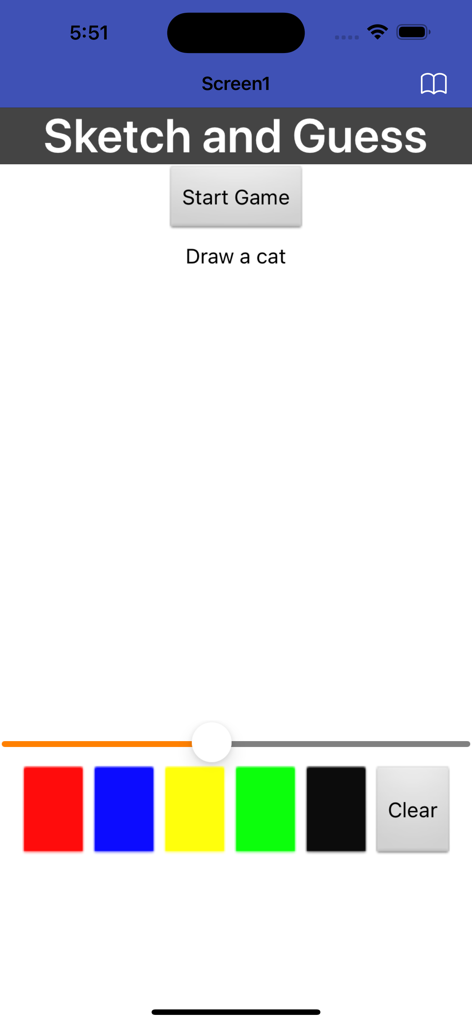
Yes, MIT App Inventor can create interactive games. The screenshot demonstrates a "Sketch and Guess" game featuring a "Start Game" button, drawing instructions, and a color selection palette.
Apps with similar features and user experience

HomerLearning, Inc.

Hopscotch Technologies

Massachusetts Institute of Technology

Learny Land S.L.

Tinybop Inc.

Guangdong Walnut Online Non Discipline Training School Co., Ltd

HORTOR INTERACTIVE TECHNOLOGY PTE. LTD.

Neuron Fuel, Inc.

Tinybop Inc.