myAir™ by Resmed

myAir™ by Resmed

Download on App Store
Spark by MWM logo
Logo of myAir™ by Resmed

myAir™ by Resmed: Take Charge of Your Sleep Therapy Success

Unlock personalized coaching, daily health insights, and easy guided setup for your AirSense™ or AirCurve™ machine. Join over 5 million users who are mastering their sleep and waking up refreshed every day.

Publisher

RESMED LTD.

Category

Medical

Downloads

5M+

User Rating

4.7/5

Total Ratings

103K+

Locales

3

Your Sleep at a Glance

Discover the interface used by 5M+ users.
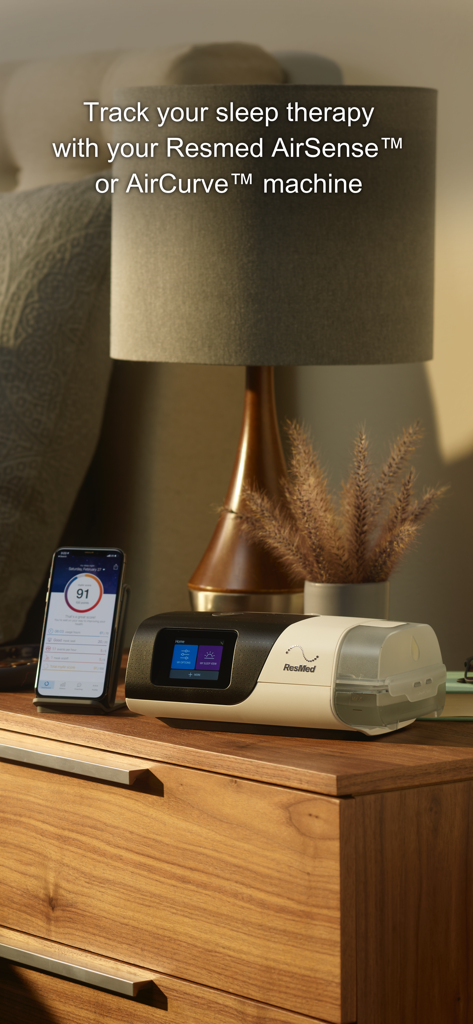
Smartphone displaying myAir sleep score next to a Resmed CPAP machine on a bedside table

Smartphone displaying myAir sleep score next to a Resmed CPAP machine on a bedside table

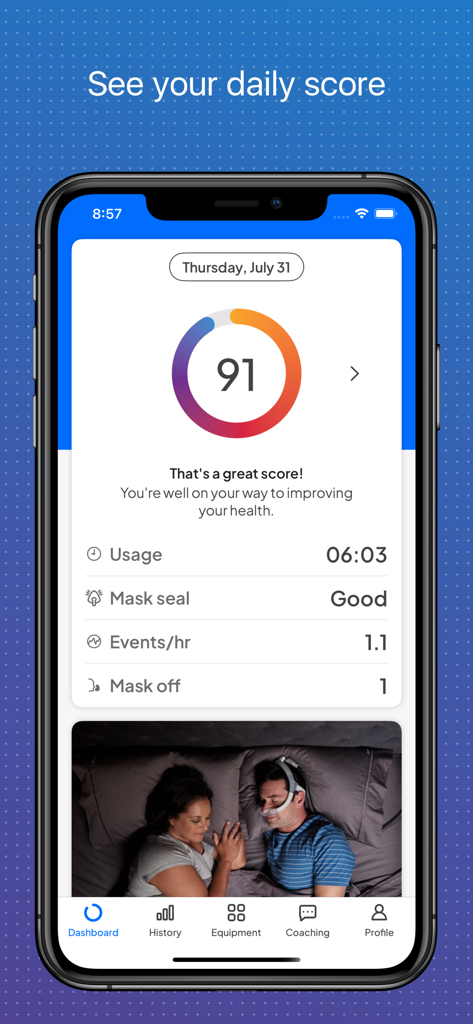
The myAir by Resmed mobile app dashboard showing a daily sleep score of 91 and CPAP therapy metrics.

The myAir by Resmed mobile app dashboard showing a daily sleep score of 91 and CPAP therapy metrics.

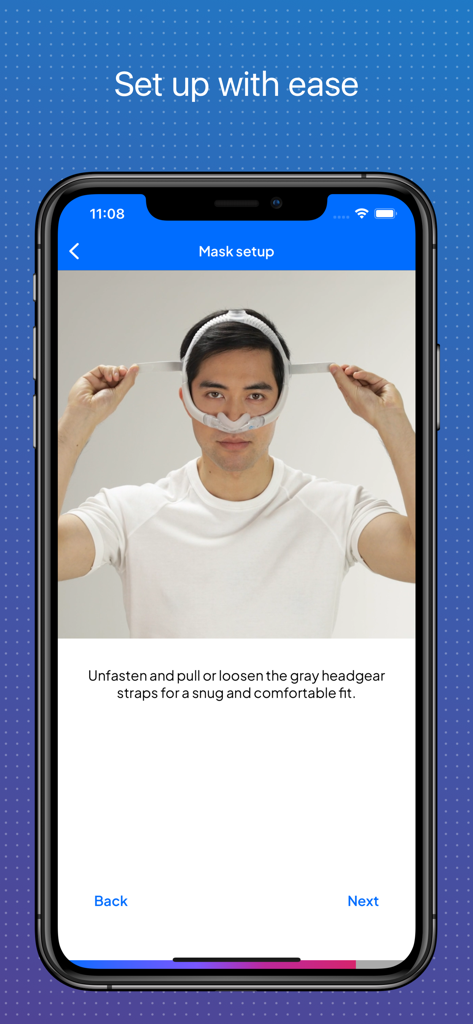
A man following the guided CPAP mask setup instructions in the myAir app

A man following the guided CPAP mask setup instructions in the myAir app

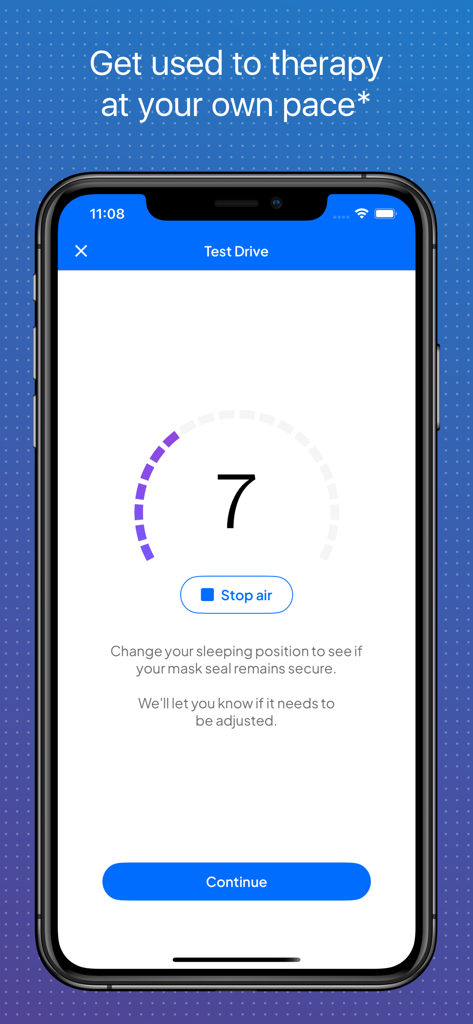
Smartphone screen showing the myAir app Test Drive feature with a mask seal gauge and instructions.

Smartphone screen showing the myAir app Test Drive feature with a mask seal gauge and instructions.

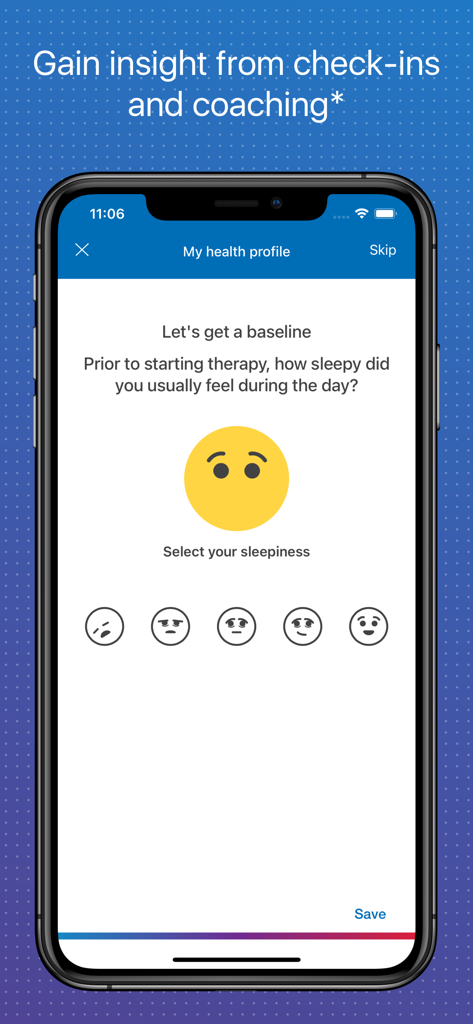
A mobile app screen for myAir by Resmed showing a health profile check-in where users rate their daytime sleepiness using emojis

A mobile app screen for myAir by Resmed showing a health profile check-in where users rate their daytime sleepiness using emojis

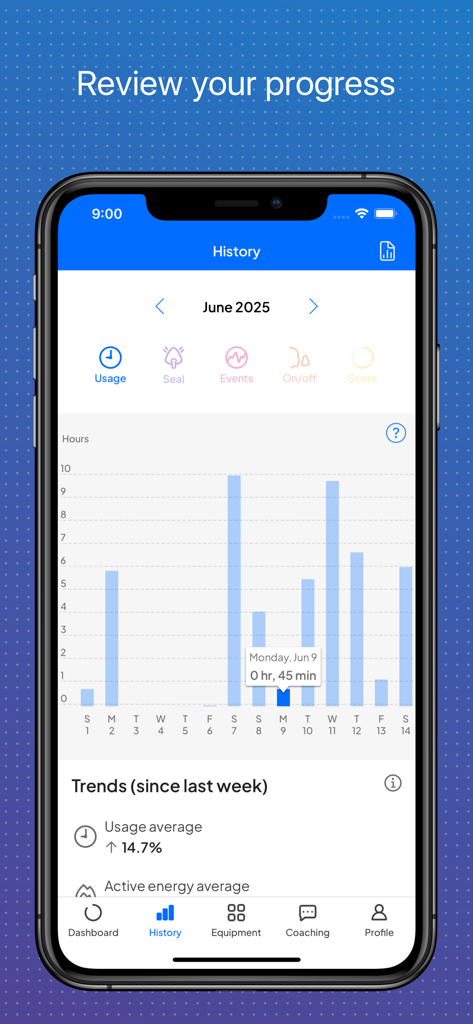
Resmed myAir app history screen displaying a bar chart of nightly CPAP usage hours and sleep therapy trends

Resmed myAir app history screen displaying a bar chart of nightly CPAP usage hours and sleep therapy trends

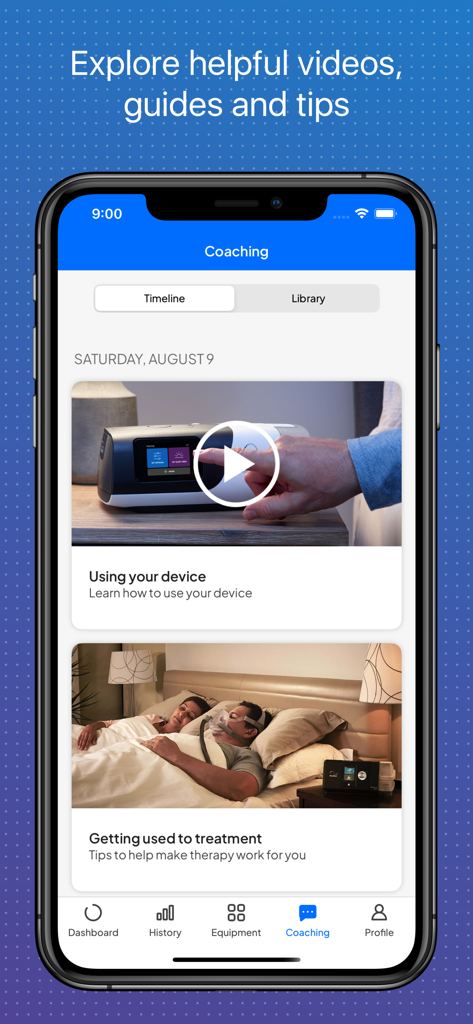
Screenshot of the myAir app coaching section showing a library of helpful videos and guides for sleep therapy.

Screenshot of the myAir app coaching section showing a library of helpful videos and guides for sleep therapy.

Master Your Sleep Therapy Journey

The tools that make this app stand out, trusted by 5M+ users.

📈

Daily myAir Score

Wake up to a personalized score that gives you an instant snapshot of your therapy success and tracks your improvement over time.

👨‍🏫

Personal Sleep Coaching

Get interactive setup guidance and tailored troubleshooting tips to fix mask leaks and ensure you stay comfortable all night long.

📲

Connected Health Data

Sync seamlessly with Apple Health and generate professional therapy reports to share your progress directly with your doctor.

Loved by users worldwide

Trusted by 5M+ people who love this app.

"

"Checking my score is the first thing I do every morning. It has turned what used to be a medical chore into a daily personal goal. Seeing my therapy data sync perfectly with Apple Health helps me stay on track and feel significantly more energetic throughout the work day."

Robert S., 55
"

"I was initially very nervous about setting up my CPAP machine, but the Test Drive and guided videos made it incredibly simple. Now, if I ever have a mask leak, I just check the app for a quick fix instead of calling my doctor. It has truly given me my confidence back."

Linda M., 62

About the app

Everything you need to know about myAir™ by Resmed.

Description

Take charge of your sleep therapy success with myAir™, an exclusive app available to Resmed AirSense™ and AirCurve™ users. GUIDED SETUP Whether you set up your equipment at home or in person, myAir helps you get started with confidence and ease. The Personal Therapy Assistant* feature provides interactive voice-guided instructions to help you set up your equipment and fit your mask. myAir's Test Drive* feature helps you get comfortable with therapy using your machine at different levels of air pressure. The app also offers a Library of helpful videos and guides that show you how to set up your specific AirSense or AirCurve machine and Resmed mask, as well as how to get comfortable on therapy. PERSONALIZED SUPPORT Getting used to therapy can take a little time, but with the right support you can enjoy a great night's sleep. myAir acts like your personal sleep coach. It guides you through therapy and connects you to the support you need, when you need it. myAir offers tailored coaching, tips and videos to increase your comfort and success. For example, if you have problems with your mask seal, myAir will provide tips about how to fix it. The app also offers a full Library of helpful videos and guides to answer common questions. Along the way, you'll get email and push notifications that encourage and support you. With regular check-ins*, myAir proactively prompts you to see how your therapy is going and provides coaching if you have problems. With your prior consent, myAir also shares your therapy insights with your healthcare team* so they can be more connected to your care. SLEEP THERAPY TRACKING With myAir, you can easily access your daily sleep therapy data to monitor your therapy progress. Simply log in to see your nightly myAir score, which shows how well you slept on therapy at a glance. Detailed metrics help you track your therapy progress over time. You can also download a therapy summary report to keep for your records or share with your healthcare provider. INTEGRATED WITH HEALTH APPLICATIONS myAir integrates with Apple Health and Health Connect to display the health data you track alongside your Resmed therapy data. Learn more at Resmed.com/myAir. *Feature available only with an AirSense 11 machine. Not available with AirSense 10 or AirCurve 10. Note: myAir is available only for Resmed AirSense and AirCurve machines with built-in wireless connectivity. For the AirMini™ machine, please download the AirMini by Resmed app. Always seek the advice of a physician or other qualified health provider with any questions you may have regarding a medical condition. If you think you are experiencing a medical emergency, seek immediate medical attention.

Latest Version

4.4.0

Size

202.5 MB

First Released

Sep 2, 2016

Take Charge of Your Sleep Success Today

Join over 5 million users who track their daily therapy progress and receive personalized coaching to wake up feeling refreshed and empowered.

Download on App Store
FAQ

Frequently Asked Questions

Everything you need to know about myAir™ by Resmed

What is myAir™ by Resmed?

myAir™ by Resmed is an exclusive app for Resmed AirSense™ and AirCurve™ users. It helps users manage their sleep therapy by providing guided setup, personalized support, and therapy tracking for successful outcomes.

Which Resmed machines are compatible with the myAir™ app?

The myAir™ app is compatible with Resmed AirSense™ and AirCurve™ machines that have built-in wireless connectivity. It is not compatible with the AirMini™ machine, which uses the AirMini by Resmed app.

Does myAir™ by Resmed offer guided setup for sleep therapy equipment?

Yes, myAir™ by Resmed offers guided setup features. These include the Personal Therapy Assistant for voice-guided instructions, Test Drive for acclimating to air pressure levels, and a Library of helpful setup videos.

Can myAir™ by Resmed track my daily sleep therapy progress?

Yes, myAir™ by Resmed allows users to track daily sleep therapy data. It displays a nightly myAir score, detailed metrics like mask seal and usage, and enables downloading a therapy summary report for progress monitoring.

Does the myAir™ app provide personalized coaching and support?

Yes, myAir™ provides personalized coaching and support. It acts as a personal sleep coach, offering tailored tips, videos, and solutions for issues like mask seal problems. The app also sends encouraging notifications and check-ins.

Does myAir™ by Resmed integrate with other health applications?

Yes, myAir™ by Resmed integrates with other health applications. It connects with Apple Health and Health Connect to display health data tracked by these platforms alongside the user's Resmed therapy data.

Are all features of myAir™ available for AirSense 10 and AirCurve 10 machines?

No. Features such as the Personal Therapy Assistant, Test Drive, and regular check-ins are exclusively available with an AirSense 11 machine. They are not accessible for AirSense 10 or AirCurve 10 users.