
Open Library Reader




The essential iPad companion for the curious mind. Manage your digital shelves and enjoy an immersive, distraction-free reading experience from the world’s largest open archive.
Publisher
Category
BooksDownloads
182K+User Rating
Total Ratings
100Locales
1Discover the interface used by 182K+ users.
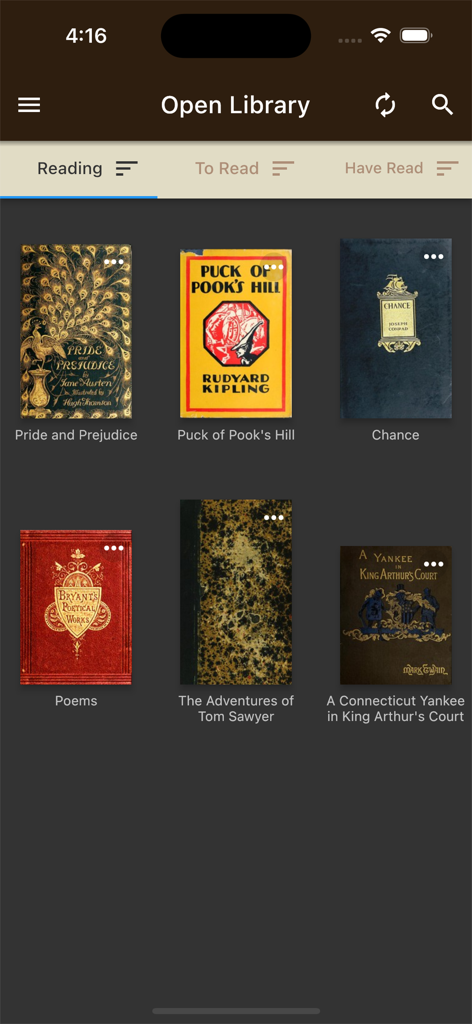
The tools that make this app stand out, trusted by 182K+ users.
Effortlessly sort, track, and manage your saved books across custom shelves that sync instantly with your Open Library account.
Enter full-screen mode with a single tap to remove all digital noise, expanding every page to the limits of your screen for deep reading.
Find your next rare find or academic resource using built-in search and related title tools designed to explore the depths of the archive.
Trusted by 182K+ people who love this app.
"As an academic researcher, I spend hours on the Open Library website, but reading in a browser was always a struggle. This app has completely transformed my workflow. It syncs perfectly with my existing shelves, and the distraction-free full-screen mode on my iPad makes deep study a pleasure. It is the perfect bridge between the Archive's massive collection and a premium reading experience."
"Finally, an interface that does justice to the Internet Archive's mission. I love being able to manage my 'Want to Read' list and discover out-of-print historical texts with the related title search. The layout is clean, intuitive, and much more accessible than the mobile web. It has become my go-to app for late-night reading on the couch."
Everything you need to know about Open Library Reader.
Description
Latest Version
1.0.16+23
Size
26.1 MB
First Released
Aug 5, 2021
Join thousands of researchers and lifelong learners. Enhance your Open Library experience with a distraction-free, full-screen reader designed for deep immersion and effortless shelf management.
Everything you need to know about Open Library Reader
The Open Library Reader is an app serving as an interface to openlibrary.org. It allows users to browse, check out, track, and read millions of books directly from the Open Library platform.
Yes, Open Library Reader requires an active internet connection. All user data and books are hosted online on openlibrary.org, not within the app itself.
Yes, the Open Library Reader app enables users to track books by managing 'Reading,' 'To Read,' and 'Have Read' shelves. It also tracks the remaining time on checked-out, limited-access books.
Open Library Reader offers built-in search, shelf management (move/remove books, change editions), related title search, and customization for shelves and book display.
Yes, Open Library Reader is optimized for iPad, providing the best user experience on that device. It also functions on smaller screens.
Users find books via the built-in search feature or by browsing their saved collections. The app also supports a related title search to discover similar books directly from a chosen title.
Open Library Reader displays books saved on the Open Library website, arranged on the screen. Users can sort these books by title, author, publication date, and date saved.
Yes, after opening a book in Open Library Reader's reading interface, a tap at the top of the screen activates full-screen mode. This maximizes the reading area and removes distractions.
Apps with similar features and user experience

OCLC

LYRASIS, Inc.

BookBites A/S
ekz.bibliotheksservice GmbH

OverDrive, Inc.
Koninklijke Bibliotheek

National Library Board

Chengdu Superstar Digital Library Information Technology Co.,Ltd

KYOBO BOOK CENTRE CO,.LTD
