Phone

Phone

Download on App Store
Spark by MWM logo
Logo of Phone

Phone: Your intelligent hub for more personal, productive, and private calls

Transform how you connect with AI-powered voicemail summaries, real-time call screening, and custom Contact Posters. Experience a smarter communication center designed to block the noise and help you focus on the conversations that matter most.

Publisher

Apple Inc.

Category

Utilities

Downloads

272K+

User Rating

3.4/5

Total Ratings

26K+

Locales

33

Communication, Reimagined

Discover the interface used by 272K+ users.
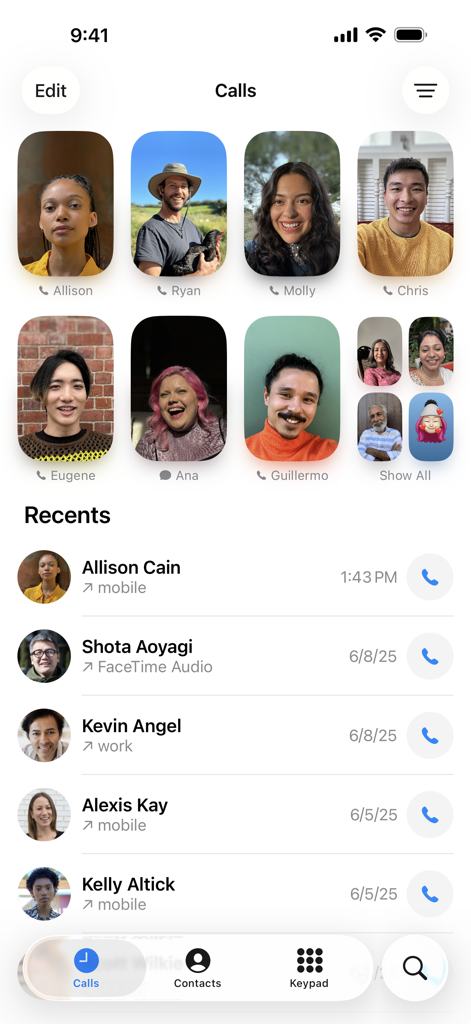
Apple Phone app screen showing favorite contacts and recent calls

Apple Phone app screen showing favorite contacts and recent calls

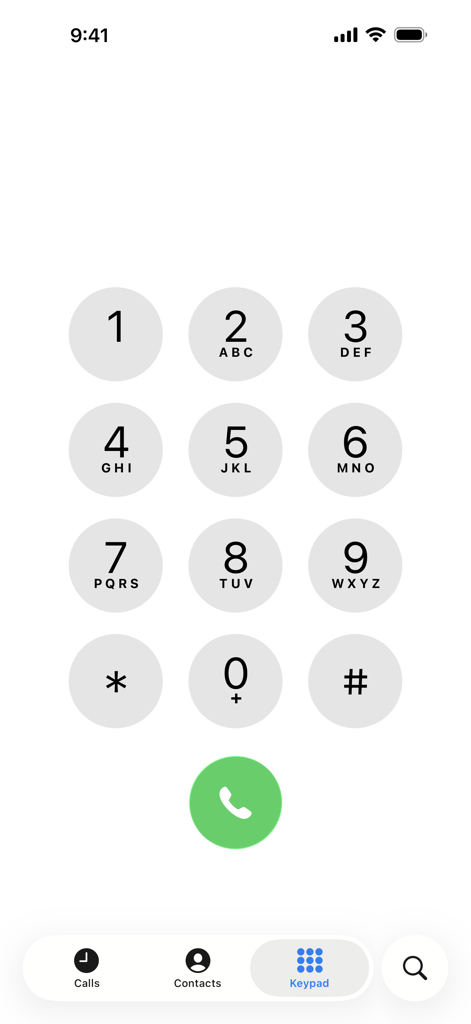
The numeric keypad interface of the Apple Phone app on an iPhone.

The numeric keypad interface of the Apple Phone app on an iPhone.

Reclaim Your Conversation

The tools that make this app stand out, trusted by 272K+ users.

🛡️

End the Spam Era

See real-time transcripts with Live Voicemail. Screen unknown callers instantly and only talk to the people who matter most.

Your Identity, Your Way

Craft your Contact Poster to control how you appear on every call. Express your personal brand with custom photos and Memoji.

Intelligence on Every Call

Get instant Voicemail Summaries and use Hold Assist to stop wasting time on hold. Professional-grade productivity is now built-in.

Loved by users worldwide

Trusted by 272K+ people who love this app.

"

"The AI Voicemail Summaries and Hold Assist features are absolute game-changers for my busy schedule. I can finally stay productive without being tied to my phone, and the live call transcriptions make tracking project details effortless."

Sarah M., Marketing Director
"

"Contact Posters let me control my digital first impression, and Live Voicemail is the best defense against robocalls I've ever used. The seamless integration with my Apple Watch makes staying connected while on the go so much more convenient."

Jordan T., Freelance Creative

About the app

Everything you need to know about Phone.

Description

Make and receive calls with the Phone app. • Phone calls, FaceTime audio calls and FaceTime video calls all in one place. • Choose a new unified layout that brings together your Favorites, Recents, and Voicemails • Favorites offers one-tap shortcuts for calls and messages to your most important contacts. • Recents displays recent conversations and missed calls. Search for previous calls, transcribed voicemails, and contacts using a broad range of search criteria. • Voicemail Summaries powered by Apple Intelligence appear in-line with missed calls and help surface the most important information. • Keypad search lets you quickly find and call existing contacts by typing in their name or number with the alphanumeric keypad. • Contact Posters let you customize exactly how you appear when you give someone a call. Choose from various treatments for photos, Memoji and your name. • Record live calls or FaceTime audio calls from the Phone app and review the transcripts in the Notes app. When you start a recording, the Phone app automatically announces that the call is being recorded. • Conference calling with up to 5 people.* • Visual Voicemail offers a written transcript of your voicemails. Save Visual Voicemail messages as notes, voice memos, or share them using Messages, Mail or AirDrop.* • Live Voicemail lets you see a real-time transcription as someone is leaving you a message, and you can pick up the call if it’s something you want to address in the moment. • Custom voicemail greetings. • Automatic Mic Mode picks the right Mic Mode for you. Voice Isolation blocks out ambient noise and spotlights your voice. Wide Spectrum will leave ambient noises unfiltered, allowing your voice and all the sounds around you to be heard. • Text responses make it easy to send a response in a single tap when you can’t pick up a call. Use suggested replies, or create your own custom text responses. • Remind Me Later helps you remember to return calls that you can’t pick up in the moment. • Ask Siri to place calls, return calls, and check your voicemail. • Hold Assist lets the Phone app wait on hold for you and alerts you once a live agent is available. • Call Screening lets you screen incoming calls from unknown numbers. Your phone will pick up the call for you and ask for a name and reason for the call before the phone even rings. • Silence Unknown Callers gives you the option to automatically send unknown numbers to voicemail. Your phone will only ring for people in your contacts, recent outgoing calls, and Siri Suggestions. • Blocked Contacts allows you to identify unwanted callers and blocks phone and FaceTime calls from those numbers. • A range of ringtones and vibrations allow you to choose distinct alerts for certain people. • Wi-Fi Calling lets you make or receive a phone call on a Wi-Fi connection, so you can stay connected in areas with little or no cellular coverage.* • Announce Calls gives you the option to hear the name or phone number of the person calling you even when you’re not looking at your device. • Dial Assist automatically determines the correct international or local prefix when dialing. • Call Waiting allows someone to call you while you’re already on another call.* • Call Forwarding relays calls made to your number to another number that you specify.* Apple Watch Features: • Make and answer phone calls right from your wrist. • When you hear or feel the call, send the call to voicemail, answer using your iPhone or send a message. • While you’re on a call, adjust the call volume, use the keypad or even switch the call to your iPhone. • Listen to voicemails. • Ask Siri to call someone in your contacts. *Requires carrier support

Latest Version

2.7

Size

4.9 MB

First Released

Oct 25, 2021

Redefine Every Conversation

Experience the power of Apple Intelligence with live voicemail summaries, professional call recording, and personalized Contact Posters designed for your busy lifestyle.

Download on App Store
FAQ

Frequently Asked Questions

Everything you need to know about Phone

Does the Phone app support FaceTime audio and video calls?

Yes, the Phone app unifies phone calls, FaceTime audio, and FaceTime video calls into a single, convenient application.

How does the Phone app manage recent calls?

The Phone app displays recent conversations and missed calls in its Recents section. Users can also search for previous calls, transcribed voicemails, and contacts there.

Can I search for contacts using the keypad in the Phone app?

Yes, the Phone app features Keypad search. This allows users to quickly find and call existing contacts by typing their name or number directly on the alphanumeric keypad.

Can the Phone app record calls?

Yes, the Phone app allows users to record live calls or FaceTime audio calls. Transcripts of these recordings are then available for review within the Notes app.

What is Live Voicemail in the Phone app?

Live Voicemail in the Phone app provides a real-time transcription of messages as they are being left. This enables users to pick up the call immediately if desired.

What microphone modes are available in the Phone app?

The Phone app offers Automatic Mic Mode, Voice Isolation to block ambient noise, and Wide Spectrum to capture all surrounding sounds during a call.

Can the Phone app silence unknown callers automatically?

Yes, the Phone app's "Silence Unknown Callers" feature automatically sends calls from unknown numbers to voicemail, ensuring the phone only rings for known contacts.

Does the Phone app support making calls over Wi-Fi?

Yes, the Phone app enables Wi-Fi Calling, allowing users to make or receive phone calls over a Wi-Fi connection. This is useful in areas with limited or no cellular coverage.