
Pitch Checker



Get real-time pitch detection, frequency analysis, and scale feedback. Whether you're training for karaoke, correcting tone deafness, or tuning your instrument, achieve perfect pitch with professional precision.
Publisher
Category
MusicDownloads
952K+User Rating
Total Ratings
7K+Locales
2Discover the interface used by 952K+ users.
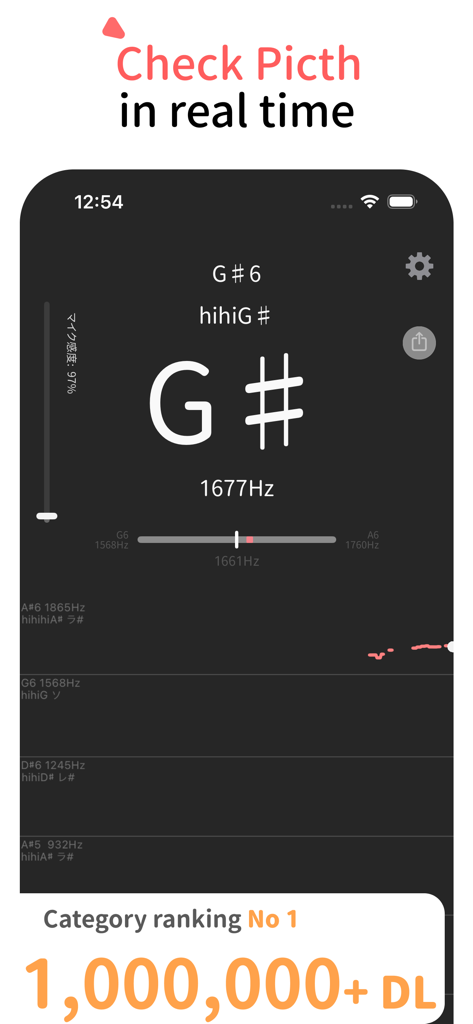
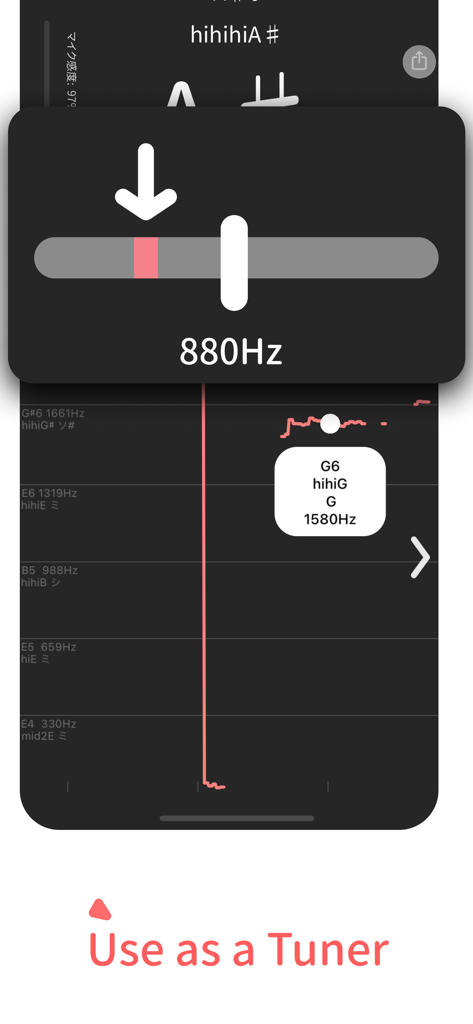
The tools that make this app stand out, trusted by 952K+ users.
Pinpoint your exact limits from lowlow A to hihi A. Perfect for tracking your growth or hitting those viral vocal challenges with confidence.
See your pitch, frequency, and waveform instantly. Use the pause feature to freeze the data and analyze your vibrato or note accuracy in detail.
Switch between Do-Re-Mi and C-D-E notations with adjustable sensitivity to tune your voice or instruments in any environment.
Trusted by 952K+ people who love this app.
"This app is a game-changer for my vocal practice! I used to guess my range, but now I can see exactly where I hit those hihi A notes. The real-time waveform helps me visualize my vibrato like nothing else. Perfect for prepping before karaoke night or just leveling up my singing skills at home."
"As a music student, the precision of Pitch Checker is unmatched. I use it for both ear training and tuning my violin. The ability to pause the analysis to review a specific frequency is incredibly helpful for my technical exercises. It's simple, fast, and replaces three other apps I used to use."
Everything you need to know about Pitch Checker.
Description
Latest Version
9.1.0
Size
52.9 MB
First Released
Dec 7, 2019
Join over 950,000 singers and musicians who use Pitch Checker to find their range, perfect their tuning, and hit every note with confidence.
Everything you need to know about Pitch Checker
The Pitch Checker app analyzes real-time audio from your device's microphone. It displays information including musical scale, pitch, octave, frequency, and waveform.
Pitch Checker helps measure vocal range, practice absolute pitch, detect musical scales, perform vocal exercises, practice karaoke, correct tone deafness, and tune instruments.
Yes, the Pitch Checker app analyzes real-time audio captured from your microphone. It continuously displays musical information such as pitch, frequency, and waveform.
Yes, you can pause the audio analysis in Pitch Checker by tapping the screen. This feature allows you to review the displayed musical results at your preferred pace.
To prevent Pitch Checker from picking up small sounds or noise, slide the "Microphone Sensitivity" bar upward. This ignores small sounds and provides a cleaner pitch detection.
Yes, Pitch Checker can function as a basic instrument tuner. For convenience, users can change the display notation from "Do, Re, Mi" to "CDEFGAB" in the app's settings.
Pitch Checker supports notations like low A, mid 2 A, hihi A, and allows switching between CDEFGAB and Do, Re, Mi (Solfege) displays. It also supports flat notations.
To change the display notation in Pitch Checker, tap the gear icon in the top right corner. Then, select "Note Name Display" to switch between CDEFGAB and Do, Re, Mi notations.
Yes, you can adjust the reference pitch within the Pitch Checker app. Access the settings menu via the gear icon to change the default A4 (440 Hz) value.
The Pitch Checker app requires microphone permission for audio analysis. It also uses Siri & Search and Mobile Data permissions for Admob advertisements.
Yes, Pitch Checker displays ranges such as hihi A or lowlow A, making it suitable for measuring and analyzing vocal range effectively.
Yes, Pitch Checker can display a graph of past detected pitches. This feature allows users to visually review their pitch history and progression.
Yes, Pitch Checker supports flat (b) notations for musical notes. Users can toggle this option in the app's settings menu for their preferred display.
Yes, Pitch Checker offers a minimal user interface. Users can switch to this new UI design through the app's settings for a streamlined experience.
Yes, Pitch Checker provides a quick launch option. Users can add a Lock Screen widget for fast access to the app's pitch checking functionality.
Apps with similar features and user experience

梦莹 张

Simply Ltd

Julian Boehm-Tettelbach
Qiushi Jiang

DevExtras Ltd
Learn To Master Ltd

PRIVET LIMITED LLC

Annabel Williams Music Ltd

SKYWORK AI PTE LTD