Punch Time Clock

Punch Time Clock

Download on App Store
Spark by MWM logo
Logo of Punch Time Clock

Punch Time Clock: The Easiest Way to Track Your Work and Get Paid

Join over 1 million freelancers and shift workers who trust Punch to manage hours, calculate earnings, and export professional PDF reports. Simple, accurate, and subscription-free.

Publisher

Trent Morris

Category

Business

Downloads

1M+

User Rating

4.8/5

Total Ratings

32K+

Locales

1

Your Workday at a Glance

Discover the interface used by 1M+ users.

Interface of the Punch Time Clock app showing easy time tracking buttons for breaks and clocking out.

Interface of the Punch Time Clock app showing easy time tracking buttons for breaks and clocking out.

Punch Time Clock app screen displaying detailed monthly timesheets with total earnings and hours worked.

Punch Time Clock app screen displaying detailed monthly timesheets with total earnings and hours worked.

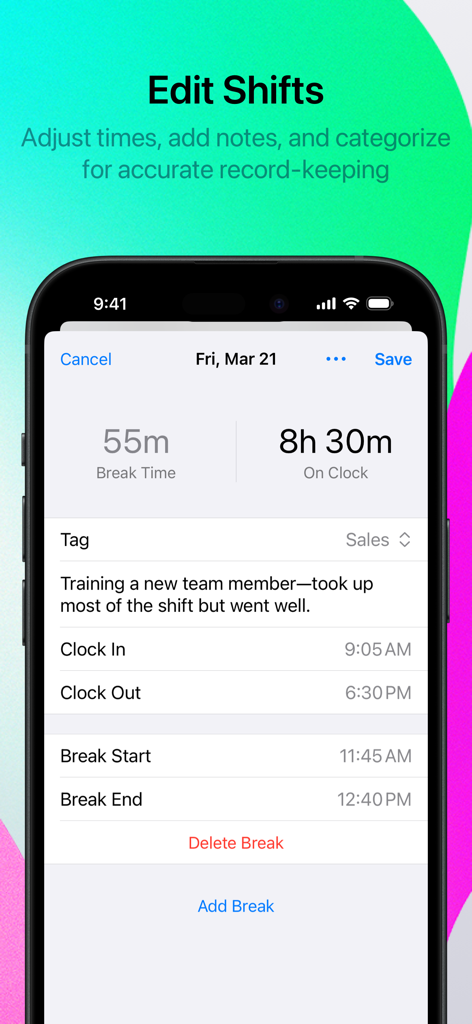
Smartphone screen showing the Edit Shifts feature in the Punch Time Clock app with break times and shift notes

Smartphone screen showing the Edit Shifts feature in the Punch Time Clock app with break times and shift notes

A preview of a professionally formatted PDF timesheet export in the Punch Time Clock app showing shift details and hours worked

A preview of a professionally formatted PDF timesheet export in the Punch Time Clock app showing shift details and hours worked

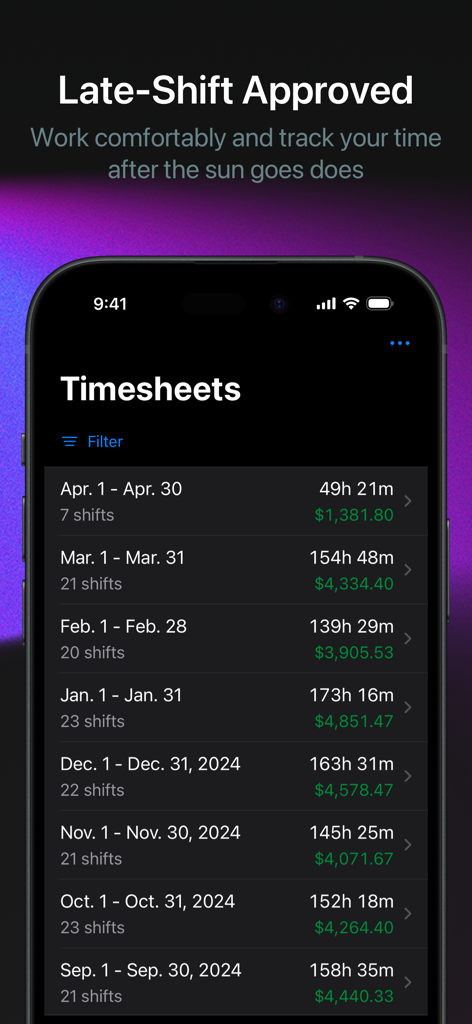
Punch Time Clock app displaying a list of monthly timesheets with hours worked and earnings in dark mode interface.

Punch Time Clock app displaying a list of monthly timesheets with hours worked and earnings in dark mode interface.

Master Your Workday & Secure Your Pay

The tools that make this app stand out, trusted by 1M+ users.

⏱️

Seamless Shift Logging

Clock in with one tap and retroactively edit hours, ensuring your personal source of truth is always 100% accurate.

📄

Invoice-Ready Reporting

Convert your hard work into professional PDF or CSV exports to bill clients or verify your payroll with absolute confidence.

💰

Smart Earnings Tracking

Take the guesswork out of budgeting with automatic overtime calculations and real-time pay estimates before you get your check.

Loved by users worldwide

Trusted by 1M+ people who love this app.

"

"Finally, a time tracker that isn't a subscription! As a freelance consultant, I need to track hours across multiple projects. The tagging feature is perfect for organization, and the PDF exports look incredibly professional when I send them to my clients. It's the most reliable tool in my kit."

Elena Rodriguez, Independent Consultant
"

"Working rotating shifts makes it hard to keep track of my actual earnings. Punch Time Clock makes it effortless to log in and out, and I love that it automatically calculates my overtime. It gives me peace of mind knowing I have a personal record of every hour I've worked."

David Chen, Shift Supervisor

About the app

Everything you need to know about Punch Time Clock.

Description

Introducing Punch Time Clock, the essential time-tracking app for shift workers, freelancers, remote workers, small-business owners, students and salaried employees. With Punch, managing your hours has never been easier. # KEY FEATURES • Effortless Time Tracking Clock in, take breaks, and clock out with a simple tap. Forgot to clock out? No problem—easily make retroactive adjustments. • Comprehensive Timesheets View detailed timesheets showing your hours worked and estimated earnings. Perfect for tracking your work history. • Professional PDF Exports Export timesheets as professionally formatted PDF or CSV files. Share them with employers, invoice clients, or keep them for personal records. • Flexible Shift Management Create new shifts from scratch or edit existing ones. Add personal notes to each shift for better task or project tracking. • Organize with Tags Categorize your shifts using Tags to filter timesheets by job, client, project, and more. Stay organized and efficient. • Overtime Calculations Automatically calculate daily and weekly overtime for Weekly and Biweekly pay schedules to ensure accurate tracking of your work hours. # WHY CHOOSE PUNCH TIME CLOCK? • User-Friendly Interface – Designed for simplicity and ease of use, so you can focus on your work, not your timesheets. • Reliable & Secure – Built with the latest technology to keep your data safe. • Customizable Experience – Tailor Punch to fit your unique needs with flexible settings and features. Take control of your work hours with Punch Time Clock. Download now and transform the way you track time—effortlessly and accurately. # UPGRADE TO PUNCH PRO Punch is completely free, with no limits. Upgrade to Punch PRO with a one-time purchase for advanced features like pay estimates, timesheet exporting, notes and tagging. Privacy Policy - https://trentmorris.com/punch/privacy Terms of Use - https://trentmorris.com/punch/terms

Latest Version

2.3.3

Size

29.4 MB

First Released

Jul 25, 2018

Ready to Master Your Work Hours?

Join over 1 million freelancers and shift workers who trust Punch Time Clock for accurate tracking and professional reporting—without the burden of monthly subscriptions.

Download on App Store
FAQ

Frequently Asked Questions

Everything you need to know about Punch Time Clock

What is Punch Time Clock?

Punch Time Clock is an essential time-tracking app designed for shift workers, freelancers, small-business owners, and employees. It simplifies managing and tracking work hours effortlessly and accurately.

How does Punch Time Clock track time?

Yes, Punch Time Clock allows users to clock in, take breaks, and clock out with a simple tap. It also supports retroactive adjustments for forgotten clock-outs.

Can Punch Time Clock generate timesheet reports?

Yes, Punch Time Clock generates comprehensive timesheets showing hours worked and estimated earnings. Users can export these as professional PDF or CSV files.

Does Punch Time Clock support overtime calculations?

Yes, Punch Time Clock automatically calculates daily and weekly overtime for Weekly and Biweekly pay schedules. This ensures accurate tracking of all work hours.

Is Punch Time Clock free to use?

Yes, Punch Time Clock is completely free with no limits on its core features. Users can upgrade to Punch PRO via a one-time purchase for advanced functionalities.

What advanced features are included in Punch PRO?

Punch PRO includes advanced features such as pay estimates, timesheet exporting, notes, and tagging. These are available through a one-time purchase within the app.

Can I edit shifts within the Punch Time Clock app?

Yes, Punch Time Clock allows users to create new shifts from scratch or edit existing ones. Users can also add personal notes to each shift for better tracking.

How can I organize my shifts in Punch Time Clock?

Punch Time Clock allows users to organize shifts using Tags. This feature enables filtering timesheets by job, client, or project for enhanced organization and efficiency.

Does Punch Time Clock provide a privacy policy?

Yes, Punch Time Clock provides a privacy policy. The link to this policy is available within the app's description for user review.

Is Punch Time Clock reliable and secure?

Yes, Punch Time Clock is reliable and secure. It is built with the latest technology specifically to keep user data safe and protected.