Schlage Home

Schlage Home

Download on App StoreDownload on Google Play
Spark by MWM logo
Logo of Schlage Home

Schlage Home: Total Control and Peace of Mind in the Palm of Your Hand

Seamlessly manage your home’s security from anywhere. Unlock with a tap, share scheduled access with guests, and stay connected with the most trusted name in hardware.

Publisher

Schlage Lock Company, LLC

Category

Lifestyle

Downloads

2M+

User Rating

4.8/5

Total Ratings

245K+

Locales

3

A Glimpse into Your Secure Home

Discover the interface used by 2M+ users.
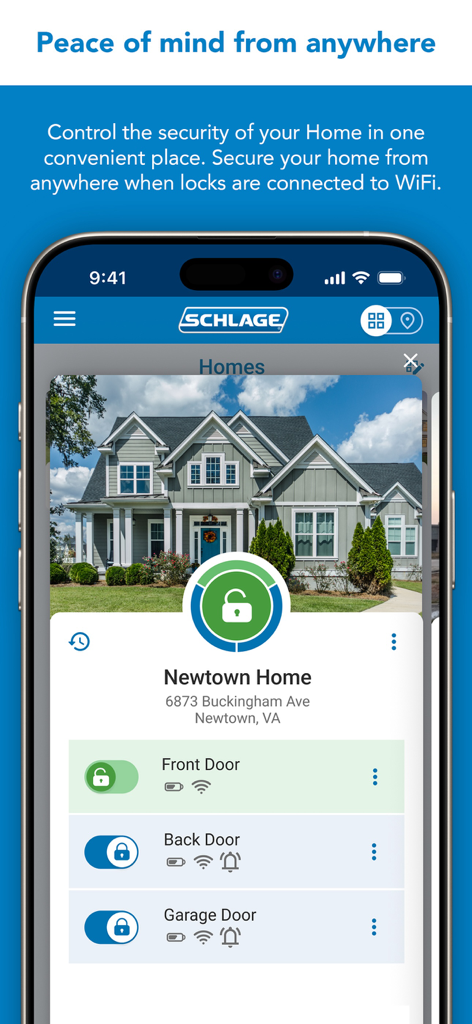
Schlage Home app showing remote smart lock control for multiple home doors on a mobile phone.

Schlage Home app showing remote smart lock control for multiple home doors on a mobile phone.

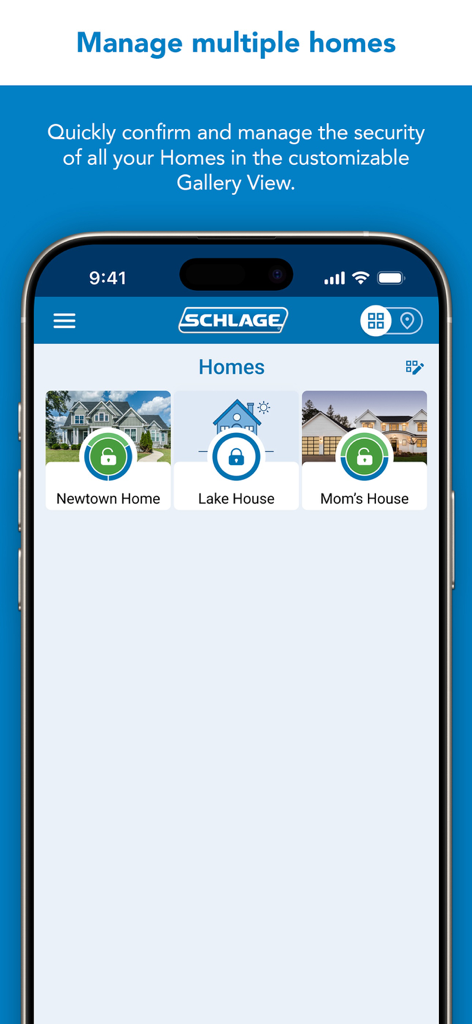
Schlage Home app gallery view showing security status for multiple homes including Newtown Home and Lake House.

Schlage Home app gallery view showing security status for multiple homes including Newtown Home and Lake House.

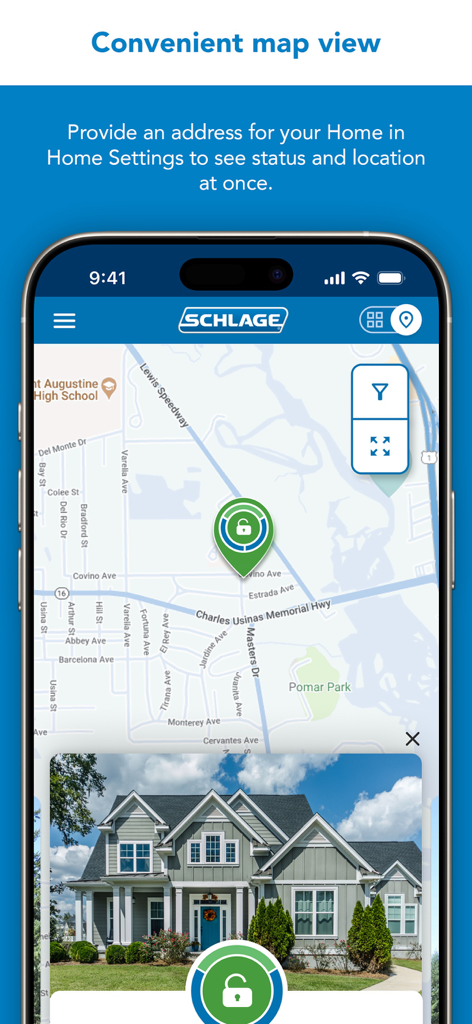
Schlage Home app showing a map view and lock status of a house

Schlage Home app showing a map view and lock status of a house

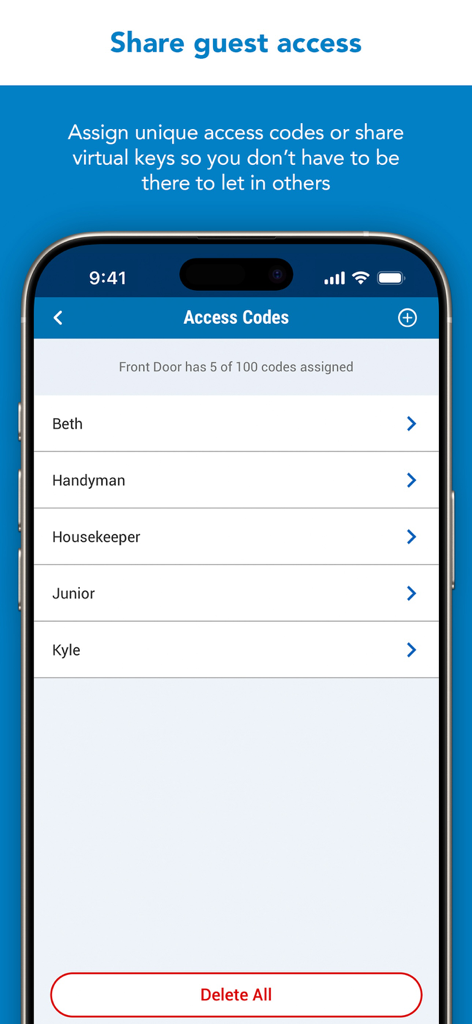
Schlage Home app interface for managing and sharing guest access codes for a smart lock

Schlage Home app interface for managing and sharing guest access codes for a smart lock

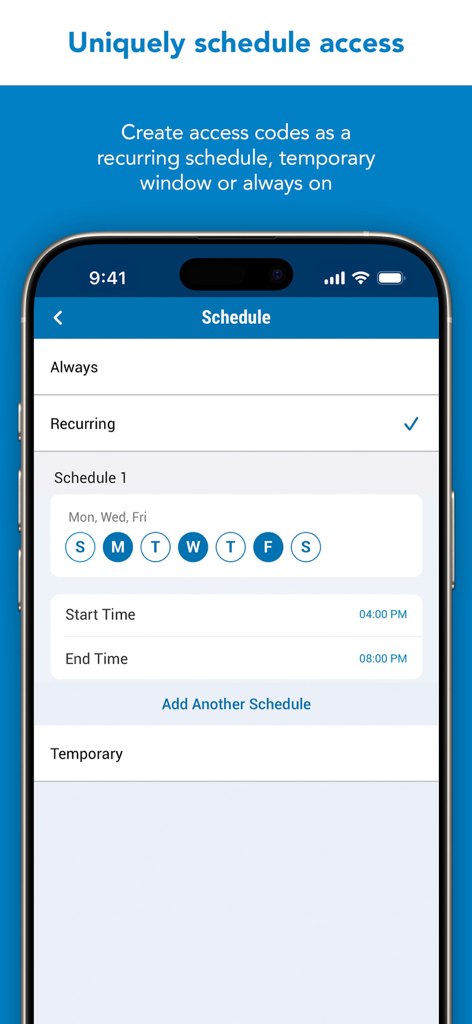
Interface of the Schlage Home app showing the recurring access code schedule setup for specific days and times.

Interface of the Schlage Home app showing the recurring access code schedule setup for specific days and times.

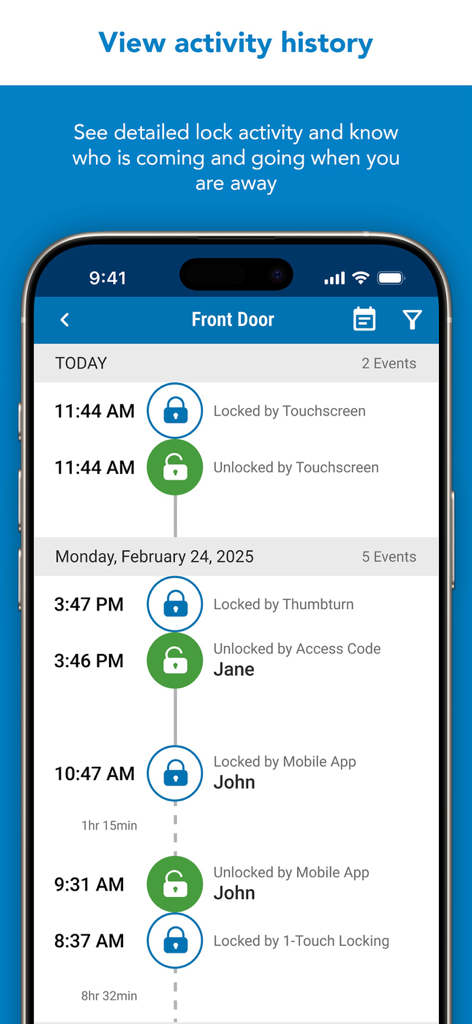
Schlage Home app screen showing the detailed activity history log and entry events for a front door smart lock.

Schlage Home app screen showing the detailed activity history log and entry events for a front door smart lock.

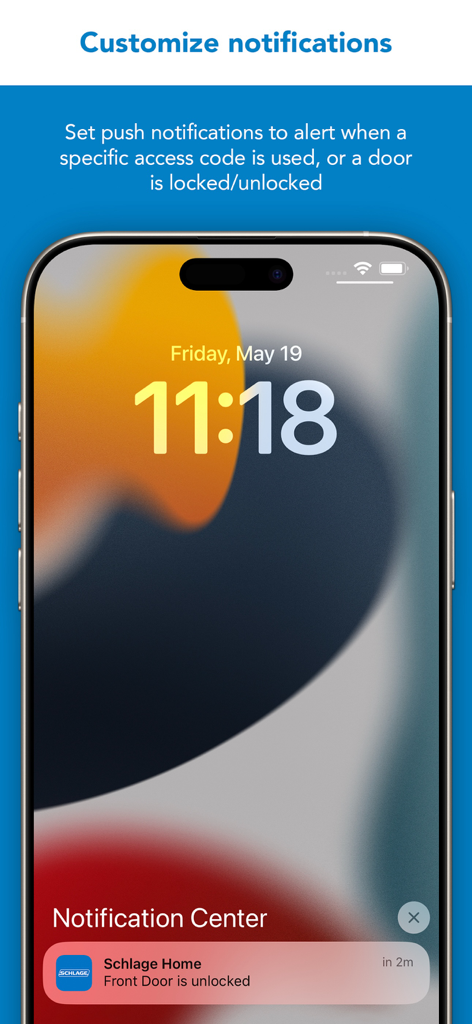
iPhone lock screen showing a Schlage Home push notification stating the front door is unlocked

iPhone lock screen showing a Schlage Home push notification stating the front door is unlocked

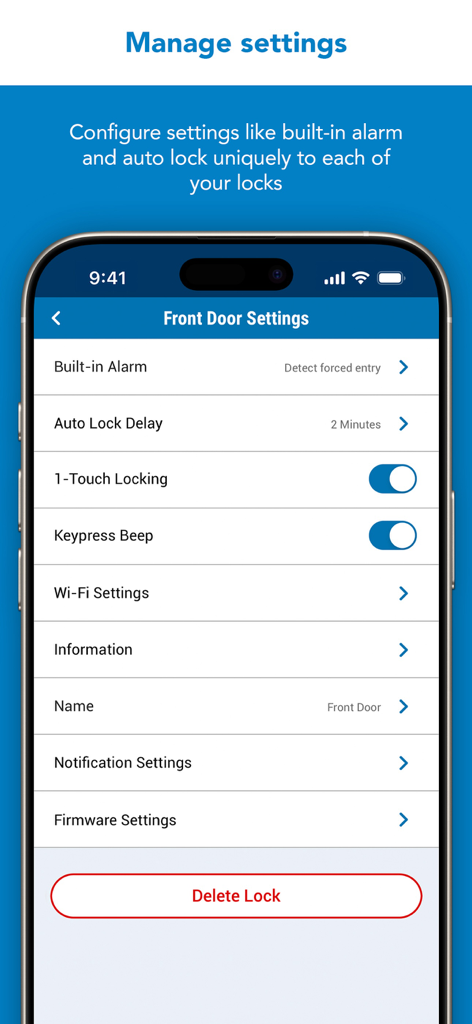
Interface of the Schlage Home app showing various lock settings for a front door, including alarm and auto-lock options.

Interface of the Schlage Home app showing various lock settings for a front door, including alarm and auto-lock options.

Intelligent Home Security at Your Fingertips

The tools that make this app stand out, trusted by 2M+ users.

🔓

Real-Time Remote Control

Instantly lock or unlock your door and verify security status from your smartphone, providing total peace of mind while you are at work or on vacation.

📅

Smart Guest Management

Issue up to 100 unique access codes with custom schedules for dog walkers or house cleaners, eliminating the risks of hidden spare keys.

Tap-to-Unlock Convenience

Leverage Apple HomeKey to enter your home with a simple tap of your iPhone or Apple Watch, or use Siri for effortless, hands-free voice control.

Loved by users worldwide

Trusted by 2M+ people who love this app.

"

"As a working parent, the peace of mind this app provides is invaluable. I get a real-time notification the moment my kids get home from school, and I love that I can set a recurring access code for our dog walker that only works during her scheduled window. No more hidden keys or worrying if the door is locked!"

Sarah Jenkins
"

"The Apple HomeKey integration is a total game-changer for my smart home setup. Being able to just tap my Apple Watch against the lock to get inside when I'm carrying groceries is incredibly convenient. The app is polished, the connection is rock-solid, and it integrates perfectly with my existing HomeKit automations."

Marcus Chen

About the app

Everything you need to know about Schlage Home.

Description

For over a century, Schlage has been trusted by millions of homes to help protect what matters most – peace of mind. The Schlage Home app lets you control and monitor your home from anywhere when your Schlage locks are paired to a home WiFi network. Through a secure encrypted connection, easily lock and unlock your doors with the touch of a button in the Home View, conveniently manage multiple Homes with the Map and Gallery View, schedule unique access codes for trusted users, view lock history, and pair your Schlage locks with leading smart home systems. This app works with Schlage Encode Plus™ Smart WiFi Deadbolt, Schlage Encode® Smart WiFi Deadbolt and Lever, and Schlage Sense® Smart Deadbolt. The Schlage Home app for Apple Watch works with Schlage Encode Smart WiFi Deadbolt and Lever. These Encode smart lock owners can lock and unlock as well as check the status of their locks from the Schlage Home app on their Apple Watch SCHLAGE ENCODE SMART WIFI DEADBOLT & LEVER AND SCHLAGE ENCODE PLUS SMART WIFI DEADBOLT These locks feature built-in WiFi so you don’t need to purchase additional hubs or accessories for remote access of your lock. When a lock is paired to your smartphone and connected to your home’s WiFi network, conveniently use the Schlage Home app to: - Lock/unlock, check your lock’s status from anywhere - Manage up to 100 unique access codes per lock - Schedule access codes as always-on, recurring at specific times/days, or temporary with a specific start and end date/time - Share virtual keys for full administrative access or guest lock/unlock only access - View history log for your lock - Customize push notifications to be alerted if specific access codes are used and when your door is locked/unlocked - Select time delay for auto-locking - Receive low battery advanced warnings - Set built-in alarm warnings - Pair with leading smart home speakers and ecosystems SCHLAGE ENCODE PLUS SMART WIFI DEADBOLT + APPLE HOMEKIT In addition to the features & benefits above, the Schlage Encode deadbolt works with Apple HomeKit. After creating an account with Schlage, use the Schlage Home app to pair your lock with Apple HomeKit to: - Create an Apple home key in the Wallet app for easy, secure access to your home using your iPhone or Apple Watch - Create and manage always-on access codes in your Apple Home app - Lock/unlock your deadbolt from your iPhone or Apple Watch - Use Siri voice control to operate and check the status of your lock - Make your lock part of automations or control it with the Apple Home app remotely when used with a HomePod or Apple TV set up as a home hub SCHLAGE SENSE SMART DEADBOLT The Schlage Sense deadbolt features Bluetooth technology allowing you to easily use your smartphone with the Schlage Home app to: Within Bluetooth range: - Lock/unlock and check your lock’s status - Manage up to 30 unique access codes per lock - Schedule access codes as always-on or recurring at specific times / days - Share virtual keys for full administrative access or guest lock/unlock only access - Use the history log to see activity at your lock - Select time delay for auto-locking - Set built-in alarm warnings based on the type of disturbance detected You must pair with a Schlage Sense WiFi Adapter and your home WiFi network to: - Control and monitor your lock remotely - Pair with leading smart home speakers and ecosystems - Receive push notifications when specific access codes are used or when your door is locked/unlocked - Make your Schlage Sense Smart Deadbolt accessible when you are away from home with Apple HomeKit. Remotely control and automate your lock with the Apple Home app when used with a HomePod, Apple TV or iPad set up as a home hub The Schlage Connect® Smart Deadbolt is not supported by the Schlage Home app. Visit Schlage’s website for more information on compatible home hubs and apps for the Schlage Connect Smart Deadbolt. Works best in iPhone11 or newer

Latest Version

9.0.0

Size

148.8 MB

First Released

Sep 22, 2015

Unlock Smarter Security and Absolute Peace of Mind

Join over 2 million homeowners who trust Schlage for keyless convenience and total control. Download the Schlage Home app to secure your world today.

Download on App StoreDownload on Google Play
FAQ

Frequently Asked Questions

Everything you need to know about Schlage Home

What is the Schlage Home app used for?

The Schlage Home app allows users to remotely control and monitor their Schlage smart locks. It provides functions such as locking/unlocking doors, managing access codes, and viewing activity history from anywhere when locks are connected to home WiFi.

Which Schlage smart locks are compatible with the Schlage Home app?

The Schlage Home app supports Schlage Encode Plus Smart WiFi Deadbolt, Schlage Encode Smart WiFi Deadbolt and Lever, and Schlage Sense Smart Deadbolt. The Schlage Connect Smart Deadbolt is not compatible.

Do Schlage Encode locks require a separate hub for remote access with the Schlage Home app?

No, Schlage Encode Smart WiFi Deadbolt and Encode Plus locks feature built-in WiFi. This eliminates the need for additional hubs or accessories for remote access through the Schlage Home app.

How can I manage multiple homes with the Schlage Home app?

The Schlage Home app enables users to manage multiple homes conveniently. It provides a customizable Gallery View and a Map View to confirm and oversee the security of all registered residences.

Can I create and schedule access codes using the Schlage Home app?

Yes, the Schlage Home app allows users to create unique access codes. These can be set as always-on, recurring for specific times/days, or temporary with defined start and end dates.

Does the Schlage Home app provide activity history for my locks?

Yes, the Schlage Home app features a detailed history log. Users can view lock activity to see who is coming and going, including the method used for locking or unlocking.

Can I receive push notifications from the Schlage Home app?

Yes, the Schlage Home app offers customizable push notifications. Users receive alerts for specific access code usage, low battery warnings, or when a door is locked or unlocked.

Is the Schlage Encode Plus Smart WiFi Deadbolt compatible with Apple HomeKit?

Yes, the Schlage Encode Plus Smart WiFi Deadbolt works with Apple HomeKit. Users can pair it via the Schlage Home app to create Apple home keys and control it with Siri.

How does the Schlage Sense Smart Deadbolt gain remote access?

The Schlage Sense Smart Deadbolt requires a Schlage Sense WiFi Adapter paired with a home WiFi network for remote control and monitoring. It uses Bluetooth for local control.

Can I configure unique settings for individual locks in the Schlage Home app?

Yes, the Schlage Home app allows users to configure settings uniquely for each lock. Options include built-in alarm, auto-lock delay, 1-touch locking, and notification settings.