Send fax with WiseFax

Send fax with WiseFax

Download on App StoreDownload on Google Play
Spark by MWM logo
Logo of Send fax with WiseFax

Send fax with WiseFax: The No-Subscription Way to Fax from Your Phone

Stop paying for monthly plans you don't use. Securely scan and send contracts, medical forms, or legal documents to over 240 countries with transparent pay-as-you-go pricing.

Download on App Store

Publisher

VANAIA LLC

Category

Business

Downloads

8K+

User Rating

5.0/5

Total Ratings

0

Locales

2

Faxing at Your Fingertips

Discover the interface used by 8K+ users.

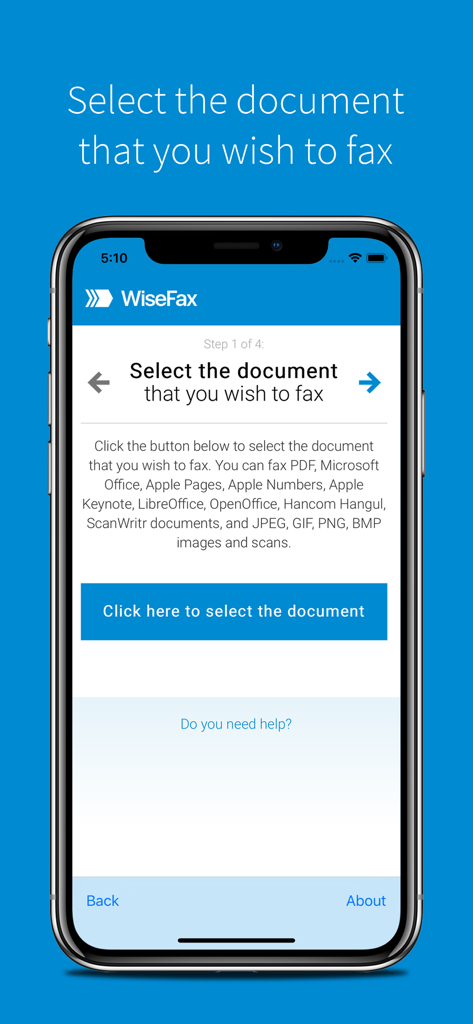
WiseFax mobile app interface showing the first step to select a document for faxing

WiseFax mobile app interface showing the first step to select a document for faxing

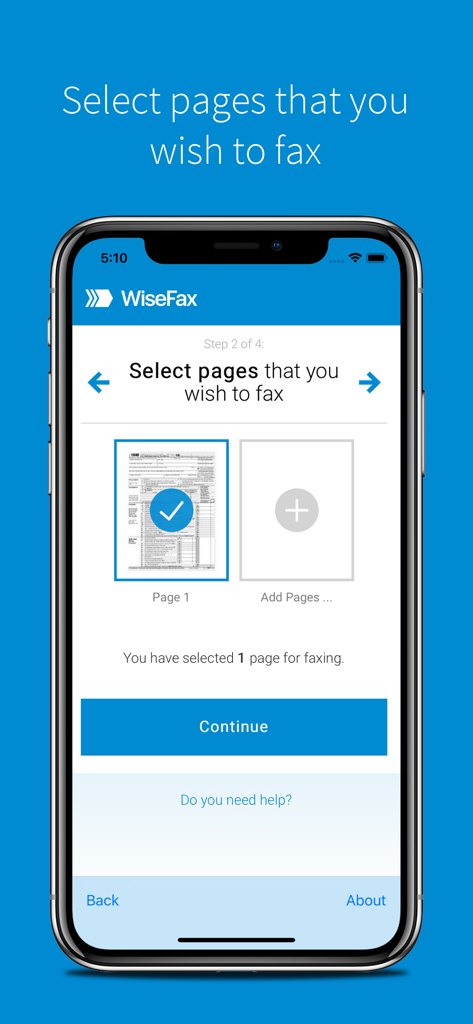
WiseFax app interface showing document page selection for faxing

WiseFax app interface showing document page selection for faxing

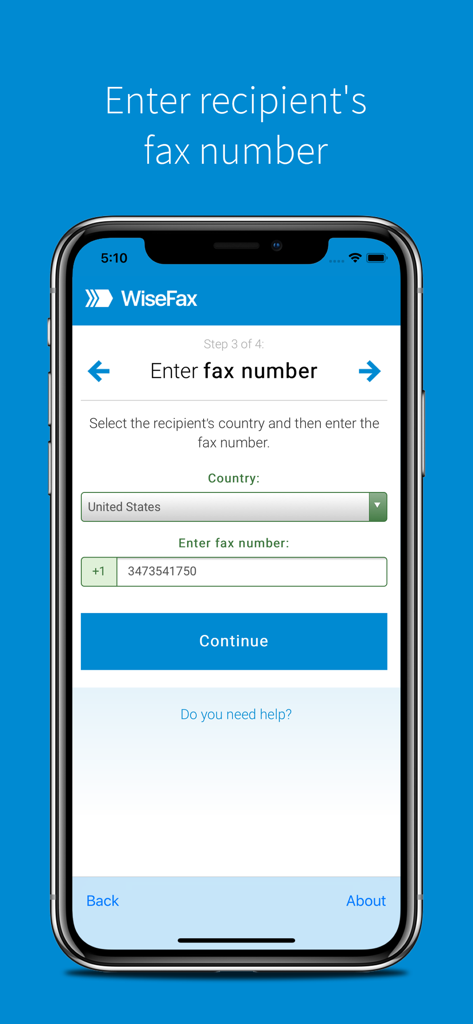
WiseFax mobile app screen showing the step to enter the recipient's country and fax number.

WiseFax mobile app screen showing the step to enter the recipient's country and fax number.

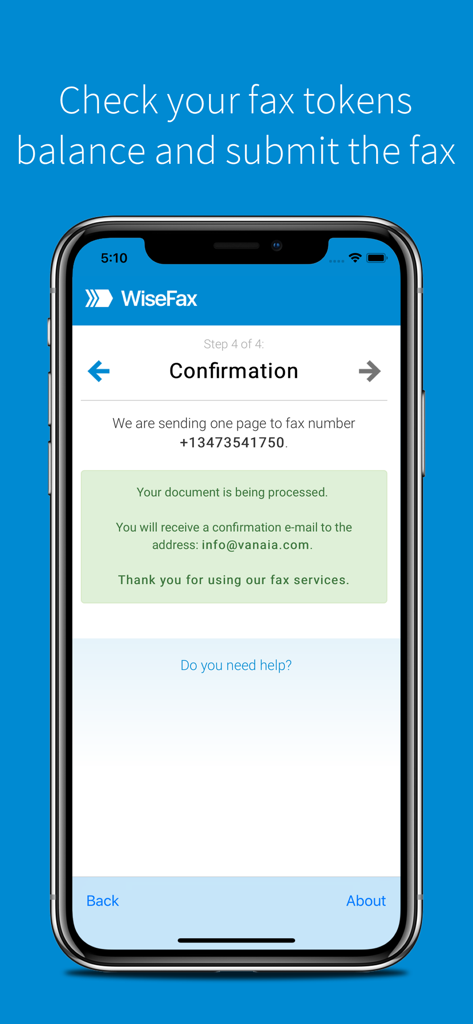
WiseFax app confirmation screen showing a successful fax submission with recipient number and email confirmation details.

WiseFax app confirmation screen showing a successful fax submission with recipient number and email confirmation details.

Fax Smarter, Not Harder

The tools that make this app stand out, trusted by 8K+ users.

šŸ’ø

No Subscriptions, Ever

Eliminate subscription fatigue. Our transparent pay-as-you-go model means you only pay for the pages you actually send.

šŸ“ø

Professional Scan Quality

Transform physical documents into crisp faxes using your camera. Our AI detects edges and enhances readability automatically.

āœ…

Instant Delivery Proof

Don't guess if it arrived. Receive a detailed email confirmation and a digital copy the moment your fax is successfully delivered.

Loved by users worldwide

Trusted by 8K+ people who love this app.

"

"I only need to send a fax once or twice a year for legal contracts, and I was so tired of every other app forcing a monthly subscription. WiseFax is a lifesaver—I just paid for exactly what I needed, the document scan quality was perfect, and I got a confirmation email immediately. Truly hassle-free."

Sarah J., Freelance Designer
"

"Dealing with insurance paperwork is stressful enough without having to find a physical fax machine. I used WiseFax to scan and send 12 pages right from my iPad. The edge detection made my photos look like professional scans, and the 'pay as you go' model is exactly what I was looking for."

Michael R., Homeowner

About the app

Everything you need to know about Send fax with WiseFax.

Description

Send fax online quickly and easily without subscription with WiseFax. Perfect efax solution! Send fax with WiseFax quickly and easily! You only need internet connection on your iPhone or iPad and send fax in four simple steps. Just add WiseFax app on your iPhone or iPad which will allow you to easy select documents you want to send to fax. Pay as you go, with no monthly or yearly subscription and send fax anywhere in the world. WiseFax supports numerous document and file formats such as Apple Pages, Apple Numbers and Apple Keynote documents and spreadsheets, PDF documents, Microsoft Office, OpenOffice and LibreOffice documents and spreadsheets, Hancom Hangul documents, ScanWritr documents, and JPEG, GIF, PNG, BMP images. You can also take a picture or scan a document and import it into WiseFax and send it to fax. When doing so WiseFax efficiently detects edges of your document using advanced edge detection algorithm and makes picture clearer with picture enhancement algorithm. This makes scanning easier and fax more readable. You can easily select which pages you want to fax. Displayed preview of the pages will look the same as they will come out on fax at recipient side. Type fax number and wait for response. Regardless if it was successful or no, you will get an email notification and in case send fax will be successful also full document copy. Send fax with WiseFax as simple as that. Try it, you’ll like it. Four easy steps of how to send fax with WiseFax are: 1. Upload your existing document from your mobile device. 2. Click and select pages that you want to fax. 3. Select among 240 countries where you want to send your fax to and type recipient's fax number. 4. Authenticate with your existing Google, Facebook, Windows Live account or create a new Vanaia account. Buy fax token, if you already didn’t do so, and send fax. Wait for fax status confirmation which you will receive to your e-mail.

Latest Version

2.3.1

Size

12.4 MB

First Released

Mar 7, 2018

Send Your Fax Now—No Subscription Required

Join thousands of professionals who skip the office supply store. Pay only for what you send and get instant confirmation for every document, right from your iPhone or iPad.

Download on App StoreDownload on Google Play