WeDJ for iPhone

WeDJ for iPhone

Download on App StoreDownload on Google Play
Spark by MWM logo
Logo of WeDJ for iPhone

WeDJ for iPhone: Mix Like a Pro with the Club-Standard App by Pioneer DJ

Transform your phone into a professional DJ booth. Mix millions of tracks from SoundCloud and Beatport using the same intuitive controls found in the world's biggest clubs.

Publisher

AlphaTheta Corporation

Category

Music

Downloads

2M+

User Rating

4.7/5

Total Ratings

71K+

Locales

2

The Booth in Your Pocket

Discover the interface used by 2M+ users.
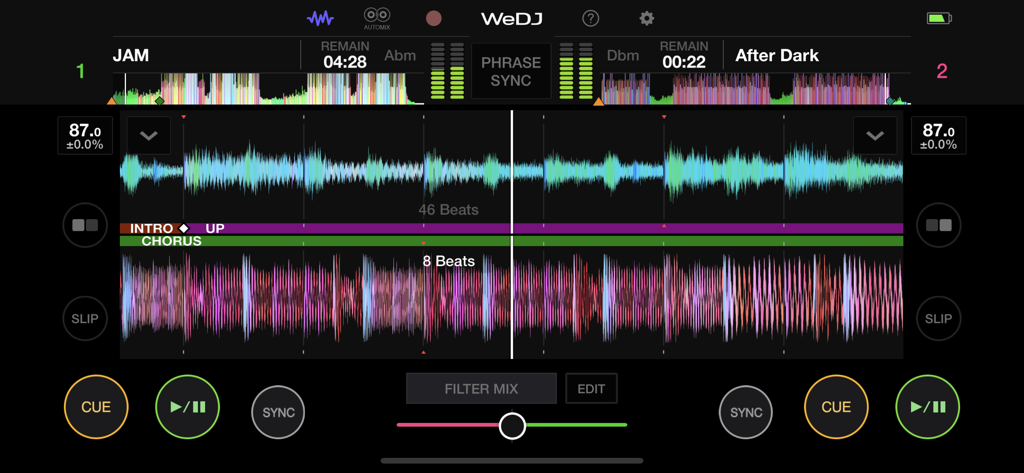
WeDJ for iPhone professional DJ mixing interface with dual track waveforms

WeDJ for iPhone professional DJ mixing interface with dual track waveforms

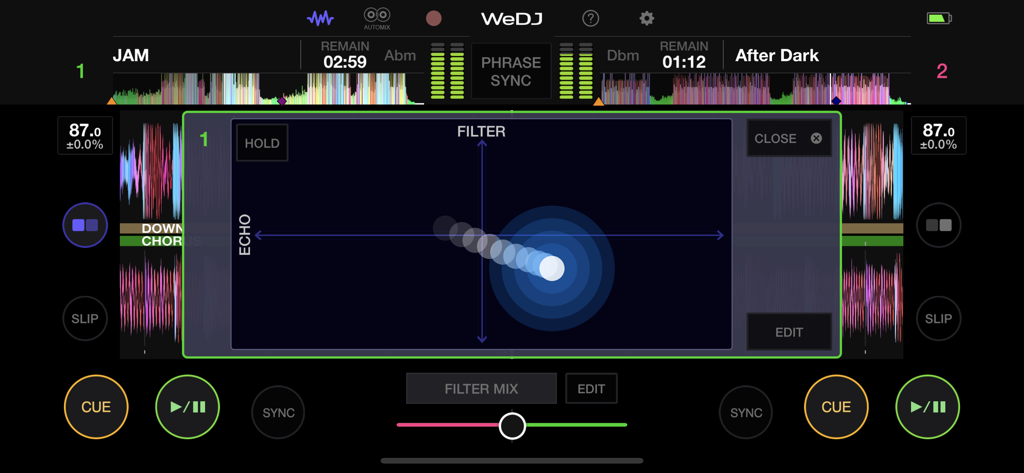
WeDJ for iPhone app screen showing a professional XY pad for filter and echo effects.

WeDJ for iPhone app screen showing a professional XY pad for filter and echo effects.

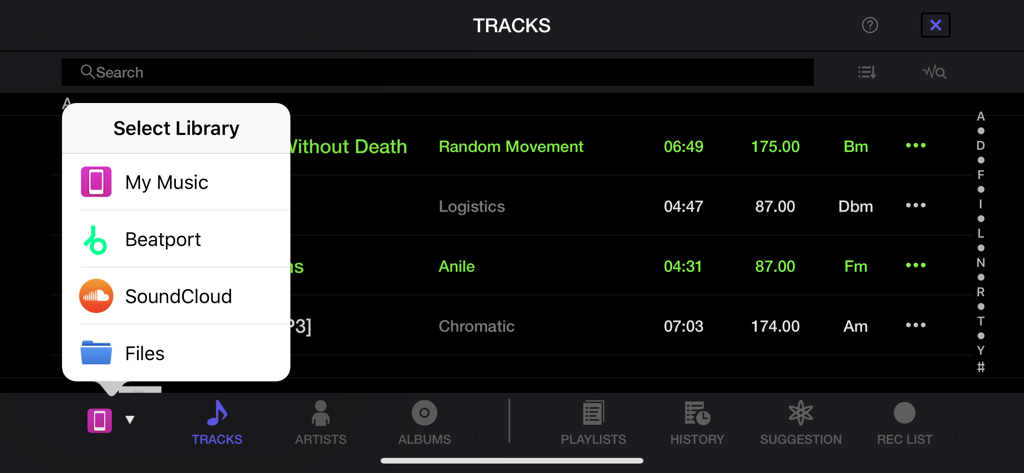
WeDJ for iPhone library selection menu with SoundCloud and Beatport streaming integration.

WeDJ for iPhone library selection menu with SoundCloud and Beatport streaming integration.

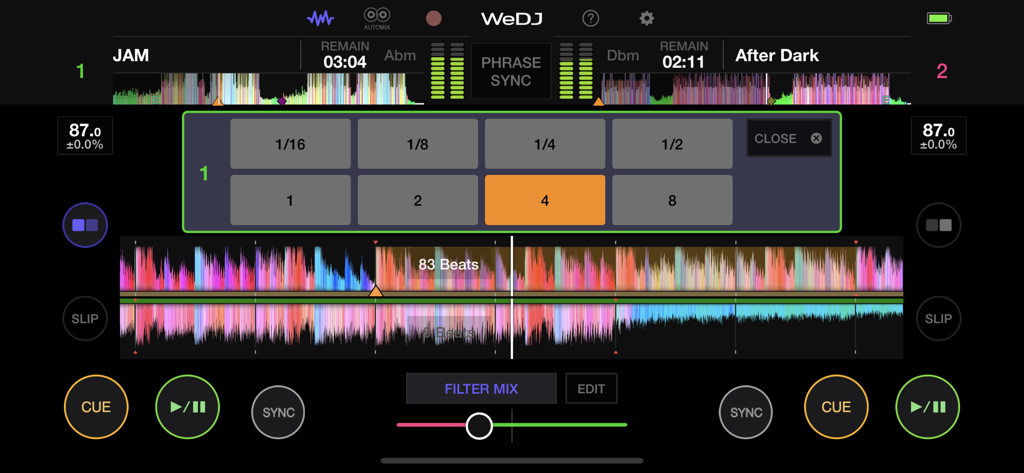
WeDJ for iPhone app showing the performance interface with waveforms and loop selection pads

WeDJ for iPhone app showing the performance interface with waveforms and loop selection pads

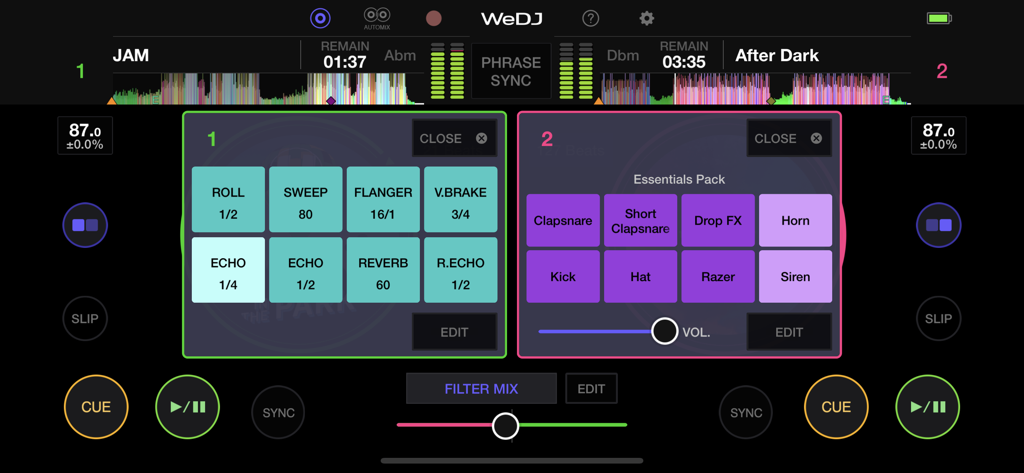
WeDJ for iPhone app interface featuring performance pads for sound effects and sampler kits

WeDJ for iPhone app interface featuring performance pads for sound effects and sampler kits

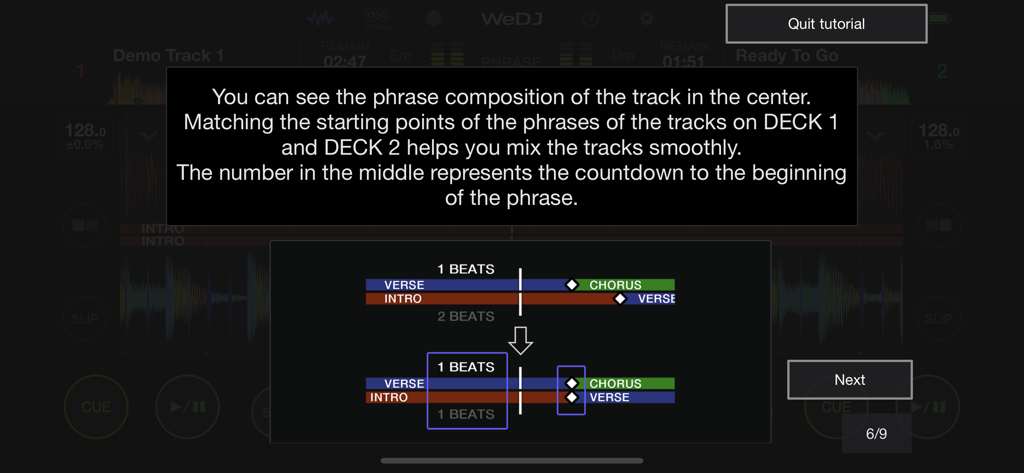
In-app tutorial explaining how to align song phrases for smooth DJ mixing in WeDJ for iPhone.

In-app tutorial explaining how to align song phrases for smooth DJ mixing in WeDJ for iPhone.

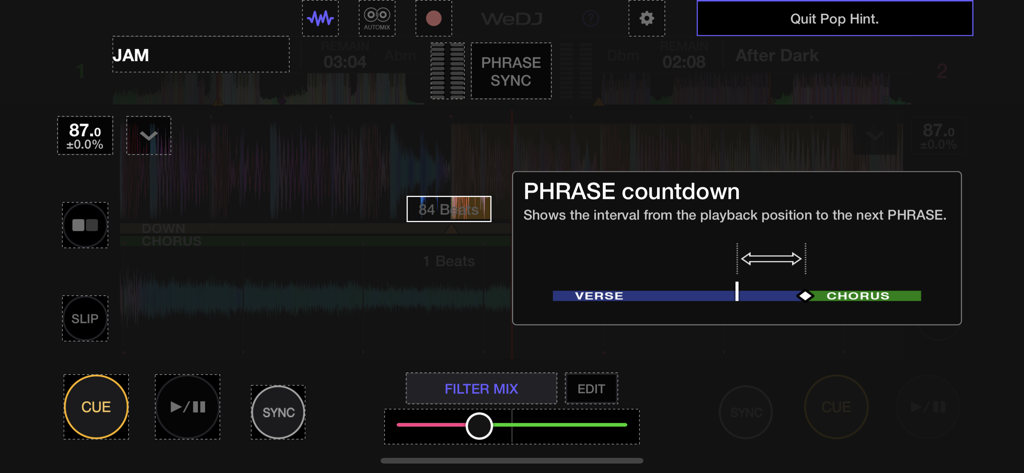
WeDJ for iPhone interface showing the phrase countdown feature for professional transitions

WeDJ for iPhone interface showing the phrase countdown feature for professional transitions

Pro-Level Mixing at Your Fingertips

The tools that make this app stand out, trusted by 2M+ users.

☁️

Stream Millions of Tracks

Forget buying MP3s. Connect your SoundCloud Go+ or Beatport account to mix the latest viral hits and underground tracks instantly.

Flawless Transitions

Nail every mix with Beat Sync and Transition FX. Sound like a club headliner from day one with tools that make professional DJing effortless.

🎧

Grow into a Pro

Start on your screen and level up with hardware. Seamlessly connect to Pioneer DJ controllers like the DDJ-200 for a true tactile performance.

Loved by users worldwide

Trusted by 2M+ people who love this app.

"

"WeDJ is literally a lifesaver for house parties. Being able to pull my SoundCloud Go+ playlists directly into the app is huge. The Transition FX make every mix sound seamless, and since it’s Pioneer DJ, the quality is top-tier. Highly recommend for anyone wanting to be the heart of the party!"

Liam S.
"

"I started out just scratching on my phone screen, and now I've connected my DDJ-200. It's the perfect bridge for aspiring DJs. The layout is so intuitive, and the Beat Sync feature is a total lifesaver while I'm learning. My TikTok followers are loving the mixes I record!"

Chloe M.

About the app

Everything you need to know about WeDJ for iPhone.

Description

Get the party started with WeDJ for iPhone! Developed by Pioneer DJ – the brand known for its club-standard DJ equipment – this app offers a flexible and seamless DJ experience. Play and mix music from streaming services such as Beatport Steaming and SoundCloud Go+/DJ, as well as tracks stored on your iPhone, and use performance features and FX to create your own sound. ◆Key features Discover and mix new music. Play tracks from: - Your iTunes - Beatport Steaming (subscription required)* - SoundCloud Go+/DJ (subscription required)* - Other locations on your iPhone, such as Dropbox * Please contact the service developer about the corresponding countries of each streaming service. ◆Take your performances to the next level by connecting compatible DJ gear. Get hands-on with any of these units: - DDJ-200 - DDJ-WeGO4 - DDJ-WeGO3 ◆Main features ◇Make the music your own. FX (effects): Change the texture of the sound using various FX, such as Echo and Reverb. Sampler: Get creative by triggering included sounds such as Horn and Siren. 3-band EQ: Mix smoothly by adjusting the volume of three sound ranges: high, medium, and low. Tempo slider: Control the speed of each track and use Master Tempo to prevent changes to the key. ◇Other features 2-channel layout: Play two different tracks at the same time. Beat Sync: Sync the tempo of two songs with the touch of a button. Crossfader: Adjust the volume balance of the two tracks. Transition FX: Create a professional-sounding transition between tracks by simply moving the crossfader. ◇Play your favorite parts of a track Loop: Choose a section of a track and play it repeatedly. Hot Cue: Mark the point in a track where you want to start playing from and jump to it at any time. ◇Listen and share Automix: Let the app do the mixing so you can simply enjoy listening. Record: Capture your mix and play it back (disabled when streaming music). Upload: Share your mix with friends and music lovers via Mixcloud or SoundCloud. ◇Design Jog wheels: Scratch tracks by touching the jog wheel on the screen. Enlarged waveforms: See a visual representation of the track and touch the waveform to visually check the playback position.

Latest Version

2.0.8

Size

74.7 MB

First Released

Nov 24, 2016

Ready to Turn Your iPhone into a Pro DJ Booth?

Join the Pioneer DJ community today. Download WeDJ and start mixing your favorite tracks from SoundCloud and Beatport with the world's most trusted industry tools.

Download on App StoreDownload on Google Play
FAQ

Frequently Asked Questions

Everything you need to know about WeDJ for iPhone

What is WeDJ for iPhone?

WeDJ for iPhone is a DJ application developed by Pioneer DJ. It provides a flexible and seamless DJ experience, allowing users to play and mix music from streaming services and tracks stored on their iPhone.

What music sources does WeDJ for iPhone support?

WeDJ for iPhone supports music from iTunes, Beatport Streaming, SoundCloud Go+/DJ, and other iPhone locations such as Dropbox. Streaming services require separate subscriptions.

Can I connect external DJ hardware to WeDJ for iPhone?

Yes, WeDJ for iPhone connects to compatible Pioneer DJ hardware. Supported units include the DDJ-200, DDJ-WeGO4, and DDJ-WeGO3, allowing for hands-on control during performances.

What effects are available in WeDJ for iPhone?

WeDJ for iPhone offers various effects (FX) to modify sound texture. These include Echo, Reverb, Roll, Sweep, Flanger, V.Brake, and R.Echo, enabling users to create unique sounds.

Does WeDJ for iPhone include a sampler?

Yes, WeDJ for iPhone includes a sampler feature. Users can trigger built-in sounds such as Horn, Siren, Clapsnare, Drop FX, Kick, Hat, and Razer to enhance their mixes creatively.

How do I record my DJ mix in WeDJ for iPhone?

WeDJ for iPhone allows users to record their mixes. This feature captures the audio output, but recording is disabled when playing music from supported streaming services like Beatport or SoundCloud.

Can WeDJ for iPhone automatically mix tracks?

Yes, WeDJ for iPhone features an Automix function. This allows the application to automatically perform the mixing between tracks, enabling users to enjoy their playlists without manual intervention.

What is Phrase Sync in WeDJ for iPhone?

Phrase Sync in WeDJ for iPhone helps achieve smooth transitions by matching the starting points of musical phrases between tracks on different decks. It provides visual cues and a countdown.

How can I use loops in WeDJ for iPhone?

WeDJ for iPhone allows users to loop specific sections of a track, playing them repeatedly. The app provides various beat loop options, including 1/16, 1/8, 1/4, 1/2, 1, 2, 4, and 8 beats.

What is the purpose of the 3-band EQ in WeDJ for iPhone?

The 3-band EQ in WeDJ for iPhone enables users to adjust the volume of high, medium, and low sound ranges. This allows for smooth mixing and balanced audio transitions between tracks.