Avid Control

Avid Control

Descargar en App Store
Spark by MWM logo
Logo de Avid Control

Avid Control: Mezcla Multitáctil Profesional para tu Estudio

Libérate del ratón y toma el mando inalámbrico de Pro Tools, Logic Pro y Media Composer. Experimenta la tecnología EUCON de alta velocidad y la precisión táctil directamente desde tu iPad para acelerar tu flujo de trabajo creativo.

Editor

Avid Technology Inc

Categoría

Music

Descargas

138K+

Valoración

4.7/5

Total valoraciones

0

Idiomas

-

Precisión en Cada Píxel

Descubre la interfaz utilizada por 138K+ usuarios.
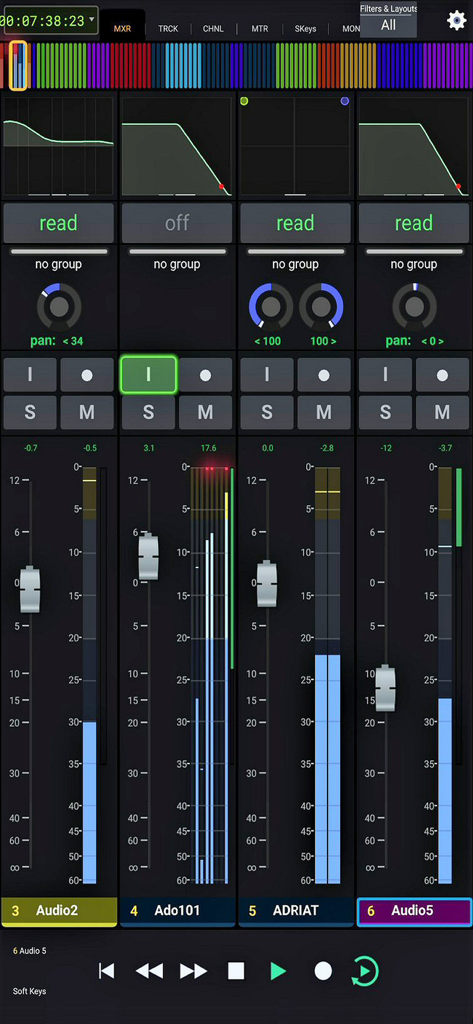
Interfaz de consola de mezcla de audio profesional con faders y tiras de canal

Interfaz de consola de mezcla de audio profesional con faders y tiras de canal

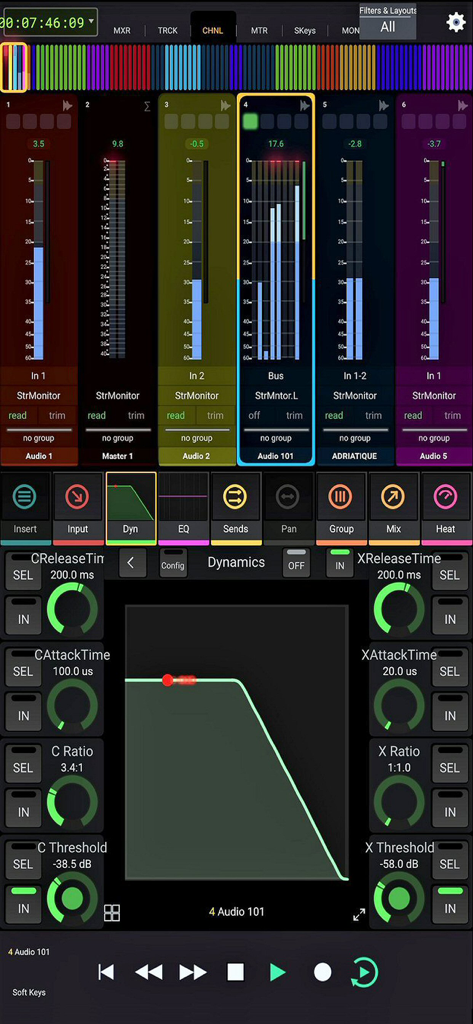
Interfaz de control de dinámica y mezcla de audio profesional en la aplicación Avid Control

Interfaz de control de dinámica y mezcla de audio profesional en la aplicación Avid Control

Domina tu Mezcla con Precisión

Las herramientas que hacen destacar esta app, elegida por 138K+ usuarios.

🎙️

Graba en Cualquier Lugar y Momento

Libérate de tu escritorio. Controla tu sesión de forma inalámbrica desde la cabina de voz o a través del estudio, perfecto para el profesional independiente que lo hace todo.

🎚️

Mezcla Multitáctil

Deja de hacer clic y empieza a crear. Manipula varios faders simultáneamente y activa macros complejas con un solo toque para mantener tu flujo de trabajo en un estado constante.

📈

Retroalimentación Visual de Nivel Profesional

Obtén medición estilo S6 de alta resolución y vistas de pista completas. Navega por sesiones masivas con la claridad visual requerida para resultados de nivel profesional.

Amada por usuarios en todo el mundo

Con la confianza de 138K+ personas que aman esta app.

"

"Como productor que a menudo graba sus propias voces e instrumentos, Avid Control ha sido un cambio radical. Poder activar la grabación y los punch-ins directamente desde la cabina de voz sin tener que correr de vuelta a mi escritorio me ahorra mucho tiempo y mantiene fluyendo la energía creativa. Es esencialmente una superficie de control de alta gama por el precio de un iPad."

Marcus Thorne, Productor Musical
"

"La medición estilo S6 y la integración de macros son increíbles para mi flujo de trabajo de postproducción. Lo he emparejado con mi Avid S1, y el nivel de retroalimentación visual y control táctil que obtengo sobre Pro Tools no tiene rival. Ha reemplazado completamente mi ratón para la mezcla, y los gestos multitáctiles hacen que la automatización compleja se sienta natural."

Sarah Lin, Mezcladora de Regrabación

Sobre la app

Todo lo que necesitas saber sobre Avid Control.

Descripción

For full instructions please see: http://avid.force.com/pkb/articles/faq/Avid-Control-Support SYSTEM REQUIREMENTS • Qualified Mac or Windows-based computer running any supported EUCON-enabled application and EuControl 2025.12 (NOTE: The free EUCON 2025.12 software must be downloaded from Avid and installed before using Avid Control) • One of the following connections: - Accessible wireless network (5 Ghz Wi-Fi network recommended), or - Lightning-to-USB 3 Camera Adapter + USB 2-to-Ethernet Adapter to connect an Ethernet cable directly to iPad (be sure to disable Wi-Fi on your iPad when using this connection type) ABOUT AVID CONTROL Take wireless control of your favorite audio and video software—right from your iPad. With Avid Control, you can record and mix audio in Pro Tools, Media Composer, Logic, Cubase, Nuendo, Digital Performer, Premiere and other media software, faster and more easily than working with a mouse and keyboard alone. The app combines the tight hardware/software integration and high-speed communication power of EUCON technology with the multi-touch advancements of iOS, so you get deep control, with great mixing flexibility. And when used with an Avid control surface (including the new Avid S1), you gain new touch workflows and custom control. Best of all… it’s free! Track and mix with just a touch • Speed up your efficiency using a host of controls • Record, mute, and solo tracks with a tap • Ride multiple faders to bring more life to your mix • Get insight into your mix with extensive visual feedback Get unrivaled audio and video control • Access and control hundreds of software commands • Punch in audio and toggle automation modes • Trigger complex macros that will save you tons of time • Switch control to different applications using a single app Mix faster with intelligent design • Gain multitouch control to speed up your efficiency • Interact with and control your mix in whole new ways • Perform keystroke shortcuts and more with a single tap • Bring tactile control with you, anywhere you go Navigate huge mixes easily • Get fast access to any channel with Tracks view • Quickly scroll through large mixes • Select, record-enable, solo, and mute multiple tracks • Keep an eye on levels with S6-style metering Free yourself from the cables that bind • Work in ways not possible with a wired mouse or control surface • Record yourself in a different room from your DAW • Control up to two networked workstations across a facility • Trigger playback or recording from anywhere Extend your control surface's workflows • Get enhanced touch control and customizable layouts • Navigate mixes faster with Tracks view • View a counter display and additional visual feedback • Recall layouts and trigger macros Work with your favorite audio and video software* • Avid Pro Tools • Avid Media Composer • Apple Logic Pro X • Steinberg Cubase • Steinberg Nuendo • Merging Pyramix • Mackie Control * Please see Avid’s Control app support page for a full compatibility list.

Última versión

2025.12.0

Tamaño

47.5 MB

Fecha de lanzamiento

6 ago 2015

¿Listo para Dominar tu Mezcla?

Únete a la élite de la industria y transforma tu flujo de trabajo hoy mismo. Descarga Avid Control gratis y lleva la precisión de una consola profesional a tu iPad.

Descargar en App Store