Channels for HDHomeRun!

Channels for HDHomeRun!

Descargar en App Store
Spark by MWM logo
Logo de Channels for HDHomeRun!
Channels para HDHomeRun: La experiencia definitiva de TV en vivo para quienes renuncian al cable

Lleva los deportes locales, las noticias y las cadenas de televisión abierta directamente a tu Apple TV y dispositivos iOS. Integra a la perfección la televisión en vivo en tu red doméstica con una guía de cuadrícula de alta calidad y un rendimiento de alta fidelidad.

Editor

Fancy Bits, LLC

Categoría

Entertainment

Descargas

448K+

Valoración

4.4/5

Total valoraciones

1K+

Idiomas

1

La televisión redefinida

Descubre la interfaz utilizada por 448K+ usuarios.
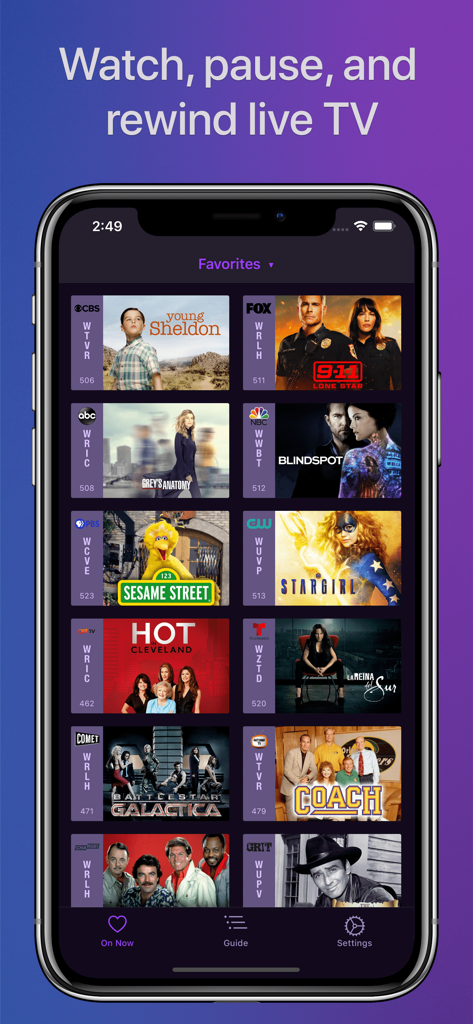
Interfaz de la aplicación Channels que muestra una cuadrícula de favoritos de TV en vivo, incluyendo Young Sheldon y Sesame Street

Interfaz de la aplicación Channels que muestra una cuadrícula de favoritos de TV en vivo, incluyendo Young Sheldon y Sesame Street

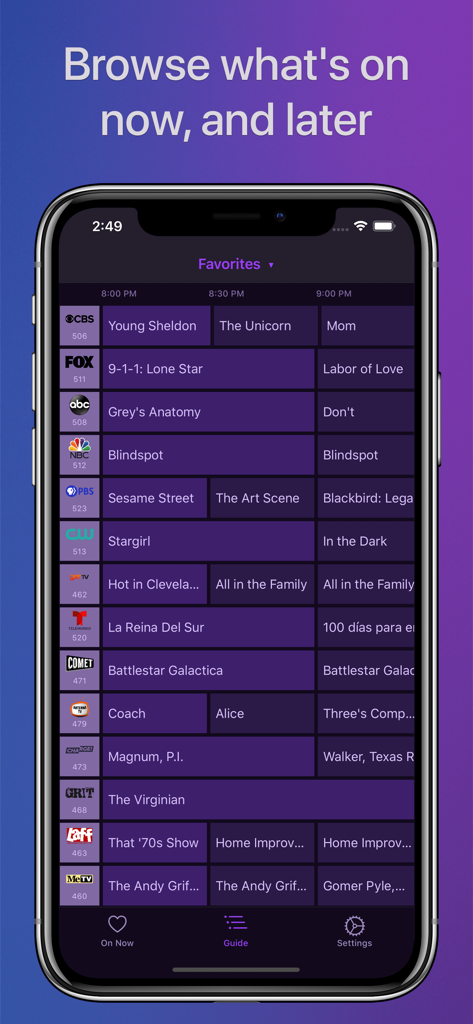
Aplicación Channels para HDHomeRun que muestra una guía de televisión de cuadrícula completa en la pantalla de un iPhone.

Aplicación Channels para HDHomeRun que muestra una guía de televisión de cuadrícula completa en la pantalla de un iPhone.

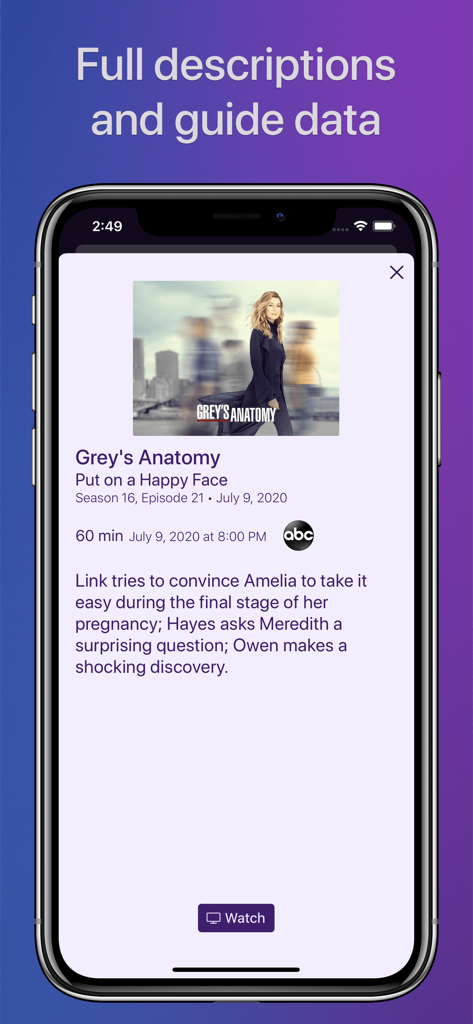
Captura de pantalla de la aplicación Channels que muestra datos detallados de la guía de programas de televisión y la descripción del episodio en un iPhone

Captura de pantalla de la aplicación Channels que muestra datos detallados de la guía de programas de televisión y la descripción del episodio en un iPhone

La actualización definitiva para tu cine en casa

Las herramientas que hacen destacar esta app, elegida por 448K+ usuarios.

Guía de cuadrícula profesional

Olvídate del decodificador de cable saturado. Navega por tus canales con una interfaz intuitiva de alto rendimiento diseñada para sentirse nativa en tus dispositivos Apple.

🏟️

Calidad de video sin concesiones

Mira deportes y noticias locales en Full HD con sonido envolvente 5.1. Disfruta de la estabilidad de una conexión directa de sintonizador sin el retraso del streaming por internet.

📱

Acceso multi-sala fluido

Deja que tu televisor te siga por toda la casa. Una sola antena alimenta todos los dispositivos de tu red, permitiéndote cambiar de tu Apple TV a tu iPad en segundos.

Amada por usuarios en todo el mundo

Con la confianza de 448K+ personas que aman esta app.

"

"Channels es el estándar de oro absoluto para quienes renuncian al cable. La interfaz está a años luz de cualquier aplicación de sintonización convencional, y la integración con mi Apple TV es perfecta. Finalmente tengo deportes y noticias locales en Full HD sin el saturado contrato de cable. Es la pieza que le faltaba a mi configuración de cine en casa."

Marcus Thompson
"

"Me encanta poder llevar el partido de la sala al iPad en la cocina sin perderme ni una jugada. La guía de cuadrícula es increíblemente rápida y la calidad del sonido envolvente 5.1 es de primera clase. Hace que mi configuración de antena se sienta como un servicio de cable premium, pero mucho más intuitivo."

Sarah Jenkins

Sobre la app

Todo lo que necesitas saber sobre Channels for HDHomeRun!.

Descripción

Watch live TV, right next to your apps. Channels lets you play, pause, and rewind local or cable TV directly on your Apple TV with your HDHomeRun TV tuner. If you are a Channels Plus subscriber with DVR Service, search for the free app: Channels: Whole Home DVR. Channels requires an HDHomeRun networked TV tuner to watch live TV on your iPhone, iPad, or iPod Touch. Learn more about how this works below. • Pause, rewind, and fast forward live TV • Guide Data • Full grid guide • Full HD streaming (bandwidth permitting) • 5.1 Surround Sound • Closed captioning • Full support for VoiceOver • Channel favoriting • Jump back to last channel • Auto Discovery • Browse what's on other channels while watching TV • Manage your HDHomeRun devices from Channels "If you’re a cord cutter, then Channels coupled with an HDHomeRun and antenna is one of the best purchases you can make." — 9to5mac "If live television has been a missing or irritating-to-use piece for your viewing pleasure, Channels plus a networked tuner pulls it neatly into your iPhone, iPod touch, or iPad." — Macworld Channels requires modern iOS devices and 802.11AC wireless for HD streaming. But as usual, your milage may vary. Supported devices: All iOS devices with an A7 chip and up. Note: Channels does not support Picture in Picture mode on the iPad or AirPlay on any device due to the video format provided by the HDHomeRun tuners. This is an iOS limitation. -- Why Use Channels? -- Channels is the missing piece of your puzzle. If you already watch everything through streaming apps, Channels lets you finally watch sports, award shows, local news, and other live events on your same device. • Watch live primetime TV, local news, and sports on your Apple TV. • Netflix, Hulu, Movies, Games, AirPlay, and now live TV on the same device. • Already using antenna for live TV? Channels lets you use one antenna to watch TV on all the devices in your home. • Want sports on your porch? News in the kitchen? Channels lets you watch these anywhere in the home. Let your TV watching follow you around the house. -- How Does It Work? -- An HDHomeRun is a simple TV tuner that can broadcast television over your home network. Channels streams that video directly to your device. 1. Plug an HD antenna or your cable into your HDHomeRun. 2. Plug your HDHomeRun into your router. 3. Watch live TV via the Channels app. -- How Do You Use It? -- Here's some protips on how to get the most out of Channels. • Pick your favorite channels by selecting your HDHomeRun device in the Settings tab and tapping on a channel. • See quickly what’s currently on your favorite channels with the On Now tab. • Tap on a channel to view more info about it (or just 3D Touch it). • Live TV buffer works for ~90 mins or less depending on how much storage is available on your device. • Skip ahead 30s by swiping right. Skip back 7s by swiping left. • Double-tap with 2 fingers to switch to the previous channel. • Swipe up/down on the Quick Guide to see what else is on your favorite channels. Tap it to change to that channel. -- HDHomeRun Device Support -- All HDHomeRun devices are supported by Channels. • HDHomeRun PRIME • HDHomeRun EXTEND • HDHomeRun EXPAND • HDHomeRun CONNECT • HDHomeRun CONNECT DUO • HDHomeRun CONNECT QUATRO • HDHomeRun DUAL • HDHomeRun ORIGINAL (blue and white tuners) Learn more about HDHomeRun tuners on silicondust.com. Simply plug a compatible tuner into your home network router and start watching Live TV with Channels today! • DRM protected streams are *not* currently supported. • Channels does *not* work outside of your home. It only works when connected to the same network as your HDHomeRun Device For questions, concerns, bug reports, and feature requests, contact us on twitter @getchannels or via email support@getchannels.com. You can talk about everything Channels on our community site at: https://community.getchannels.com.

Última versión

7.0.1

Tamaño

156.0 MB

Fecha de lanzamiento

30 jul 2016

Completa tu configuración de 'Cord-Cutting' profesional

Únete a más de 400,000 entusiastas que han recuperado su televisión en vivo. Conecta tu HDHomeRun a tus dispositivos Apple favoritos para disfrutar de la experiencia premium y sin retrasos que tu red doméstica merece.

Descargar en App Store