iMPC Pro 2 for iPhone

iMPC Pro 2 for iPhone

Descargar en App Store
Spark by MWM logo
Logo de iMPC Pro 2 for iPhone
iMPC Pro 2 para iPhone: La Potencia Icónica para Crear Beats en Tu Bolsillo

Lleva el legendario flujo de trabajo de Akai Professional a tu estudio móvil. Muestrea, corta y mezcla beats estándar de la industria con un mezclador de 64 pistas, integración AU y la icónica interfaz de 16 pads, donde sea que te llegue la inspiración.

Descargar en App Store

Editor

Akai Professional

Categoría

Music

Descargas

214K+

Valoración

4.5/5

Total valoraciones

2K+

Idiomas

1

El Poder del MPC, Visualizado

Descubre la interfaz utilizada por 214K+ usuarios.
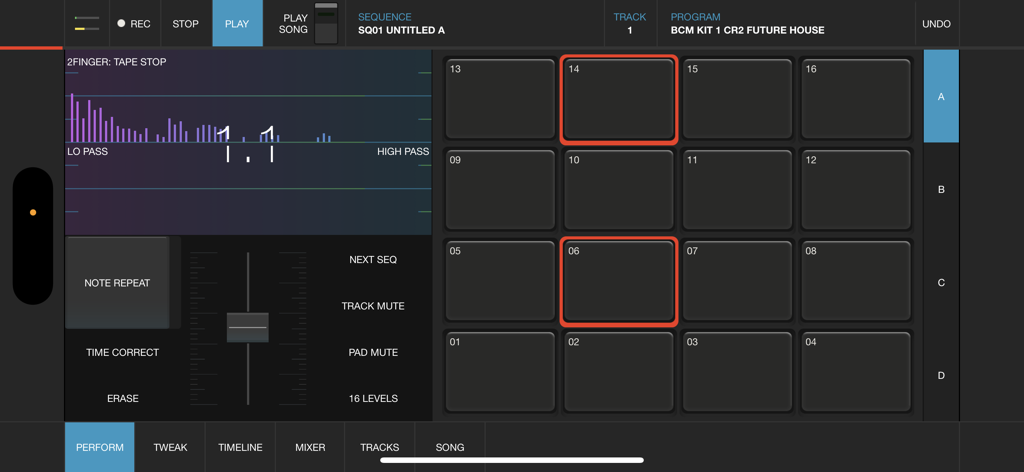
Interfaz profesional de creación de beats para iMPC Pro 2 en iPhone con la icónica cuadrícula de 16 pads y controles de rendimiento de audio

Interfaz profesional de creación de beats para iMPC Pro 2 en iPhone con la icónica cuadrícula de 16 pads y controles de rendimiento de audio

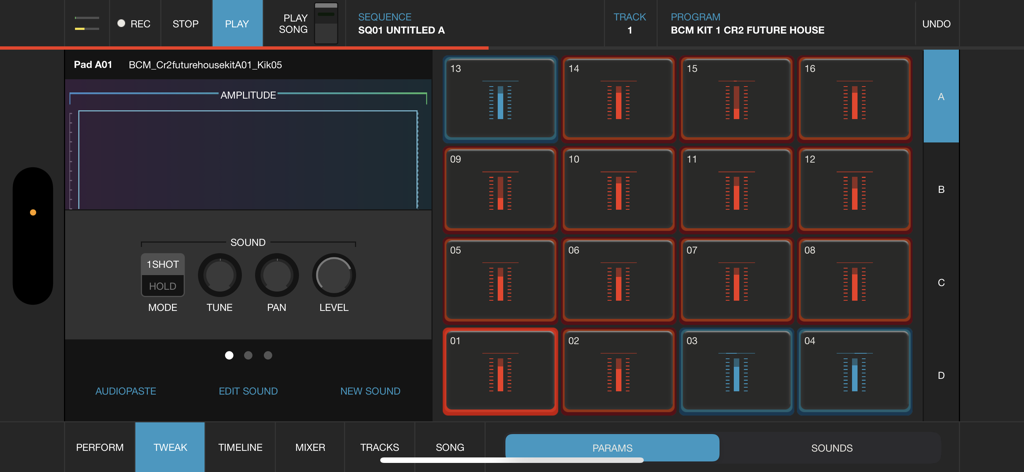
Interfaz de iMPC Pro 2 para iPhone con 16 pads de batería y un editor de sonido de forma de onda para creación de beats móvil

Interfaz de iMPC Pro 2 para iPhone con 16 pads de batería y un editor de sonido de forma de onda para creación de beats móvil

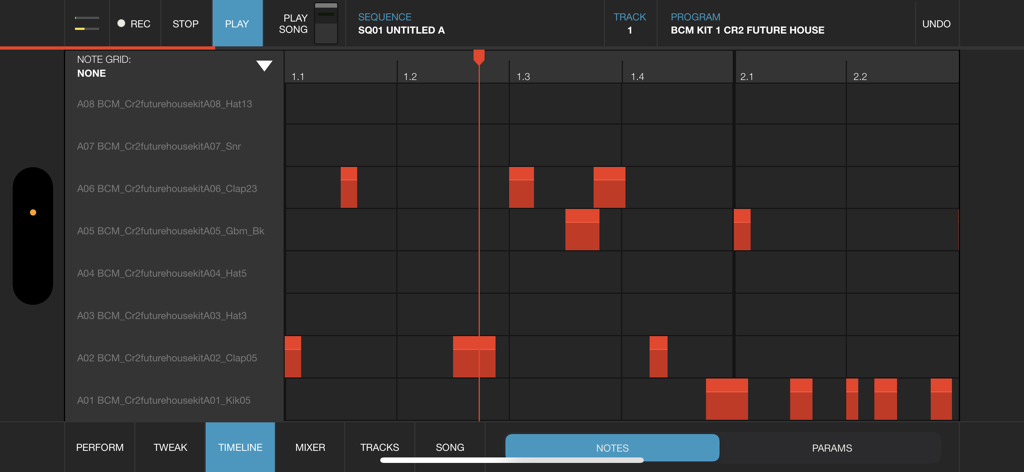
Vista de línea de tiempo de iMPC Pro 2 para iPhone con cuadrícula de notas para secuenciación de producción musical

Vista de línea de tiempo de iMPC Pro 2 para iPhone con cuadrícula de notas para secuenciación de producción musical

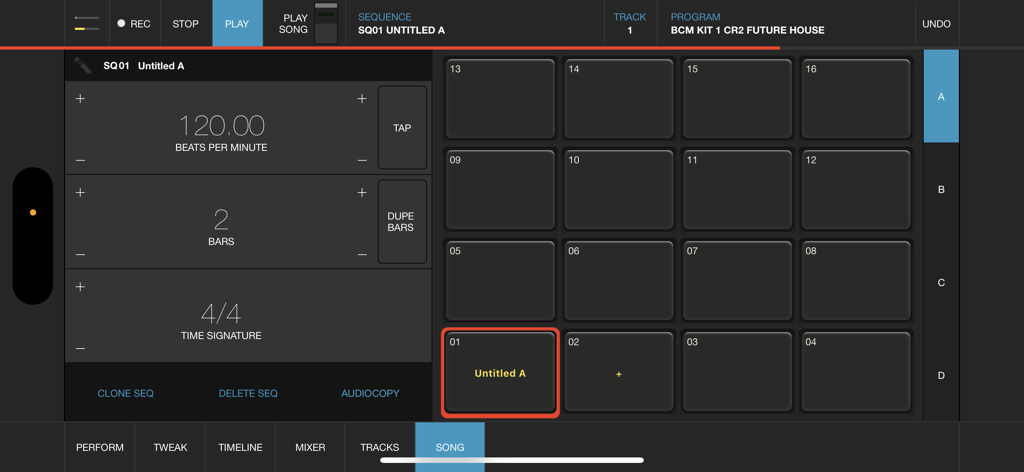
Interfaz del modo de canción de iMPC Pro 2 para iPhone que muestra la cuadrícula de 16 pads y la configuración de secuencia

Interfaz del modo de canción de iMPC Pro 2 para iPhone que muestra la cuadrícula de 16 pads y la configuración de secuencia

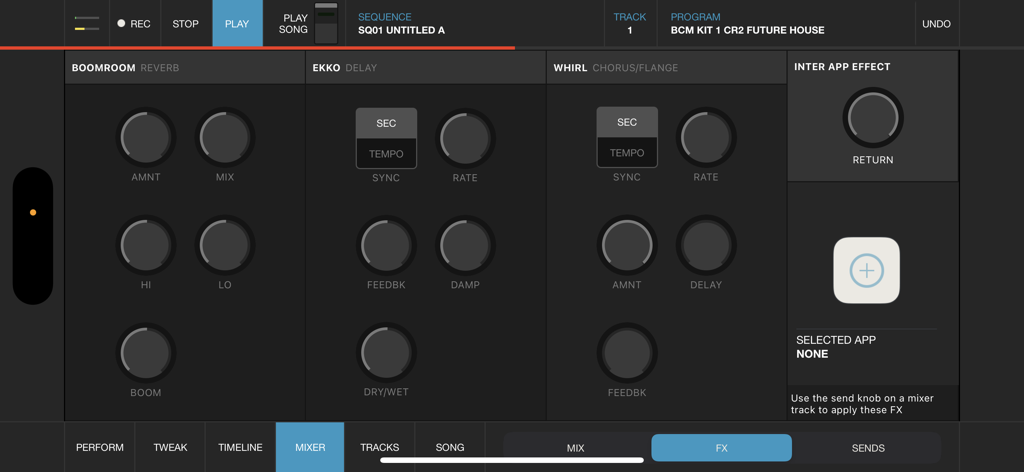
La interfaz del mezclador de efectos de iMPC Pro 2 para iPhone con controles de reverberación, delay y chorus

La interfaz del mezclador de efectos de iMPC Pro 2 para iPhone con controles de reverberación, delay y chorus

El Estándar de Oro de la Producción Móvil

Las herramientas que hacen destacar esta app, elegida por 214K+ usuarios.

✂️

Muestreo y Corte Icónico

Experimenta la precisión del Chop-Shop. Muestrea directamente desde Spotify y utiliza la edición intuitiva multitáctil para transformar sonidos como un profesional.

🏗️

Potencia de Estudio de 64 Pistas

Construye arreglos complejos con un mezclador masivo, pistas vocales y soporte Audio Unit. Tu bolsillo es ahora una potencia de producción.

🎓

Acceso a la Universidad iMPC

Evita la curva de aprendizaje. Domina el arte de la creación de beats con tutoriales integrados y desbloquea kits de sonido exclusivos de la bóveda de Akai.

Amada por usuarios en todo el mundo

Con la confianza de 214K+ personas que aman esta app.

"

"Como productor profesional siempre en movimiento, esta aplicación es un cambio de juego completo. El legendario flujo de trabajo MPC está perfectamente capturado en el iPhone, y poder grabar voces y mezclar 64 pistas mientras estoy en el tren es una locura. No es solo un juguete; es un estudio legítimo en mi bolsillo."

Marcus 'M-Dot' Johnson
"

"Comencé sin experiencia, pero la Universidad iMPC hizo que la curva de aprendizaje fuera muy fácil. El muestreo de Spotify y la edición del Chop-shop son increíblemente intuitivos. Ya he terminado mi primer EP completamente en esta aplicación, y la calidad de sonido de los kits integrados es de primer nivel, estándar de la industria."

Elena 'L-Beatz' Rivera

Análisis de reseñas

Información de las reseñas de usuarios.

Puntuación de sentimiento

32%
Negativo

Resumen

The app receives predominantly negative feedback, primarily due to persistent issues with sample import, which users describe as frustrating and often broken with AudioCopy, iTunes, and inter-app sharing. Many users report frequent crashes, bugs, and a general lack of updates, with specific complaints about input lag on iPhone 15 and constant crashes on iPhone 14 Pro Max. While some appreciate its potential as a portable beat maker and its user-friendly interface, the lack of essential features like MPC swing, auto-chop, or 'FULL LEVEL' functionality, combined with poor developer support, leads many to feel the app is unusable or a 'money grab'.

Temas comunes

Sample Import Functionality(19)
Crashes and Bugs(16)
Lack of Updates & Support(10)
Missing Key Features(10)
Value for Money(9)
Creative Beat Making Tool(7)
User Interface & Workflow(6)

Sobre la app

Todo lo que necesitas saber sobre iMPC Pro 2 for iPhone.

Descripción

iMPC Pro 2 for iPhone fuses innovative song creation with the iconic MPC workflow. It’s a powerhouse in your pocket. Whether you’re using the powerful sampler, dropping in some vocals, or integrating an Audio Unit, you’re sure to find everything you need. AUDIO TRACKS: Within the audio tracks, you can time warp, pitch shift, and rearrange your audio clips in real time. The sophistication of real time manipulation is captured in a simple workflow and sleek interface. You can choose from multiple input sources to record, including external mic channels, hardware audio interfaces, and IAA. AUDIO UNIT TRACKS: You can now load any Audio Units instrument into an Audio Unit Track! Control your AU instrument with a classic piano keyboard interface and an iMPC interface with note variation, Flux Link, Note Repeat, 16 Levels, and more. The app also features an improvement to the workflow for song creation. Song sequencing is faster, more powerful, and more flexible, so you have complete creative control. 100% NEW SOUND KIT AND MORE: Designed exclusively for iMPC Pro 2 for iPhone, these kits cover some of the most iconic and cutting-edge beat genres available, from a range of beloved producers, all chosen from the Akai Professional vault. Each kit includes samples featuring sounds from punchy 808’s to melodic hits and stabs, designed for the best user experience possible. The app also comes with 4 additional Sound Packs for FREE (valued at $20). Grab these packs in the AudioCopy Content Store: Bryson’s Soul, Dark Swang, and Metro Bang. iMPC University students have the opportunity to earn an additional Sound Pack, The Diploma! You can use them in hundreds of AudioCopy compatible apps (including iMPC for iPhone). iMPC UNIVERSITY: Unlock producer secrets and learn how to become a full fledged song creator with this tutorial series. iMPCU unlocks one course per day and gives you the tools you need to take your music to the next level. Fun for both new and experienced users, iMPC Pro 2 for iPhone offers an expansive dive into the world of beatmaking and song editing through these courses. We’re excited for you to try it! FEATURES: Audio Tracks: - Record from built in mic, external mics, audio interfaces, instruments, etc. - Record from Inter App Audio Apps - Warp Tracks and Clips to match tempo - Access several quick editing features on Audio Clips (Pitch shift, Time Stretch, Amplify, Crop, Split, Duplicate) - Drag to arrange Audio Clips, snap them to an adjustable grid setting - Advanced waveform editing AudioUnit integration: - Audio Unit tweak mode with full keyboard support (including 2 dozen scale modes from Chromatic to Blues to Aeolian) --- - 100% New Sound Set, with 4 additional free Sound Packs - Sample sounds from Spotify - 64 Track Mixer with EQ and 4 FX sends (Reverb, Delay, Chorus/Flange, and one Inter App Audio Effect) - Chop-shop provides intuitive multi-touch editing, trimming, auditioning, splicing, splicing and processing samples - Tracks View shows an overview of all the tracks in your song - 16 Levels mode with attack, velocity, length, and tuning settings for quickly creating variations of sounds - Live Sequence queuing for real-time performance and playback - Time correct: 1/8 note - 1/32T with variable swing - MPC Note Repeat featuring 1/8 note - 1/32T timing with latch - IAA and Ableton Link support - Share beats and songs seamlessly to YouTube - 4 Mute Groups and custom-designed envelope filters for all pads - AudioCopy and AudioPaste support - Improved integration and support for iMPC Pro Packs and other Sound Packs from the AudioCopy Content Store - Expert MIDI support including expanded options, multiple maps, and more - Extensive undo/redo capabilities - New Song Arrangement workflow and integrated Song Mode makes song creation easier than ever - Drag entire Folders and Sound Packs directly to pads to load many sounds at once

Última versión

2.2.2

Tamaño

202.7 MB

Fecha de lanzamiento

10 dic 2018

Deja Tu Huella con el Flujo de Trabajo MPC Icónico

Únete a más de 214.000 creadores y transforma tu iPhone en una potencia de producción profesional. Tu próximo éxito está a solo un toque de distancia.

Descargar en App Store