Canon Viewer - Sheet music

Canon Viewer - Sheet music

Télécharger sur App Store
Spark by MWM logo
Logo de Canon Viewer - Sheet music

Canon Viewer - Partitions : La bibliothèque numérique ultime pour les musiciens modernes

Accédez à plus de 8 000 partitions professionnelles avec transposition instantanée, retournement automatique des pages et prise en charge de l'Apple Pencil. Entraînez-vous plus intelligemment, enregistrez vos progrès et emportez toute votre collection de musique partout avec votre iPad.

Télécharger sur App Store

Éditeur

Funtap Co. Ltd.

Catégorie

Music

Téléchargements

57K+

Note

4.6/5

Nombre d'avis

700

Langues

2

Partitions, réinventées

Découvrez l'interface utilisée par 57K+ utilisateurs.

Un iPad affichant des partitions numériques de l'application Canon Viewer sur un pupitre de piano pendant que quelqu'un joue.

Un iPad affichant des partitions numériques de l'application Canon Viewer sur un pupitre de piano pendant que quelqu'un joue.

Une femme jouant du piano avec un surlignage du texte "Play" mettant en évidence la fonction de partition numérique

Une femme jouant du piano avec un surlignage du texte "Play" mettant en évidence la fonction de partition numérique

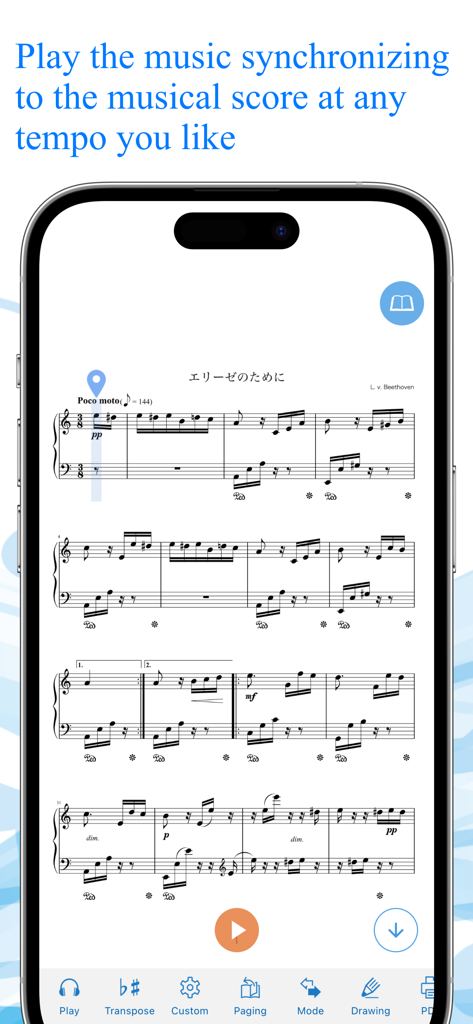
L'application Canon Viewer affichant une lecture synchronisée de partitions sur un smartphone.

L'application Canon Viewer affichant une lecture synchronisée de partitions sur un smartphone.

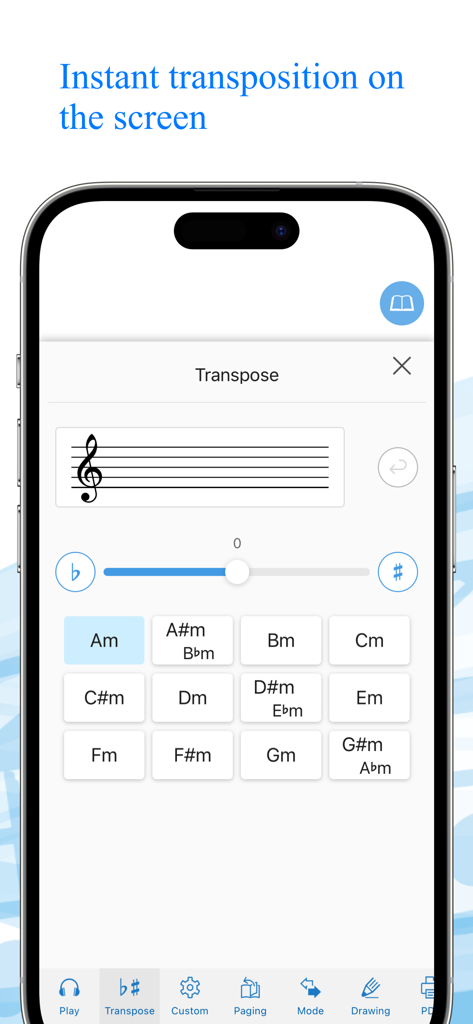
Écran de smartphone affichant l'interface de transposition instantanée dans l'application Canon Viewer avec une grille de touches musicales et un curseur de transposition.

Écran de smartphone affichant l'interface de transposition instantanée dans l'application Canon Viewer avec une grille de touches musicales et un curseur de transposition.

Interface de l'application Canon Viewer montrant la fonction d'importation de partitions personnelles via des fichiers PDF ou des photos.

Interface de l'application Canon Viewer montrant la fonction d'importation de partitions personnelles via des fichiers PDF ou des photos.

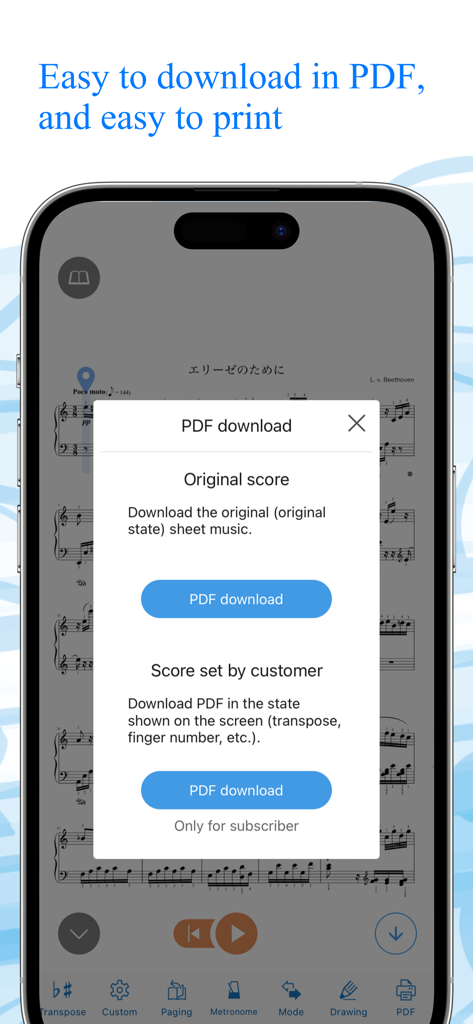
L'application Canon Viewer affichant un menu de téléchargement PDF pour les partitions originales et personnalisées

L'application Canon Viewer affichant un menu de téléchargement PDF pour les partitions originales et personnalisées

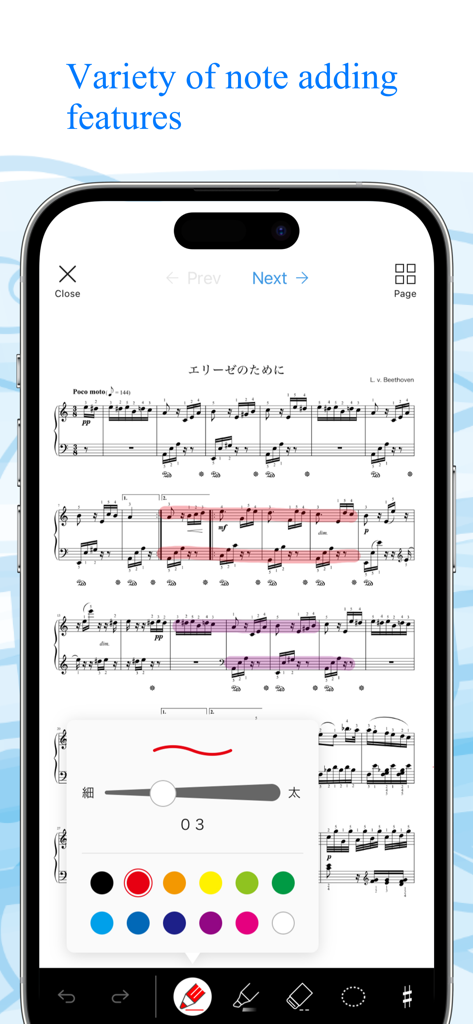
Un écran de téléphone portable montrant l'application Canon Viewer avec des partitions de piano et un menu pour ajouter des notes et des surlignages numériques dans différentes couleurs.

Un écran de téléphone portable montrant l'application Canon Viewer avec des partitions de piano et un menu pour ajouter des notes et des surlignages numériques dans différentes couleurs.

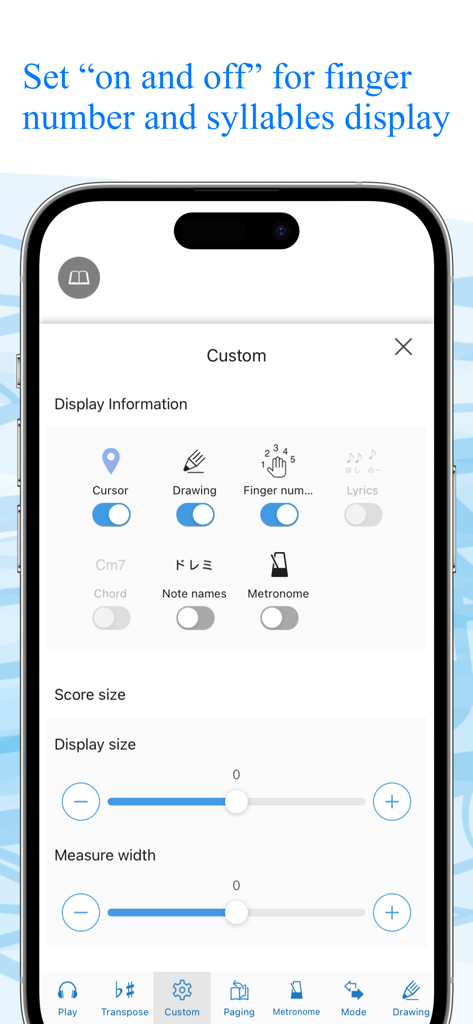
Écran des paramètres de l'application Canon Viewer pour personnaliser l'affichage des partitions avec des commutateurs pour les doigtés et les noms de notes

Écran des paramètres de l'application Canon Viewer pour personnaliser l'affichage des partitions avec des commutateurs pour les doigtés et les noms de notes

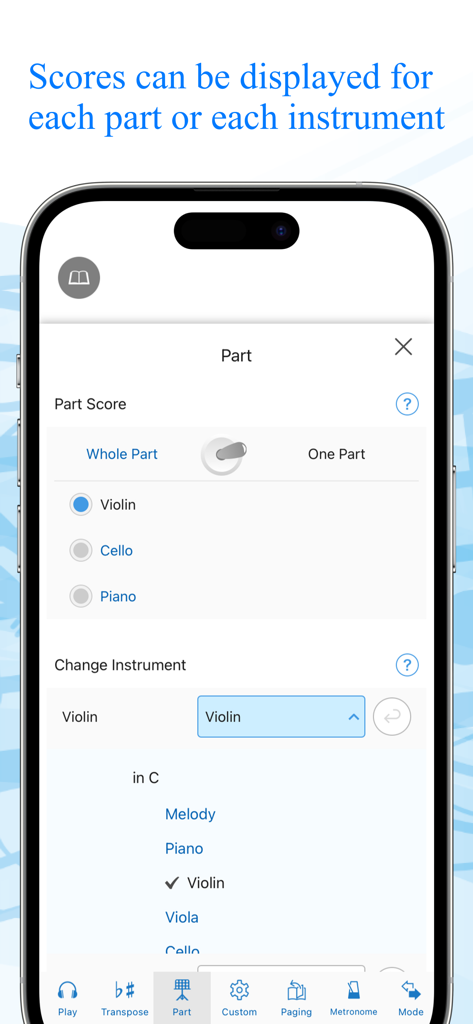
Interface de l'application pour sélectionner des parties d'instruments spécifiques et des partitions musicales

Interface de l'application pour sélectionner des parties d'instruments spécifiques et des partitions musicales

Écran de smartphone montrant le magasin Canon Viewer avec une barre de recherche et une liste classée de titres de partitions numériques à télécharger.

Écran de smartphone montrant le magasin Canon Viewer avec une barre de recherche et une liste classée de titres de partitions numériques à télécharger.

Maîtrisez chaque morceau avec une précision numérique

Les outils qui font la différence, choisis par 57K+ utilisateurs.

✍️

Annotation intelligente et prise en charge de l'Apple Pencil

Laissez tomber le papier et le stylo. Annotez vos partitions naturellement avec votre Apple Pencil et exportez vos partitions modifiées au format PDF pour une flexibilité totale.

🎹

Transposition instantanée en un seul clic

Adaptez n'importe quel morceau à votre tessiture vocale ou à votre instrument d'un simple toucher. Transposez instantanément sur les 12 tonalités sans réécriture manuelle.

🚀

Retournement automatique des pages mains libres

Gardez vos mains sur votre instrument. Utilisez le défilement automatique personnalisable ou la prise en charge d'une pédale Bluetooth pour rester dans le rythme de chaque performance.

Plébiscitée par les utilisateurs du monde entier

Approuvée par 57K+ personnes qui adorent cette app.

"

"Cette application est un incontournable absolu pour tout musicien utilisant un iPad. La possibilité d'annoter des partitions avec mon Apple Pencil, puis de les transposer instantanément pour mes chanteurs pendant les répétitions m'a fait gagner des heures de travail. C'est facilement le meilleur visualiseur de partitions numériques que j'ai utilisé."

Samantha L., pianiste accompagnatrice
"

"Les fonctions de défilement et de retournement automatique des pages sont impeccables, surtout lorsqu'elles sont associées à une pédale Bluetooth. J'adore pouvoir isoler des parties d'instruments spécifiques et enregistrer mes séances d'entraînement pour suivre mes progrès : c'est comme avoir un coach personnel sur ma tablette."

Jason K., flûtiste professionnel

À propos de l'app

Tout ce que vous devez savoir sur Canon Viewer - Sheet music.

Description

This is a [free musical score application] with selection of 8,000 titles, where users can download their favorite tiles individually and can find many user-friendly features. “My score” can be used off-line. Users can customize their musical scores by using the functions such as [Automatic page turner] [Adding notes] [Play a musical score] and [background change]. When a user wants to play the melody line with wind instruments or stringed instruments, musical scores that correspond to the selected instruments will be automatically displayed. Another function transposes a whole musical score for those who want to play at the most appropriate key for a certain instrument. ”This is the very musical score application that all the music lovers have wanted!” Please discover what our application offers that may change your music life with its impressive user-friendly features. ◆◇ Point 1 : You can PLAY the musical scores ◇◆ You can listen to the sound, so that makes it easier to read musical sheets with complicated melody or rhythm. You can also change the tempo and play only the selected part, like only the right hand part of the piano scores, or only the alto and tenor parts of the chorus scores. This useful function will surely make your practice more efficient. ◆◇ Point 2 : Instant transposition with one click of a button ◇◆ With only one click of a button, you can transpose to any of 12 keys. If you want to play an instrument at a half lower key to accompany a singer, you can transpose instantly! You can also optimize your scores with “Change of Sound Range” function. Transposed musical scores can be downloaded in PDF format and printed. ◆◇ Point 3 : Perfect command of page turner ◇◆ The greatest feature of Canon Musical Score Viewer is the advanced page turner function. Users can set the speed and timing such as “At which measure to turn the page” for each score. If the display is set for “Scroll display” mode, the score will be shown as a single score flow from the beginning to the end, meaning users do not have to turn pages at all. It also works with external “Page turner pedal”. ◆◇ Point 4 : Scores can be displayed exclusively for favorite parts and instruments ◇◆ Users can change the parts other than piano as “Your favorite instrument”. According to the selection of the instrument, the score will be automatically altered. Display of “All parts” and “Each part” can be switched automatically. ◆◇ Point 5 : Free writing on the screen ◇◆ Users can freely add notes and codes to the scores on the screen, and download the edited scores in PDF format to print. For iPad, the use of Apple Pencil will make the editing easier. ◆◇ Point 6 : 2 kinds of practice mode ◇◆ [Repeat practice mode] Users can select the part of the score to play repeatedly. [Record practice mode] Users can record their performance and play it with the corresponding score. ◆◇ Point 7 : Customized display function ◇◆ Users can select any necessary information to be displayed including [Finger numbers] [Syllables] [Codes] and [Lyrics] by setting ON/OFF. Background image can also be customized with your favorite one. ** About Digital Musical Score Canon Digital Musical Score Canon is an online musical score delivery service. It delivers and sells more than 8,000 titles, majorly popular and trendy titles. All the scores are produced by professionals. All the purchased scores can be displayed and used on “Canon Musical Score Viewer” that can be operated on a Web browser or application of smartphones and tablets. https://www.canon-score.com/support

Dernière version

3.15.13

Taille

130.3 MB

Date de sortie

3 mars 2020

Toute votre bibliothèque musicale, perfectionnée.

Rejoignez plus de 50 000 musiciens utilisant des outils de niveau professionnel pour transposer, annoter et maîtriser plus de 8 000 partitions directement sur votre iPad.

Télécharger sur App Store