Juno Connect: Jupyter Client

Juno Connect: Jupyter Client

Télécharger sur App Store
Spark by MWM logo
Logo de Juno Connect: Jupyter Client

Juno Connect : Notebooks Jupyter professionnels sur iPad et iPhone

Exploitez la puissance de calcul à distance, où que vous soyez. Connectez-vous en toute sécurité à vos propres serveurs ou services cloud tels qu'AWS SageMaker et CoCalc avec une expérience de codage native, de qualité professionnelle.

Éditeur

Rational Matter Ltd

Catégorie

Developer Tools

Téléchargements

60K+

Note

4.6/5

Nombre d'avis

2K+

Langues

1

Votre laboratoire, redéfini

Découvrez l'interface utilisée par 60K+ utilisateurs.
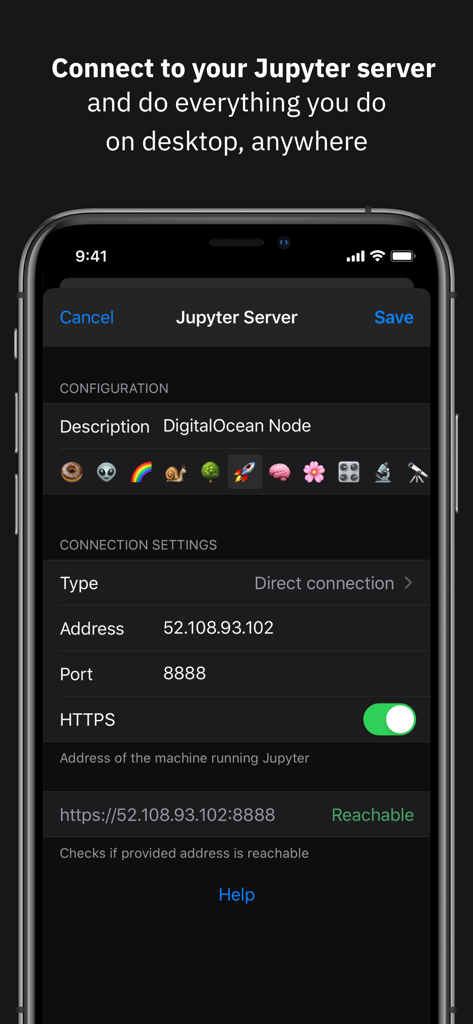
Interface Juno Connect pour la configuration d'une connexion à un serveur Jupyter distant sur iPhone

Interface Juno Connect pour la configuration d'une connexion à un serveur Jupyter distant sur iPhone

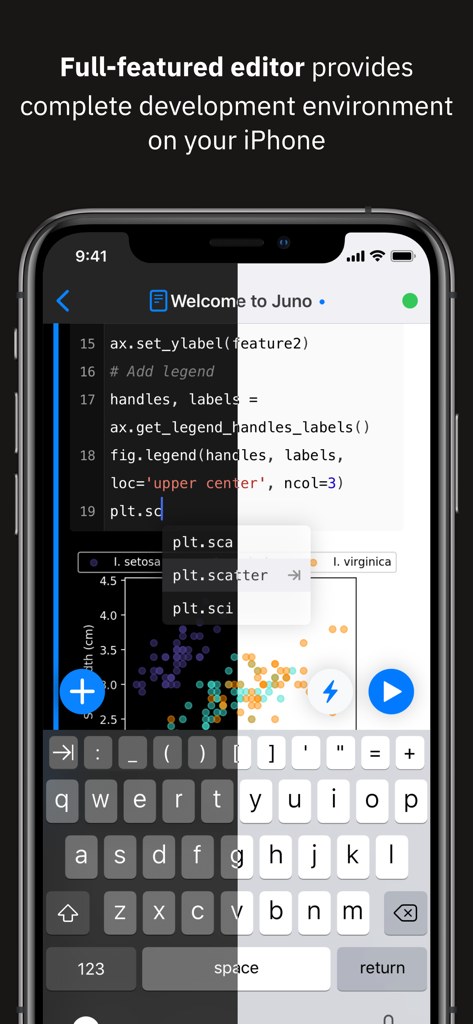
Application Juno Connect sur iPhone affichant un éditeur de code Python et un nuage de points avec prévisualisation en mode sombre et clair

Application Juno Connect sur iPhone affichant un éditeur de code Python et un nuage de points avec prévisualisation en mode sombre et clair

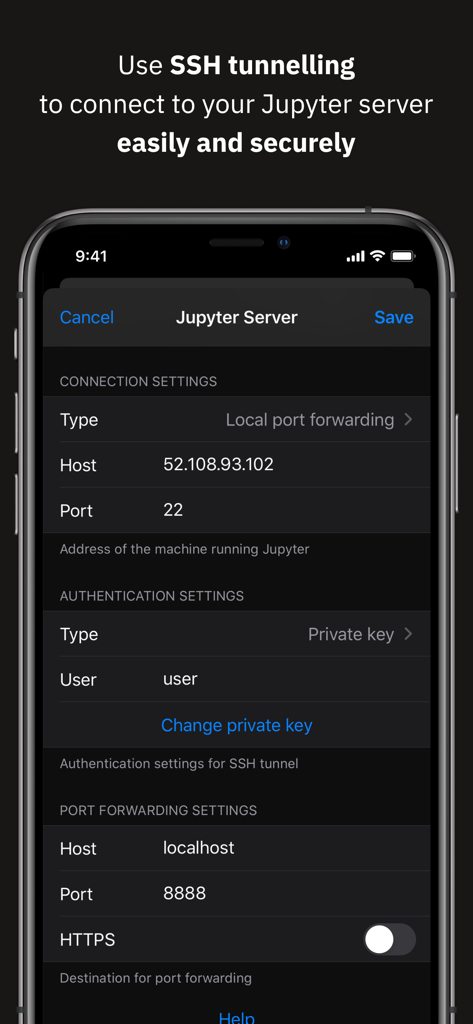
Configuration du tunneling SSH pour une connexion sécurisée au serveur Jupyter dans Juno Connect

Configuration du tunneling SSH pour une connexion sécurisée au serveur Jupyter dans Juno Connect

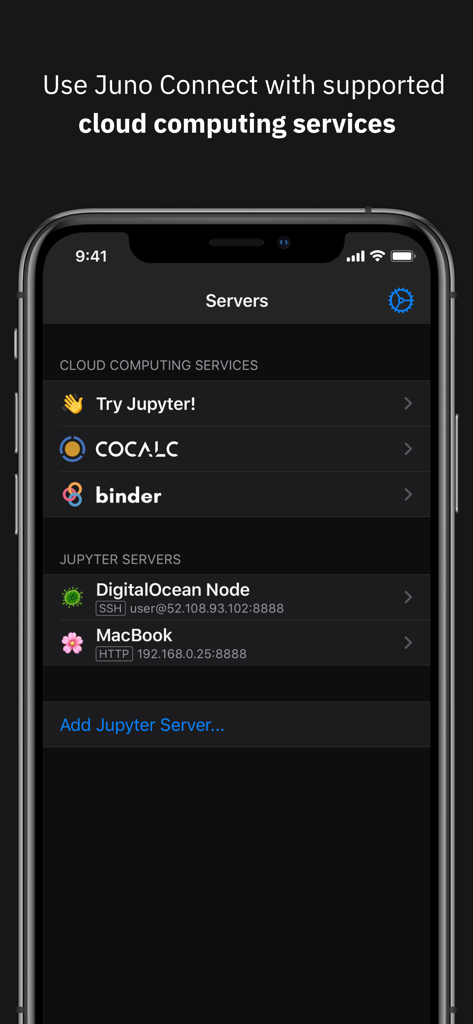
Écran d'iPhone montrant l'interface de l'application Juno Connect pour la sélection de services de calcul cloud et de serveurs Jupyter tels que CoCalc et DigitalOcean

Écran d'iPhone montrant l'interface de l'application Juno Connect pour la sélection de services de calcul cloud et de serveurs Jupyter tels que CoCalc et DigitalOcean

Science des données professionnelle, sans le bureau

Les outils qui font la différence, choisis par 60K+ utilisateurs.

☁️

Puissance de calcul illimitée

Déchargez l'entraînement intensif et l'analyse de données sur des serveurs distants comme AWS SageMaker, CoCalc ou votre propre matériel, tout en gérant le tout depuis votre appareil mobile.

⌨️

Expérience de codage de qualité professionnelle

Tirez pleinement parti de votre Magic Keyboard et de votre trackpad avec un éditeur raffiné conçu pour le multitâche sur iPadOS, les flux de travail en écran partagé et les raccourcis IDE complexes.

🔒

Sécurité de niveau entreprise

Travaillez en toute sécurité sur des projets sensibles en utilisant le tunneling SSH intégré et le transfert de port local, garantissant que votre code propriétaire et vos données restent protégés à tout moment.

Plébiscitée par les utilisateurs du monde entier

Approuvée par 60K+ personnes qui adorent cette app.

"

"Juno Connect a complètement transformé mon iPad Pro en une véritable station de travail pour la science des données. La prise en charge native du tunneling SSH et d'AWS SageMaker me permet de gérer des tâches d'entraînement intensives depuis n'importe où, sans compromettre la sécurité ou les performances."

Marcus Thorne, Ingénieur ML principal
"

"Le meilleur client Jupyter sur iOS, sans aucun doute. Je l'utilise quotidiennement pour prototyper des expériences sur Binder tout en gardant mes articles de recherche ouverts en mode Split View. C'est incroyablement fluide, et les raccourcis clavier étendus rendent le codage en déplacement naturel."

Sarah Jenkins, Chercheuse doctorante

À propos de l'app

Tout ce que vous devez savoir sur Juno Connect: Jupyter Client.

Description

Juno Connect is a client app for Jupyter, a cloud-based computational environment. Juno Connect lets you leverage the computing power of a remote Jupyter server right from your iPhone or iPad. With Juno Connect you can: • Connect to cloud-computing services, such as CoCalc, Binder, SageMaker, Gradient or NAAS • Add and configure your own remote Jupyter servers • Leverage SSH tunneling with local port forwarding for secure connections • Take full advantage of your keyboard and trackpad in our full-featured code editor • Utilise full multitasking capabilities on iPad When you run code in Juno Connect, the actual computing is happening on a remote Jupyter server, giving you access to virtually unlimited computational resources from your iPhone or iPad. You can either connect to your own Jupyter server — directly via HTTP/HTTPS, or by establishing an SSH tunnel with local port forwarding — or use cloud computing services, such as CoCalc, Binder, SageMaker, Gradient or NAAS. And if you would rather execute code on device instead, check out our other app Juno, it lets you work with Jupyter notebooks autonomously on your iPhone or iPad. Juno Connect offers a full-featured notebook and code editor, providing a complete development environment on your iPad or iPhone. it supports Dark Mode and Dynamic Type, offers extended on-screen keyboard and works beautifully with all hardware keyboards and trackpads. Juno Connect lets you reach your Jupyter server easily and securely with SSH tunnel using local port forwarding. You can launch Juno Connect in Split-screen mode alongside other apps on iPad — run notebooks with documentation, terminal, or other code editor in front of you. WHAT IS JUPYTER? Jupyter is an interactive cloud-based computational environment, where you can combine code execution, rich text, mathematics, plots and rich media. It works with Jupyter notebooks, a computational document format that allows storing live code, markdown text, plots, images and equations in LaTeX — all wrapped into a single notebook file. Notebook documents keep record of all inputs and outputs of the interactive programming session, and the rich output generated by running R, Python or Julia scripts (including HTML, images, video, and plots) is embedded into the Jupyter notebook document. They are especially convenient if you are coding in Python for data analysis, machine learning, or computational science in general. A notebook consists of a sequence of cells, each representing either a narrative text in a form of markdown text or HTML, or a coding script with a text or media output. This makes notebooks both human-readable documents with the analysis description and the results (figures, tables, etc), as well as executable scripts for data analysis or plain programming. You can use Jupyter notebook as a document with optional executable code in it, or simply as a programming playground for data manipulation and experiments. Jupyter supports countless programming languages, including Python, R, Julia, and Scala. Jupyter lets you leverage big data tools, such as Apache Spark, from Python, R, and Scala — or explore that same data with pandas, scikit-learn, ggplot2, PyTorch and TensorFlow. And, of course, Juno Connect lets you use whichever language kernels and libraries are installed on your Jupyter server right on your iPhone or iPad.

Dernière version

1.6.13

Taille

15.3 MB

Date de sortie

24 janv. 2018

Prêt à libérer votre flux de travail de science des données ?

Rejoignez plus de 60 000 professionnels et chercheurs qui exploitent la puissance de calcul à distance en déplacement. Connectez-vous à SageMaker, CoCalc ou à votre propre serveur et commencez à coder avec un éditeur de qualité professionnelle sur iOS dès aujourd'hui.

Télécharger sur App Store