Juno Connect: Jupyter Client

Juno Connect: Jupyter Client

Scarica su App Store
Spark by MWM logo
Logo di Juno Connect: Jupyter Client

Juno Connect: Notebook Jupyter Professionali su iPad e iPhone

Sfrutta la potenza computazionale remota da qualsiasi luogo. Connettiti in modo sicuro ai tuoi server o ai servizi cloud come AWS SageMaker e CoCalc con un'esperienza di codifica nativa di livello desktop.

Editore

Rational Matter Ltd

Categoria

Developer Tools

Download

60K+

Valutazione

4.6/5

Valutazioni totali

2K+

Lingue

1

Il Tuo Laboratorio, Ridefinito

Scopri l'interfaccia usata da 60K+ utenti.
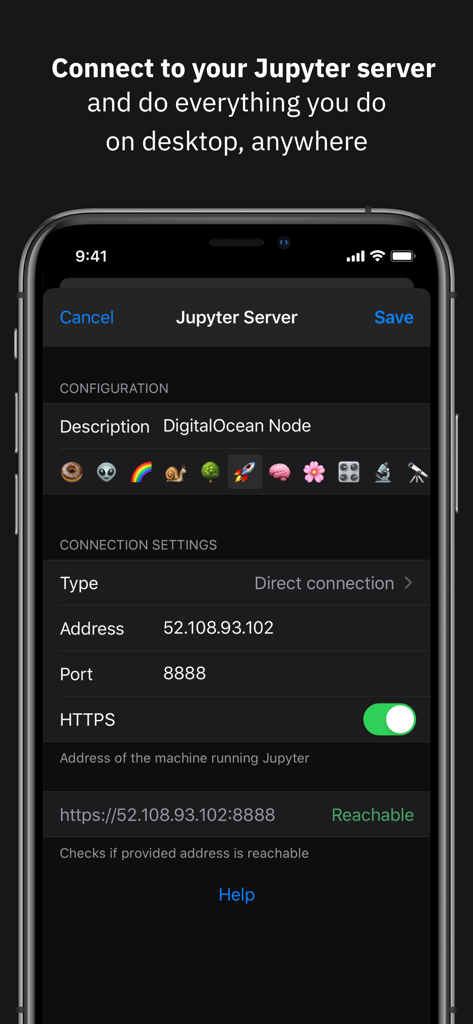
Interfaccia di Juno Connect per la configurazione della connessione a un server Jupyter remoto su iPhone

Interfaccia di Juno Connect per la configurazione della connessione a un server Jupyter remoto su iPhone

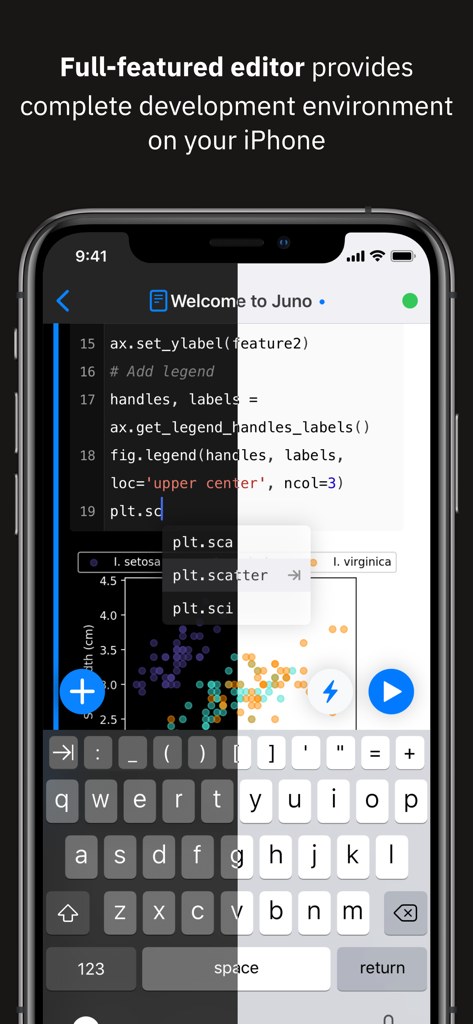
App Juno Connect su iPhone che mostra l'editor di codice Python e un grafico a dispersione con anteprima della modalità scura e chiara

App Juno Connect su iPhone che mostra l'editor di codice Python e un grafico a dispersione con anteprima della modalità scura e chiara

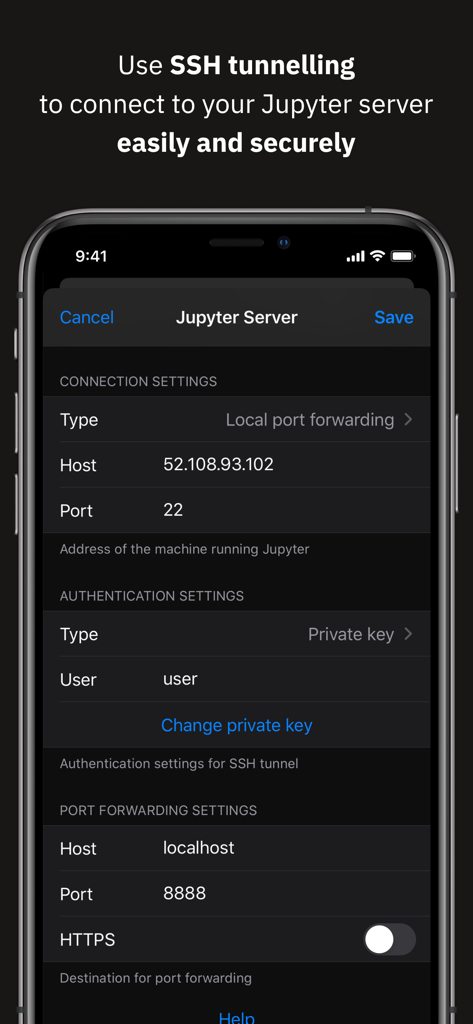
Impostazioni del tunneling SSH per una connessione sicura al server Jupyter in Juno Connect

Impostazioni del tunneling SSH per una connessione sicura al server Jupyter in Juno Connect

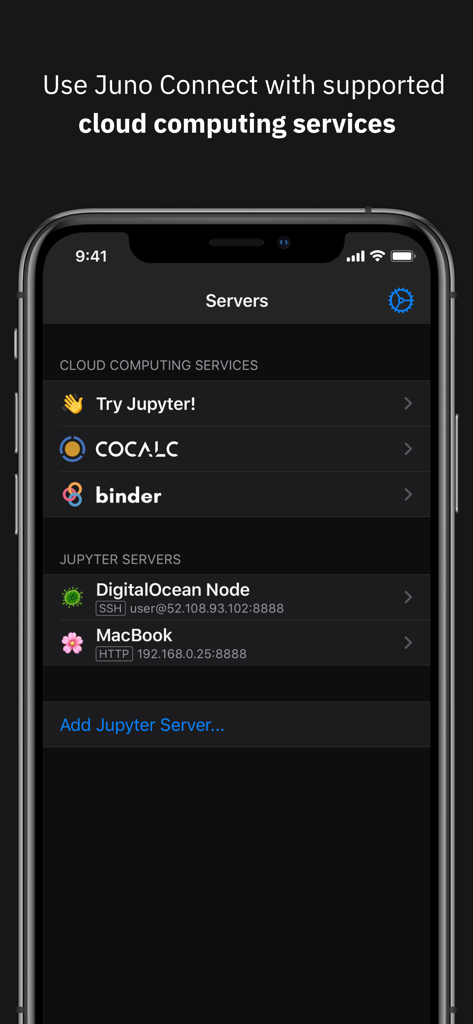
Schermata dell'iPhone che mostra l'interfaccia dell'app Juno Connect per la selezione di servizi di cloud computing e server Jupyter come CoCalc e DigitalOcean

Schermata dell'iPhone che mostra l'interfaccia dell'app Juno Connect per la selezione di servizi di cloud computing e server Jupyter come CoCalc e DigitalOcean

Data Science Professionale, Senza il Desktop

Gli strumenti che rendono questa app unica, scelti da 60K+ utenti.

☁️

Potenza Computazionale Illimitata

Scarica l'addestramento intensivo e l'analisi dei dati su server remoti come AWS SageMaker, CoCalc o il tuo hardware, gestendo tutto dal tuo dispositivo mobile.

⌨️

Esperienza di Codifica di Livello Desktop

Sfrutta appieno la tua Magic Keyboard e il tuo trackpad con un editor raffinato progettato per il multitasking di iPadOS, flussi di lavoro in split-screen e scorciatoie IDE complesse.

🔒

Sicurezza di Livello Enterprise

Lavora in modo sicuro su progetti sensibili utilizzando il tunneling SSH integrato e l'inoltro di porte locali, garantendo che il tuo codice e i tuoi dati proprietari rimangano protetti in ogni momento.

Amata dagli utenti di tutto il mondo

Scelto da 60K+ persone che amano questa app.

"

"Juno Connect ha trasformato completamente il mio iPad Pro in una vera postazione di lavoro per la data science. Il supporto nativo per il tunneling SSH e AWS SageMaker mi permette di gestire lavori di addestramento pesanti da qualsiasi luogo, senza compromettere sicurezza o prestazioni."

Marcus Thorne, Senior ML Engineer
"

"Il miglior client Jupyter su iOS, senza dubbio. Lo uso quotidianamente per prototipare esperimenti su Binder mentre tengo aperti i miei articoli di ricerca in Split View. È incredibilmente fluido e le scorciatoie da tastiera estese rendono la codifica in movimento naturale."

Sarah Jenkins, PhD Researcher

Info sull'app

Tutto quello che devi sapere su Juno Connect: Jupyter Client.

Descrizione

Juno Connect is a client app for Jupyter, a cloud-based computational environment. Juno Connect lets you leverage the computing power of a remote Jupyter server right from your iPhone or iPad. With Juno Connect you can: • Connect to cloud-computing services, such as CoCalc, Binder, SageMaker, Gradient or NAAS • Add and configure your own remote Jupyter servers • Leverage SSH tunneling with local port forwarding for secure connections • Take full advantage of your keyboard and trackpad in our full-featured code editor • Utilise full multitasking capabilities on iPad When you run code in Juno Connect, the actual computing is happening on a remote Jupyter server, giving you access to virtually unlimited computational resources from your iPhone or iPad. You can either connect to your own Jupyter server — directly via HTTP/HTTPS, or by establishing an SSH tunnel with local port forwarding — or use cloud computing services, such as CoCalc, Binder, SageMaker, Gradient or NAAS. And if you would rather execute code on device instead, check out our other app Juno, it lets you work with Jupyter notebooks autonomously on your iPhone or iPad. Juno Connect offers a full-featured notebook and code editor, providing a complete development environment on your iPad or iPhone. it supports Dark Mode and Dynamic Type, offers extended on-screen keyboard and works beautifully with all hardware keyboards and trackpads. Juno Connect lets you reach your Jupyter server easily and securely with SSH tunnel using local port forwarding. You can launch Juno Connect in Split-screen mode alongside other apps on iPad — run notebooks with documentation, terminal, or other code editor in front of you. WHAT IS JUPYTER? Jupyter is an interactive cloud-based computational environment, where you can combine code execution, rich text, mathematics, plots and rich media. It works with Jupyter notebooks, a computational document format that allows storing live code, markdown text, plots, images and equations in LaTeX — all wrapped into a single notebook file. Notebook documents keep record of all inputs and outputs of the interactive programming session, and the rich output generated by running R, Python or Julia scripts (including HTML, images, video, and plots) is embedded into the Jupyter notebook document. They are especially convenient if you are coding in Python for data analysis, machine learning, or computational science in general. A notebook consists of a sequence of cells, each representing either a narrative text in a form of markdown text or HTML, or a coding script with a text or media output. This makes notebooks both human-readable documents with the analysis description and the results (figures, tables, etc), as well as executable scripts for data analysis or plain programming. You can use Jupyter notebook as a document with optional executable code in it, or simply as a programming playground for data manipulation and experiments. Jupyter supports countless programming languages, including Python, R, Julia, and Scala. Jupyter lets you leverage big data tools, such as Apache Spark, from Python, R, and Scala — or explore that same data with pandas, scikit-learn, ggplot2, PyTorch and TensorFlow. And, of course, Juno Connect lets you use whichever language kernels and libraries are installed on your Jupyter server right on your iPhone or iPad.

Ultima versione

1.6.13

Dimensione

15.3 MB

Data di lancio

24 gen 2018

Pronto a Svincolare il Tuo Flusso di Lavoro di Data Science?

Unisciti a oltre 60.000 professionisti e ricercatori che sfruttano la potenza computazionale remota in movimento. Connettiti a SageMaker, CoCalc o al tuo server e inizia a codificare con un editor di livello desktop su iOS oggi stesso.

Scarica su App Store