Polycam 3D Scanner, LiDAR, 360

Polycam 3D Scanner, LiDAR, 360

ダウンロード: App Storeダウンロード: Google Play
Spark by MWM logo
ロゴ: Polycam 3D Scanner, LiDAR, 360

Polycam: 世界をリードする3Dスキャナー&LiDARアプリ

物理世界を高品質な3Dモデル、インスタントフロアプラン、没入型360度キャプチャへと変貌させます。建築家、デザイナー、クリエイターのためのプロレベルのスキャンが、かつてないほど簡単に。

開発元

Polycam Inc.

カテゴリ

Photo & Video

ダウンロード

12M+

ユーザー評価

4.7/5

評価数

110K+

対応言語

27

現実に、3Dでキャプチャ

このインターフェースを利用する 12M+ 人のユーザー.

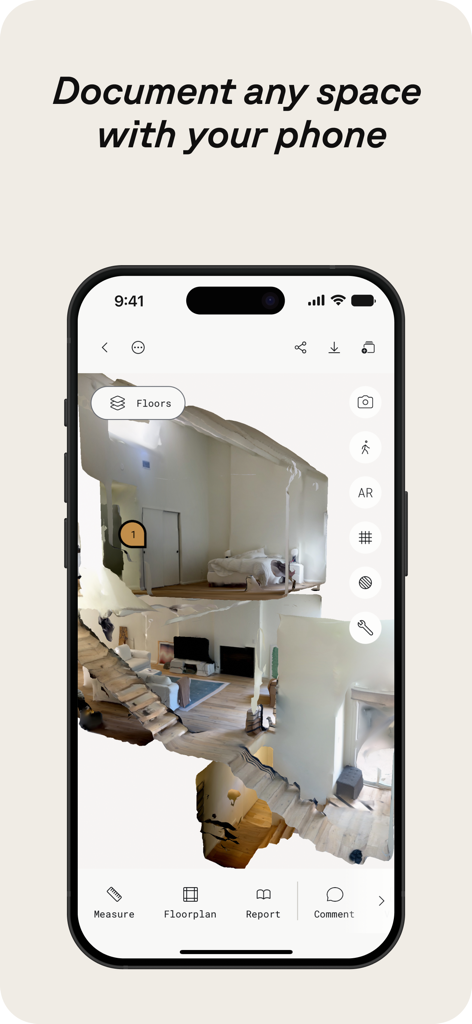
PolycamアプリがiPhone上で住宅空間の3Dインテリアスキャンを表示している様子

PolycamアプリがiPhone上で住宅空間の3Dインテリアスキャンを表示している様子

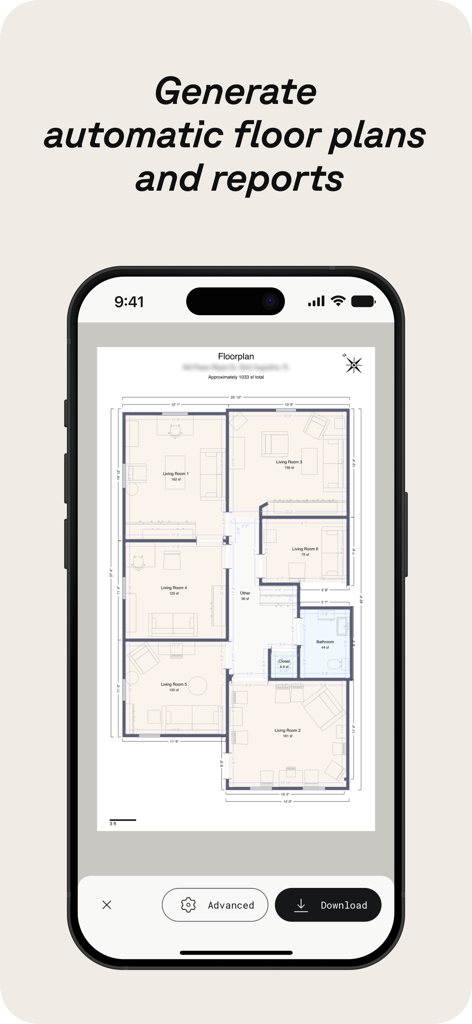
Polycamアプリ画面に、寸法と部屋名ラベルが付いた自動生成された2Dフロアプランが表示されている様子

Polycamアプリ画面に、寸法と部屋名ラベルが付いた自動生成された2Dフロアプランが表示されている様子

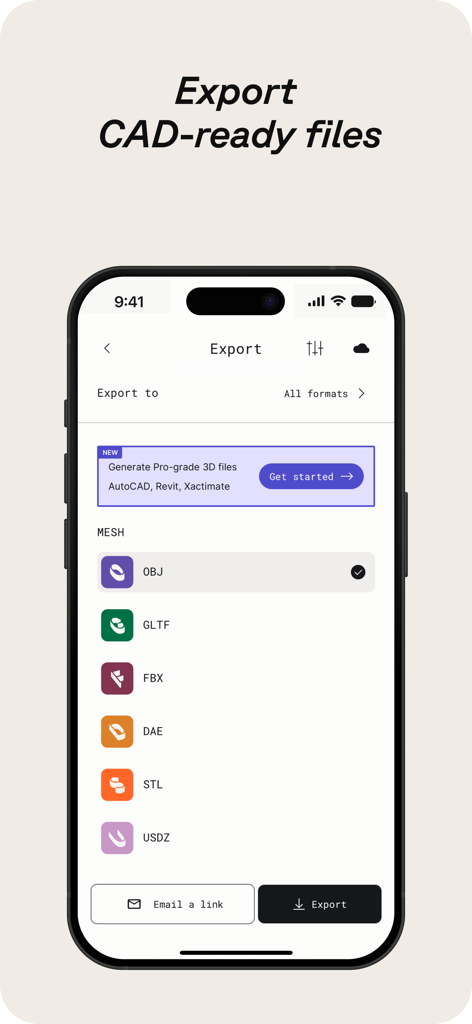
CADソフトウェア向けのさまざまな3Dファイルエクスポート形式を表示するPolycamアプリのモバイル画面

CADソフトウェア向けのさまざまな3Dファイルエクスポート形式を表示するPolycamアプリのモバイル画面

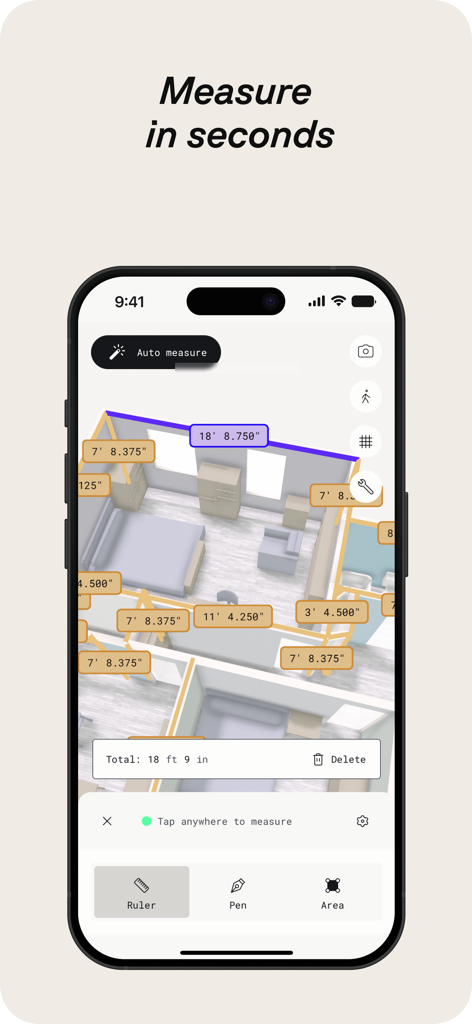
Polycam 3Dスキャナーアプリが、自動部屋測定とデジタルフロアプランを表示している様子

Polycam 3Dスキャナーアプリが、自動部屋測定とデジタルフロアプランを表示している様子

Polycamアプリインターフェースに、3Dキッチン スキャンとフロアプラン レイヤーが表示されている様子

Polycamアプリインターフェースに、3Dキッチン スキャンとフロアプラン レイヤーが表示されている様子

Polycamアプリが、ドローンでキャプチャされた建設現場の航空3Dスキャンを表示している様子

Polycamアプリが、ドローンでキャプチャされた建設現場の航空3Dスキャンを表示している様子

2人の建設専門家が、現場でタブレットを使用してリアルタイムで協力している様子

2人の建設専門家が、現場でタブレットを使用してリアルタイムで協力している様子

あらゆるワークフローに対応するプロフェッショナル3Dキャプチャ

このアプリを際立たせるツール、 12M+ 人のユーザーが選択.

🏗️

インスタント高精度ブループリント

LiDARを活用して、数分で正確な2Dフロアプランと3Dルームモデルを生成し、手作業での現場測定時間を大幅に節約します。

📸

超リアルな3Dアセット

高度なフォトグラメトリを使用して、写真を忠実なデジタルツインに変換し、ゲームエンジン、3Dプリント、VFXですぐに使用できるようにします。

📂

シームレスな業界連携

キャプチャしたデータを、.obj、.fbx、.dxfを含む主要フォーマットに対応したBlender、SketchUp、AutoCADに直接エクスポートします。

世界中のユーザーに愛されています

Trusted by 12M+ 人がこのアプリを愛用しています.

"

"Polycamは建築家としての私のワークフローを完全に変えました。LiDARルームモードを使用して、メジャーで数時間かけていた正確なフロアプラン作成が数分で完了するのは、まさにゲームチェンジャーです。SketchUpへのエクスポートもシームレスで、クライアントは私がその場で提示できる3Dビジュアライゼーションにいつも感銘を受けています。"

Sarah J.、シニアアーキテクト
"

"ゲーム開発者として、私は常に現実世界のテクスチャやオブジェクトを自分の環境に取り入れる方法を探しています。Polycamのガウシアン スプラットとフォトグラメトリの品質は驚異的です。現実世界のプロップをスキャンして、デスクに戻る前にBlenderで使える状態にできます。これは私のクリエイティブキットの中で最高のツールです。"

Marcus C.、フリーランス3Dアーティスト

アプリについて

について知っておくべきこと Polycam 3D Scanner, LiDAR, 360.

説明

Polycam is the leading 3D scanning platform for iPhone and iPad, blending professional-grade capabilities with a user-friendly interface. Effortlessly create high-quality 3D models from photos, generate precise LiDAR scans, and capture immersive 360° images—all on your device. Edit directly on your iPhone or iPad and export in formats compatible with industry-standard software. Seamlessly share your work and connect with a global community of creators. Polycam offers a suite of features for 3D scanning and editing: ● Effortlessly Create High-Quality 3D Models: Convert everyday photos into stunning 3D models with photogrammetry and Gaussian splats, perfect for capturing intricate objects and scenes. These 3D models can be exported to various computer graphics applications, including Blender and SketchUp, making them ideal for professional workflows. (Works on all iPhones and iPads) ● Top-Rated LiDAR 3D Scanner: Experience Polycam's top-rated LiDAR scanning for rapid, accurate captures of space. Use Polycam to create detailed 3D scans that are ready to be edited or imported into other design software like Blender or SketchUp. (Requires an iPhone or iPad with LiDAR) ● Revolutionize Capturing Interior Spaces with Room Mode: Instantly generate detailed, highly accurate 3D models of rooms and interiors using LiDAR, perfect for architects, designers, and real estate professionals. Overlay models with additional scans for immersive, real-time room planner views that enhance design visualization and documentation, seamlessly integrating into your workflow. (Requires an iPhone or iPad with LiDAR) ● Immerse Yourself in 360° Experiences: Transform your iPhone into a full-fledged 360° camera. Create immersive panoramic experiences, share them with a link, or export them as equirectangular images. Polycam's AI technology seamlessly fills unseen areas for complete virtual environments. (Works on iPhone 11 and later) ● Edit and measure with precision: Crop, rotate, rescale, measure, and more with powerful on-device tools that allow you to fine-tune your 3D models, enhancing every detail before export. Make Polycam a Key Part of Your 3D Workflow with Polycam Pro: ● Seamless Export Options: Export detailed 3D models (.obj, .dae, .fbx, .stl) and color point clouds (.dxf, .ply) directly into your favorite 3D software like Blender and SketchUp, enhancing your design and visualization process. ● Precision Floor Plans and Blueprints: Instantly generate 2D floor plans and scale-accurate blueprints from your 3D room scans, ready to integrate into architectural and design workflows .Export floor plans in formats compatible with popular software like AutoCAD, SketchUp, and Adobe Illustrator. ● Unlimited Photogrammetry and Gaussian Splats: Capture and process as many high-quality 3D models as you need, without limits, ensuring every detail is captured for your projects. Share, collaborate, and elevate your workflow: ● Effortless Sharing: Share 3D captures instantly with simple links for professional feedback and collaboration. ● Streamlined Teamwork: Use shared libraries to collaborate efficiently on projects, enhancing workflow. ● Join the Community: Connect with creators, designers, and 3D enthusiasts on Polycam Explore. Discover inspiring work and elevate your own projects. Included Free: Polycam Web Access Access Polycam’s web platform to edit, enhance, and share your models from your computer. Use your existing login for seamless integration into your workflow. ● Enhanced Editing: Work on your phone’s captures from your computer with advanced editing tools, AI texture generation, and cloud syncing. ● Professional Collaboration: Collaborate with shared libraries and easily export models to 3D software. Experience the full power of Polycam on both your iOS device and your computer and take your 3D projects to the next level! Privacy Policy: https://poly.cam/privacy_policy.pdf Terms of Use: https://poly.cam/terms_and_conditions.pdf

最新バージョン

5.2.0

サイズ

488.5 MB

リリース日

Sep 28, 2020

あなたの世界を3Dでキャプチャする準備はできましたか?

1200万人以上の建築家、デザイナー、クリエイターの仲間入りをしましょう。Polycamを今すぐダウンロードして、iPhoneやiPadをプロレベルの3Dスキャナーに変えましょう。

ダウンロード: App Storeダウンロード: Google Play
FAQ

よくある質問

について知っておくべきこと Polycam 3D Scanner, LiDAR, 360

Polycamは何に使われますか?

Polycamは、iPhoneとiPad向けの3Dスキャンプラットフォームです。写真から高品質な3Dモデルを作成し、LiDARスキャンを生成し、編集や業界標準ソフトウェアへのエクスポートのために360°画像をキャプチャします。

Polycamは写真から3Dモデルを生成できますか?

はい、Polycamはフォトグラメトリとガウシアン スプラットを使用して、写真から高品質な3Dモデルを生成します。この機能は、すべてのiPhoneおよびiPadで機能します。

PolycamはLiDARスキャンをサポートしていますか?

はい、Polycamは、空間を迅速かつ正確にキャプチャするためのトップクラスのLiDARスキャンを提供します。この機能には、LiDARテクノロジーを搭載したiPhoneまたはiPadが必要です。

Polycamの360°カメラ機能に対応しているデバイスは何ですか?

Polycamの360°カメラ機能は、iPhone 11以降のモデルに対応しています。デバイスを本格的な360°カメラに変え、没入感のあるパノラマ体験を提供します。

Polycamは3Dスキャンから間取り図を作成できますか?

はい、PolycamはRoomモードでLiDARを使用して部屋の詳細な3Dモデルを生成し、これらのスキャンから2D間取り図とスケールで正確な間取り図を即座に作成します。

Polycamはどのようなファイル形式で3Dモデルをエクスポートできますか?

Polycamは、.obj、.dae、.fbx、.stl形式で詳細な3Dモデルをエクスポートし、カラーポイントクラウドを.dxfおよび.plyとしてエクスポートします。間取り図は、AutoCAD、SketchUp、Adobe Illustrator用にエクスポートされます。

Polycamはオンデバイス編集ツールを提供していますか?

はい、Polycamは、正確な編集と測定のために強力なオンデバイスツールを提供します。ユーザーは、iPhoneまたはiPadで直接、3Dモデルをトリミング、回転、リサイズ、測定できます。

Polycamはプロジェクトのコラボレーションをどのように促進しますか?

Polycamは、簡単なリンクによる共有と、共有ライブラリを使用した効率的なチームワークを通じてコラボレーションを促進します。ユーザーは、Polycam Exploreのクリエイターコミュニティともつながることができます。

Polycam Web Accessはアプリに含まれていますか?

はい、Polycam Web Accessは無料で含まれています。これにより、ユーザーはコンピューターからモデルを編集、強化、共有できます。高度な編集、AIテクスチャ生成、クラウド同期を備えています。

Polycam Proは無制限の3Dモデル作成を提供しますか?

はい、Polycam Proは無制限のフォトグラメトリとガウシアン スプラットを提供します。これにより、ユーザーはプロジェクトのために無制限の高品質3Dモデルをキャプチャおよび処理できます。

Polycamは3Dスキャンでの距離測定に使用できますか?

はい、Polycamでは3Dスキャン内での正確な測定が可能です。アプリは、画面に表示される寸法で示されるように、数秒でデバイス上で直接距離を測定するツールを提供します。

Polycamのプライバシーポリシーはどこで確認できますか?

Polycamのプライバシーポリシーは、次のリンクからアクセスできます: https://poly.cam/privacy_policy.pdf。このドキュメントには、Polycamがユーザーデータとプライバシー慣行をどのように処理するかが詳述されています。