Voice Recorder Lite: Record HD

Voice Recorder Lite: Record HD

ダウンロード: App Store
Spark by MWM logo
ロゴ: Voice Recorder Lite: Record HD
Voice Recorder Lite: HD録音 – あらゆる重要な瞬間のためのプロフェッショナルオーディオキャプチャ

最大100メートル離れた場所からの、高度なノイズリダクションによるクリスタルクリアなサウンドをキャプチャ。講義室でも会議室でも、数百万人のプロフェッショナルや学生が信頼するツールで、オーディオをインスタントに録音、編集、クラウドに同期しましょう。

ダウンロード: App Store

開発元

LiveBird Technologies Private Limited

カテゴリ

Business

ダウンロード

6M+

ユーザー評価

4.5/5

評価数

280K+

対応言語

10

すべてのタップに明瞭さを

このインターフェースを利用する 6M+ 人のユーザー.

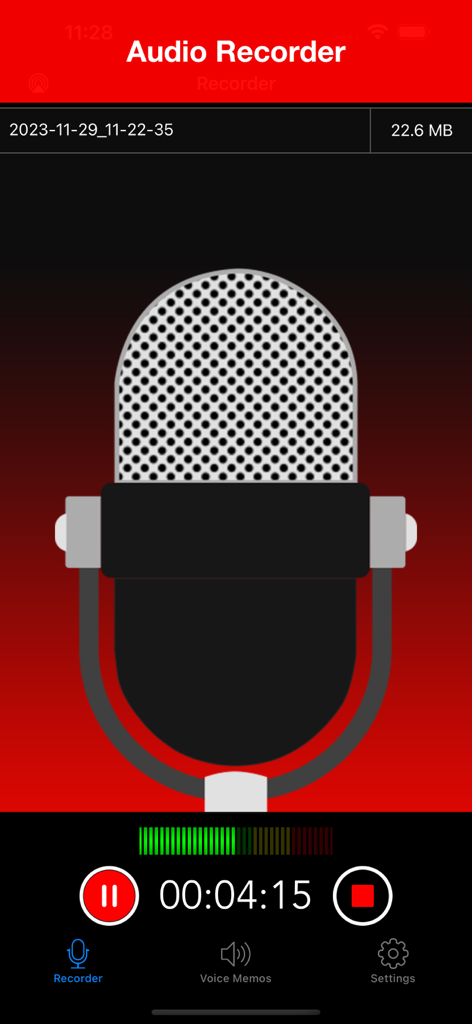
Voice Recorder Liteアプリのインターフェース。大きなマイクアイコンとタイマーが表示されたアクティブなHDオーディオ録音画面。

Voice Recorder Liteアプリのインターフェース。大きなマイクアイコンとタイマーが表示されたアクティブなHDオーディオ録音画面。

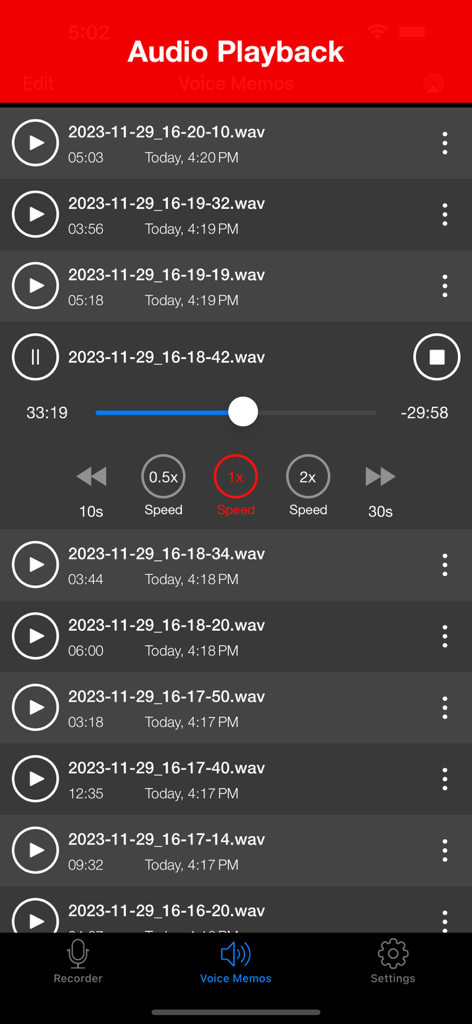
オーディオ録音のリストと、再生速度調整オプション付きの再生コントロールが表示されたインターフェース。

オーディオ録音のリストと、再生速度調整オプション付きの再生コントロールが表示されたインターフェース。

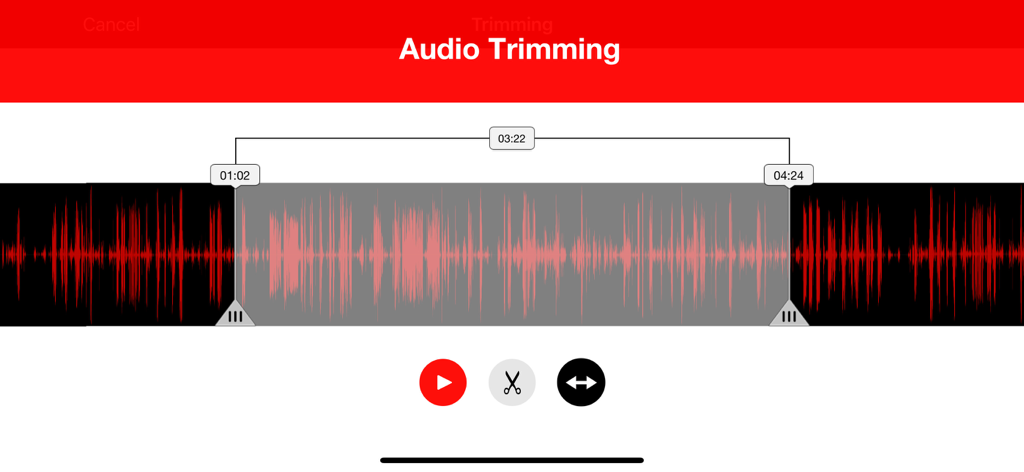
Voice Recorder Liteのオーディオトリミングインターフェース。編集コントロール付きの赤いサウンド波形が表示されています。

Voice Recorder Liteのオーディオトリミングインターフェース。編集コントロール付きの赤いサウンド波形が表示されています。

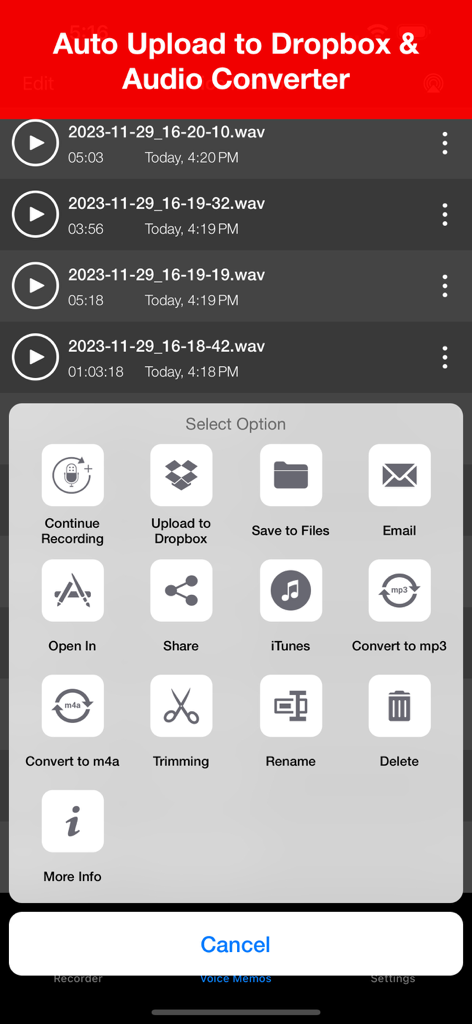
Voice Recorder Liteアプリのインターフェース。Dropboxアップロード、メール、オーディオ変換などの共有および編集オプションのメニューが表示されています。

Voice Recorder Liteアプリのインターフェース。Dropboxアップロード、メール、オーディオ変換などの共有および編集オプションのメニューが表示されています。

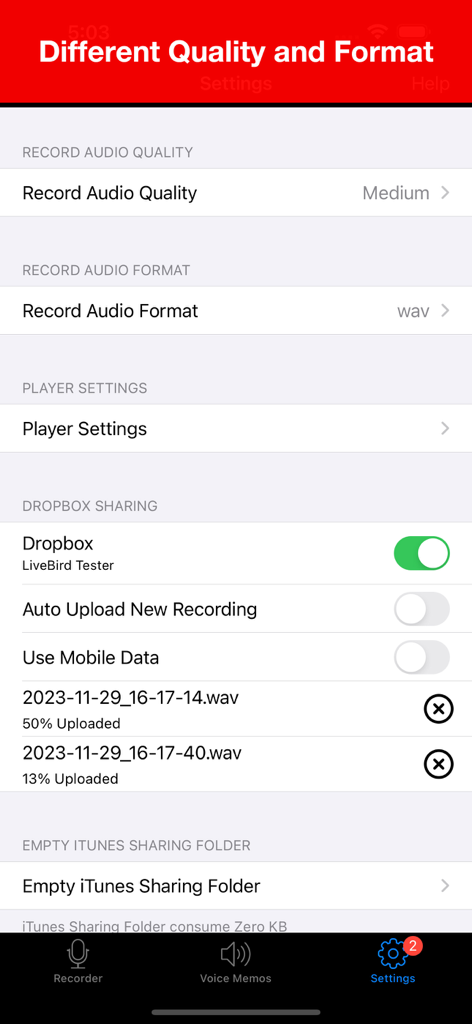
Voice Recorder Liteの設定画面。オーディオ品質、フォーマットオプション、Dropboxクラウド同期が表示されています。

Voice Recorder Liteの設定画面。オーディオ品質、フォーマットオプション、Dropboxクラウド同期が表示されています。

複雑さのないプロフェッショナル録音

このアプリを際立たせるツール、 6M+ 人のユーザーが選択.

🎙️

クリスタルクリアHDオーディオ

内蔵ノイズリダクション技術により、最大100メートル離れた場所からハイファイサウンドをキャプチャ。大規模な講義室や賑やかな会議室に最適です。

☁️

シームレスなクラウドワークフロー

録音を二度と失うことはありません。ファイルをDropboxまたはiCloudに自動同期し、電話の着信後も録音が即座に再開されるので安心です。

✂️

プロレベルの編集とハードウェア

外出先でオーディオをトリミングし、外部TascamまたはBluetoothマイクを接続して、iPhoneまたはiPadでプロフェッショナルなスタジオセットアップを実現します。

📞

通話中断時の録音継続

通話中も録音を一時停止し、通話終了後に自動的に再開します。重要な会議や講義を中断させません。

世界中のユーザーに愛されています

Trusted by 6M+ 人がこのアプリを愛用しています.

"

"このアプリは、大学の講義にとってまさに救世主です。私はしばしば大きなホールの後ろの方に座っていますが、ノイズリダクションは教授の声を信じられないほどクリアに捉えています。Dropboxに直接同期してiPadでオーディオをトリミングできるので、勉強がずっと効率的になりました。"

Sarah Jenkins, 大学院生
"

"プロのジャーナリストとして、信頼性はすべてです。通話中断時の処理は、インタビュー中に安心感を与えてくれます。外部マイクのサポートにより、どこでもスタジオ品質のサウンドをキャプチャできます。真剣な仕事においては、ネイティブのボイスメモアプリよりもはるかに優れています。"

David Chen, 調査報道記者

アプリについて

について知っておくべきこと Voice Recorder Lite: Record HD.

説明

Live sound with its true feelings. Enjoy recording, playback and audio editing with Voice Recorder. We have fine tuned it for your day-to-day activities. Attending something important and want to record it for later playback, Voice Recorder will allow you to record your meetings, lectures, and other events with codec noise reduction technology. You can record anything within 10-100 meters around you. Edit the recording as per your need and save it for later playback. Voice Recorder has multiple playback options helping you decide how you want to hear your recording. Developed specially for Apple, it plays just as excellent with Apple EarPods as it plays with our old earphones. You can auto upload and even share the recording on cloud (Dropbox) in seconds. Voice Recorder is an easy to use and handy app to record the meeting, lecture, music and many more. The interface is designed to make it quick. With single tap you can record and share the recordings. Enjoy sound, record, edit, play and listen! List of Features # Audio Recorder - Quality options: (Low:8KHz, Medium:22.05KHz, High:44.1KHz) - Format options: (WAV, CAF, M4A) - External input device support : Bluetooth Mic, Other External Mic (Tested with Tascam mic) - Background recording support (New) - Continue recording into existing recordings. - Call Interruption handling - Recording will continue after a call or other interruption. # Audio Player - Quick audio player - Playback controls (Fast backward, Fast backward) - External output device support (Bluetooth and External speaker devices) - Background audio playing # Audio Trimming - Select a part of recording and trim it. # Sharing - Email recordings - Dropbox sharing (Auto upload recording support) - Upload to iCloud Drive - Import recordings to computer with iTunes file sharing - Airdrop sharing with iOS and Mac devices. # Universal App - Support for both iPhone and iPad devices. # AVAILABLE IN 11 DIFFERENT LANGUAGE English, Español, Français, Deutsch, Português (Br.),Português, Italiano, 中文 (Simplified), Русский, 日本語, 한국어

最新バージョン

8.5

サイズ

37.9 MB

リリース日

Jan 14, 2015

あらゆるディテールをクリスタルクリアにキャプチャ

ノイズのないHD録音をインスタントにクラウドに同期するVoice Recorder Liteを信頼する、600万人以上のプロフェッショナルや学生に加わりましょう。

ダウンロード: App Store
FAQ

よくある質問

について知っておくべきこと Voice Recorder Lite: Record HD

Does Voice Recorder Lite support different audio quality settings?

はい、Voice Recorder Lite は、Low (8KHz)、Medium (22.05KHz)、High (44.1KHz) を含むさまざまなオーディオ品質設定をサポートしており、録音のニーズに合わせて調整できます。

What audio formats can Voice Recorder Lite save recordings in?

Voice Recorder Lite では、複数の形式で録音を保存できます。オーディオファイルとして WAV、CAF、M4A 形式をサポートしています。

Can Voice Recorder Lite record audio in the background?

はい、Voice Recorder Lite はバックグラウンド録音をサポートしており、アプリが画面上でアクティブに開かれていない場合でも、オーディオをキャプチャし続けることができます。

Does Voice Recorder Lite offer audio trimming capabilities?

はい、Voice Recorder Lite にはオーディオトリミング機能が含まれています。ユーザーは録音の特定の部分を選択して、必要に応じてトリミングできます。

How can I share recordings from Voice Recorder Lite?

Voice Recorder Lite では、電子メール、Dropbox (自動アップロード付き)、iCloud Drive、iTunes ファイル共有、Airdrop (iOS および Mac デバイス向け) を含む複数の共有オプションを提供しています。

Is Voice Recorder Lite compatible with external microphones?

はい、Voice Recorder Lite は外部入力デバイスをサポートしています。Bluetooth マイクや、Tascam マイクを含むその他の外部マイクでテストされています。

Does Voice Recorder Lite support auto-uploading recordings to Dropbox?

はい、Voice Recorder Lite は録音を Dropbox に直接自動アップロードすることをサポートしています。ユーザーはアプリの設定でこの機能を有効にできます。

Can Voice Recorder Lite continue recording after a phone call interruption?

はい、Voice Recorder Lite は通話中断処理機能を備えています。電話、またはその他の割り込みが終了すると、録音は自動的に継続されます。

What playback controls does Voice Recorder Lite offer?

Voice Recorder Lite は、早戻し、早送り、再生速度調整オプション (0.5x、1x、2x) を含むコントロールで、迅速なオーディオ再生を提供します。

Is Voice Recorder Lite a universal app for Apple devices?

はい、Voice Recorder Lite はユニバーサルアプリです。iPhone と iPad デバイスの両方をサポートしており、プラットフォーム全体で一貫した機能を提供します。

Does Voice Recorder Lite include noise reduction technology?

はい、Voice Recorder Lite は、録音されたオーディオの明瞭度と品質を向上させるためのコーデックノイズリダクションテクノロジーを組み込んでいます。

Can I convert audio files within the Voice Recorder Lite app?

はい、Voice Recorder Lite ではオーディオファイルの変換が可能です。共有オプションメニューから、録音を MP3 または M4A 形式に変換できます。