BlueDriver OBD2 Scan Tool

BlueDriver OBD2 Scan Tool

Download on App Store
Spark by MWM logo
Logo of BlueDriver OBD2 Scan Tool
BlueDriver OBD2 Scan Tool: Professional Diagnostics in Your Pocket

Empowering over 1 million drivers to diagnose, fix, and save. Get vehicle-specific repair reports and clear check engine lights with the most trusted wireless scan tool—no subscriptions required.

Download on App Store

Publisher

Root Four Imagination Inc.

Category

Productivity

Downloads

1M+

User Rating

4.6/5

Total Ratings

18K+

Locales

1

Diagnostics at a Glance

Discover the interface used by 1M+ users.
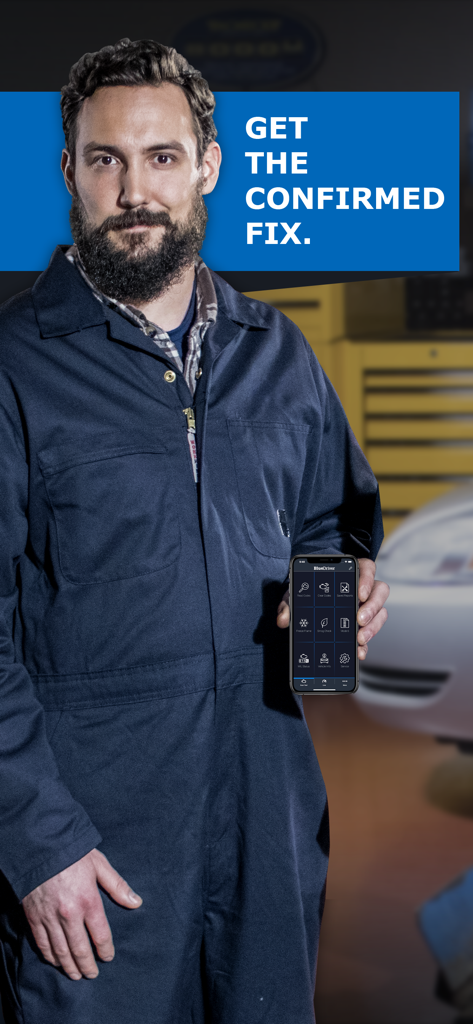
A mechanic holding a smartphone showing the BlueDriver OBD2 scan tool app interface with text saying Get the confirmed fix

A mechanic holding a smartphone showing the BlueDriver OBD2 scan tool app interface with text saying Get the confirmed fix

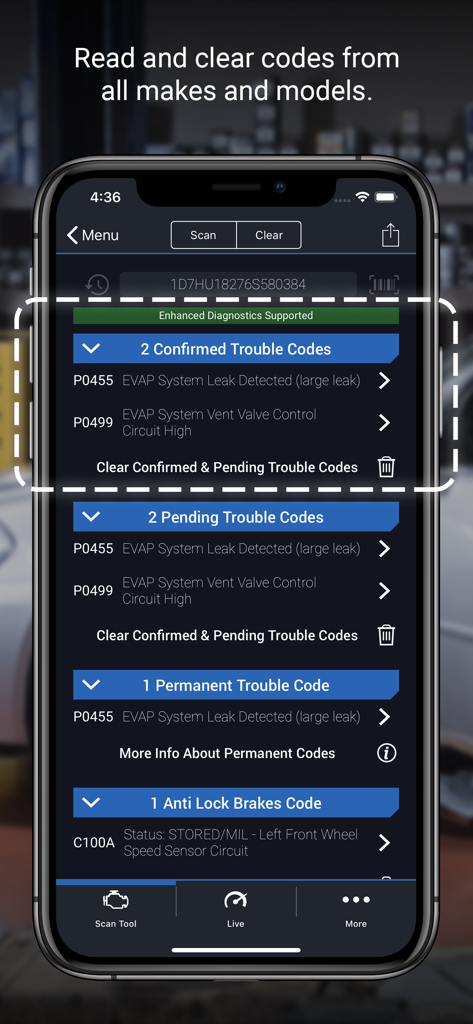
BlueDriver app displaying confirmed pending and permanent vehicle diagnostic trouble codes

BlueDriver app displaying confirmed pending and permanent vehicle diagnostic trouble codes

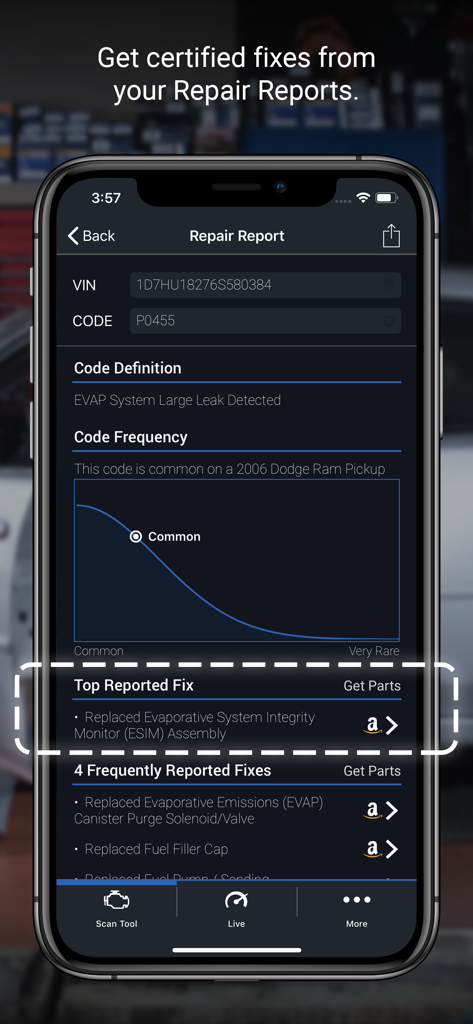
BlueDriver app display showing a diagnostic code definition and vehicle specific repair solutions

BlueDriver app display showing a diagnostic code definition and vehicle specific repair solutions

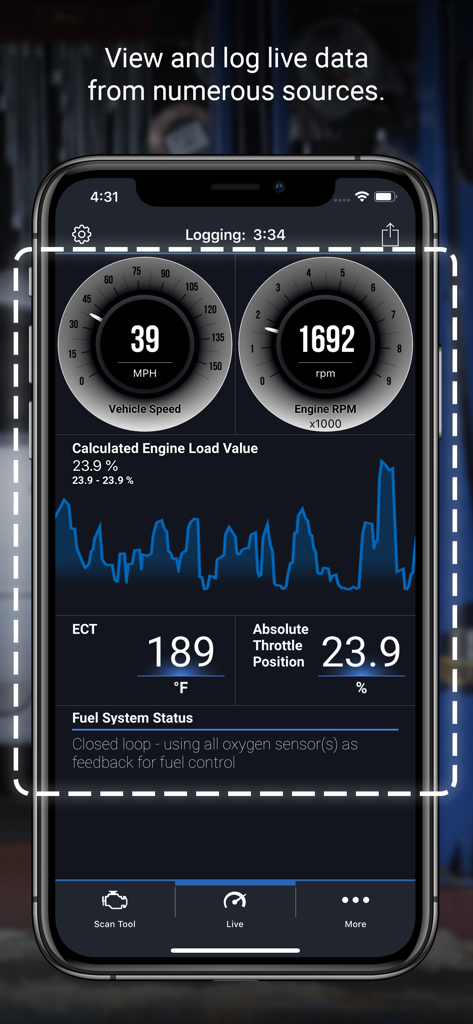
BlueDriver app live data dashboard showing vehicle speed engine RPM and engine load graph

BlueDriver app live data dashboard showing vehicle speed engine RPM and engine load graph

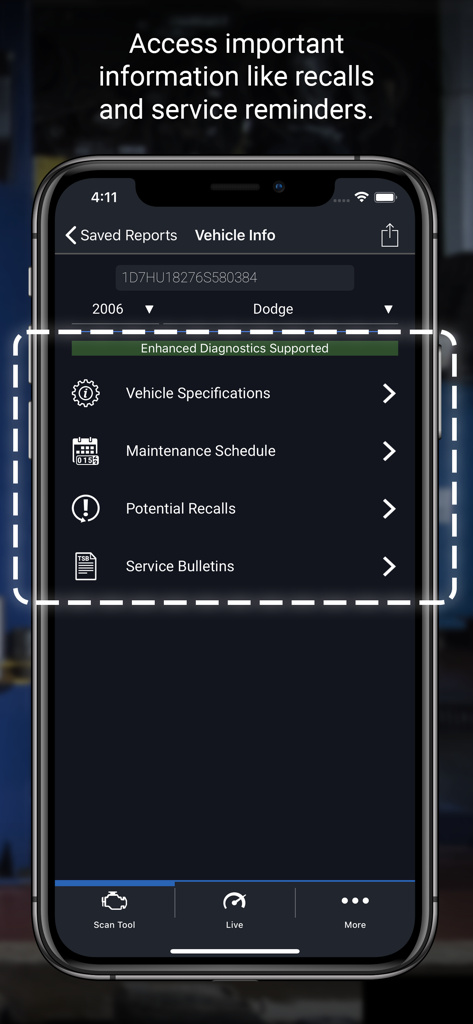
BlueDriver app screen showing vehicle specifications maintenance schedule and potential recalls for a car

BlueDriver app screen showing vehicle specifications maintenance schedule and potential recalls for a car

Take Control of Your Car’s Health

The tools that make this app stand out, trusted by 1M+ users.

🛠️

Verified Repair Reports

Get a customized report for your exact vehicle. Access millions of real-world fixes verified by ASE certified technicians so you can DIY with confidence.

🔍

Advanced System Diagnostics

Go beyond basic codes. Read and clear complex issues related to ABS, Airbags, and Transmission to understand your vehicle's health before you visit a shop.

📈

Real-Time Performance Data

Monitor your engine in real-time with interactive graphing. Check smog readiness and live sensor data to ensure your car is running at peak efficiency.

Loved by users worldwide

Trusted by 1M+ people who love this app.

"

"I used to dread the check engine light because it usually meant a $100 diagnostic fee at the dealership before any repairs even started. With BlueDriver, I found out my 'major' issue was just a loose gas cap. It has already paid for itself several times over. The plain-language repair reports are a total game-changer for a DIYer like me who wants to avoid being overcharged."

Mike R., Suburban Homeowner
"

"As someone who frequently buys and sells used vehicles, this tool is indispensable. Being able to check for hidden cleared codes and smog readiness right on my iPhone gives me incredible peace of mind during inspections. The live data graphing is professional-grade and the fact that there is no monthly subscription makes it the best investment I have made for my garage."

Sarah J., Automotive Enthusiast

About the app

Everything you need to know about BlueDriver OBD2 Scan Tool.

Description

BlueDriver® transforms your iPhone or iPad into a powerful OBD2 scan tool – trusted by over 1 million drivers, from professional mechanics to DIYers. Paired with the BlueDriver Bluetooth® Sensor (sold separately), it lets you read codes, diagnose issues, and fix your car with confidence—no wires, no guesswork. Whether you're checking a check engine light, running a smog test, or diving into enhanced diagnostics like ABS or transmission codes, BlueDriver gives you the tools you need to understand your vehicle and make smarter repair decisions – with clear, easy-to-understand information. What You Can Do with BlueDriver · Read and clear trouble codes - including check engine, ABS, airbag, transmission, and more · Generate, save, and share professional-grade Repair Reports based on your exact vehicle and trouble code · Access Mode 6 on-board monitoring test results · Check smog readiness and freeze frame data · View live data with multi-PID interactive graphing · Scan your vehicle wirelessly with Bluetooth—no cables required · Choose between metric and imperial settings · Get likely fixes for your vehicle’s issues, explained in plain language Enhanced Diagnostics Coverage · GM, Ford, Chrysler, Toyota, Nissan, Mazda, Mercedes (2005+ models) · Mitsubishi (2008+), Hyundai/Kia (2012+) – available worldwide · BMW/Mini, Honda/Acura, Volkswagen/Audi – available in North America · Subaru – available in the United States What Makes BlueDriver Different? · No subscription required · Backed by a database of millions real-world fixes · Repair Reports are specific to your vehicle’s year, make, and model · Works globally with the BlueDriver Sensor · App is free to install—just pair with the Sensor to start scanning You can even preview a Repair Report without a Sensor by entering your VIN and a trouble code. Account Setup Made Easy You’ll create a BlueDriver account during setup—it’s quick and easy, and gives you secure access to all your scans, reports, and new features across any device. Important Info The BlueDriver Sensor plugs into your vehicle’s data port (found in every car built since 1996). It connects to the app via Bluetooth® to deliver full diagnostic functionality. Sensor sold separately in-app or at www.BlueDriver.com

Latest Version

8.6.3

Size

222.3 MB

First Released

Jul 6, 2011

Take Command of Your Car’s Health Today

Join over 1 million drivers who diagnose, fix, and save with professional-grade reports. Download the app and turn your iPhone into a powerful scan tool—no subscriptions required.

Download on App Store
FAQ

Frequently Asked Questions

Everything you need to know about BlueDriver OBD2 Scan Tool

What is the BlueDriver OBD2 Scan Tool?

BlueDriver® transforms your iPhone or iPad into an OBD2 scan tool. It helps read codes, diagnose issues, and fix your car by connecting wirelessly via the BlueDriver Bluetooth® Sensor.

Does the BlueDriver app require a subscription?

No, the BlueDriver app itself does not require a subscription. The app is free to install, but it requires the BlueDriver Bluetooth Sensor, which is sold separately, to function.

Can the BlueDriver OBD2 Scan Tool clear my check engine light?

Yes, BlueDriver can read and clear trouble codes, including check engine lights, ABS, airbag, and transmission codes. This functionality is a core feature of the BlueDriver OBD2 Scan Tool.

How does BlueDriver connect to a vehicle?

The BlueDriver Sensor plugs into your vehicle’s data port (OBD2 port, found in cars built since 1996). It connects to the BlueDriver app on your iPhone or iPad wirelessly via Bluetooth® for full diagnostic functionality.

Does BlueDriver provide vehicle repair information?

Yes, BlueDriver provides professional-grade Repair Reports specific to your vehicle’s year, make, and model. These reports offer likely fixes for issues, explained in plain language, and link to parts.

Can I view live engine data with the BlueDriver app?

Yes, the BlueDriver app allows users to view live data with multi-PID interactive graphing. This includes information like vehicle speed, RPM, engine load, and temperature.

What vehicles support enhanced diagnostics with BlueDriver?

BlueDriver offers enhanced diagnostics for GM, Ford, Chrysler, Toyota, Nissan, Mazda, Mercedes (2005+), Mitsubishi (2008+), Hyundai/Kia (2012+) globally. BMW/Mini, Honda/Acura, VW/Audi are available in North America, and Subaru in the US.

Does BlueDriver offer vehicle recall information?

Yes, BlueDriver provides access to important information such as potential recalls, service bulletins, vehicle specifications, and maintenance schedules directly within the app.

Can I preview a BlueDriver Repair Report without buying the Sensor?

Yes, you can preview a BlueDriver Repair Report without a Sensor by entering your vehicle's VIN and a trouble code directly into the app.