
Page Screenshot for Safari


Transform long websites into high-quality JPEG images instantly. The essential productivity tool for professionals and researchers to save, share, and organize visual web content across iPhone, iPad, and Mac.
Publisher
Category
Photo & VideoDownloads
12K+User Rating
Total Ratings
0Locales
1Discover the interface used by 12K+ users.
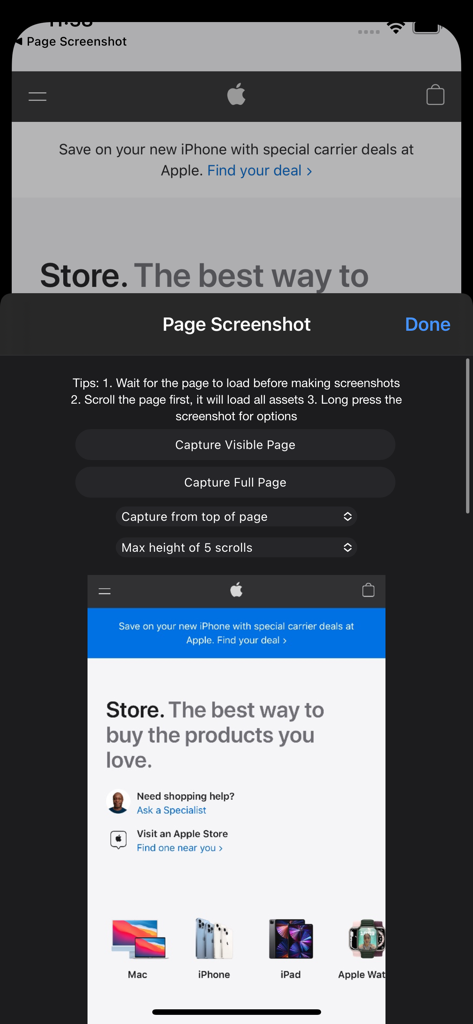
The tools that make this app stand out, trusted by 12K+ users.
Capture entire articles or landing pages in a single shot. No more messy stitching or missing context.
Integrated directly into Safari for the fastest way to save high-quality JPEGs without leaving your browser.
A unified experience across iPhone, iPad, and Mac, perfectly designed for your Apple productivity ecosystem.
Trusted by 12K+ people who love this app.
"This extension is a massive time-saver for my design research. Capturing full-length landing pages as JPEGs instead of clunky PDFs makes sharing inspiration with my team so much easier. It works seamlessly across my MacBook and iPhone!"
"Finally, a way to save entire articles and recipes without taking ten different screenshots. It's fast, intuitive, and the quality is perfect for mobile viewing. If you’re a Safari user on iPad, this is a must-have productivity tool."
Everything you need to know about Page Screenshot for Safari.
Description
Latest Version
2.5.6
Size
11.5 MB
First Released
Jul 18, 2019
Join over 12,000 professionals and researchers capturing full-page screenshots effortlessly across iPhone, iPad, and Mac. Download now and start saving time.
Top-ranked apps in the same category

BYTEDANCE PTE. LTD.

Instagram, Inc.

Google LLC

Canva Pty Ltd

Snap, Inc.

Beijing Kwai Technology Co., Ltd.

Instagram, Inc.

Xiamen Meitu Technology Co., Ltd.

Google LLC