Unzip – ZIP RAR 7Z Extractor

Unzip – ZIP RAR 7Z Extractor

Download on App Store
Spark by MWM logo
Logo of Unzip – ZIP RAR 7Z Extractor

Unzip – ZIP RAR 7Z Extractor: Desktop-Class File Management for Your iPhone & iPad

Stop reaching for your laptop. Effortlessly extract any format, manage professional documents, and stream 4K media directly from archives with the ultimate privacy-first productivity tool.

Publisher

Little Sweet Technology Co., Ltd.

Category

Productivity

Downloads

25M+

User Rating

4.9/5

Total Ratings

691K+

Locales

9

Desktop Power, Mobile Ease

Discover the interface used by 25M+ users.

Unzip mobile app interface displaying ZIP RAR and 7Z files in a folder

Unzip mobile app interface displaying ZIP RAR and 7Z files in a folder

Unzip app file manager menu showing cloud storage and transfer options on an iPhone screen

Unzip app file manager menu showing cloud storage and transfer options on an iPhone screen

A screenshot of the Unzip app on iPhone showing file batch operations including copy cut delete and unzip

A screenshot of the Unzip app on iPhone showing file batch operations including copy cut delete and unzip

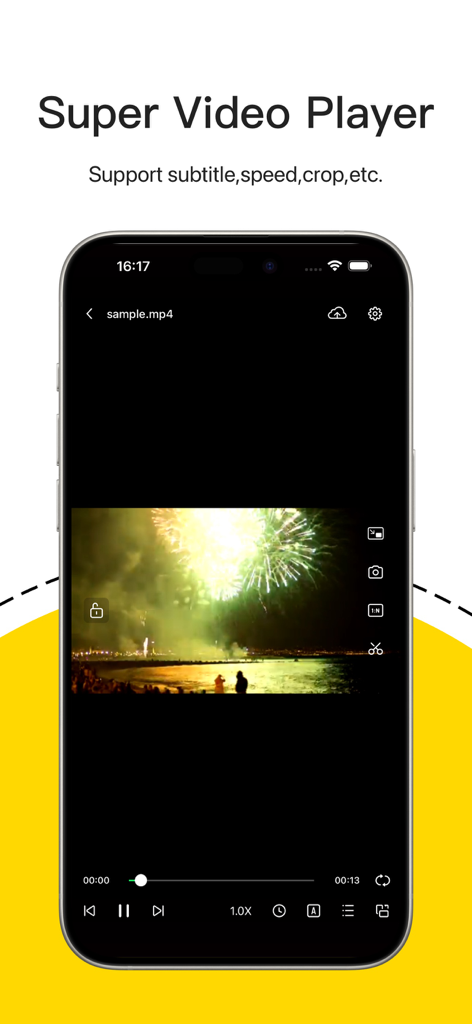
Interface of the Unzip app video player on iPhone with subtitle and speed controls

Interface of the Unzip app video player on iPhone with subtitle and speed controls

Integrated music player interface in the Unzip app for iPhone showing playback controls and song details

Integrated music player interface in the Unzip app for iPhone showing playback controls and song details

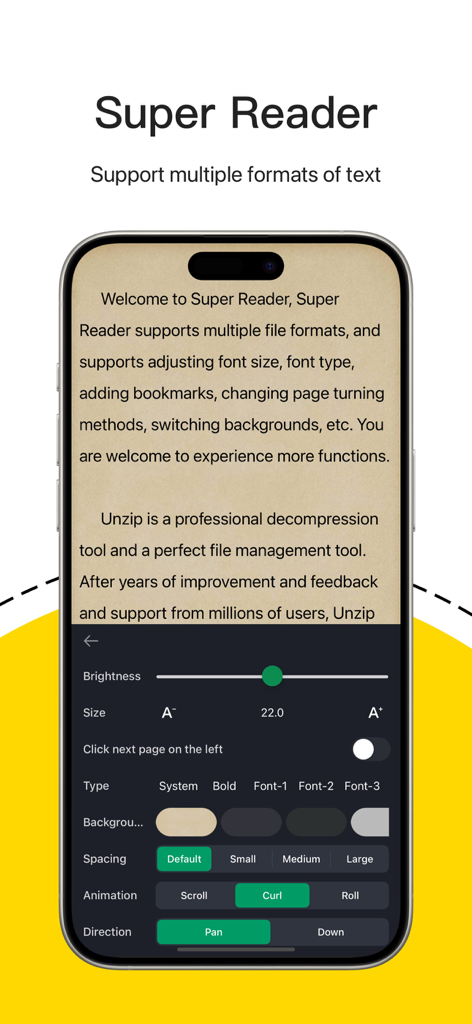
Unzip app Super Reader feature showing customizable text settings for font size background color and page animation on a mobile device

Unzip app Super Reader feature showing customizable text settings for font size background color and page animation on a mobile device

Desktop-Class Power for Your Mobile Workflow

The tools that make this app stand out, trusted by 25M+ users.

📦

Universal Extraction & Speed

Open everything from encrypted RARs to multi-part 7Z and ISO files. Experience lightning-fast performance that turns your iPhone or iPad into a true productivity powerhouse.

🎬

Stream Directly from Archives

Save time and storage space. Watch 4K MKV videos or listen to Lossless audio directly inside your ZIP files with full external subtitle support and hardware decoding.

💼

Pro Connectivity & Cloud Sync

Seamlessly bridge your mobile and professional life. Connect to FTP, SMB, and NAS servers or sync with Google Drive and Dropbox to manage your files wherever you are.

Loved by users worldwide

Trusted by 25M+ people who love this app.

"

"Unzip turned my iPad into a true laptop replacement. I deal with huge 7Z and RAR archives for my university projects, and this app handles them faster than my old PC. The cloud integration is seamless, making it incredibly easy to move files between Google Drive and my local storage without any hassle."

Marcus J.
"

"The best file manager on iOS, hands down. I love being able to watch MKV videos with subtitles directly inside a ZIP without wasting space on extraction. The SMB and FTP support is a lifesaver for accessing my office server on the go, and I really appreciate the one-time Pro purchase instead of a subscription."

Elena R.

About the app

Everything you need to know about Unzip – ZIP RAR 7Z Extractor.

Description

Unzip, Open, and Manage Any File on iPhone & iPad Unzip is a powerful all-in-one tool that helps you extract, view, and manage files without a computer. Open compressed files, stream videos inside an archive, browse your documents, and organize everything in one app — no extra software required. Whether it’s class materials, work documents, downloaded videos, cloud drive archives, or game files, Unzip makes it easy. Lightning-Fast Unzip & Compression - Supports DZIP, ZIP, RAR, 7Z, LZH, TAR, GZ, ISO, and more - Works with multi-part archives (.001/.002/.003…) - Extracts encrypted archives with passwords - Create ZIP, 7Z, and DZIP files - One-tap to compress multiple files and folders - Fast, stable performance for large files Supported formats include: DZIP, ZIP, RAR, 7Z, LZH, ZIPX, TAR, GZIP, BZIP, TGZ, TBZ, ISO, DEB, CAB, JAR, RPM, and more. Desktop-Style File Manager - Create and manage folders - Move, copy, rename, delete files - Batch operations - File categories: Documents, Videos, Audio, Photos - Import from the Files app - Download files directly from your browser - Share via other apps or AirDrop Play Videos Directly Inside ZIP Files - Supports MKV, MP4, MOV, and more - Automatic subtitle loading (SRT, ASS) - External subtitle support - Full-screen and playback speed control - Smooth playback for large files - 4K hardware decoding Great Audio Playback Experience - MP3, AAC, FLAC, WAV, and more - Play audio files directly inside archives - Import and organize music easily Read Any Document On the Go - TXT, PDF, Markdown, DOC, and more - Smooth reading experience for large TXT/PDF files - Search and jump to sections - Dark Mode for comfortable reading Connect to All Your Storage - FTP, SMB, WebDAV - iCloud Drive sync - Google Drive, Dropbox, OneDrive - Wi-Fi file transfer - Scan a QR code to transfer files between devices Why Unzip - Extract, compress, manage, and play — all in one app - Save time and storage: no need to extract everything - Works with all major formats and multi-part archives - Reliable and easy to use - Designed for both work and entertainment Privacy First Your files are yours. We don’t read or upload any of your content. Premium Access Unzip offers optional premium upgrades: Lifetime Pro One-time purchase. Use forever. Annual Pro (Auto-Renew) Enjoy full access with automatic renewal. Support Privacy Policy: https://www.dkzip.com/PrivacyUserTerms/privacy.html Terms of Use: https://www.dkzip.com/PrivacyUserTerms/user_terms.html Contact us: techsupport@dkzip.com

Latest Version

6.7.1

Size

231.4 MB

First Released

Jul 28, 2018

Unlock the Full Potential of Your Files

Join 25 million power users who have bridged the gap between mobile and desktop. Extract, manage, and play any format with the ultimate all-in-one productivity tool.

Download on App Store
FAQ

Frequently Asked Questions

Everything you need to know about Unzip – ZIP RAR 7Z Extractor

What is Unzip – ZIP RAR 7Z Extractor?

Unzip is an all-in-one app for iPhone and iPad that extracts, views, and manages various file types without needing a computer. It handles compressed files, streams videos, browses documents, and organizes files efficiently.

What archive file formats does Unzip support for extraction?

Unzip supports extraction of DZIP, ZIP, RAR, 7Z, LZH, TAR, GZ, ISO, ZIPX, GZIP, BZIP, TGZ, TBZ, DEB, CAB, JAR, and RPM formats. It also works with multi-part archives and extracts encrypted files.

Can Unzip – ZIP RAR 7Z Extractor create new archive files?

Yes, Unzip can create ZIP, 7Z, and DZIP archive files. It allows for one-tap compression of multiple files and folders, providing fast and stable performance even for large files.

Does Unzip provide a file management system?

Unzip includes a desktop-style file manager that enables creating, managing, moving, copying, renaming, and deleting files and folders. It also supports batch operations and file categorization.

Can Unzip – ZIP RAR 7Z Extractor play videos directly from archives?

Yes, Unzip features a Super Video Player that supports MKV, MP4, MOV, and more. It includes automatic subtitle loading, external subtitle support, full-screen mode, playback speed control, and 4K hardware decoding.

Does Unzip – ZIP RAR 7Z Extractor integrate with cloud storage platforms?

Yes, Unzip connects to various cloud storage services including iCloud Drive, Google Drive, Dropbox, and OneDrive. It also supports FTP, SMB, and WebDAV protocols for enhanced file accessibility.

How does Unzip – ZIP RAR 7Z Extractor handle user privacy and data?

Unzip prioritizes user privacy. The app explicitly states, 'Your files are yours. We don’t read or upload any of your content,' ensuring that user data remains private and secure.

What are the premium upgrade options available for Unzip?

Unzip offers two optional premium upgrades: 'Lifetime Pro,' a one-time purchase for permanent access, and 'Annual Pro (Auto-Renew),' which provides full access with an automatic yearly renewal.

Can Unzip transfer files between different devices?

Yes, Unzip facilitates file transfer between devices using Wi-Fi transfer and a QR code scanner. This feature simplifies sharing files without additional software.

Does Unzip – ZIP RAR 7Z Extractor support extracting password-protected archives?

Yes, Unzip is capable of extracting encrypted archives. Users can open these protected files by providing the necessary passwords directly within the application.