Polycam 3D Scanner, LiDAR, 360

Polycam 3D Scanner, LiDAR, 360

Download on App StoreDownload on Google Play
Spark by MWM logo
Logo of Polycam 3D Scanner, LiDAR, 360

Polycam: The World’s Leading 3D Scanner and LiDAR App

Transform your physical world into high-quality 3D models, instant floor plans, and immersive 360° captures. Professional-grade scanning made effortless for architects, designers, and creators.

Publisher

Polycam Inc.

Category

Photo & Video

Downloads

12M+

User Rating

4.7/5

Total Ratings

110K+

Locales

27

Reality, Captured in 3D

Discover the interface used by 12M+ users.

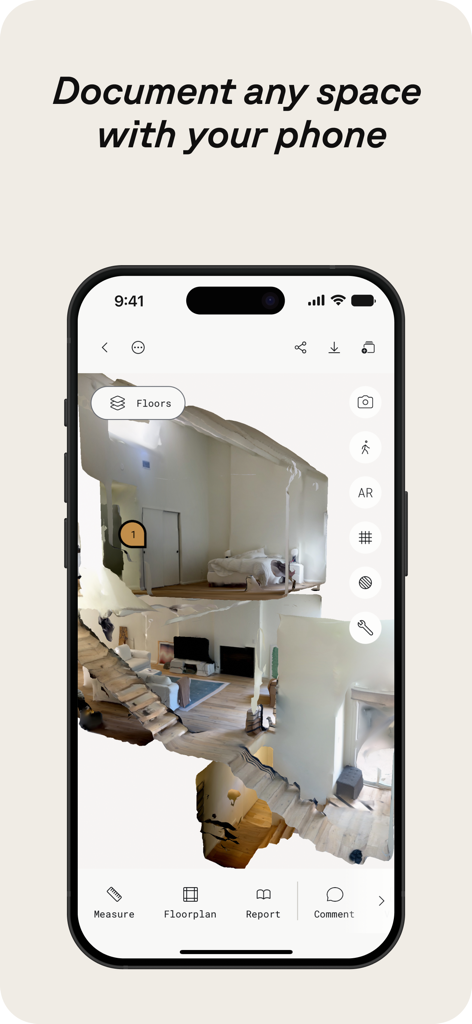
Polycam app displaying a 3D interior scan of a residential space on an iPhone

Polycam app displaying a 3D interior scan of a residential space on an iPhone

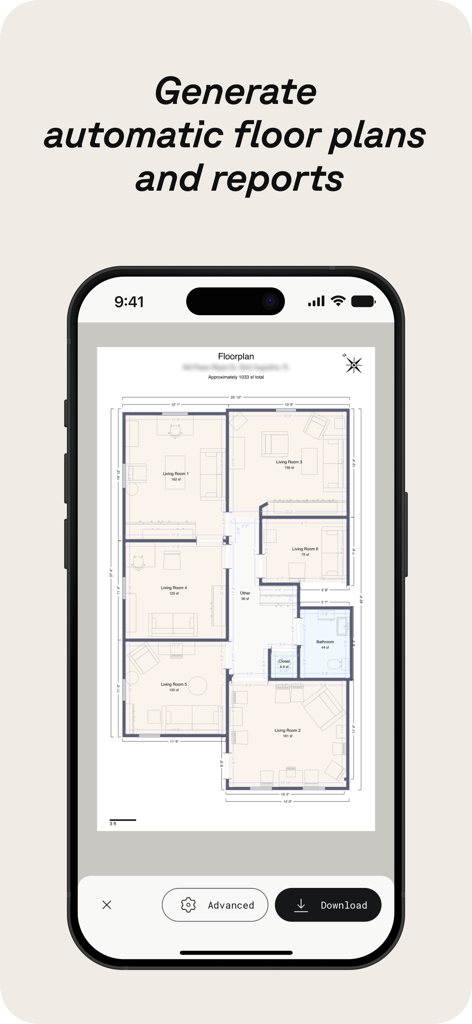
Polycam app screen showing an automatically generated 2D floor plan with dimensions and room labels

Polycam app screen showing an automatically generated 2D floor plan with dimensions and room labels

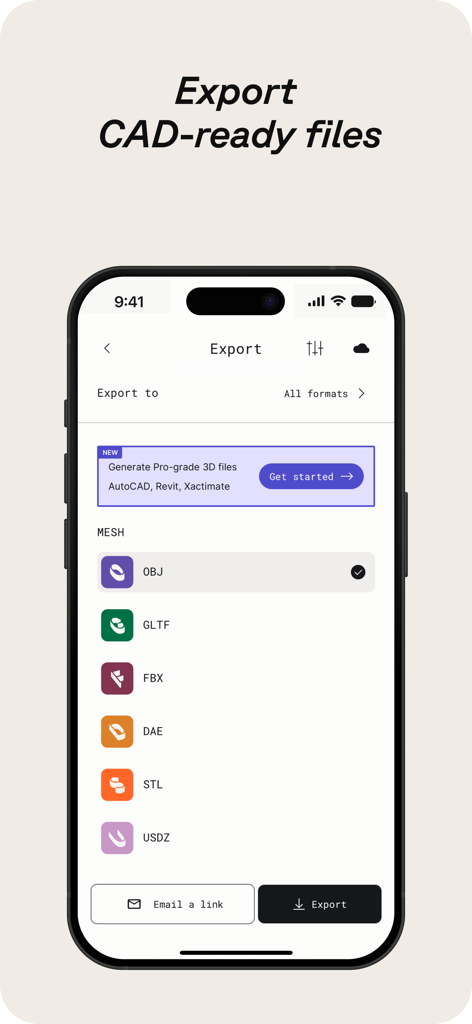
Mobile screen of Polycam app showing various 3D file export formats for CAD software

Mobile screen of Polycam app showing various 3D file export formats for CAD software

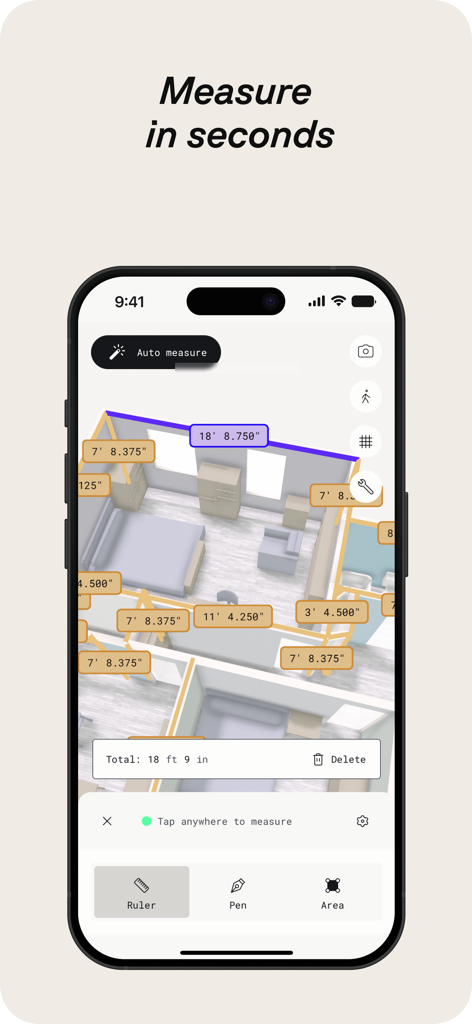
Polycam 3D scanner app showing automatic room measurements and a digital floor plan

Polycam 3D scanner app showing automatic room measurements and a digital floor plan

Polycam app interface displaying a 3D kitchen scan and floorplan layers

Polycam app interface displaying a 3D kitchen scan and floorplan layers

Polycam app showing an aerial 3D scan of a construction site captured by a drone

Polycam app showing an aerial 3D scan of a construction site captured by a drone

Two construction professionals collaborating in real time using a tablet on a job site

Two construction professionals collaborating in real time using a tablet on a job site

Professional 3D Capture for Any Workflow

The tools that make this app stand out, trusted by 12M+ users.

🏗️

Instant Precision Blueprints

Leverage LiDAR to generate accurate 2D floor plans and 3D room models in minutes, saving hours of manual onsite measurement.

📸

Hyper-Realistic 3D Assets

Convert photos into high-fidelity digital twins using advanced photogrammetry, ready for use in game engines, 3D printing, or VFX.

📂

Seamless Industry Integration

Export captures directly to Blender, SketchUp, or AutoCAD with support for all major formats including .obj, .fbx, and .dxf.

Loved by users worldwide

Trusted by 12M+ people who love this app.

"

"Polycam has completely transformed my workflow as an architect. Using the LiDAR Room Mode to generate accurate floor plans in minutes instead of hours with a tape measure is a total game-changer. The export to SketchUp is seamless, and my clients are always impressed by the 3D visualizations I can show them on the spot."

Sarah J., Senior Architect
"

"As a game developer, I am always looking for ways to bring real-world textures and objects into my environments. The Gaussian splats and photogrammetry quality in Polycam are mind-blowing. I can scan a prop in the real world and have it ready for Blender before I even get back to my desk. It is the best tool in my creative kit."

Marcus C., Freelance 3D Artist

About the app

Everything you need to know about Polycam 3D Scanner, LiDAR, 360.

Description

Polycam is the leading 3D scanning platform for iPhone and iPad, blending professional-grade capabilities with a user-friendly interface. Effortlessly create high-quality 3D models from photos, generate precise LiDAR scans, and capture immersive 360° images—all on your device. Edit directly on your iPhone or iPad and export in formats compatible with industry-standard software. Seamlessly share your work and connect with a global community of creators. Polycam offers a suite of features for 3D scanning and editing: ● Effortlessly Create High-Quality 3D Models: Convert everyday photos into stunning 3D models with photogrammetry and Gaussian splats, perfect for capturing intricate objects and scenes. These 3D models can be exported to various computer graphics applications, including Blender and SketchUp, making them ideal for professional workflows. (Works on all iPhones and iPads) ● Top-Rated LiDAR 3D Scanner: Experience Polycam's top-rated LiDAR scanning for rapid, accurate captures of space. Use Polycam to create detailed 3D scans that are ready to be edited or imported into other design software like Blender or SketchUp. (Requires an iPhone or iPad with LiDAR) ● Revolutionize Capturing Interior Spaces with Room Mode: Instantly generate detailed, highly accurate 3D models of rooms and interiors using LiDAR, perfect for architects, designers, and real estate professionals. Overlay models with additional scans for immersive, real-time room planner views that enhance design visualization and documentation, seamlessly integrating into your workflow. (Requires an iPhone or iPad with LiDAR) ● Immerse Yourself in 360° Experiences: Transform your iPhone into a full-fledged 360° camera. Create immersive panoramic experiences, share them with a link, or export them as equirectangular images. Polycam's AI technology seamlessly fills unseen areas for complete virtual environments. (Works on iPhone 11 and later) ● Edit and measure with precision: Crop, rotate, rescale, measure, and more with powerful on-device tools that allow you to fine-tune your 3D models, enhancing every detail before export. Make Polycam a Key Part of Your 3D Workflow with Polycam Pro: ● Seamless Export Options: Export detailed 3D models (.obj, .dae, .fbx, .stl) and color point clouds (.dxf, .ply) directly into your favorite 3D software like Blender and SketchUp, enhancing your design and visualization process. ● Precision Floor Plans and Blueprints: Instantly generate 2D floor plans and scale-accurate blueprints from your 3D room scans, ready to integrate into architectural and design workflows .Export floor plans in formats compatible with popular software like AutoCAD, SketchUp, and Adobe Illustrator. ● Unlimited Photogrammetry and Gaussian Splats: Capture and process as many high-quality 3D models as you need, without limits, ensuring every detail is captured for your projects. Share, collaborate, and elevate your workflow: ● Effortless Sharing: Share 3D captures instantly with simple links for professional feedback and collaboration. ● Streamlined Teamwork: Use shared libraries to collaborate efficiently on projects, enhancing workflow. ● Join the Community: Connect with creators, designers, and 3D enthusiasts on Polycam Explore. Discover inspiring work and elevate your own projects. Included Free: Polycam Web Access Access Polycam’s web platform to edit, enhance, and share your models from your computer. Use your existing login for seamless integration into your workflow. ● Enhanced Editing: Work on your phone’s captures from your computer with advanced editing tools, AI texture generation, and cloud syncing. ● Professional Collaboration: Collaborate with shared libraries and easily export models to 3D software. Experience the full power of Polycam on both your iOS device and your computer and take your 3D projects to the next level! Privacy Policy: https://poly.cam/privacy_policy.pdf Terms of Use: https://poly.cam/terms_and_conditions.pdf

Latest Version

5.2.0

Size

488.5 MB

First Released

Sep 28, 2020

Ready to Capture Your World in 3D?

Join over 12 million architects, designers, and creators. Download Polycam today to turn your iPhone or iPad into a professional-grade 3D scanner.

Download on App StoreDownload on Google Play
FAQ

Frequently Asked Questions

Everything you need to know about Polycam 3D Scanner, LiDAR, 360

What is Polycam used for?

Polycam is a 3D scanning platform for iPhone and iPad. It creates high-quality 3D models from photos, generates LiDAR scans, and captures 360° images for editing and export to industry-standard software.

Can Polycam generate 3D models from photos?

Yes, Polycam generates high-quality 3D models from photos using photogrammetry and Gaussian splats. This feature functions across all iPhones and iPads.

Does Polycam support LiDAR scanning?

Yes, Polycam offers top-rated LiDAR scanning for rapid, accurate captures of space. This feature requires an iPhone or iPad equipped with LiDAR technology.

What devices are compatible with Polycam's 360° camera feature?

Polycam's 360° camera feature is compatible with iPhone 11 and later models. It transforms the device into a full-fledged 360° camera for immersive panoramic experiences.

Can Polycam create floor plans from 3D scans?

Yes, Polycam generates detailed 3D models of rooms using LiDAR in Room Mode, and instantly creates 2D floor plans and scale-accurate blueprints from these scans.

What file formats can Polycam export 3D models in?

Polycam exports detailed 3D models in .obj, .dae, .fbx, and .stl formats, and color point clouds as .dxf and .ply. Floor plans are exported for AutoCAD, SketchUp, and Adobe Illustrator.

Does Polycam offer on-device editing tools?

Yes, Polycam provides powerful on-device tools for precise editing and measuring. Users can crop, rotate, rescale, and measure their 3D models directly on their iPhone or iPad.

How does Polycam facilitate collaboration on projects?

Polycam facilitates collaboration through easy sharing via simple links and streamlined teamwork using shared libraries. Users can also connect with a community of creators on Polycam Explore.

Is Polycam Web Access included with the app?

Yes, Polycam Web Access is included free. It allows users to edit, enhance, and share models from their computer, featuring advanced editing, AI texture generation, and cloud syncing.

Does Polycam Pro offer unlimited 3D model creation?

Yes, Polycam Pro offers unlimited photogrammetry and Gaussian splats. This allows users to capture and process any number of high-quality 3D models for their projects without restrictions.

Can Polycam be used for measuring distances in 3D scans?

Yes, Polycam allows precise measurement within 3D scans. The app provides tools to measure distances in seconds directly on the device, as shown with dimensions displayed on screen.

How can I view the Privacy Policy for Polycam?

The Privacy Policy for Polycam is accessible via the link: https://poly.cam/privacy_policy.pdf. This document details how Polycam handles user data and privacy practices.