朝暮计划-自律打卡学习计划清单提醒管家

朝暮计划-自律打卡学习计划清单提醒管家

Download on App Store
Spark by MWM logo
Logo of 朝暮计划-自律打卡学习计划清单提醒管家

Zomoplan: Master Your Habits & Elevate Your Daily Routine

The all-in-one aesthetic planner designed for your personal life reset. Effortlessly manage study schedules, track health milestones, and collect daily rewards as you build the life you want.

Publisher

Bstmle Technology Co., Ltd

Category

Productivity

Downloads

467K+

User Rating

4.8/5

Total Ratings

26K+

Locales

2

Design Your Daily Flow

Discover the interface used by 467K+ users.
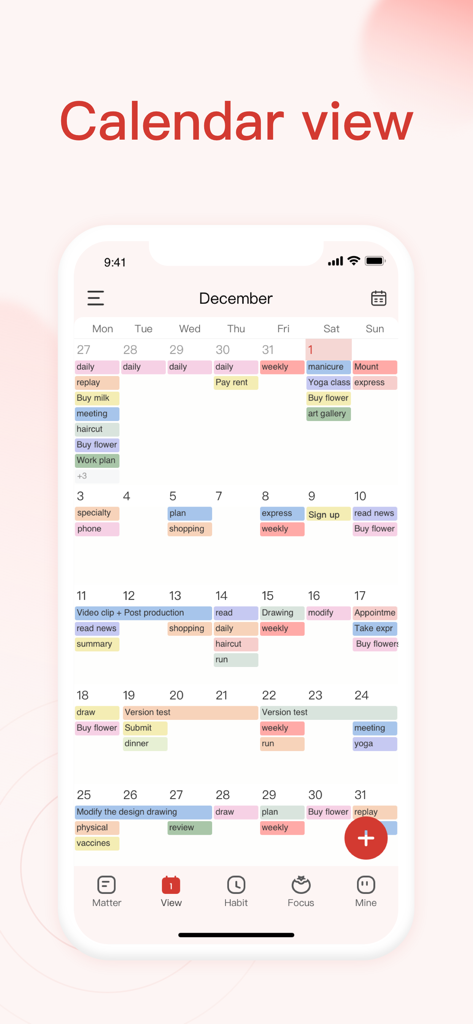
Monthly calendar view in the Zomoplan app showing a color coded schedule of tasks and habits

Monthly calendar view in the Zomoplan app showing a color coded schedule of tasks and habits

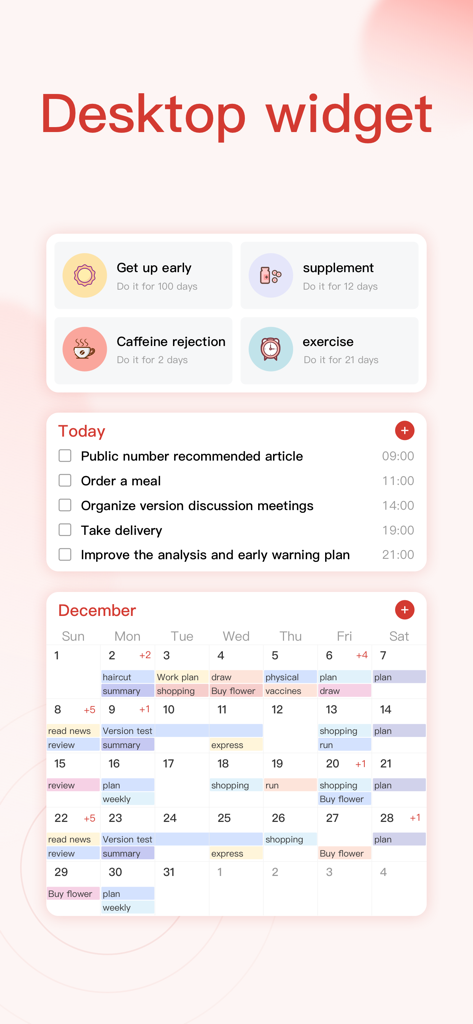
Zomoplan desktop widget showing habit tracking, daily task list, and monthly calendar view

Zomoplan desktop widget showing habit tracking, daily task list, and monthly calendar view

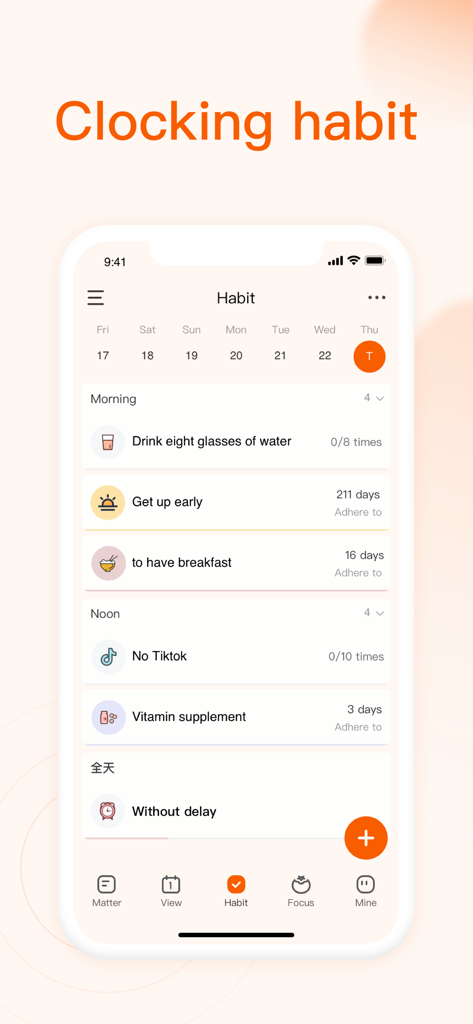
Screenshot of the Zomoplan app habit tracking screen showing a daily checklist for wellness and productivity goals

Screenshot of the Zomoplan app habit tracking screen showing a daily checklist for wellness and productivity goals

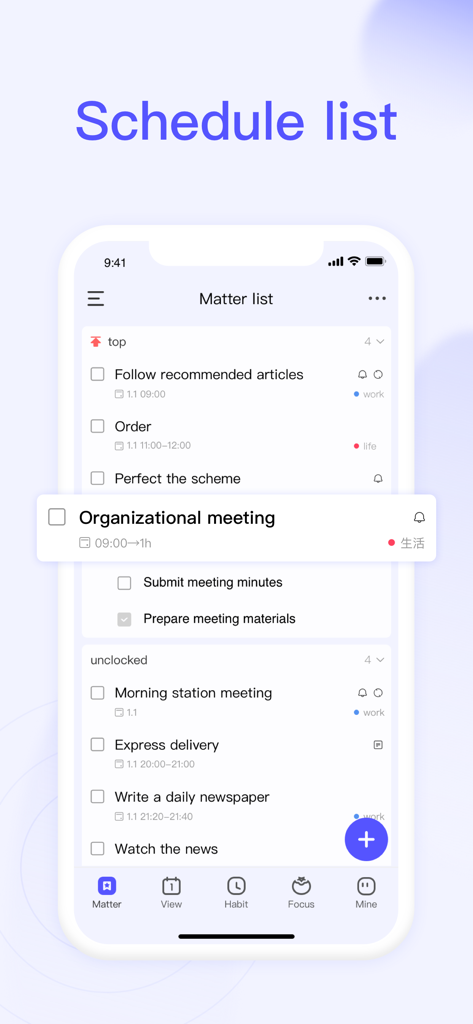
Zomoplan app showing a schedule list with work and life tasks organized by priority and time

Zomoplan app showing a schedule list with work and life tasks organized by priority and time

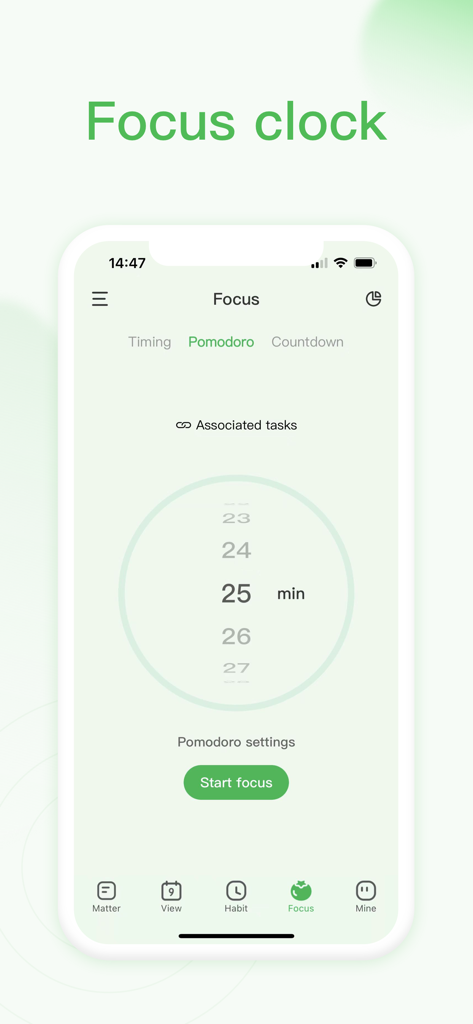
Focus clock screen in Zomoplan app showing a 25 minute Pomodoro timer.

Focus clock screen in Zomoplan app showing a 25 minute Pomodoro timer.

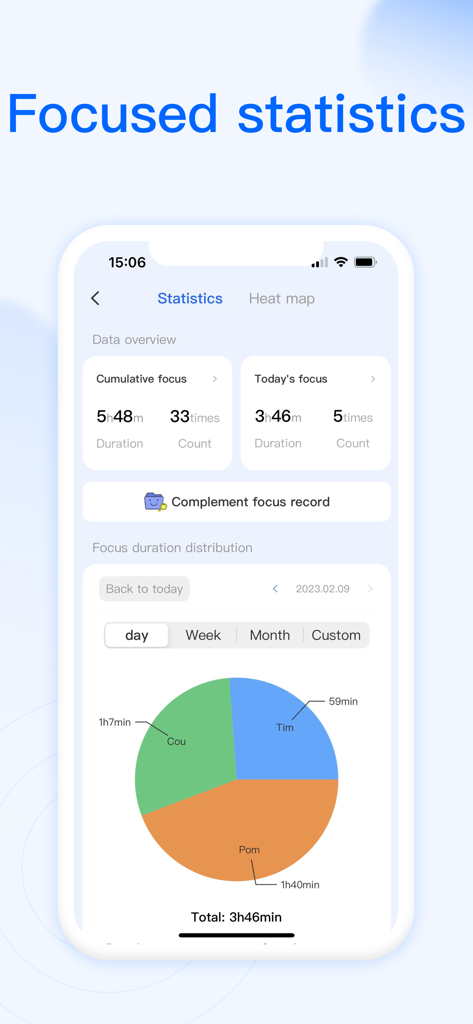
Zomoplan app interface showing focused statistics with daily productivity data and focus duration pie chart

Zomoplan app interface showing focused statistics with daily productivity data and focus duration pie chart

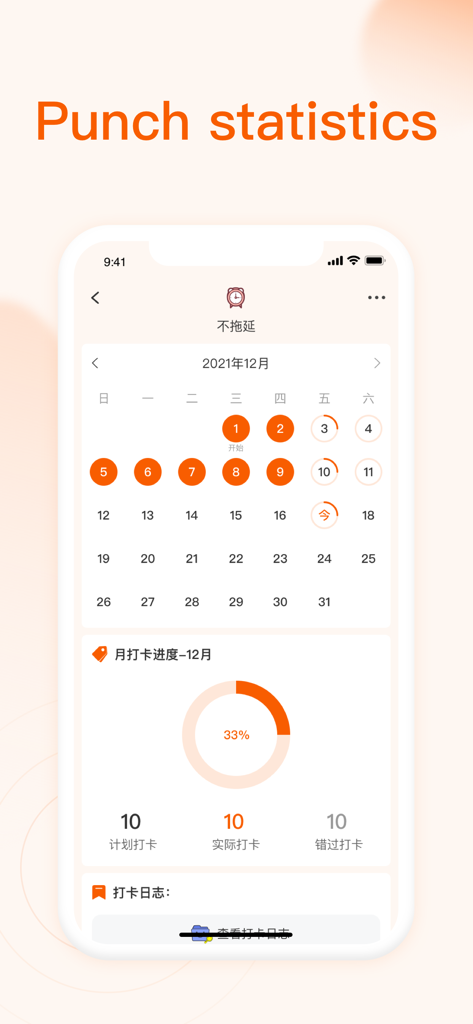
Zomoplan app interface showing a monthly calendar and habit punch statistics with a 33 percent progress chart.

Zomoplan app interface showing a monthly calendar and habit punch statistics with a 33 percent progress chart.

Design Your Daily Success

The tools that make this app stand out, trusted by 467K+ users.

🌟

All-in-One Life Hub

Manage your study plans, work tasks, and personal health cycles in one place. No more switching between multiple apps to stay organized.

🃏

Reward Your Consistency

Build lasting habits and earn beautiful daily reflection cards. Turn your routine into a rewarding journey of self-growth and mindfulness.

🎯

Smart Focus & Countdowns

From exam reminders to relationship anniversaries, keep every important date and deep-work session organized with elegant, intuitive alerts.

Loved by users worldwide

Trusted by 467K+ people who love this app.

"

"Zomoplan has completely transformed my study routine! I love having my exam countdowns, daily habits, and class schedule in one beautiful place. The daily collectible cards are the perfect dopamine hit to keep me motivated—it’s like a digital journal and planner all in one."

Chloe R., University Student
"

"As someone juggling a remote career and a wellness routine, this app is a lifesaver. It’s the first time I’ve found a tool that integrates my project deadlines with my habit tracking and cycle info so seamlessly. It helps me stay disciplined without feeling overwhelmed by a clunky interface."

Sarah M., Digital Marketing Manager

About the app

Everything you need to know about 朝暮计划-自律打卡学习计划清单提醒管家.

Description

Plan List Habits Check in Countdown to Anniversary Have you ever experienced a busy day but gained little, and the goal you insisted on is quickly given up? Zomoplan helps you improve efficiency and reminds you to complete your plans and goals. Manage your free time with perfect time planning. 【Features 】 1. Daily check-in: One tap to complete the daily check-in 2. Habit check-in: Show all the good habits you want to develop 3. Get used to signing up: no longer afraid of forgetting to check in 4. Add habits: customize and add the good habits you want to develop 5. Daily notes: record the changes in daily growth 6. Countdown Anniversary: One-click query for statutory holidays, wedding anniversaries, love anniversaries, menstrual periods, birthdays, one-click settings, expiration reminders 【Habit of checking in】 1. You can set which days of the week to repeat and which time period to execute for each habit; 2. The habits to be adhered to today will be presented separately on the TODAY page, and a tap on the picture will indicate the completion of the check-in of the habit; 3. A card will be pushed every day. When all the habits of today are completed, the card can be obtained and collected. Motivate yourself by jotting down your thoughts of the day on the back of the card. 【scenes to be used】 Work and workplace: formulate project plans, set meeting reminders, arrange itinerary planning, keep work focused, improve work efficiency, make business cards to expand contacts, etc. Necessary for learning: Reasonably plan study time, set study goals, set exam reminders, open the learning master focus mode, improve concentration, and record study moments. Life assistant: set small life goals, reminders of to-do items, plan travel itineraries, record shopping lists, and can also be used for event memos, making wish lists, etc. Automatic renewal subscription service for zomoplan members: 1. Service name: zomoplan annual membership; 2. Subscription cycle: 1 month (continuous monthly subscription product); 12 months (continuous annual subscription product); 3. Subscription price: Based on iAP application information; 4. Payment: Debit through the user's iTunes account, and the deduction will be made after the user confirms the purchase; 5. Cancel the renewal: If you need to cancel the renewal, please manually open the "Settings" of the mobile phone 24 hours before the expiration of the current subscription period, enter the "iTunes Store and App Store", click "Apple ID", select "View Apple ID ", enter the "Account Settings" page, click "Subscribe", select "Zomoplan Annual Membership" to cancel the subscription, otherwise this subscription will continue to be valid; 6. Renewal: The Apple iTunes account will be deducted within 24 hours before the expiration, and the subscription period will be extended by one subscription period after the deduction is successful; 7. Subscriptions may be managed by the user and auto-subscriptions may be turned off in the user's Account Settings after purchase; 8. Any unused portion of the free trial period (if offered), will be reclaimed after the user purchases the service; Privacy Policy: https://www.zomoplan.com/agreement/privacyStatement_iOS.html Service Agreement: https://www.zomoplan.com/izm/service/ contact us: E-mail: kefu@youliangkeji.cn We always listen to your opinions and give feedback at any time!

Latest Version

4.6.0

Size

349.6 MB

First Released

Oct 27, 2020

Ready for your ultimate life reset?

Join over 467,000 users turning daily habits into an aesthetic journey. Master your goals, schedule, and wellness in one beautiful place.

Download on App Store
FAQ

Frequently Asked Questions

Everything you need to know about 朝暮计划-自律打卡学习计划清单提醒管家

What is Zomoplan and what does it do?

Zomoplan is an app designed to improve efficiency, manage free time, and help users achieve goals. It provides daily check-ins, habit tracking, and comprehensive time planning features.

Can Zomoplan help users track and manage habits?

Yes, Zomoplan allows users to track and manage various habits. It enables customization, setting repetition days and execution times, and offers a dedicated habit check-in feature.

How can users customize habit tracking in Zomoplan?

Zomoplan allows users to customize habits by setting specific days of the week for repetition. Users can also define particular time periods for each habit's execution.

Does Zomoplan include a countdown feature for important dates?

Yes, Zomoplan provides a Countdown Anniversary feature. Users can set reminders for statutory holidays, wedding anniversaries, love anniversaries, menstrual periods, and birthdays with expiration notifications.

How does Zomoplan improve work efficiency?

Zomoplan helps improve efficiency by allowing users to formulate project plans, set meeting reminders, arrange itineraries, and keep work focused to enhance overall productivity.

Does Zomoplan provide a focus mode for studying?

Yes, Zomoplan offers a focus mode to aid studying. It includes features to improve concentration, set exam reminders, and record study moments effectively.

How can users view their schedule and plans in Zomoplan?

Zomoplan displays schedules through a calendar view and a dedicated 'Schedule list'. This allows users to manage and view their daily plans, tasks, and organizational meetings effectively.

Does Zomoplan offer desktop widgets for quick access?

Yes, Zomoplan supports desktop widgets. Users can add these widgets to their device's home screen for quick access and an overview of their habits and daily tasks.

What subscription plans are available for Zomoplan?

Zomoplan offers two automatic renewal subscription options: a continuous monthly subscription and a continuous annual subscription, both referred to as "Zomoplan annual membership".

How are Zomoplan subscriptions paid for?

Payment for Zomoplan subscriptions is processed via the user's iTunes account. The deduction occurs automatically after the user confirms the purchase of the service.

How do I cancel my Zomoplan subscription renewal?

To cancel Zomoplan subscription renewal, navigate to iPhone 'Settings', then 'iTunes Store and App Store', tap 'Apple ID', 'View Apple ID', 'Account Settings', 'Subscribe', and select 'Zomoplan Annual Membership' to cancel.

When does Zomoplan automatically renew subscriptions?

Zomoplan automatically renews within 24 hours before the current subscription period expires. The Apple iTunes account is debited, extending the subscription for another period.

Does Zomoplan offer a free trial period?

Zomoplan may offer a free trial period. If a free trial is provided, any unused portion is reclaimed once the user purchases the full service.

Where can I find Zomoplan's Privacy Policy?

The Privacy Policy for Zomoplan is accessible at the following URL: https://www.zomoplan.com/agreement/privacyStatement_iOS.html.

How do I contact Zomoplan customer support?

You can contact Zomoplan support by sending an email to kefu@youliangkeji.cn. They are available to listen to user opinions and provide feedback.

What is the 'Punch statistics' feature in Zomoplan?

Zomoplan provides "Punch statistics" to visualize habit check-in progress. It shows monthly data including planned check-ins, actual completions, and missed check-ins in a clear calendar view.

Can Zomoplan help record daily personal growth?

Yes, Zomoplan helps users record daily growth and changes. It offers a dedicated daily notes feature for logging personal developments.