AI Background - Pokecut Studio

AI Background - Pokecut Studio

Download on App Store
Spark by MWM logo
Logo of AI Background - Pokecut Studio

AI Background - Pokecut Studio: Create Studio-Quality Product Photos in Seconds

The all-in-one AI photo editor built for entrepreneurs. Effortlessly remove backgrounds, batch edit 50+ items at once, and generate stunning AI scenes to scale your sales on Etsy, Shopify, and Poshmark.

Publisher

Guangzhou Guangzhuiyuan Information Technology Co., Ltd.

Category

Graphics & Design

Downloads

692K+

User Rating

4.7/5

Total Ratings

5K+

Locales

8

Studio Quality, Instantly

Discover the interface used by 692K+ users.

A screenshot of the Pokecut Studio app showing the AI background removal feature on a portrait of a woman

A screenshot of the Pokecut Studio app showing the AI background removal feature on a portrait of a woman

A product photo of a brown quilted handbag displayed on various AI generated backgrounds

A product photo of a brown quilted handbag displayed on various AI generated backgrounds

A mobile interface showing the creation of professional AI product videos for social media marketing

A mobile interface showing the creation of professional AI product videos for social media marketing

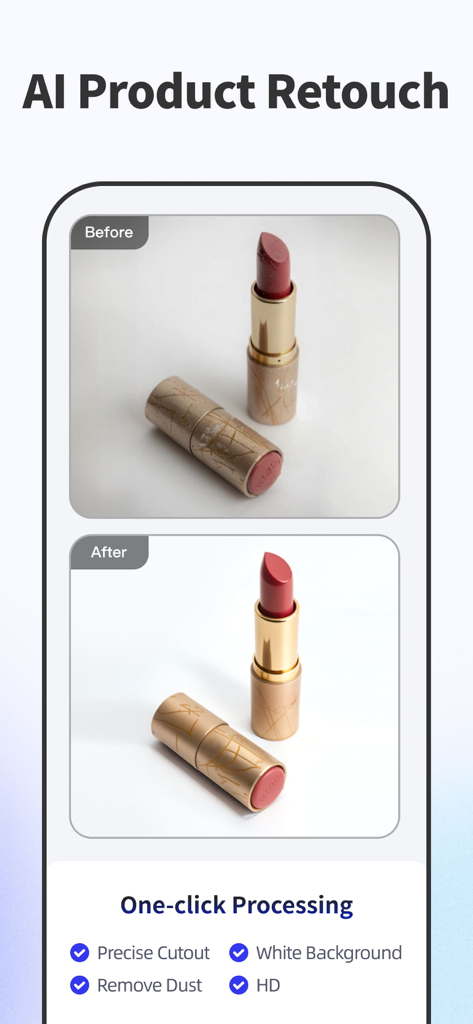
Before and after comparison of a lipstick product photo showing AI retouching and background removal

Before and after comparison of a lipstick product photo showing AI retouching and background removal

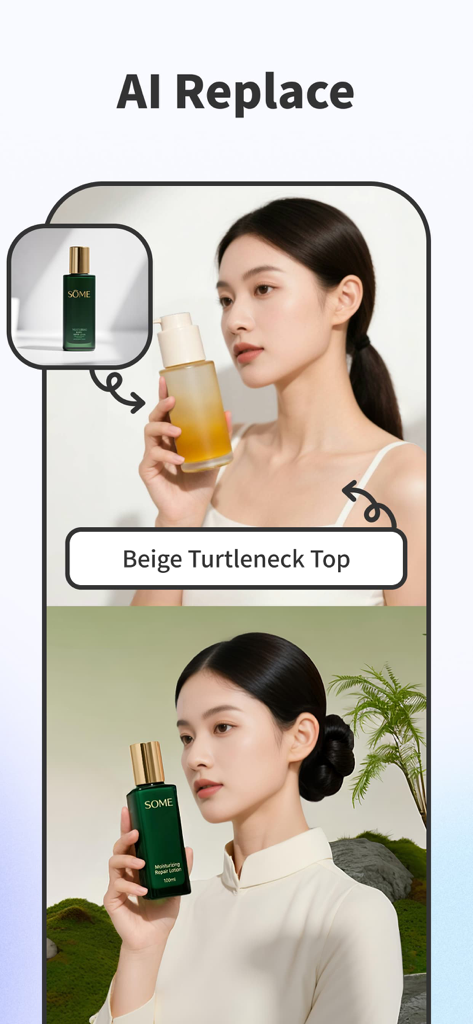
AI Replace feature demonstrating clothing and product modification on a model

AI Replace feature demonstrating clothing and product modification on a model

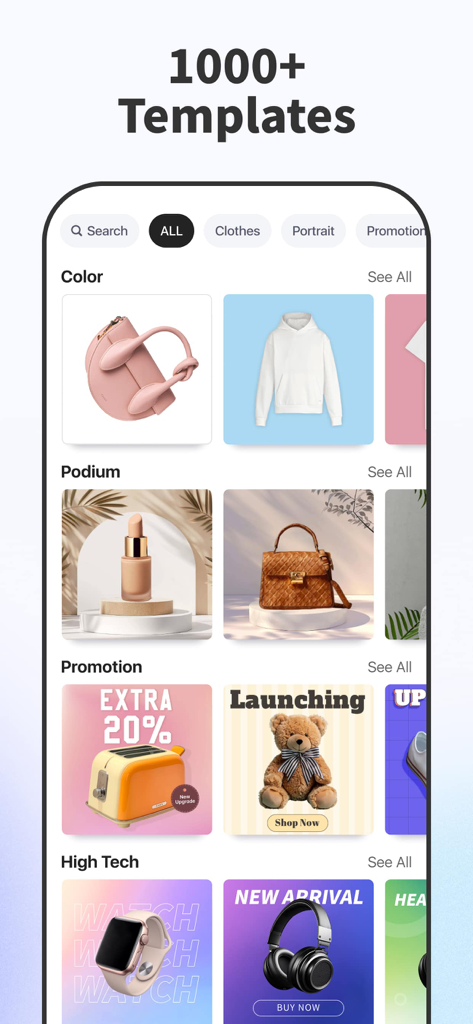
Pokecut Studio app interface showing a gallery of over 1000 professional product photography templates for e-commerce

Pokecut Studio app interface showing a gallery of over 1000 professional product photography templates for e-commerce

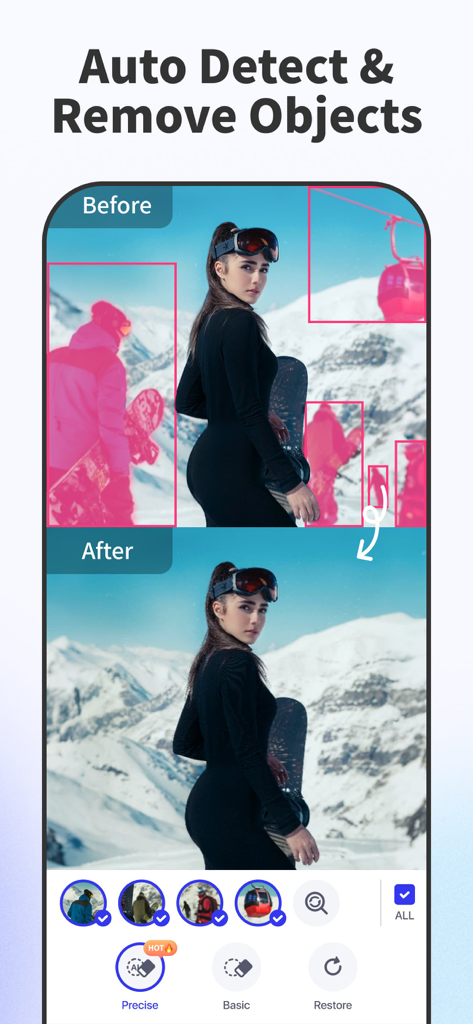
Before and after comparison of the AI object removal feature in the Pokecut app showing a woman on a snowy mountain

Before and after comparison of the AI object removal feature in the Pokecut app showing a woman on a snowy mountain

The batch edit screen of the Pokecut app showing multiple jewelry products with a consistent blue background

The batch edit screen of the Pokecut app showing multiple jewelry products with a consistent blue background

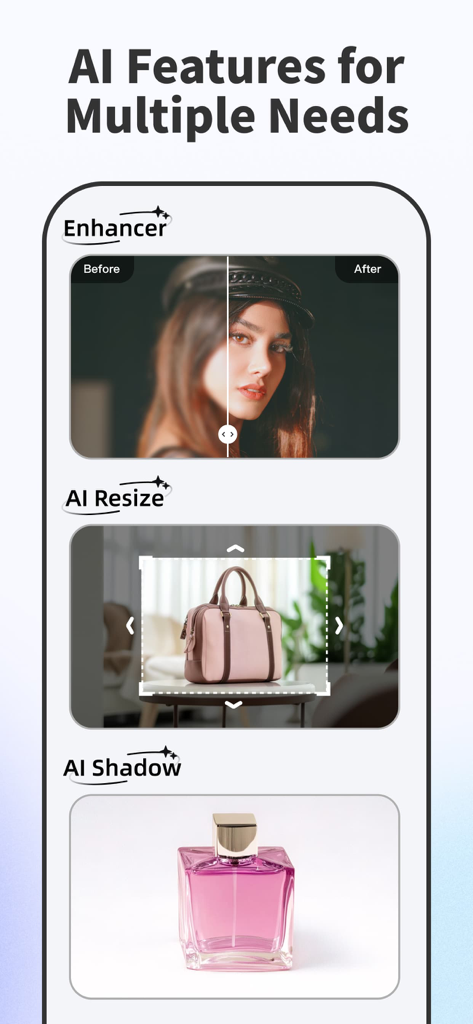
Showcase of Pokecut Studio AI features including image enhancer AI resize and AI shadow for product photography

Showcase of Pokecut Studio AI features including image enhancer AI resize and AI shadow for product photography

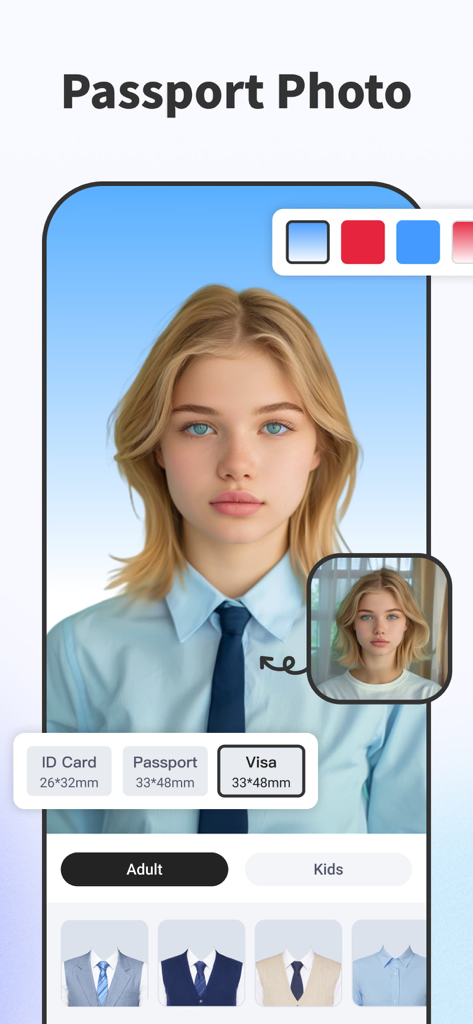
Mobile app interface for generating professional passport and ID photos using AI to change backgrounds and clothing

Mobile app interface for generating professional passport and ID photos using AI to change backgrounds and clothing

Professional Photos That Drive More Sales

The tools that make this app stand out, trusted by 692K+ users.

One-Tap Batch Processing

Save hours of manual work by erasing backgrounds from up to 50 photos simultaneously. The ultimate time-saver for scaling your online inventory.

Instant AI Studio Scenes

Generate stunning, natural backgrounds that make your products pop. Achieve professional studio lighting and depth without the expensive gear.

🏷️

Pro Marketplace Templates

Access 1,000+ layouts tailored for Etsy, Shopify, and Poshmark to build a cohesive brand identity that builds customer trust and loyalty.

Loved by users worldwide

Trusted by 692K+ people who love this app.

"

"I run a high-volume vintage shop on Poshmark, and Pokecut has completely transformed my workflow. The batch background removal is a lifesaver—I can process 50 photos in a single tap, which used to take me all afternoon. It gives my store that clean, professional boutique look that buyers trust."

Sarah Miller
"

"I was blown away by the AI background generator. I sell handmade ceramics and don't have a professional studio setup, but this app makes my products look like they were shot for a high-end magazine. The smart relighting tool is incredible for fixing shadows. It's the best investment for my Etsy business."

David Chen

About the app

Everything you need to know about AI Background - Pokecut Studio.

Description

Auto erase photo background and edit with templates to create studio-quality images in seconds! 1000+ beautifully designed templates are available to help you easily create professional-looking photos. Design has never been easier! Use Pokecut for: - Create viral AI video - Auto erase photo background and change any background - Get stunning, natural AI backgrounds in one click - AI Replace, powerful AI tool, arbitrary image modification, free dressing, and product appearance - Create product images for -commerce & marketplaces - Create profile photos for social media - Auto detect image content and remove unwanted parts easily - Instantly enhance image quality for stunning clarity Features: #Smart Background Remover# -Instantly remove the background with just one tap -Erase the background with a perfect cutout -Support batch background removal and batch edit -Create white background product photo instantly #Useful AI Tools# -AI Retouch: Remove unwanted objects seamlessly with one click -AI Background: Generate stunning, natural backgrounds instantly with AI -Photo Enhancer: Boost image clarity with one-click AI enhancements -Smart Relight: Perfect your images with intelligent lighting adjustments #Flawless Templates# -1000+ product images templates for -commerce & marketplaces -Choose from 30+ themes, including minimal, colorful, elegant... -Keep updating templates weekly #Powerful Photo Editor# -Batch edit: Remove background and batch edit 50+ photos. Time saver! -Shadow: Add shadow and refine it for natural results -Stickers: Hundreds of stickers including vintage materials, price tags, holiday sticker and more -Text: Explore text arts with various fonts & unique designs -Brand kit: Easily add your brand logo and emphasize your brand -Relight: Relight your images to achieve perfect contrast and lighting -Filters: High quality filters perfect for any occasion -Adjustment: 20+ tools to enhance your photos: Curve, HSL, Exposure, White Balance... -Magnifier: Add magnifiers to highlight details in your images -Stock Photos: search millions of images from Unsplash Subscription Info: Pokecut offers a weekly or yearly subscription for unlimited access to all features and contents in the app. Payment will be charged to iTunes Account at confirmation of purchase. Subscription automatically renews unless auto-renew is turned off at least 24 hours before the end of the current period. Account will be charged for renewal within 24-hours prior to the end of the current period, and identify the cost of the renewal. Subscriptions may be managed by the user and auto renewal may be turned off by going to the user's Account Settings after purchase. Any unused portion of a free trial period, if offered, will be forfeited when the user purchases a subscription to that publication, where applicable. Pricing in other countries may vary and actual charges may be converted to your local currency depending on the country of residence. Privacy policy: https://www.pokecut.com/privacy_ios_en Terms of use: https://www.pokecut.com/agreement_ios_en

Latest Version

4.9.9

Size

287.0 MB

First Released

Aug 20, 2021

Ready to Scale Your Side-Hustle?

Stop wasting hours on manual editing. Join over 600,000 entrepreneurs using Pokecut to create studio-quality product photos and boost your sales instantly.

Download on App Store
FAQ

Frequently Asked Questions

Everything you need to know about AI Background - Pokecut Studio

What is AI Background - Pokecut Studio?

AI Background - Pokecut Studio is an app that automatically removes photo backgrounds and provides templates. It creates studio-quality images, offers AI tools for video creation, background changes, product image generation, and photo enhancement.

How does Pokecut Studio remove photo backgrounds?

Pokecut Studio removes photo backgrounds instantly with one tap using its Smart Background Remover feature. It ensures perfect cutouts and supports batch background removal for multiple images.

Can Pokecut Studio generate AI backgrounds for images?

Yes, Pokecut Studio generates stunning, natural AI backgrounds instantly using its AI Background tool. Users can change any background with a single click.

Does Pokecut Studio offer image templates?

Yes, Pokecut Studio provides over 1000 product image templates suitable for e-commerce and marketplaces. These templates are available in more than 30 themes and are updated weekly.

How do I remove unwanted objects from photos using Pokecut Studio?

Pokecut Studio removes unwanted objects from photos using its AI Retouch feature, which performs seamless removal with one click. It also automatically detects and removes unwanted parts of an image.

Does Pokecut Studio support batch editing of photos?

Yes, Pokecut Studio supports batch background removal and batch editing for over 50 photos. This feature is part of its Powerful Photo Editor, designed to save time.

What are the subscription options for Pokecut Studio?

Pokecut Studio offers weekly or yearly subscription options. These subscriptions grant unlimited access to all features and content within the app.

Does the Pokecut Studio subscription auto-renew?

Yes, Pokecut Studio subscriptions automatically renew. Users must turn off auto-renew in their account settings at least 24 hours before the current period ends to avoid renewal charges.

Can I create viral AI videos with Pokecut Studio?

Yes, Pokecut Studio allows users to create viral AI videos. This capability is one of the app's highlighted uses for creative content generation.

What does the AI Replace feature do in Pokecut Studio?

The AI Replace feature in Pokecut Studio is a powerful AI tool. It enables arbitrary image modifications, including free dressing and changes to product appearance.

Can Pokecut Studio be used for creating passport photos?

Yes, Pokecut Studio can be used for creating passport photos. It supports various official sizes like ID Card, Passport, and Visa, with options for both adult and kids' photos.