
AIDA64
FinalWire Korlatolt Felelossegu Tarsasag



Go beyond the surface and unlock complete transparency for your iPhone and iPad. Access detailed SoC specs, battery health, and real-time sensor data with the power of the industry-leading hardware utility.
Publisher
Category
UtilitiesDownloads
2M+User Rating
Total Ratings
62K+Locales
1Discover the interface used by 2M+ users.
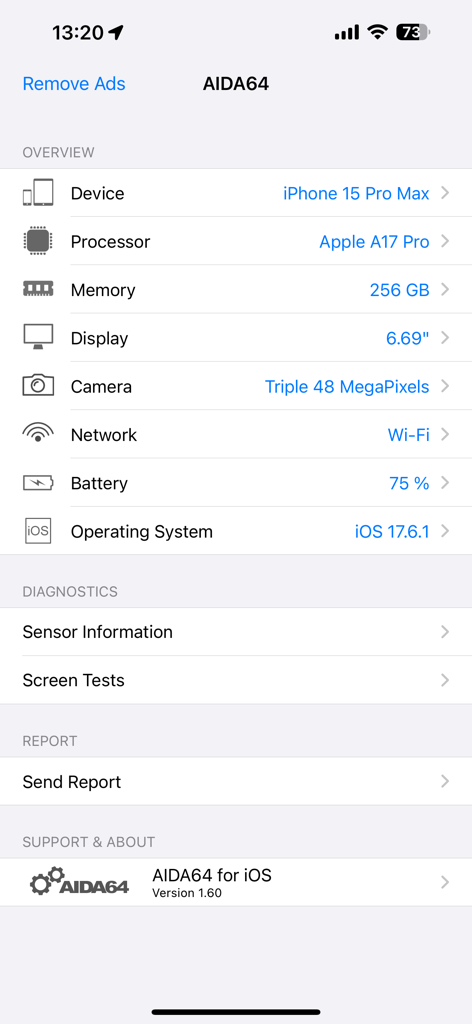
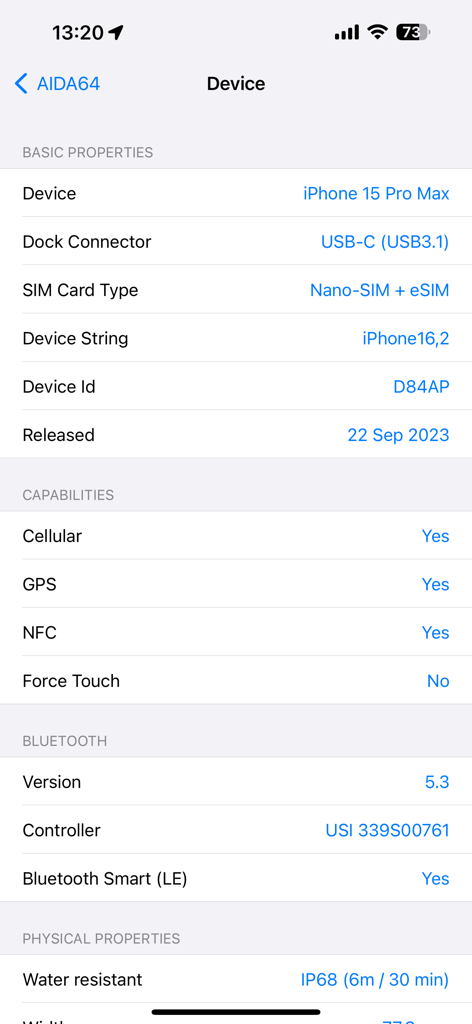
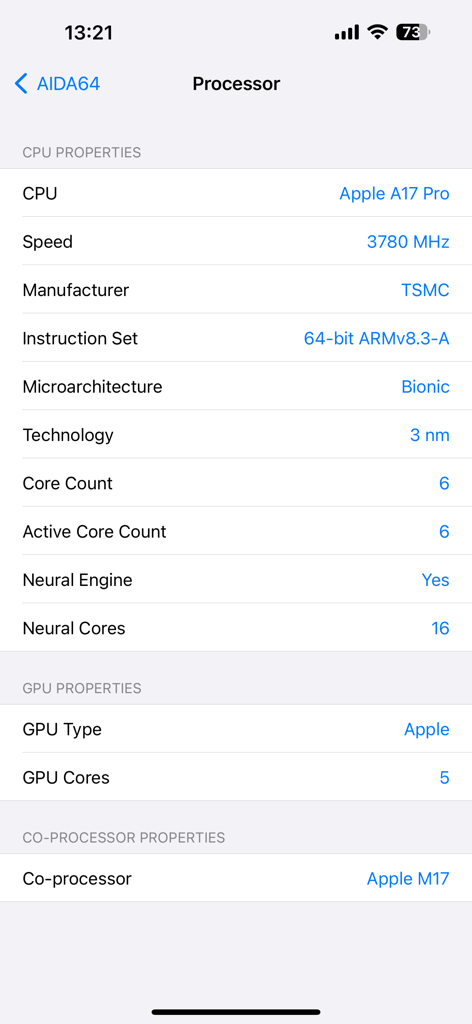
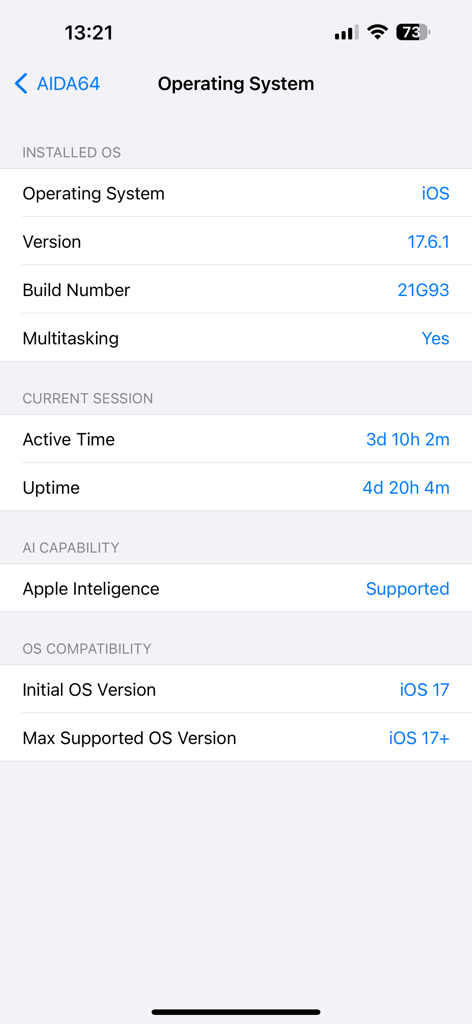
The tools that make this app stand out, trusted by 2M+ users.
Go beyond marketing names with precise SoC details, CPU clock speeds, and manufacturer specs that reveal the true power under the hood.
Track real-time status, exact mAh capacity, and chemistry details to monitor degradation and maximize your device's long-term efficiency.
Analyze data from every internal sensor and verify hardware authenticity, perfect for troubleshooting or auditing a used device purchase.
Trusted by 2M+ people who love this app.
"I've relied on AIDA64 for my PC builds for over a decade, and the iOS version brings that same level of forensic detail to my pocket. It's the only app I trust to give me the real story on my iPhone's SoC performance and thermal sensors. A must-have for anyone who wants to know what's actually happening under the hood."
"AIDA64 is the gold standard for hardware diagnostics. Whether I'm verifying the screen specs on a new iPad or troubleshooting a battery drain issue, the depth of data is unparalleled. It strips away the 'black box' mystery of Apple hardware and provides the transparency every power user deserves."
Everything you need to know about AIDA64.
Description
Latest Version
1.61
Size
13.8 MB
First Released
Jun 4, 2015
Join over 2 million power users and get the industry-standard hardware diagnostic tool for your iPhone or iPad. Stop guessing and start analyzing your device today.
Everything you need to know about AIDA64
AIDA64 for iOS provides detailed hardware and software information including CPU details, screen specifications, camera, battery status, network insights, memory usage, sensor data, and screen diagnostics.
Yes, AIDA64 for iOS displays processor details including CPU type, speed, manufacturer, core count, neural engine status, and GPU type. For example, it shows "Apple A17 Pro."
Yes, AIDA64 for iOS identifies the installed operating system version, such as iOS 17.6.1, along with the build number and multitasking support. It also shows active time and uptime.
AIDA64 for iOS performs screen diagnostics through its "Screen Tests" feature located in the "Diagnostics" section. This allows users to check for display anomalies.
Yes, AIDA64 for iOS provides detailed battery status and type information. It displays the current charge percentage, such as "75 %," and other relevant battery data.
You monitor sensor data by navigating to the "Diagnostics" section within AIDA64 for iOS and selecting "Sensor Information." This provides detailed readings from your device's sensors.
Yes, AIDA64 for iOS confirms support for Apple Intelligence. This capability is clearly listed within the operating system details section of the application.
AIDA64 for iOS displays comprehensive network information for both Wi-Fi and cellular connections. It identifies the connected network type, such as "Wi-Fi," and provides further insights.
Yes, AIDA64 for iOS identifies your device model, like "iPhone 15 Pro Max," and provides System-on-a-Chip (SoC) information, including the processor details such as "Apple A17 Pro."
Yes, AIDA64 is a powerful utility designed for iOS devices, making it available and compatible with both iPhones and iPads to provide detailed diagnostics.
Yes, AIDA64 for iOS displays device physical properties including water resistance. For instance, it provides specifications such as "IP68 (6m / 30 min)."
AIDA64 for iOS supports a maximum operating system version of iOS 17+. This ensures the application remains compatible with current and future iOS updates.
You can obtain support and updates for AIDA64 for iOS by connecting with the official channels on Twitter via @aida64_official or on Facebook at AIDA64.
Yes, AIDA64 for iOS provides detailed information regarding memory and storage usage. It displays the total installed memory, for example, "256 GB."
Yes, AIDA64 for iOS provides detailed camera specifications. It can show specifics such as "Triple 48 MegaPixels" for your device's camera system.
Apps with similar features and user experience

Beijing AnTuTu Technology Limited

永刚 陈

iDea Mobile Tech Inc.

Binh Tran
Marco Ricca

Jiri Techet

David Ryall

Raven Panna

Klaus Haessler