AppSheet

AppSheet

Download on App Store
Spark by MWM logo
Logo of AppSheet

AppSheet: Turn Your Spreadsheets into Powerful Custom Apps Without Code

The leading no-code platform for business. Connect your data from Google Sheets, Excel, or SQL to build, deploy, and manage professional mobile apps that work anywhere, even offline.

Publisher

Solvebot Inc.

Category

Business

Downloads

2M+

User Rating

3.5/5

Total Ratings

800

Locales

1

Business Logic in Action

Discover the interface used by 2M+ users.
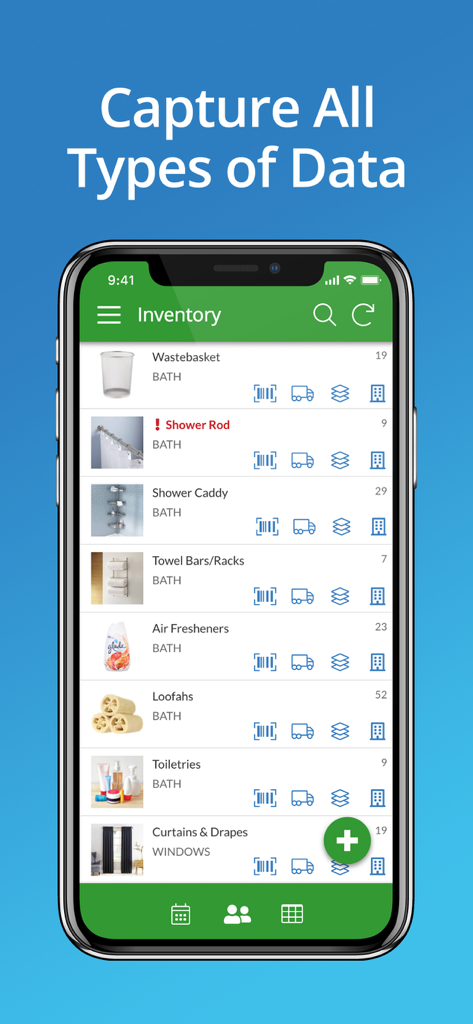
Mobile app screenshot of AppSheet showing an inventory list for bathroom products with data capture icons

Mobile app screenshot of AppSheet showing an inventory list for bathroom products with data capture icons

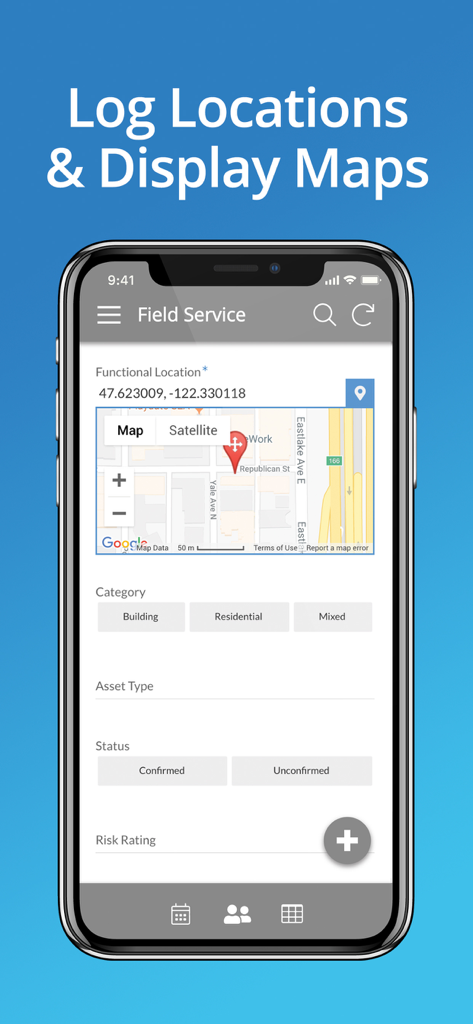
AppSheet field service app interface displaying GPS coordinates and map integration for location tracking.

AppSheet field service app interface displaying GPS coordinates and map integration for location tracking.

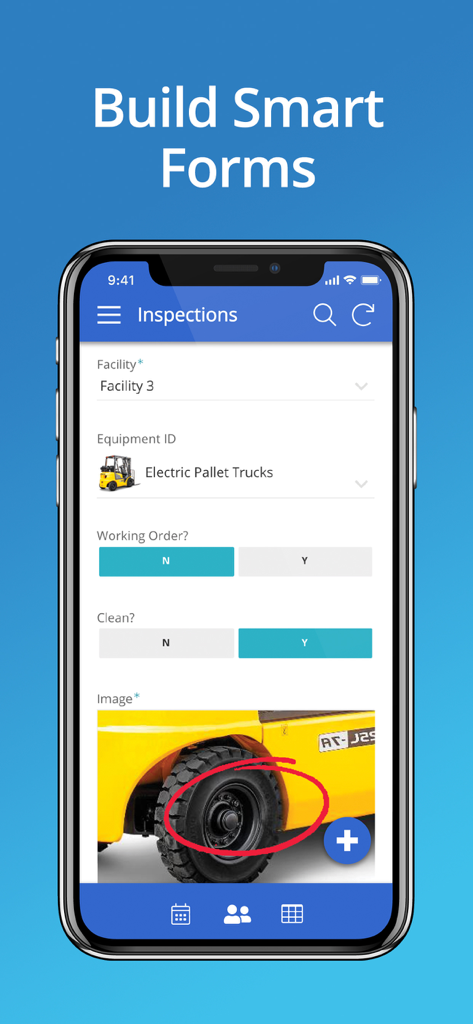
A mobile phone displaying an inspection form built with AppSheet

A mobile phone displaying an inspection form built with AppSheet

Build the Custom Tools Your Business Demands

The tools that make this app stand out, trusted by 2M+ users.

🚀

Zero Code, Infinite Potential

Turn your Excel or Google Sheets into fully functional apps in minutes. No developers, no high costs—just your data working harder.

📍

Built for the Field

Empower remote teams with offline data entry, GPS tracking, and barcode scanning. Capture critical info anywhere and sync it back to the office automatically.

⚙️

Automate the Mundane

Create smart workflows that trigger emails, notifications, and reports. Free your team from manual entry and focus on growing your business.

Loved by users worldwide

Trusted by 2M+ people who love this app.

"

"We used to lose so much time with paper invoices and manual data entry. With AppSheet, I built a custom app that connects directly to our SQL database in just a few days. Now, my team can capture photos and GPS coordinates directly from the job site, and everything is organized instantly. It's a game-changer for operations management."

Michael Reynolds, Operations Director
"

"I am not a developer, but AppSheet made me feel like one. I created a robust student progress tracker for our school using just a Google Sheet. Being able to share the app securely with my staff while keeping our data centralized has saved us hours of back-and-forth emails every week. Truly intuitive and powerful."

Dr. Sarah Jenkins, High School Principal

About the app

Everything you need to know about AppSheet.

Description

With AppSheet, you can create and distribute your own custom mobile apps without writing code or hiring developers. These apps can display content, take notes, create forms, capture photos, signatures and GPS, scan bar codes, and generate workflows for a wide variety of business scenarios. You can also build web apps and chatbots. AppSheet uses data from your cloud storage -- Google Sheets, Excel on Office365, Dropbox or Box, Smartsheet, SalesForce, and a variety of databases (SQLServer, mySQL, Postgres, and DynamoDB). You can create an app in minutes and enhance it to create rich custom apps for your team, business, or enterprise. Check review sites like Capterra to learn how AppSheet’s modern technology platform outpaces older low-code solutions like PowerApps, Salesforce1, and App Maker. AppSheet is an ideal solution for many business, including those in property management, agriculture, supply chain, operations, salesforce management, education and more. Here are just a few scenarios: WORKING WITH REMOTE TEAMS Apps built with AppSheet can help a remote team work with centralized data saved in spreadsheets (eg: in Google Drive, Box, or Droppox) or SQL databases. PROJECT MANAGEMENT Millions of people manage projects using Google Sheets, Excel, and Smartsheets. Project managers can build apps with AppSheet to display and share project data through a mobile device with other team members and stakeholders. Keep data centralized in a core spreadsheet and share only the parts that their audience needs to see. No more managing dozens of files that go back and forth via email! EDUCATION Manage study plans, school rosters, grading, and group work by creating a custom app with charts, maps, text summaries and image galleries. Share the app securely with students and colleagues. CUSTOMER SUPPORT AND ENGAGEMENT: Keep track of your customer pipeline on a Google Sheet but get the benefits of a streamlined custom mobile app using AppSheet. You can also interact with your data in new ways like building maps from your data, calling or messaging to telephone numbers, sending emails to contacts, and building catalogs using image galleries.

Latest Version

16.9

Size

35.7 MB

First Released

Nov 1, 2013

Transform Your Data Into a Custom Mobile App Today

Join over 2 million professionals building powerful business solutions without writing a single line of code. Connect your spreadsheets and empower your team for free.

Download on App Store
FAQ

Frequently Asked Questions

Everything you need to know about AppSheet

What is AppSheet?

AppSheet enables users to create and distribute custom mobile and web applications without writing code. It supports displaying content, taking notes, creating forms, capturing photos, signatures, GPS data, and scanning barcodes for various business scenarios.

What data sources does AppSheet integrate with?

AppSheet integrates with cloud storage services such as Google Sheets, Excel on Office365, Dropbox, Box, and Smartsheet. It also connects to various databases, including SQLServer, mySQL, Postgres, and DynamoDB for data management.

Can AppSheet create apps for logging locations and displaying maps?

Yes, AppSheet creates apps that log locations and display maps. For instance, a field service app can track functional locations and show them on a map interface, allowing users to input specific location-based data efficiently.

Does AppSheet support custom form creation for data capture?

Yes, AppSheet allows users to build smart forms. These custom forms can capture diverse data types, including text inputs, selections, and images, as demonstrated in inspection and inventory management applications within the AppSheet platform.

Can AppSheet be used for inventory management?

Yes, AppSheet can be used for inventory management. Users create custom inventory apps to capture and display data for various items, track quantities, and manage different categories of products or assets effectively within the app.