Blackmagic Camera

Blackmagic Camera

Download on App Store
Spark by MWM logo
Logo of Blackmagic Camera

Blackmagic Camera: Hollywood Cinematography in Your Pocket

Transform your iPhone into a professional cinema camera with the same intuitive interface used on award-winning film sets. Gain total manual control over ISO, shutter angle, and white balance, then sync directly to DaVinci Resolve for a seamless cloud-based workflow.

Publisher

Blackmagic Design Inc

Category

Photo & Video

Downloads

21M+

User Rating

4.8/5

Total Ratings

92K+

Locales

9

Cinema Control, Visualized

Discover the interface used by 21M+ users.

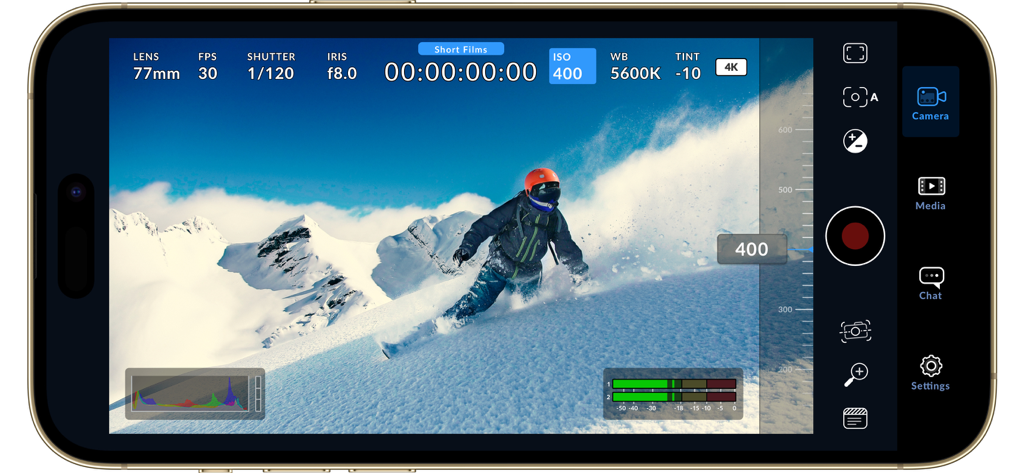
Blackmagic Camera app interface showing manual video controls while recording a snowboarder in 4K

Blackmagic Camera app interface showing manual video controls while recording a snowboarder in 4K

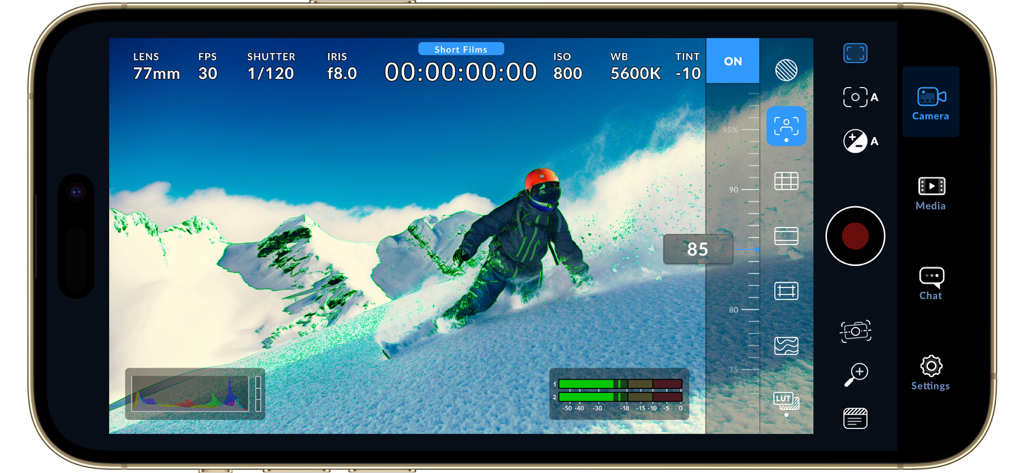
Blackmagic Camera app interface featuring manual cinematic controls while recording a snowboarder in 4K.

Blackmagic Camera app interface featuring manual cinematic controls while recording a snowboarder in 4K.

Blackmagic Camera app interface displaying professional video controls and a snowboarder on a mountain

Blackmagic Camera app interface displaying professional video controls and a snowboarder on a mountain

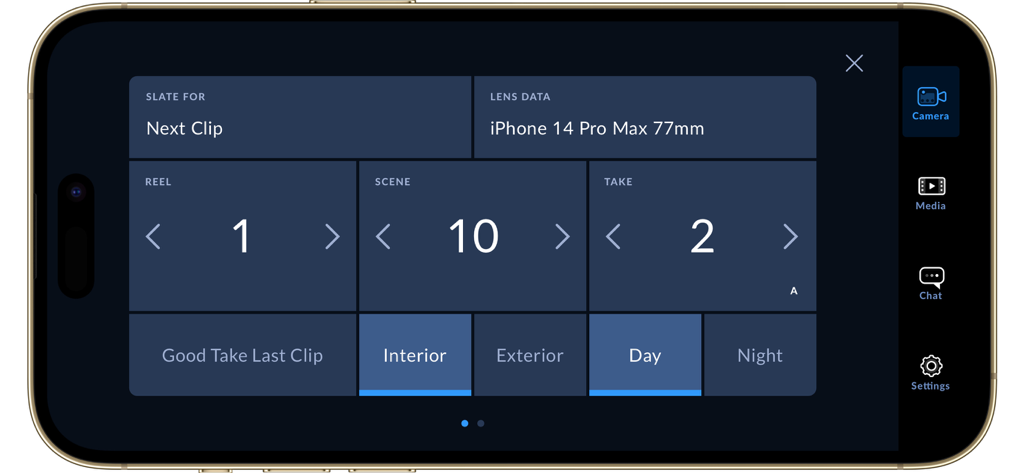
Digital slate interface in the Blackmagic Camera app showing metadata for reel scene take and location

Digital slate interface in the Blackmagic Camera app showing metadata for reel scene take and location

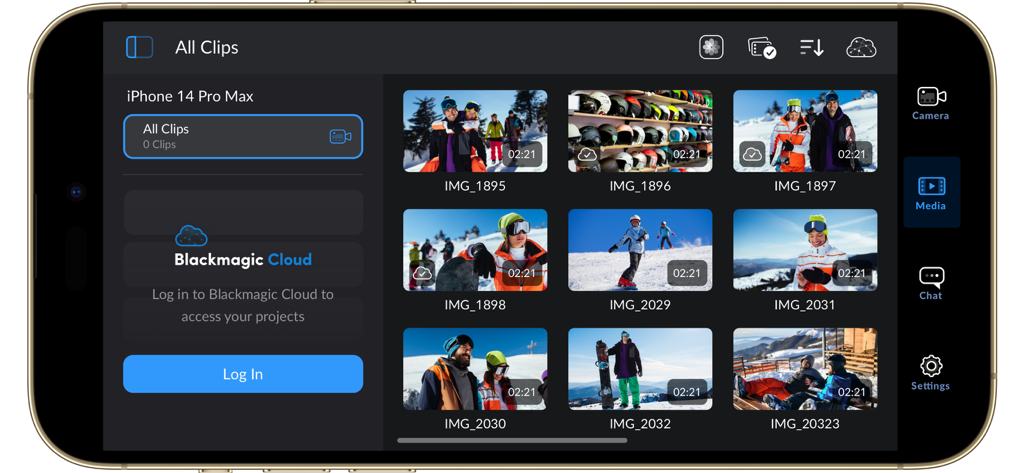
Interface of the Blackmagic Camera app showing a library of video clips and the Blackmagic Cloud login screen

Interface of the Blackmagic Camera app showing a library of video clips and the Blackmagic Cloud login screen

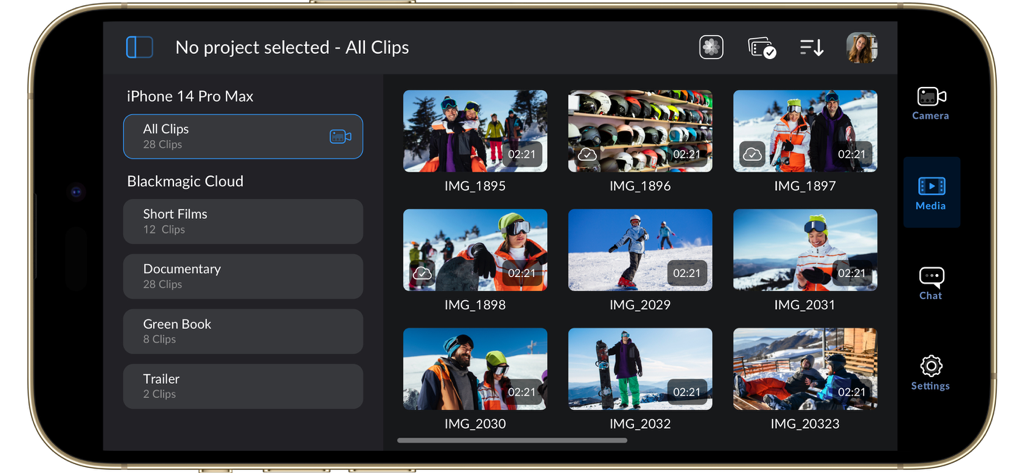
The media library interface of the Blackmagic Camera app showing a grid of video clips and cloud project folders on an iPhone screen

The media library interface of the Blackmagic Camera app showing a grid of video clips and cloud project folders on an iPhone screen

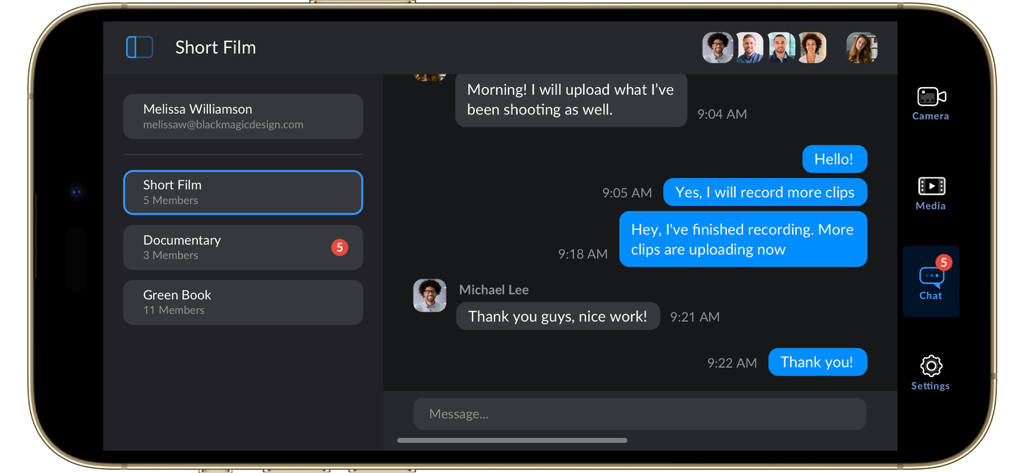
Blackmagic Camera app showing the team chat interface for project collaboration and media upload updates

Blackmagic Camera app showing the team chat interface for project collaboration and media upload updates

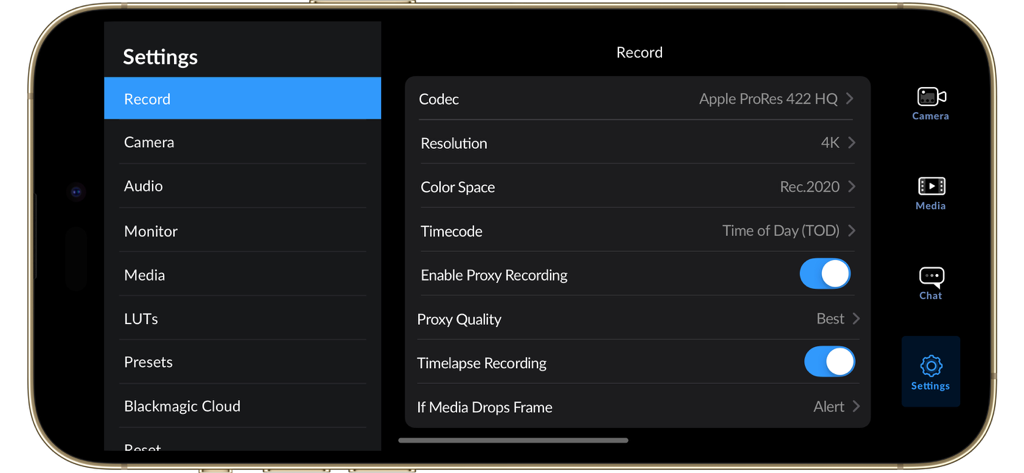
The recording settings menu in the Blackmagic Camera app showing options for 4K resolution and Apple ProRes codec on an iPhone.

The recording settings menu in the Blackmagic Camera app showing options for 4K resolution and Apple ProRes codec on an iPhone.

Blackmagic Camera app interface showing manual video controls while recording a snowboarder.

Blackmagic Camera app interface showing manual video controls while recording a snowboarder.

Professional video recording interface of the Blackmagic Camera app showing manual controls and ISO settings on an iPhone.

Professional video recording interface of the Blackmagic Camera app showing manual controls and ISO settings on an iPhone.

Professional Cinematography at Your Fingertips

The tools that make this app stand out, trusted by 21M+ users.

🕹️

Granular Manual Control

Master your craft with instant access to ISO, shutter angle, and white balance settings via an intuitive, pro-grade heads-up display.

🎬

Cinematic Image Quality

Record in industry-standard 10-bit Apple ProRes and 4K, giving your YouTube, TikTok, or indie film that sought-after Hollywood look.

Cloud-Powered Workflow

Sync footage instantly to Blackmagic Cloud and DaVinci Resolve, allowing your editors to start working while you are still on location.

Loved by users worldwide

Trusted by 21M+ people who love this app.

"

"Blackmagic Camera has transformed my iPhone into a legitimate B-cam for professional shoots. The manual control over shutter angle and ISO is exactly what was missing from the native app, and syncing directly to DaVinci Resolve via the cloud has shaved hours off my editing workflow."

Marcus Jensen, Freelance Cinematographer
"

"I am obsessed with the cinematic look this app gives my content. It completely eliminates that over-sharpened smartphone feel. Having professional tools like focus peaking and histograms right on my screen makes capturing high-end footage for my social channels so much easier!"

Chloe Valenti, Digital Content Creator

About the app

Everything you need to know about Blackmagic Camera.

Description

Introducing Digital Film for iPhone and iPad! Blackmagic Camera unlocks the power of your iPhone and iPad by adding digital film camera controls and operating systems! Now you can create the same cinematic ‘look’ as Hollywood feature films. You get the same intuitive and user friendly interface as Blackmagic Design’s award winning cameras. So it’s just like using a professional digital film camera! This means you can adjust settings such as frame rate, shutter angle, white balance and ISO all in a single tap. Or record directly to Blackmagic Cloud in industry standard 10-bit Apple ProRes files up to 4K! Recording to Blackmagic Cloud Storage lets you collaborate on DaVinci Resolve projects with editors anywhere in the world, all at the same time! Get the "Hollywood Look" with Digital Film! Blackmagic Camera puts the professional features you need for feature film, television and documentaries in your pocket. Now you can create YouTube and TikTok content with a cinematic look, and broadcast quality ENG! Imagine having a run and gun camera on hand to capture breaking news whenever it happens! Or use Blackmagic Camera as a B Cam to capture angles that are difficult to reach with traditional cameras, while still retaining control of important settings. Best of all, recording to Blackmagic Cloud allows you to get your footage to the newsroom or post production studio in minutes. Interactive Controls for Fast Setup Blackmagic Camera has all the controls you need to quickly setup and start shooting! Everything is interactive, so you can tap any item and instantly change settings without searching through confusing menus! The HUD shows status and record parameters, histogram, focus peaking indicators, levels, frame guides and more. Show or hide the HUD by swiping up or down. You can auto focus by tapping the screen in the area you want to focus. You can shoot in 16:9 or vertical aspect ratios, plus you can shoot 16:9 while holding your phone vertically if you want to shoot unobtrusively. On Screen Heads Up Display The heads up display, or HUD, controls have the most important camera controls such as lens selection, frame rate, shutter angle, timecode, ISO, white balance, gain and audio levels. You can adjust settings such as exposure by touching the ISO indicator, or you can change the audio levels simply by touching the audio meters. Everything is interactive, so if you tap any item you can instantaneously change its settings without having to search through complex menus! Camera Setup Menus The settings tab unlocks the full power of your phone’s camera, with quick access to advanced settings such as monitoring, audio, camera setup, recording and more! The record tab gives you total control over video resolution and recording format including industry standard Apple ProRes or space efficient H.264 and H.265. Plus, you can set anamorphic de-squeeze and lens correction settings. Professional audio options include AAC and PCM format and VU or PPM audio metering. You can even add external microphones! Or add 3D LUTs to recreate film looks! Media The Blackmagic Camera media tab has all the controls you need to browse or scrub clips for quick review, search and sort and view the upload status of your media. Access your media from Blackmagic Camera’s all clips folder by choosing the Media button to see the thumbnails for each clip you have stored. Plus, you can save to the files folder on the phone, send it to Blackmagic Cloud Storage via Blackmagic Cloud or manually choose which clips to upload to a project library. You can even sync media from Blackmagic Camera directly into the DaVinci Resolve project so you’re ready to edit! Live Sync to Blackmagic Cloud Storage When shooting with Blackmagic Camera, the video you capture can be instantly uploaded as a proxy file, followed by the camera originals, and saved to Blackmagic Cloud Storage. This means you can start editing quickly using your proxies, speeding up your workflow.

Latest Version

3.2

Size

180.0 MB

First Released

Sep 14, 2023

Unlock Hollywood-Grade Filmmaking on Your iPhone

Join the community of elite creators using professional manual controls and 10-bit ProRes recording. Take total control of your vision and sync directly to DaVinci Resolve today.

Download on App Store
FAQ

Frequently Asked Questions

Everything you need to know about Blackmagic Camera

What is the Blackmagic Camera app?

Blackmagic Camera transforms an iPhone or iPad into a digital film camera. It provides professional controls and an operating system, enabling cinematic video production on mobile devices.

What advanced camera controls does Blackmagic Camera offer?

Blackmagic Camera offers digital film controls for frame rate, shutter angle, white balance, and ISO. Users adjust these settings with a single tap through the interactive interface and HUD.

Can Blackmagic Camera record 4K video?

Yes, Blackmagic Camera records industry-standard 10-bit Apple ProRes files up to 4K resolution. This ensures high-quality cinematic video capture on supported iPhone and iPad devices.

Does Blackmagic Camera support cloud collaboration?

Yes, Blackmagic Camera supports cloud collaboration by recording directly to Blackmagic Cloud. This feature allows users to work on DaVinci Resolve projects with editors globally.

What video recording formats are available in Blackmagic Camera?

Blackmagic Camera supports industry-standard Apple ProRes, H.264, and H.265 recording formats. Users manage video resolution and format through the dedicated settings menu.

How does Blackmagic Camera create cinematic video?

Blackmagic Camera provides professional features required for feature film, television, and documentaries. It enables users to achieve a cinematic look and broadcast quality for their content.

Does Blackmagic Camera feature an on-screen display (HUD)?

Yes, Blackmagic Camera features a Heads Up Display (HUD). This display shows status, record parameters, histogram, focus peaking, levels, and frame guides, which users can show or hide.

Can Blackmagic Camera record video vertically?

Yes, Blackmagic Camera allows recording in 16:9 or vertical aspect ratios. It also supports shooting 16:9 while holding the phone vertically for discrete recording.

How can I manage my media files within Blackmagic Camera?

Blackmagic Camera's media tab allows browsing, scrubbing, searching, and sorting clips. Users view upload status and can save files locally, to Blackmagic Cloud, or project libraries.

Does Blackmagic Camera support external microphones?

Yes, Blackmagic Camera supports external microphones. It offers professional audio options like AAC and PCM formats, with VU or PPM audio metering for precise sound control.

Can 3D LUTs be used with Blackmagic Camera?

Yes, Blackmagic Camera allows users to add 3D LUTs. This feature integrates specific film looks, providing creative control for achieving desired visual styles in recordings.

Does Blackmagic Camera offer live media syncing to the cloud?

Yes, Blackmagic Camera provides live sync to Blackmagic Cloud Storage. It instantly uploads proxy files, followed by camera originals, streamlining the workflow for quick editing access.