FotorGear - Camera in Pocket

FotorGear - Camera in Pocket

Download on App Store
Spark by MWM logo
Logo of FotorGear - Camera in Pocket

FotorGear - The Professional Camera in Your Pocket

Unlock the full power of your hardware with manual controls, RAW capture, and 4K cinematic video tools designed for serious creators.

Download on App Store

Publisher

Shenzhen Fotorgear Technology Co., Ltd.

Category

Photo & Video

Downloads

2M+

User Rating

4.8/5

Total Ratings

38K+

Locales

2

Master Your Mobile Lens

Discover the interface used by 2M+ users.
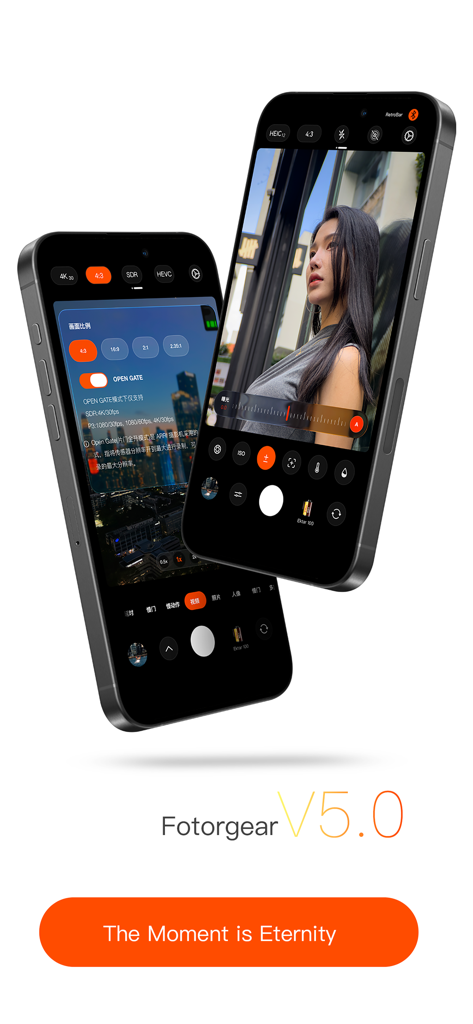
Two iPhones displaying the FotorGear version 5 professional camera interface with manual controls and aspect ratio settings

Two iPhones displaying the FotorGear version 5 professional camera interface with manual controls and aspect ratio settings

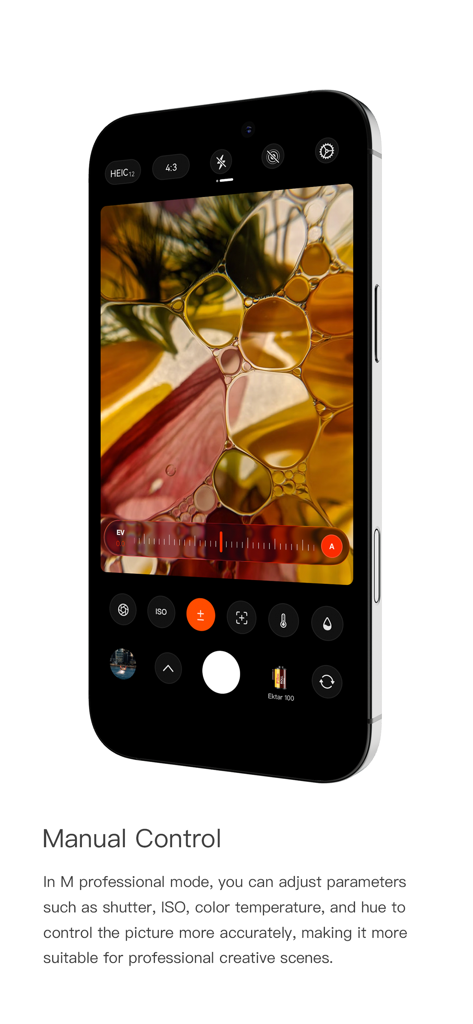
Smartphone screen showing FotorGear manual camera interface with ISO and shutter speed adjustments

Smartphone screen showing FotorGear manual camera interface with ISO and shutter speed adjustments

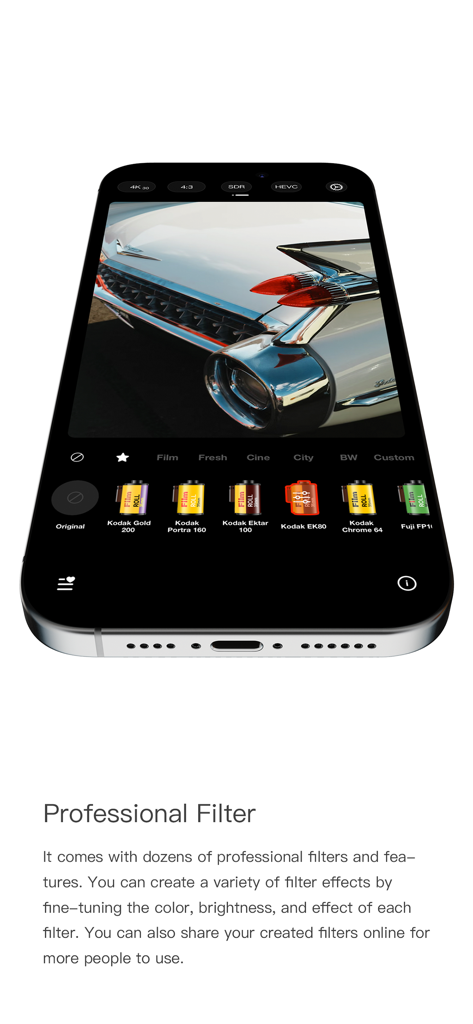
FotorGear app interface showing professional film stock filters applied to a photo of a vintage car

FotorGear app interface showing professional film stock filters applied to a photo of a vintage car

FotorGear app interface showing the multiple exposure camera feature on a smartphone screen

FotorGear app interface showing the multiple exposure camera feature on a smartphone screen

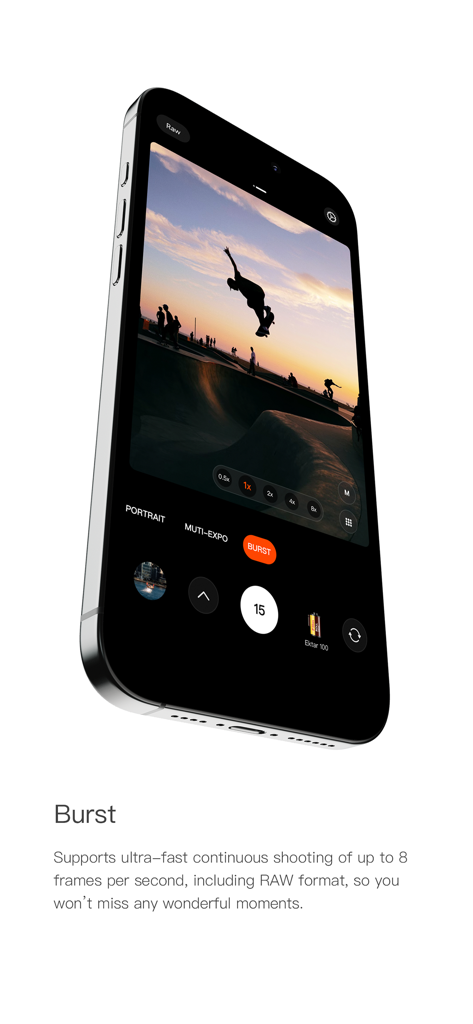
FotorGear app interface in burst mode capturing a skateboarder in mid-air at sunset

FotorGear app interface in burst mode capturing a skateboarder in mid-air at sunset

iPhone screen showing the FotorGear app portrait mode with depth of field blur on a female subject

iPhone screen showing the FotorGear app portrait mode with depth of field blur on a female subject

FotorGear app interface showing hardware synchronization with a professional camera accessory and mechanical controls.

FotorGear app interface showing hardware synchronization with a professional camera accessory and mechanical controls.

Smartphone screen showing FotorGear app interface for professional video recording with 4K and manual settings

Smartphone screen showing FotorGear app interface for professional video recording with 4K and manual settings

Professional Tools for Visionary Creators

The tools that make this app stand out, trusted by 2M+ users.

🎛️

Total Manual Agency

Take command of ISO, Shutter Speed, White Balance, and Focus Peaking to capture the exact mood you envision without AI interference.

🎬

Cinema-Grade Video

Shoot in 4K 60FPS with Flat Log color and Anamorphic lens support for professional footage ready for high-end color grading.

📸

Pro-Level Raw Capture

Capture images in RAW format to preserve every pixel of detail, giving you maximum dynamic range and flexibility for post-production.

Loved by users worldwide

Trusted by 2M+ people who love this app.

"

"As a freelance filmmaker, I need my iPhone to act as a reliable B-cam. FotorGear's Log color profile and anamorphic support are absolute game-changers for my mobile workflow. The cinematic stabilization is incredibly smooth, making my handheld shots look like they were filmed on a professional rig."

Alex Rivera
"

"I’ve almost completely ditched my bulky DSLR for street photography thanks to this app. Having full manual control over shutter speed and focus peaking right in my pocket is essential. Shooting in RAW gives me so much flexibility in post-processing; it truly unlocks the full potential of the sensor."

Sarah Chen

About the app

Everything you need to know about FotorGear - Camera in Pocket.

Description

We are design team from @fotorgear. We design FotorGear to make you better use your mobile phone to shoot unlimited creativity. From now on, you no longer need to bring a bulky camera, no need to set parameters tediously, all you need is to use FotorGear to achieve all of this, real-time photo filters, manual Control, time-lapse photography, motion blur mode, light painting and more... all you want is FotorCam. The mobile phone in your hand is more powerful than you think, still using it to shoot mediocre videos? Try FotorGear, real-time filters, 4K 60P, cinematic video stabilization, flat log color and more. Your phone is a professional camera in your pocket! If you have any features or ideas please contact us at hi@fotorgear.com or DM us on Instagram @fotorgear. #Photo Features# MANUAL CONTROL Easy to control everything. Shutter Speed, ISO, focus, white balance. tint and more.. REALTIME PHOTO FILTER Apply photo filters in realtime. Portrait, Film, Cinematic, BW, Landscape mode included. TAKE RAW FILES Take photos with RAW format, Preserve more image details. PEAK FOCUS More precise focus with Peak Focus. HISTOGRAM Make your every photo exposure perfectly. TILTMETER Keep it straight and make the composition more rigorous. POWERFUL TIME LAPSE Smart control time lapse parameter, powerful & Efficient. Record the world in time lapse mode. MOTION BLUR Shoot long exposure effects in daytime, Blur water, cloud and everything. LIGHT TRAIL Record light trails, Enjoy the magic of light painting. PHOTO EDITOR Adjust Brightness, Contrast, Saturation, Shadow, Highlights, Sharp ... to make photos more perfect. #Video Features# CINEMATIC VIDEO CONTROL Record up to 4K 60fps videos. Meet the high quality video world. REALTIME VIDEO FILTER Apply photo filters in realtime. Portrait, Film, Cinematic, BW, Landscape mode included. ANAMORPHIC LENS SUPPORT Attach anamorphic lens, Make your phone looks more like a video camera. ASPECT RATIO Include 1:1 / 16:9 / 2.35:1 / 2.76:1 (ANAMORPHIC LENS required). AUDIO LEVEL Record videos with high quality audios. VIDEO STABILIZATION With cinematic video stabilization, make your video more stable just with your hands. PROFESSIONAL LOG COLOR Improve video tolerance and make color grading more easier Anamorphic Lens Support Use the Fotorgear Anamorphic lens to shoot film look videos in 2.35:1 or 2.76:1. Raw file require an iPhone 6S or later. Follow us on: Instagram: @fotorgear Facebook: @fotorgear Youtube: @fotorgear Email: hi@fotorgear.com Web: fotorgear.com

Latest Version

5.1.8

Size

303.8 MB

First Released

Oct 29, 2020

Turn Your iPhone Into a Professional Cinema Camera

Unleash the full potential of your sensor with manual controls, RAW capture, and 4K cinematic tools. Join over 2 million creators and start shooting like a pro today.

Download on App Store