إدارة الملفات (حمّل)

إدارة الملفات (حمّل)

Download on App Store
Spark by MWM logo
Logo of إدارة الملفات (حمّل)

إدارة الملفات (حمّل): Your All-In-One Power Tool for Media and Files

Download from links, edit videos, and organize your digital life with the ultimate Swiss Army Knife utility for iOS. Trusted by 21 million users to scan, convert, and secure files with ease.

Publisher

Waraqat Group

Category

Utilities

Downloads

21M+

User Rating

4.7/5

Total Ratings

1M+

Locales

2

Power at Your Fingertips

Discover the interface used by 21M+ users.
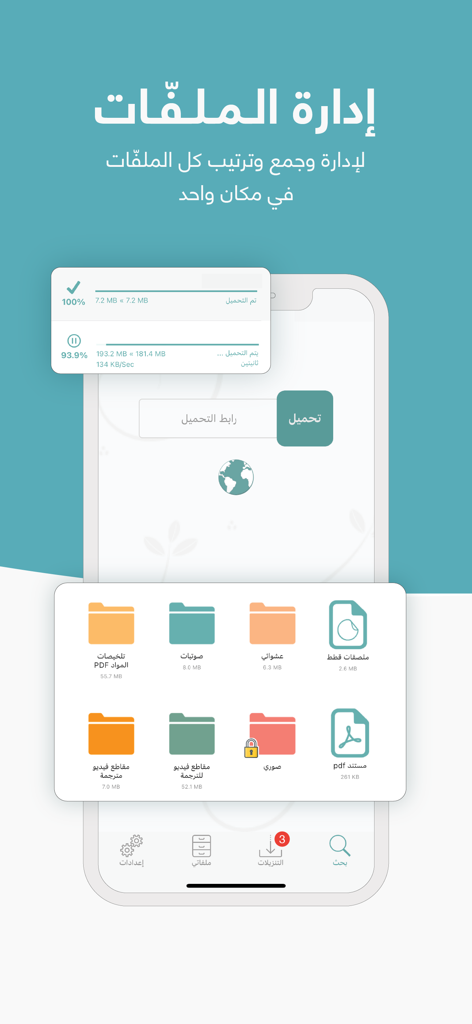
Interface of the Arabic File Manager app showing organized folders for documents and media along with download progress indicators.

Interface of the Arabic File Manager app showing organized folders for documents and media along with download progress indicators.

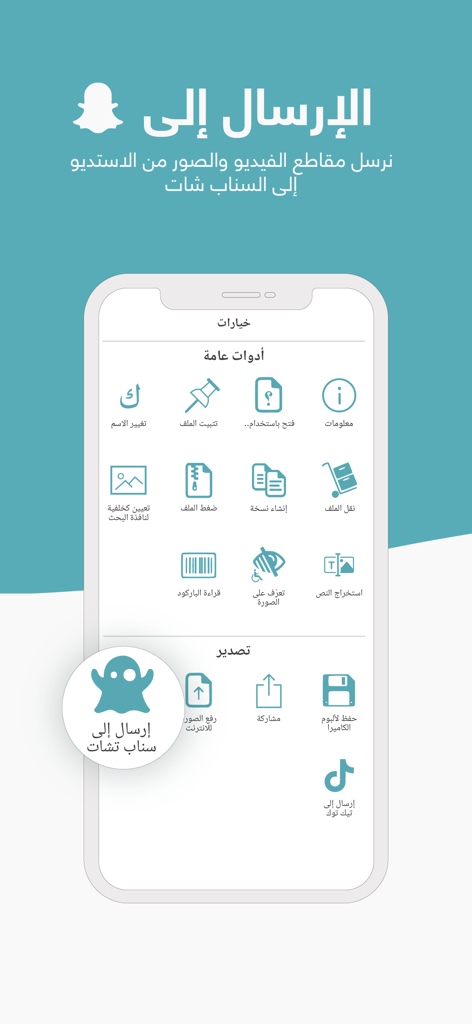
Interface of an Arabic file manager app showing sharing options to Snapchat and TikTok

Interface of an Arabic file manager app showing sharing options to Snapchat and TikTok

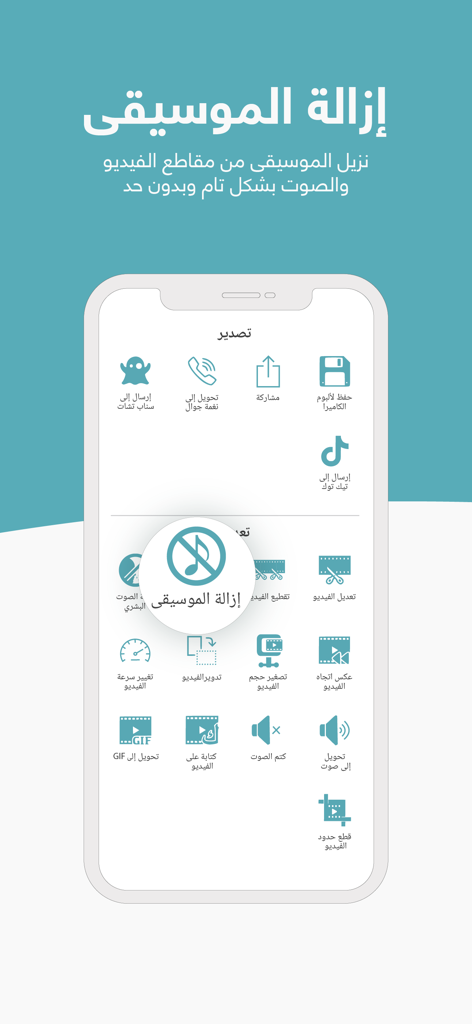
Interface of the File Manager app highlighting the music removal feature for videos and audio.

Interface of the File Manager app highlighting the music removal feature for videos and audio.

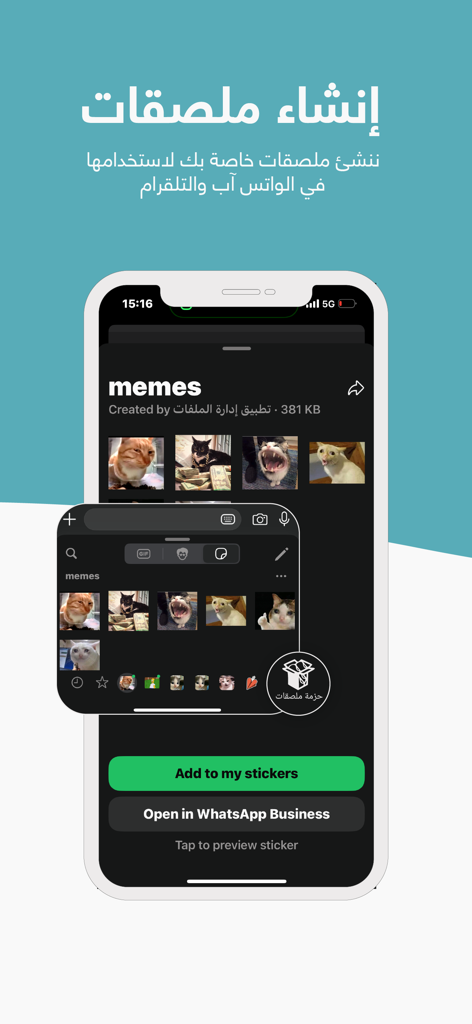
Interface of the File Manager app showing the custom WhatsApp and Telegram sticker creator feature with cat memes.

Interface of the File Manager app showing the custom WhatsApp and Telegram sticker creator feature with cat memes.

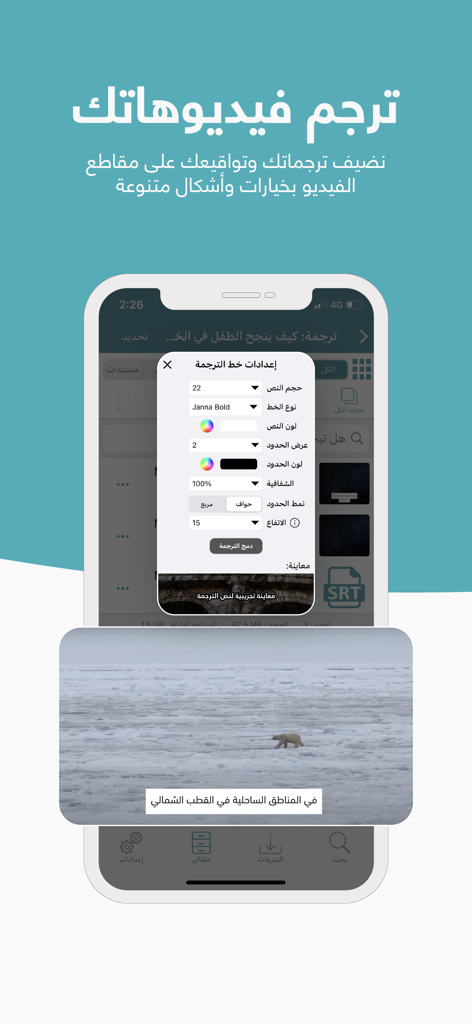
A screenshot of the File Manager app showing settings for customizing and merging subtitles onto a video.

A screenshot of the File Manager app showing settings for customizing and merging subtitles onto a video.

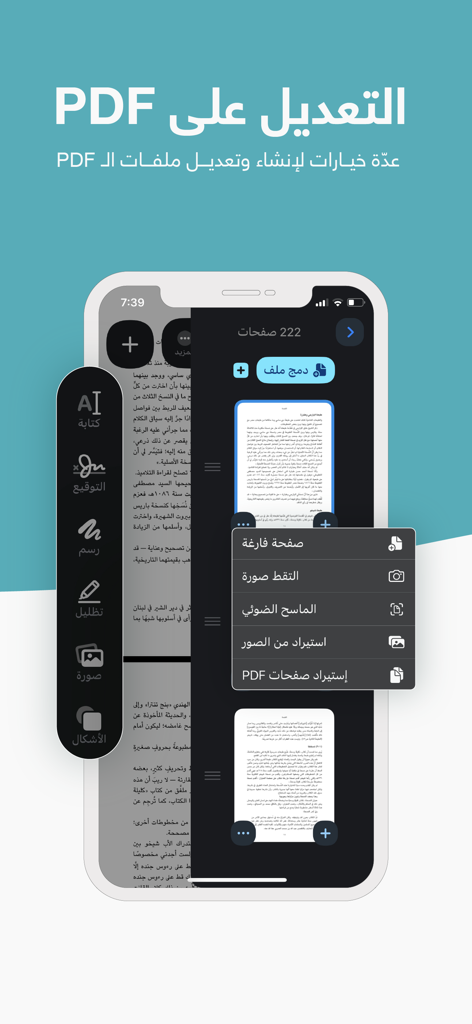
Interface of the File Manager app showing PDF editing tools and document scanning options in Arabic.

Interface of the File Manager app showing PDF editing tools and document scanning options in Arabic.

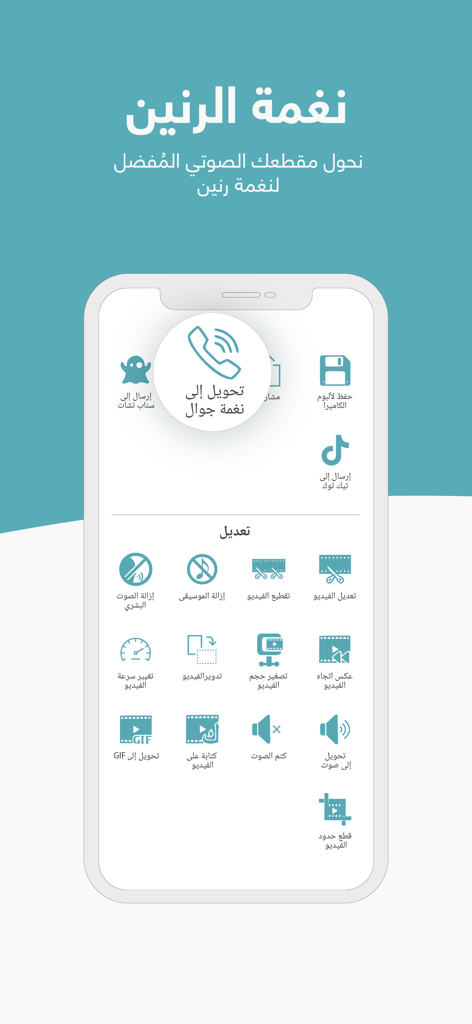
Interface of the File Manager app showing ringtone conversion and various video and audio editing tools in Arabic

Interface of the File Manager app showing ringtone conversion and various video and audio editing tools in Arabic

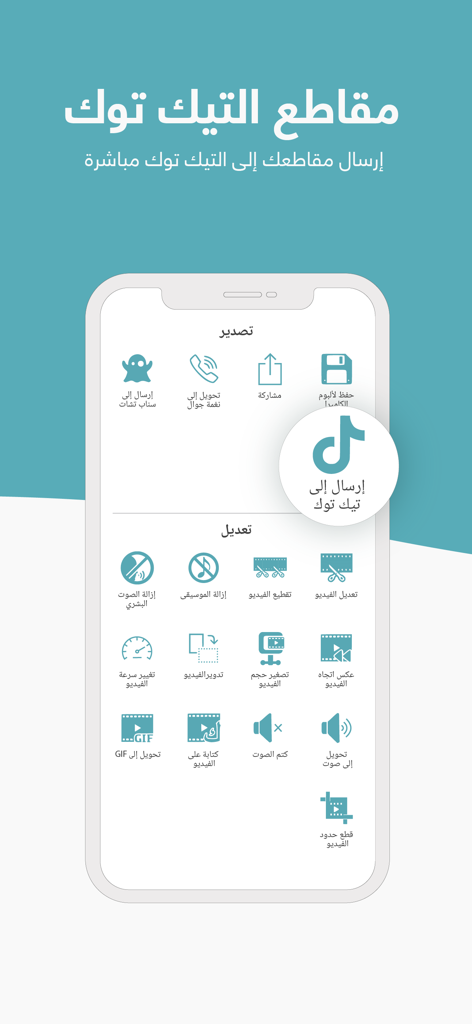
Interface of the Arabic File Manager app showing video editing tools and direct sharing options to TikTok

Interface of the Arabic File Manager app showing video editing tools and direct sharing options to TikTok

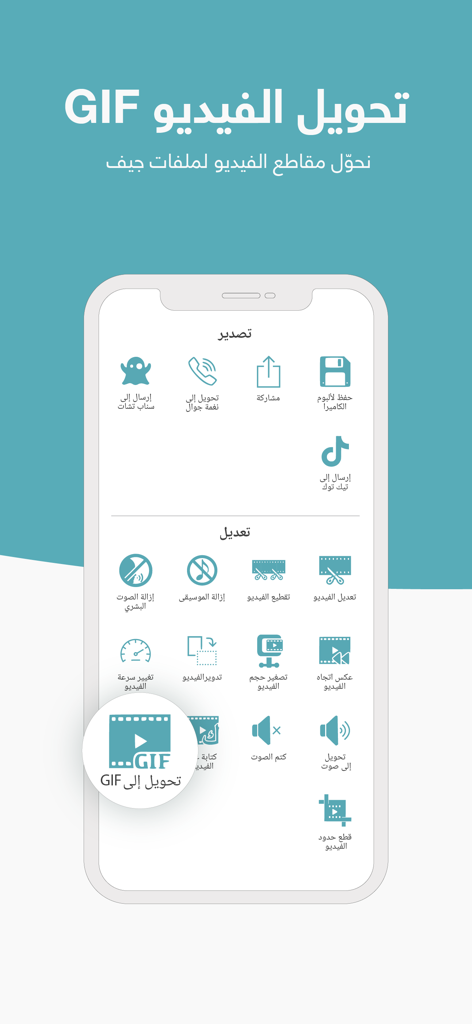
Mobile app interface showing video to GIF conversion and media editing tools in Arabic

Mobile app interface showing video to GIF conversion and media editing tools in Arabic

Master Your Media Like Never Before

The tools that make this app stand out, trusted by 21M+ users.

📥

Smart Downloader & Camera Roll Save

Download any file via link and move media directly to your Photos app. Say goodbye to complex transfers and keep your favorite content exactly where you want it.

✂️

Pro Creator Toolkit

Convert videos to MP3, merge subtitles, edit clips, and create custom WhatsApp stickers. Everything you need to remix and share content is built right in.

🎧

Seamless Background Playback

Listen to audio or watch videos while multitasking in other apps or with your screen locked. Perfect for offline commutes, study sessions, and long flights.

Loved by users worldwide

Trusted by 21M+ people who love this app.

"

"Finally, an app that handles everything in my native language! Managing files on iOS used to be a headache, but now I can download, organize, and even create WhatsApp stickers for my family group chats all in one place. The privacy lock features give me total peace of mind for my personal media."

Ahmed Z.
"

"As a content creator, this is my Swiss Army Knife. I use it to convert videos to MP3, merge subtitles, and quickly save files directly to my camera roll—something that's usually a struggle on iPhone. It has replaced at least four other utility apps on my home screen and simplified my workflow."

Sarah M.

Review Analysis

Insights from user reviews.

Sentiment Score

30%
Negative

Summary

This mobile app receives mixed to largely negative feedback from its users, particularly in recent reviews. Historically, many users lauded its ability to quickly download videos and audio, appreciating the quality and utility for offline access. However, recent updates have introduced significant problems, with numerous reports of persistent downloading errors (including on iOS 26 and iPhone 15 Pro), app instability, and freezing issues that render its core functionality unusable for many. Additionally, users are frustrated by a shift towards a subscription model for previously free features, an increase in intrusive advertisements, and concerns over data loss, prompting calls for urgent bug fixes and improved development.

Common Themes

Downloading Errors(16)
App Performance & Stability(13)
Video and Audio Downloads(9)
Intrusive Ads(4)
Subscription Model(3)
Overall Reliability(3)
Data Loss & Recovery(2)

About the app

Everything you need to know about إدارة الملفات (حمّل).

Description

تطبيق إدارة الملفات (حمّل) .. برنامج متكامل لإدارة ملفاتك ، وترتيبها ، وتحميلها ، وحفظها إلى الاستديو مباشرة مميزات تطبيق إدارة الملفات: - قسم خاص بإدارة جميع الملفات ، وإمكانية إنشاء المجلدات لترتيب الملفات أو نقلها أو تعديلها - إمكانية تحميل الملفات بسهولة من خلال الرابط مباشرة - خاصية الوضع الليلي - إمكانية حماية التطبيق بكلمة سر - إمكانية تثبيت نغمات للجوال - إمكانية البحث عن الملفات داخل التطبيق - إمكانية الحفظ التلقائي في الاستديو بعد الانتهاء من التحميل - إمكانية إنشاء ملصقات للواتساب - إمكانية الكتابة على الفيديو - إمكانية تثبيت المجلدات أو الملفات - إمكانية دمج الترجمة مع مقاطع الفيديو - إمكانية حذف الموسيقى من الصوت أو الفيديو - تحويل أي مقطع صوتي إلى MP3 - إمكانية عمل مسح ضوئي للمستندات - إمكانية تحويل الفيديو إلى GIF - إمكانية تشغيل ملفات الترجمة من خلال مشغّل الفيديو - ميزة تسريع وتبطيء وعكس اتجاه مقاطع الفيديو - سلة مهملات داخل قسم الملفات لتسهيل استعادة الملفات عند الحاجة - إمكانية تغيير ألوان التطبيق وتعيين خلفية خاصة للواجهة - إمكانية مشاهدة الفيديو عبر كروم كاست وأبل تي في - إمكانية رفع الصور للإنترنت - إمكانية قفل المجلدات بكلمة سر - إمكانية إنشاء قائمة تشغيل مخصصة - إمكانية ضغط صور JPG و PNG - إمكانية إزالة خلفية الصورة بضغطة واحدة - إمكانية قراءة الباركود من الصورة - إمكانية استخراج النصوص من الصورة - إمكانية تلوين المجلدات - إمكانية ترتيب الملفات بشكل يدوي - إمكانية المزامنة والنسخ الاحتياطي عبر الآيكلاود - إمكانية تكرار أي مقطع بشكل تلقائي بعد الانتهاء من التشغيل ، أو الانتقال للمقطع التالي ، أو اختيار مقطع آخر بشكل عشوائي - إمكانية إيقاف التحميل واستئنافه لاحقاً - إمكانية تشغيل الصوت أو الفيديو في الخلفية - دعم تحميل عدة مقاطع دفعة واحدة ، وإمكانية تحميلها جميعاً في الخلفية - إمكانية استيراد مقاطع الفيديو من الاستديو وتخزينها وتحريرها - إمكانية تخزين الروابط من خارج التطبيق دون الحاجة لدخول التطبيق ، ثم تحميلها بشكل متتابع عند الدخول - التحكم بمقاطع الفيديو أو الصوت من خارج التطبيق عبر الانتقال للمقطع التالي أو السابق ، أو عبر تقديم المقطع أو تأخيره - إمكانية تحرير الصور بشكل كامل من خلال التطبيق وإمكانية حذف خلفية الصورة أو جزء منها بشكل احترافي - إمكانية دمج صورة مع صوت ، أو عدة صور مع عدة مقاطع صوتية - إمكانية دمج عدة مقاطع فيديو من خلال التطبيق - إمكانية دمج عدة مقاطع صوتية من خلال التطبيق - إمكانية تغيير الصوت الخاص بمقطع الفيديو من خلال دمج مقطع صوتي فوقه - إمكانية كتم صوت الفيديو - إضافة ميزة تحويل مقاطع الفيديو إلى ملفات صوتية مباشرة عبر التطبيق - إضافة ميزة تحرير مقاطع الفيديو بداخل التطبيق - إضافة إمكانية إنشاء نسخة للملفات - إضافة خاصية قفل الطفل ، لمنع الطفل من الخروج من التطبيق أثناء التشغيل - إمكانية التقديم أو التأخير عشر ثواني عند عرض الفيديو عبر الضغط مرتين في الجهة اليمنى أو اليسرى - إمكانية تسريع مقاطع الفيديو أو تبطيئها حسب الرغبة - إمكانية حذف أو نقل أو حفظ عدة ملفات إلى الاستديو دفعة واحدة - إمكانية التحميل عبر الضغط على كلمة "تحميل" ، بدون الحاجة للصق الرابط - إمكانية ضغط الملفات من خلال التطبيق - إمكانية تحميل الصور والمستندات مثل الكتب والمستندات والنصوص والصور وغيرها إذا كانت عبر رابط مباشر - إمكانية إنشاء مجلدات لترتيب الملفات بعد التحميل مباشرة حسب النوع أو المصدر - إمكانية ترتيب الملفات حسب الحجم أو الاسم أو النوع أو التاريخ - إمكانية إزالة الملفات المؤقتة لتقليل حجم التطبيق وغيرها من المزايا التي سنتركها لك لتكتشفها بنفسك .. -- "Remove Ads" Subscription -- - Enjoy the app without the interruption of any ads. All for 0.99$/month! Subscribe now and your first two weeks are free.* Your payment will be charged to your iTunes account at confirmation of purchase. Your subscription will automatically renew each month 24-hours before the end of the current period, and your credit card will be charged through your iTunes account unless auto-renew is turned off at least 24-hours before the end of the current period. You can turn off auto-renew at any time from your iTunes account settings. Any unused portion of a free trial period, if offered, will be forfeited when you purchase a subscription to that publication, where applicable. Privacy Policy: https://hammel.in/privacy Terms of Service: https://hammel.in/terms * Promotional offers are for new subscribers only.

Latest Version

9.6

Size

507.0 MB

First Released

Dec 20, 2016

Take Absolute Control of Your Files

Join 21 million+ power users. Download, edit, and organize your media with the ultimate all-in-one utility for iOS.

Download on App Store
FAQ

Frequently Asked Questions

Everything you need to know about إدارة الملفات (حمّل)

What is the primary function of the Hammel File Manager app?

The Hammel File Manager app allows users to download files directly using a link, manage their files, organize them into folders, and save them to the device's gallery.

Does Hammel File Manager support a dark mode?

Yes, the Hammel File Manager app offers a dark mode feature to enhance user experience during low-light conditions.

Can I password-protect the Hammel File Manager app?

Yes, users can protect the Hammel File Manager app with a password for enhanced privacy and security of their stored files.

Can I set custom ringtones using the Hammel app?

Yes, the Hammel File Manager app allows users to convert audio clips into ringtones directly within the application.

Does Hammel File Manager automatically save downloads to the gallery?

Yes, the Hammel File Manager app includes a feature for automatic saving to the gallery immediately after a download is completed.

Can the Hammel app create WhatsApp stickers?

Yes, Hammel File Manager allows users to create custom stickers for WhatsApp directly from within the app.

Is it possible to add text to videos using Hammel File Manager?

Yes, Hammel File Manager offers comprehensive video editing tools, including the ability to write text directly onto video clips.

Does Hammel File Manager support merging subtitles with videos?

Yes, users can merge external subtitles with video clips and customize their appearance using the Hammel File Manager.

Can I remove music from audio or video files in Hammel File Manager?

Yes, the Hammel app allows users to remove the background music from both audio and video files.

Does Hammel File Manager convert audio to MP3?

Yes, Hammel File Manager can convert any audio clip into the MP3 format.

Does Hammel File Manager have a document scanner?

Yes, the Hammel app offers a document scanning feature, allowing users to digitize physical documents.

Can I convert videos to GIF with the Hammel app?

Yes, the Hammel File Manager app provides the functionality to convert video clips into GIF format.

Is Hammel File Manager compatible with Chromecast or Apple TV?

Yes, Hammel File Manager supports viewing videos via Chromecast and Apple TV for a larger screen experience.

Does Hammel File Manager allow uploading photos to the internet?

Yes, the Hammel app enables users to upload images directly to the internet.

Can I lock folders with a password in the Hammel app?

Yes, Hammel File Manager includes an option to password-lock specific folders, protecting sensitive content.

Does Hammel File Manager offer image compression for JPG and PNG?

Yes, users can compress JPG and PNG image files within the Hammel File Manager app to reduce their size.

Can Hammel File Manager remove image backgrounds?

Yes, the Hammel app can remove the background from an image with a single tap, offering a professional editing feature.

Does the Hammel app have OCR functionality to extract text from images?

Yes, Hammel File Manager includes an optical character recognition (OCR) feature to extract text from images.

Does Hammel File Manager offer iCloud synchronization and backup?

Yes, Hammel File Manager supports iCloud for syncing files and creating backups, ensuring data safety and accessibility.

Can I play audio or video in the background with Hammel File Manager?

Yes, Hammel File Manager supports playing audio and video in the background while using other applications.

Can I import and edit videos from my gallery in Hammel File Manager?

Yes, the Hammel app allows for importing, storing, and editing video clips directly from the device's photo gallery.

Does Hammel File Manager include a child lock feature?

Yes, Hammel File Manager offers a child lock feature to prevent accidental exits from the app during media playback.

What is the cost of the 'Remove Ads' subscription in Hammel File Manager?

The Hammel File Manager app offers a 'Remove Ads' subscription for $0.99 per month, with the first two weeks free for new subscribers.

Does the Hammel File Manager subscription auto-renew?

Yes, the Hammel File Manager subscription automatically renews monthly unless auto-renew is turned off at least 24 hours before the current period ends.

How do I cancel my Hammel File Manager subscription?

You can turn off auto-renewal for your Hammel File Manager subscription at any time from your iTunes account settings.