Flexcil Note & Good PDF Reader

Flexcil Note & Good PDF Reader

Download on App StoreDownload on Google Play
Spark by MWM logo
Logo of Flexcil Note & Good PDF Reader

Flexcil: The Ultimate Note-Taking & PDF Reader for High-Achievers

Master your research and studies with intuitive pen gestures, seamless multitasking, and audio-synced notes designed for the modern paperless workflow.

Publisher

Flexcil Inc.

Category

Productivity

Downloads

1M+

User Rating

4.2/5

Total Ratings

11K+

Locales

15

A Glimpse of Peak Productivity

Discover the interface used by 1M+ users.

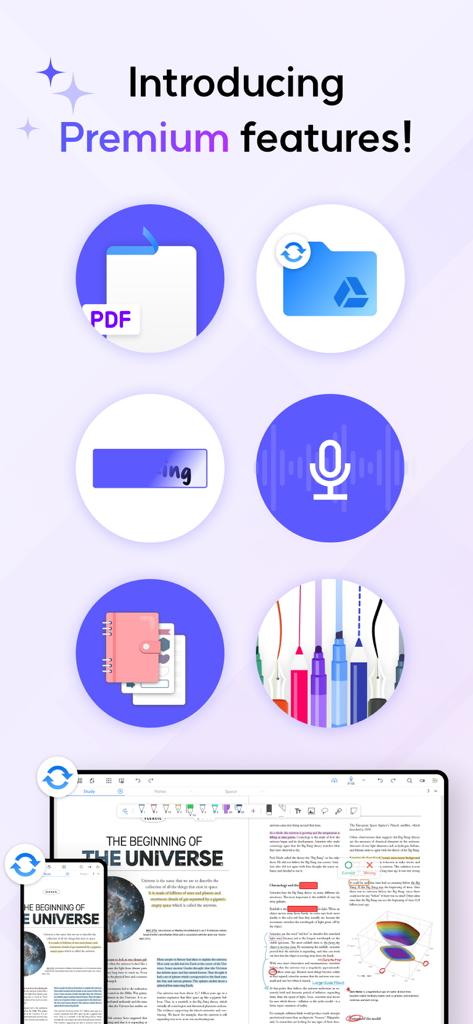
An overview of Flexcil premium features including cloud sync audio recording and digital note taking tools

An overview of Flexcil premium features including cloud sync audio recording and digital note taking tools

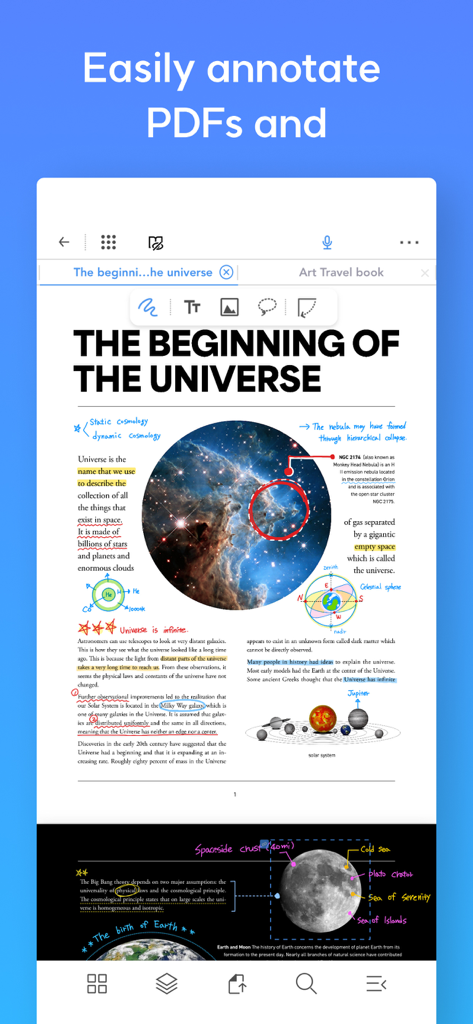
A science PDF document being annotated with handwritten notes, highlights, and diagrams in the Flexcil app.

A science PDF document being annotated with handwritten notes, highlights, and diagrams in the Flexcil app.

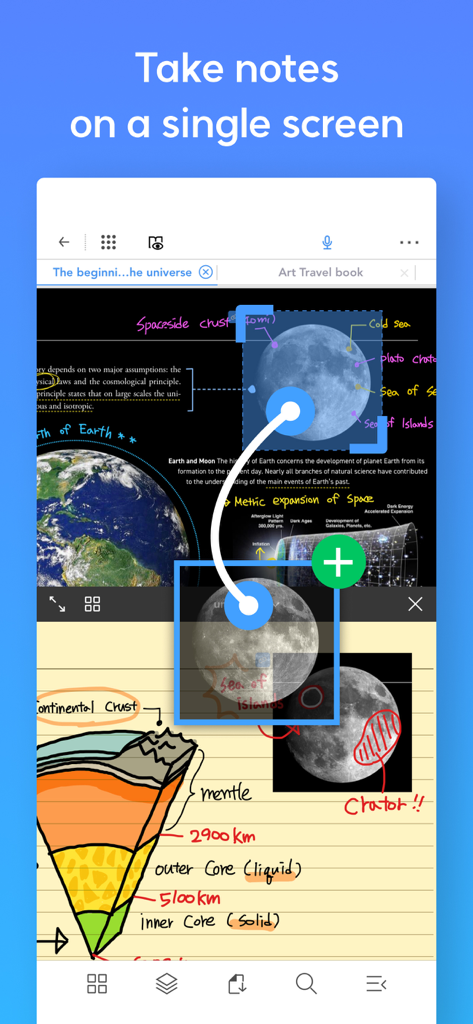
Flexcil app interface showing split-screen multitasking with a PDF document and a digital handwritten notebook.

Flexcil app interface showing split-screen multitasking with a PDF document and a digital handwritten notebook.

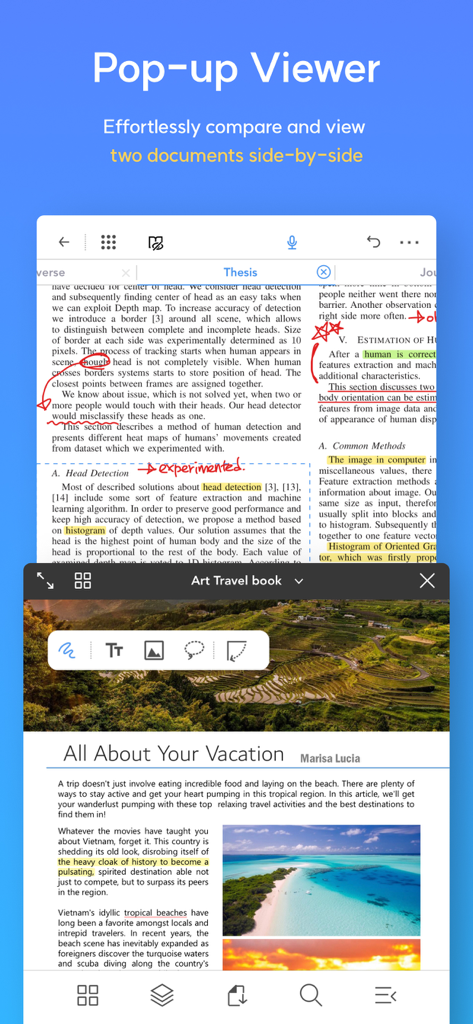
Flexcil app showing the pop up viewer feature with two documents side by side on a mobile screen

Flexcil app showing the pop up viewer feature with two documents side by side on a mobile screen

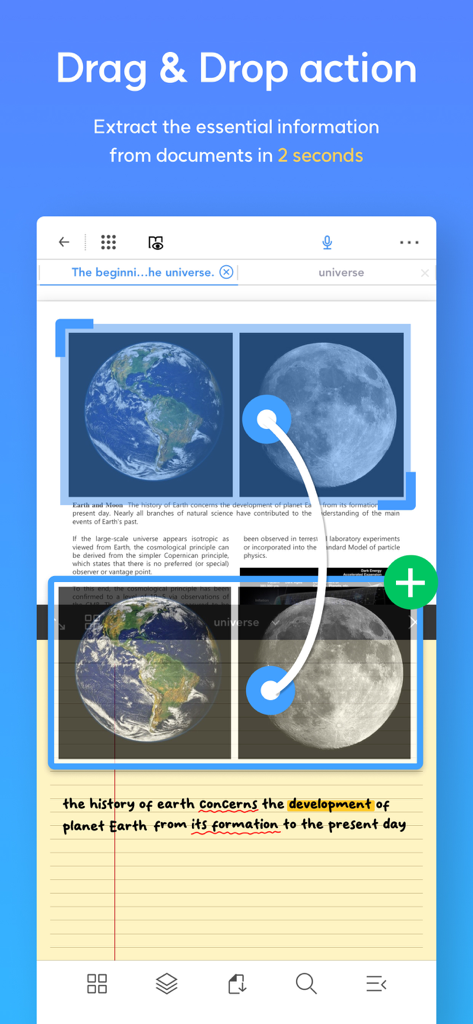
Screenshot of Flexcil app demonstrating how to drag and drop images from a PDF document into a digital notebook

Screenshot of Flexcil app demonstrating how to drag and drop images from a PDF document into a digital notebook

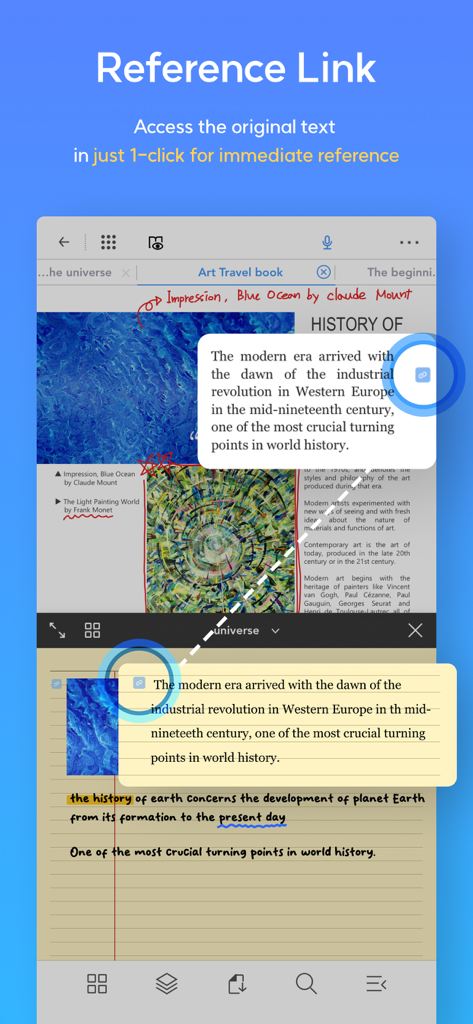
Flexcil app interface showing the reference link feature connecting study notes back to original PDF source text in a split screen view.

Flexcil app interface showing the reference link feature connecting study notes back to original PDF source text in a split screen view.

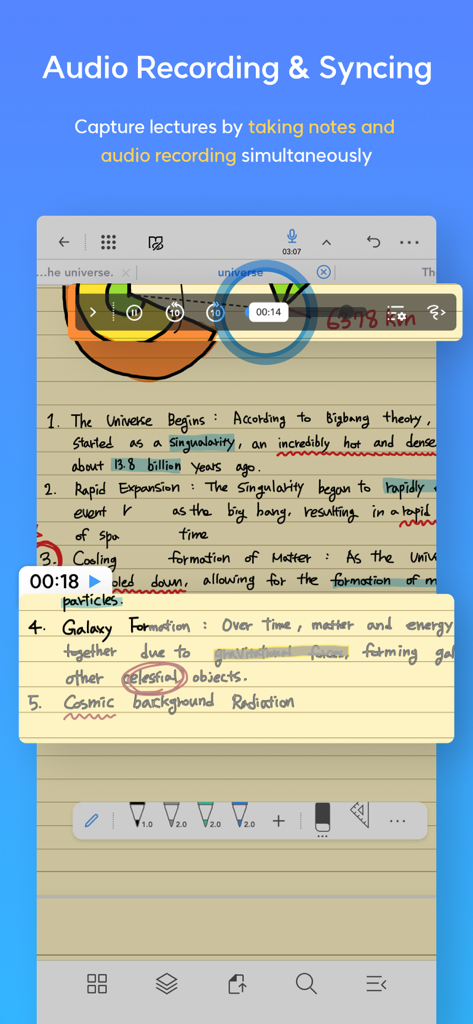
Audio recording synced with handwritten lecture notes in the Flexcil app

Audio recording synced with handwritten lecture notes in the Flexcil app

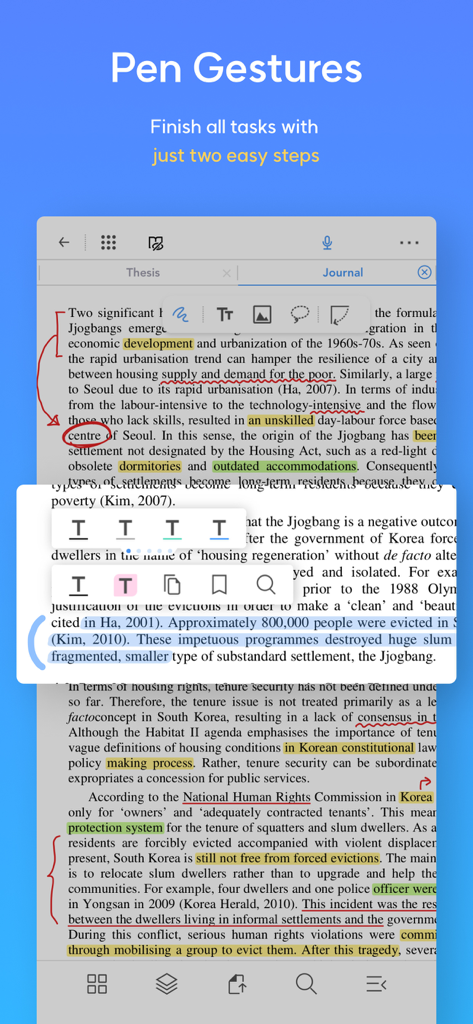
Flexcil app interface demonstrating pen gestures for highlighting and annotating a PDF document

Flexcil app interface demonstrating pen gestures for highlighting and annotating a PDF document

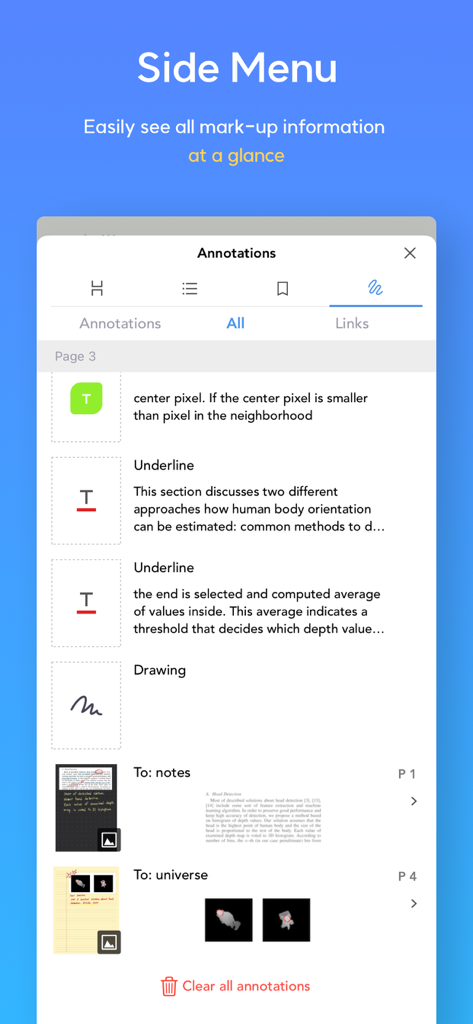
A side menu in the Flexcil app displaying a summary list of document annotations including underlines and drawings.

A side menu in the Flexcil app displaying a summary list of document annotations including underlines and drawings.

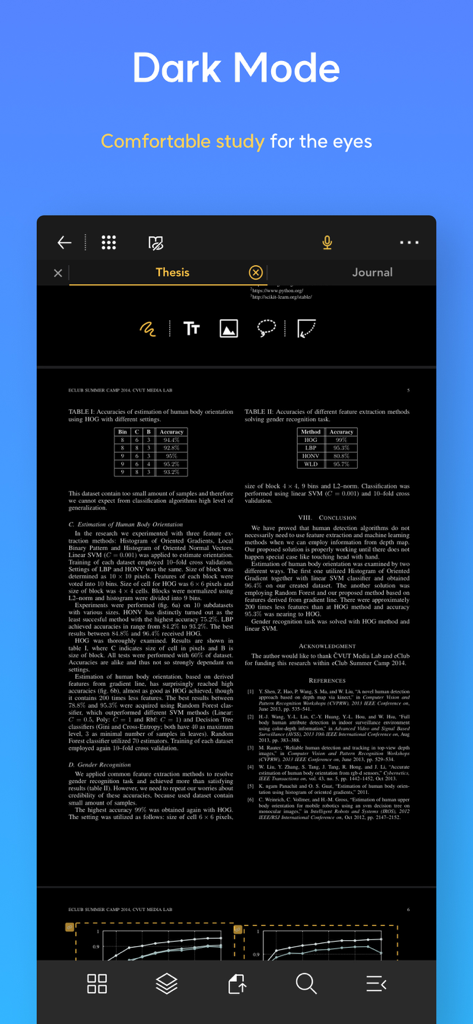
Flexcil app interface in dark mode showing an academic document for comfortable study

Flexcil app interface in dark mode showing an academic document for comfortable study

Master Your Workflow with Precision

The tools that make this app stand out, trusted by 1M+ users.

Instant Gesture Capture

Eliminate manual transcription. Use intuitive pen gestures to highlight text and capture images directly into your notes for faster, smarter summarization.

📖

Side-by-Side Multitasking

Experience a true digital desk. Open your textbooks and notebooks in a single view to organize your thoughts without ever switching between apps.

🎙️

Smart Audio-Note Sync

Never miss a lecture detail. Record audio while you write, then simply tap your notes to replay exactly what was being said at that specific moment.

Loved by users worldwide

Trusted by 1M+ people who love this app.

"

"Flexcil has completely revolutionized my research process. Being able to view my PDF and my notebook side-by-side while using simple pen gestures to capture text is a total time-saver. It is by far the most powerful tool for anyone serious about digital note-taking."

Dr. Elena Rodriguez, Academic Researcher
"

"I finally found an app that handles my heavy textbooks and my daily bullet journaling in one place. The Apple Pencil responsiveness is flawless, and the audio recording feature is a lifesaver for catching details I missed during fast-paced lectures."

Jordan Miller, Graduate Student

About the app

Everything you need to know about Flexcil Note & Good PDF Reader.

Description

Flexcil: The world’s ultimate iOS note-taking app Loved by Apple Editors - Editor's Choice, App of the Day, Note-taking on the next level, College Life, Apple Pencil Enhanced, New Apps We Love, Noteworthy Apps & Game, Productivity Boost for teachers Whether you’re taking notes, bullet journaling, reading documents, or editing pages from textbooks ー use Flexcil! It’s the #1 note-taking tool for any Apple device. Simply highlight by pen gestures and capture images and text on the study-note by pen gestures! Save time transcribing summaries by gestures on study-note with your Apple pencil. ALL IN ONE NOTE TAKING • Edit PDF pages • Annotate almost anything • Endless pen colors, sizes, and fonts • Seamlessly highlight and underline text with GESTURE • Summarize and organize your thoughts, texts and notes • Instantly open any PDF for reading and studying • Zoom to read small text • Organize and manage your books AND notes EASY AND INTUITIVE • Drag and paste text flawlessly • Add text and annotate with ease • Smooth Image selection • Reading and pen gesture mode - FLEXCIL EXCLUSIVE • Search the dictionary for any definitions you need • Improved the tiring, old-fashioned way of writing which results in wrist/palm pain BULLET JOURNAL & TAKE BETTER NOTES • Easily create bullet journal pages • Hundreds of colors and pen stroke sizes • Colorful covers & templates • Endless creativity ー perfect for artists, hobbyists, or anyone that wants to make studying more fun • Proven to boost productivity & happiness RECORD & PLAYBACK AUDIO • Record everything you hear whenever you take class notes or writing meeting notes • Replay audio recording and review what you wrote during the class or in the meeting • Tab on your note and hear what was said at the moment MULTITASK • Use Flexcil while other apps are open - take notes during lectures! • Edit 2 PDFs at once • Advanced viewing: full screen view, vertical scroll, 4-page view, and so much more COMPATIBLE WITH: • Zoom • Google Classroom • Google Drive • Dropbox • Box • iCloud • Notes • Digital textbooks • ebooks • PDFs and more! APPLE PENCIL • Simulate real-life note-taking by using your Apple Pencil - easy to use for all ages • Guaranteed ZERO touch malfunctions • Support Apple pencil 2nd generation & double tap Plus, enjoy these NEW FEATURES! • Cloud sync: Access your notes from anywhere, and seamlessly sync across devices. • Masking pen: Enhance your annotations with precision using the masking pen. Take your note-taking to the next level with Flexcil. Download the most comprehensive, easy to use, and innovative study tool on the App Store today! * Support: https://support.flexcil.com * Website: https://www.flexcil.com * Twitter: https://www.twitter.com/flexcil * Facebook: https://www.facebook.com/flexcil * Youtube: https://www.youtube.com/channel/UCjro4WpiFnxqKxAXQmASNwg [Access Permission Guide] • Storage (Photos and Videos): Used for adding images to documents in Flexcil, accessing PDF files, purchasing and downloading store content. • Music and Audio: Used for voice recording features, purchasing and downloading store content. • Microphone: Used for voice recording. • Camera: Used for taking pictures when adding photos. • Notifications: Used to display important notification content.

Latest Version

1.5.17

Size

170.0 MB

First Released

Nov 2, 2020

Ready to Master Your Workflow?

Join over 1 million high-achievers who have transformed their iPad into the ultimate study tool. Download the Apple Editor’s Choice today and start your paperless journey.

Download on App StoreDownload on Google Play
FAQ

Frequently Asked Questions

Everything you need to know about Flexcil Note & Good PDF Reader
What is Flexcil?

Flexcil is an ultimate iOS note-taking app that supports bullet journaling, reading documents, and editing pages from textbooks. Users can annotate PDFs, capture text/images with gestures, and organize notes.

Can I annotate PDFs in Flexcil?

Yes, Flexcil allows users to easily annotate PDFs. It supports editing PDF pages and annotating almost anything within the document.

Does Flexcil support Apple Pencil?

Yes, Flexcil supports the Apple Pencil, including the 2nd generation with double-tap functionality. It simulates real-life note-taking and guarantees zero touch malfunctions.

Can Flexcil record audio during note-taking?

Yes, Flexcil offers audio recording and playback features. Users can record lectures or meetings while taking notes simultaneously, then review by tapping specific notes.

Does Flexcil offer cloud synchronization?

Yes, Flexcil includes cloud sync as a new feature. Users can access notes from anywhere and seamlessly sync them across multiple devices.

Can I view multiple documents at once in Flexcil?

Yes, Flexcil offers multitasking capabilities, including a Pop-up Viewer that allows users to effortlessly compare and view two documents side-by-side. It also supports editing two PDFs simultaneously.

What is the masking pen feature in Flexcil?

The masking pen is a new feature in Flexcil designed to enhance annotations with precision. It allows users to refine their mark-ups.

Does Flexcil offer a dark mode for studying?

Yes, Flexcil includes a Dark Mode feature. This provides a comfortable study environment, specifically designed to be easy on the eyes.

How do pen gestures work in Flexcil?

Flexcil utilizes pen gestures for efficient note-taking, allowing users to highlight, capture images and text, and summarize content. This streamlines tasks in just two easy steps.

Is Flexcil compatible with Google Drive?

Yes, Flexcil is compatible with Google Drive. It also integrates with other services such as Zoom, Google Classroom, Dropbox, Box, and iCloud for versatile use.