MarginNote 3

MarginNote 3

Download on App Store
Spark by MWM logo
Logo of MarginNote 3

MarginNote 3: Architect Your Knowledge and Master Complex Subjects

The ultimate all-in-one workspace for power users to transform PDFs into interactive mind maps and flashcards for deep learning and long-term retention.

Publisher

Beijing Yunsi Software Technology Co., Ltd

Category

Productivity

Downloads

5M+

User Rating

4.8/5

Total Ratings

172K+

Locales

4

Visualize Your Mastery

Discover the interface used by 5M+ users.
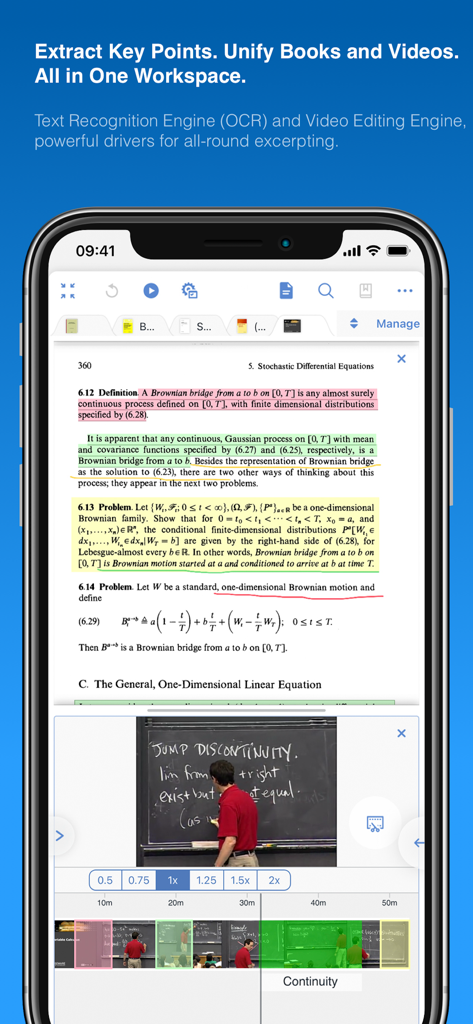
A split screen in the MarginNote 3 app showing a highlighted math PDF and a lecture video for integrated study

A split screen in the MarginNote 3 app showing a highlighted math PDF and a lecture video for integrated study

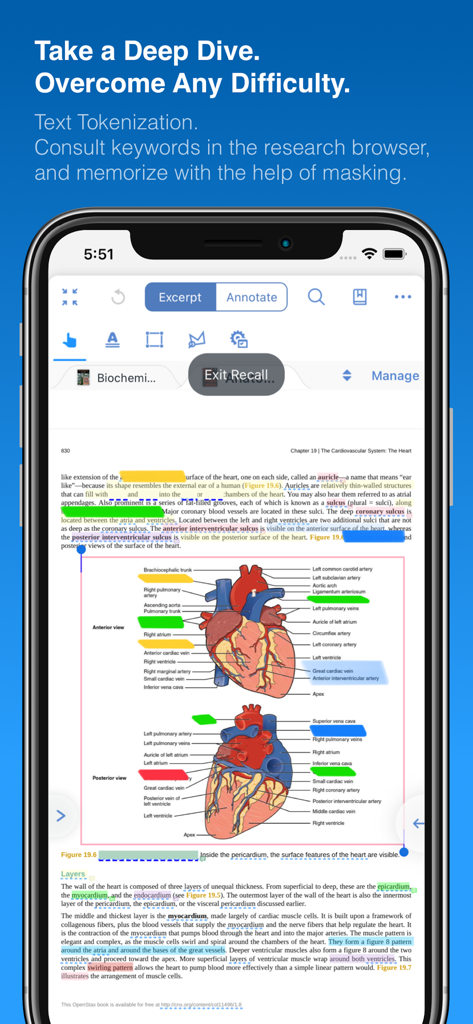
MarginNote 3 recall mode with masked labels on a heart anatomy diagram.

MarginNote 3 recall mode with masked labels on a heart anatomy diagram.

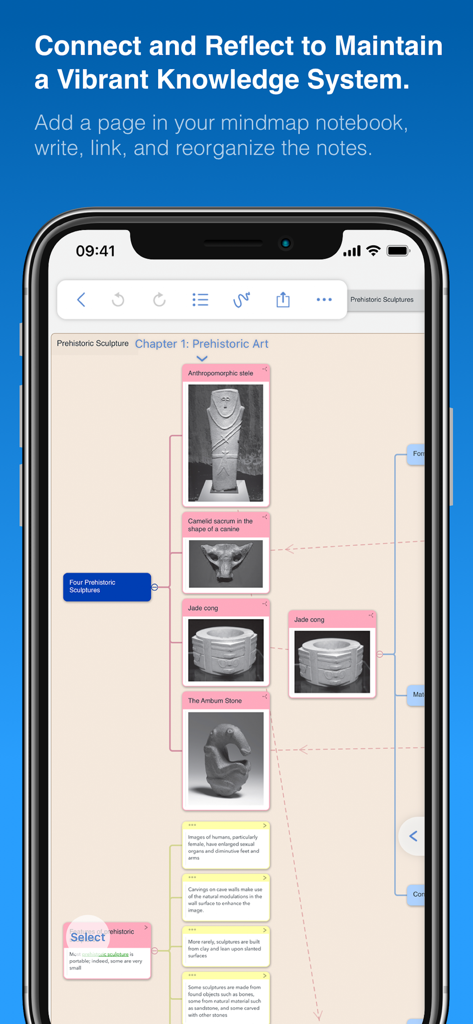
MarginNote 3 mindmap interface showing study notes and images of prehistoric sculptures

MarginNote 3 mindmap interface showing study notes and images of prehistoric sculptures

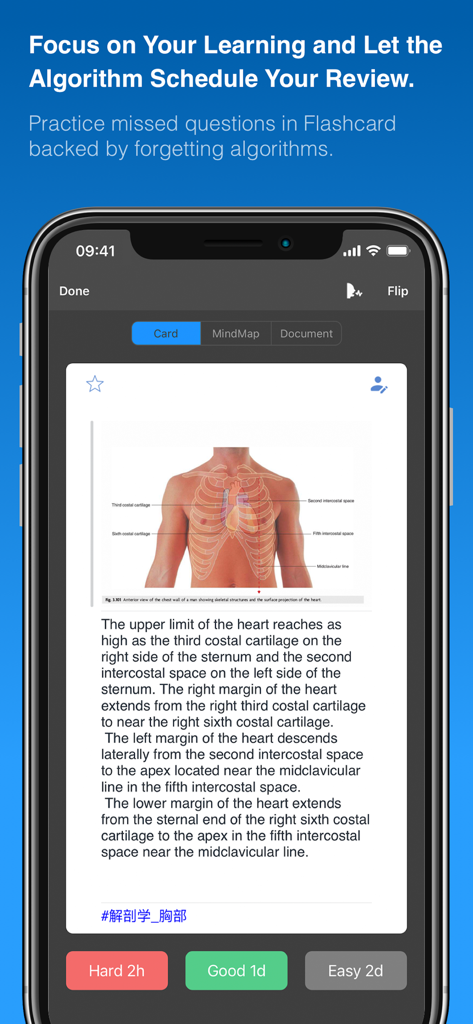
Flashcard interface in MarginNote 3 showing a medical diagram and spaced repetition buttons

Flashcard interface in MarginNote 3 showing a medical diagram and spaced repetition buttons

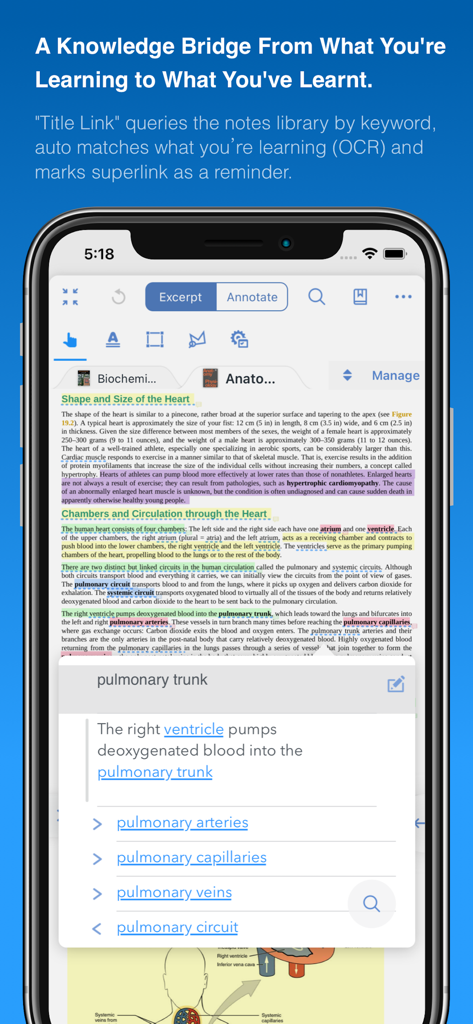
MarginNote 3 app interface on iPhone showing the Title Link feature connecting medical study terms through OCR

MarginNote 3 app interface on iPhone showing the Title Link feature connecting medical study terms through OCR

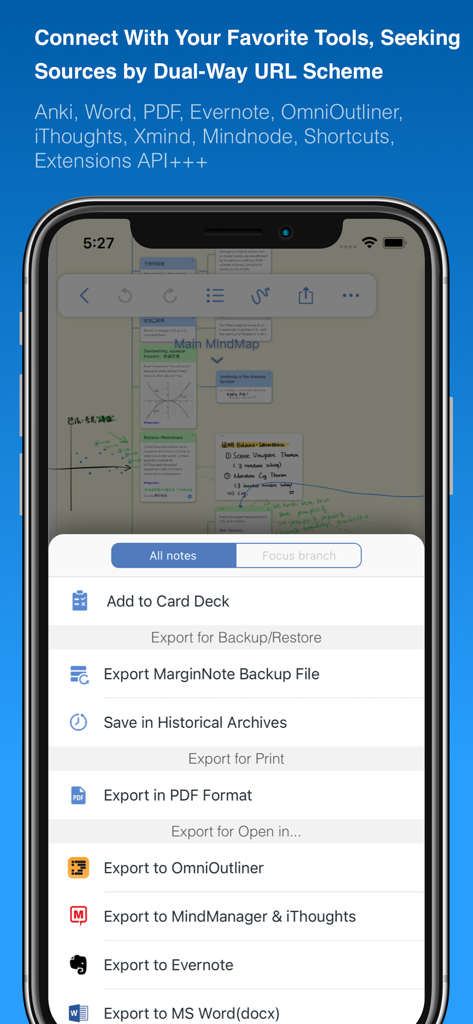
MarginNote 3 export menu showing integrations with Anki Word Evernote and PDF

MarginNote 3 export menu showing integrations with Anki Word Evernote and PDF

From Passive Reading to Active Mastery

The tools that make this app stand out, trusted by 5M+ users.

🧠

Unified Study Pipeline

Bridge the gap between reading and remembering. Excerpt text and generate mind maps directly from your PDFs in one high-efficiency workspace.

Automated Active Recall

Turn highlights into Cloze-deletion flashcards instantly. Export to Anki to master massive volumes of information using spaced repetition.

🗺️

Visual Knowledge Mapping

Organize fragmented notes into a logical framework. Connect ideas across multiple documents to visualize the 'Big Picture' of your research.

Loved by users worldwide

Trusted by 5M+ people who love this app.

"

"MarginNote 3 is the ultimate tool for med school. The seamless pipeline from PDF excerpts to MindMaps and Anki-style flashcards saved me countless hours during my board prep. It is the first app that actually keeps up with the volume of information I need to master daily."

Dr. Sarah Jenkins, Medical Resident
"

"Managing complex litigation requires connecting dots across thousands of pages. The ability to link excerpts from different documents into a single visual framework is revolutionary. It has become the central hub for my legal research and case strategy."

Marcus Thorne, Senior Legal Researcher

Review Analysis

Insights from user reviews.

Sentiment Score

27%
Negative

Summary

This mobile app receives mixed to largely negative feedback from users. Many appreciate its robust PDF reading capabilities and powerful study-oriented functionalities, and some note initial positive impressions and helpful customer support. However, the overall user experience is significantly hampered by widespread issues including frequent app crashes, critical data loss, and unreliable synchronization across devices. Furthermore, many users report a persistently non-functional translation feature and express strong dissatisfaction with the app's upgrade and pricing policy, citing perceived unfairness for long-term users.

Common Themes

App Functionality(3)
PDF Reading(2)
Study Tools(2)
Customer Support(1)
Initial Impression(1)

About the app

Everything you need to know about MarginNote 3.

Description

MarginNote 3, all brand new e-reader to better study and digest your books Integrating powerful tools for book annotation, mindmapping, flashcards and more, to build up your reading notes as never before. ============================================ Welcome to MarginNote. This is a highly powerful reading and study software and is applicable to Mac, iPad, and iPhone. By integrating the PDF/EPUB reader and multiple powerful study tools, MarginNote will enable learners to reorganize and connect knowledge from different aspects, then memorize and grasp it accordingly. Whatever your profession, such as student, educator, researcher, lawyer, or life-long learner, you may annotate and take notes through MarginNote, organize notes via Mindmap and Outline, connect knowledge horizontally via Hashtag and raise memory effect via the Flashcards. You will discover what MarginNote does is not to simply integrate these tools. Instead, it combines them deeply and skillfully, which makes it easier for users to toggle between different tools. What's New in MarginNote 3 * New and Clean UI Completely redesigned. * Improved performance and Running more smoothly * Support both Document Reading mode & Study Reading mode. * Excerpts & Note-taking * Enhanced Handwriting & apple-pencil support. * Support TextBox on PDF. * Support direct text-typing & sketching when editing note cards. * Support Auto OCR when excerpting on scanned PDFs. * Emphasis & Cloze * Support direct emphasis in powerful Emphasis mode both on PDF or Outline. * Support auto convert emphasis to Cloze in CardDeck. * Support creating Image-Occlusion flashcards. * Multi-Documents * Support both document tabs & split views to switch between documents. * MindMap * Auto grouping new excerpts by Document Table of Contents. * Support new brach display mode: Framework. * Swipe/Drag gestures to slide in/out Outline & Documents in Study mode. * Enhanced grouped cut/paste, drag to merge,.. etc. * Outline * Improved search and displaying keywords in results. * Improved styles. * CardDeck: * View Flashcards in MindMap mode and Document mode. * Enhanced Anki Export: Card styles, Image occlusions, Cloze * Enhanced Research web browser. * iCloud Sync * Fixed several design issue in previous versions. * More stable & improved performance. * Categories * Separate categories for Document, Study and Review. * Trash * Recover data from Trash and make data more safe. * Trial * 14-days free trial. MarginNote 2 features: Reading: - Support PDF and EPUB format; Annotating and NoteTaking: - Support text highlight and rectangular highlight; - Add notes directly at the page margin; the note editing area will not overlap with the book content at all; - Text, voice, picture, sketching and many other forms of comments in note; - Add hashtags to notes to facilitate the connection of notes; Outline and Mindmap: - Outline and Mindmap in one view; - Create Outline tree by swipe gestures; - Multi-selection editing such as group, merge, clone, etc; - Quick searching and filtering according to colors, hashtags, books. Flashcard: - Highlights and notes can be automatically turned into flashcards for review; - Spaced repetition adopting the Anki-based algorithm; - Switch to the linking book page at any time; iPad Pro & Apple pencil: - Split View of multiple tasks; - High-precision drawing by Apple pencil; - Fine tuned for Apple pencil; - Keyboard shortcuts; Import, Export and Sync: - Import webpages and notes from Evernote; - Export flashcards to Anki; - Export Outline to OmniOutliner; - Export Mindmap to iThoughts or MindManager; - Export to Evernote; - Export all the margin notes, MindManager, Outline and Pages to a printable PDF; - Sync books & notes with iCloud; Terms of Use: https://www.marginnote.com/press/marginnote-3-term-of-use Privacy Policy: https://www.iubenda.com/privacy-policy/92678020

Latest Version

3.7.32

Size

392.4 MB

First Released

Aug 4, 2018

Build Your Personal Knowledge Empire Today

Join over 5 million researchers, medical students, and legal professionals who have stopped just reading and started mastering their materials. Start your 14-day free trial and experience the power of a seamless study workflow.

Download on App Store
FAQ

Frequently Asked Questions

Everything you need to know about MarginNote 3

What is MarginNote 3?

MarginNote 3 is a powerful reading and study software that integrates PDF/EPUB reading with tools for annotation, mindmapping, and flashcards to help users reorganize, connect, and memorize knowledge.

What platforms does MarginNote 3 support?

MarginNote 3 supports Mac, iPad, and iPhone devices. It is a versatile reading and study tool available across these Apple platforms.

Can MarginNote 3 handle both PDF and EPUB formats?

Yes, MarginNote 3 supports both PDF and EPUB document formats. This allows users to read and annotate a wide range of digital books and articles within the app.

Does MarginNote 3 offer OCR functionality?

Yes, MarginNote 3 provides Auto OCR (Optical Character Recognition) when excerpting on scanned PDFs. It also includes a Text Recognition Engine for broader text processing.

How does MarginNote 3 help with note organization?

MarginNote 3 organizes notes through Mindmap and Outline views. Users can connect knowledge via Hashtags and improve memory effect with Flashcards, enabling effective knowledge management.

Does MarginNote 3 support Apple Pencil?

Yes, MarginNote 3 features enhanced handwriting support and fine-tuning for Apple Pencil. It also supports sketching when editing note cards.

Can users export flashcards from MarginNote 3 to Anki?

Yes, MarginNote 3 allows users to export flashcards to Anki. It offers enhanced Anki Export with support for card styles, image occlusions, and cloze deletions.

Is there a free trial available for MarginNote 3?

Yes, MarginNote 3 offers a 14-day free trial. This allows users to test the app's features and functionality before making a purchase decision.

How does MarginNote 3 handle document viewing?

MarginNote 3 supports both Document Reading mode and Study Reading mode. It also allows multi-documents with document tabs and split views to switch between them.

Where can I find the Privacy Policy for MarginNote 3?

The Privacy Policy for MarginNote 3 is available on the iubenda website. The specific URL is https://www.iubenda.com/privacy-policy/92678020.

Does MarginNote 3 have iCloud Sync?

Yes, MarginNote 3 supports iCloud Sync. This feature ensures that books and notes are synchronized across user devices and improves overall performance.

What types of comments can be added to notes in MarginNote 3?

MarginNote 3 supports various comment forms for notes, including text, voice, picture, and sketching. Users can also add hashtags to connect notes.

Can MarginNote 3 recover deleted data?

Yes, MarginNote 3 includes a Trash feature. Users can recover data from the Trash to ensure data safety and prevent accidental loss.

What is the 'Title Link' feature in MarginNote 3?

The 'Title Link' feature in MarginNote 3 queries the notes library by keyword. It automatically matches current learning with learned content, using OCR, and serves as a reminder.

How does MarginNote 3 enhance memory with flashcards?

MarginNote 3 automatically turns highlights and notes into flashcards for review. It uses a spaced repetition algorithm based on Anki to optimize memory retention.