Flowdia Diagrams

Flowdia Diagrams

Download on App Store
Spark by MWM logo
Logo of Flowdia Diagrams

Flowdia Diagrams: Professional Architecture, BPMN, and UML at Your Fingertips

Transform complex systems into clear, professional visuals. The ultimate mobile utility for IT architects and business analysts to create, connect, and export Visio-compatible diagrams in seconds.

Publisher

Behzad Gorimar

Category

Productivity

Downloads

437K+

User Rating

3.5/5

Total Ratings

400

Locales

9

Precision at Your Fingertips

Discover the interface used by 437K+ users.
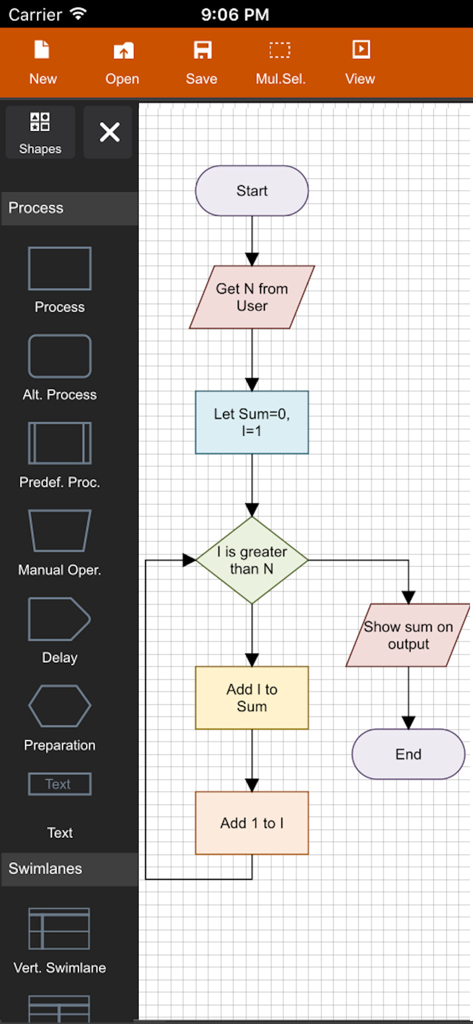
Mobile interface of Flowdia Diagrams app showing a logical flowchart being created with various colorful shapes

Mobile interface of Flowdia Diagrams app showing a logical flowchart being created with various colorful shapes

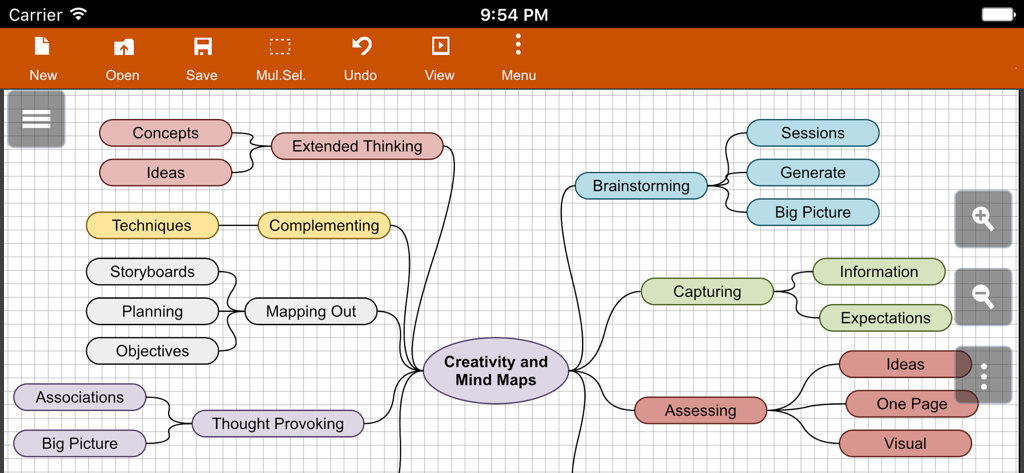
A detailed mind map diagram about creativity and brainstorming created in the Flowdia app

A detailed mind map diagram about creativity and brainstorming created in the Flowdia app

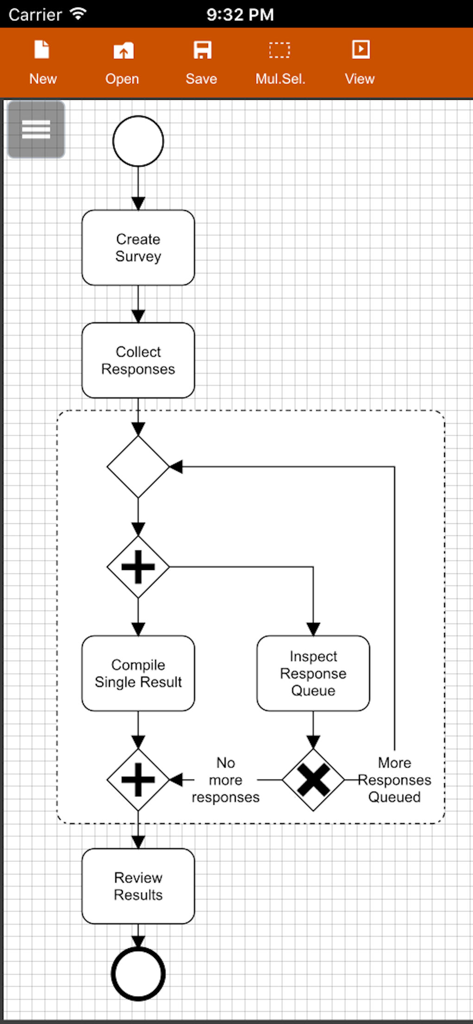
A BPMN business process diagram for survey collection created within the Flowdia mobile app interface

A BPMN business process diagram for survey collection created within the Flowdia mobile app interface

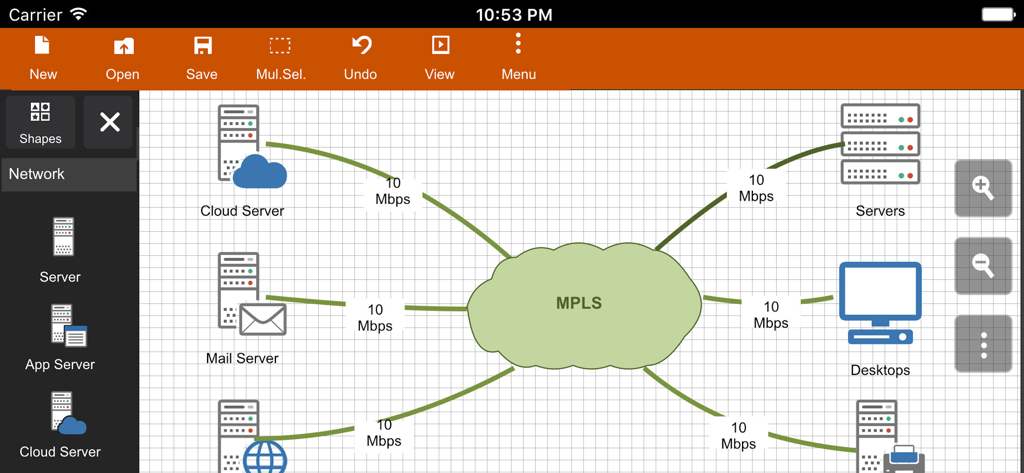
A network diagram interface in the Flowdia app showing interconnected servers and an MPLS cloud

A network diagram interface in the Flowdia app showing interconnected servers and an MPLS cloud

Master Complex Workflows Anywhere

The tools that make this app stand out, trusted by 437K+ users.

🛠️

Niche Technical Libraries

Go beyond basic shapes with specialized sets for AWS, Cisco, BPMN, and UML. Perfect for documenting network layouts, server racks, and software architectures on site.

Built for Mobile Speed

Connect shapes with a single tap and use intelligent auto-positioning. Designed for the Power iPad user who needs to turn complex ideas into professional visuals during a meeting.

📤

Pro-Grade Export & Sync

Bridge the gap between mobile and desktop. Export to high-resolution PDF or SVG formats compatible with Microsoft Visio for a seamless professional workflow.

Loved by users worldwide

Trusted by 437K+ people who love this app.

"

"As a solutions architect, I often need to sketch out network layouts while on-site at data centers. Flowdia’s Cisco and AWS shape libraries are a lifesaver. Being able to export SVGs directly to my team for Visio integration has streamlined our entire workflow. It's the best diagramming tool I've found for the iPad."

Marcus Chen, Solutions Architect
"

"I use Flowdia for all my Systems Analysis assignments. The UML class and sequence diagrams are so easy to put together between classes. I love how the 'plus' button automatically handles the positioning for mind maps—it saves me so much time when I'm brainstorming my thesis structure. Highly recommended for any engineering student!"

Sarah Jenkins, CS Student

About the app

Everything you need to know about Flowdia Diagrams.

Description

Flowdia is an easy to use flow diagram tool that can be used to quickly create professional quality flowcharts, mind maps, BPMN, network and server layouts, Cisco network, Rack diagram, UML activity, business process and process flow diagrams. The app is designed with ease of use in mind. You can quickly connect flowchart shapes by simply selecting the start and end connection points and quickly add new lanes to a swimlane diagram or new sub-topics to a mind map diagram by using "+" button from the selected swimlane or mind map shape menu. The mind map sub-topics are automatically positioned on the page but can be easily moved as required. Flowdia supports export of the diagram / flowchart to PNG, JPG, PDF and SVG formats.You can view exported SVG files in Microsoft Visio. You can import custom PNG and JPG images. The following diagrams can be created using Flowdia: - Flowchart - Swimlanes - Mind Maps - BPMN - Network Diagram - AWS Architecture Diagram - Cisco Network Diagram - Server Layout Diagram - Rack Diagram - UML Class Diagram - UML Activity Diagram - UML Use Case Diagram - UML Sequence Diagram - Business Process Diagram - Process Flow - Chevron Diagram You can quickly select and change BPMN activity, event and gateway types by using the special shape selector available to all BPMN shapes. The flowchart shapes in this tool are not images can be re-sized without loosing quality. You can customize the look of the shapes by applying background color and also change the font color and size of the text. **NOTE: Free version of Flowdia is restricted to: - 4 files. - 1 page per diagram. - Cannot remove or duplicate pages. - Image and PDF exports with watermark

Latest Version

1.15.6

Size

13.8 MB

First Released

Jan 27, 2017

Design Your Systems Anywhere, Anytime

Join over 400,000 professionals using the ultimate mobile utility for AWS, Cisco, and UML diagrams. Download Flowdia today and turn your complex ideas into professional-grade exports in seconds.

Download on App Store