Money Manager Classic

Money Manager Classic

Download on App StoreDownload on Google Play
Spark by MWM logo
Logo of Money Manager Classic

Money Manager Classic: Professional-Grade Asset Management

Take total control with double-entry bookkeeping, PC data editing, and the precision of a desktop tool designed for the methodical optimizer.

Publisher

RealByte

Category

Finance

Downloads

188K+

User Rating

3.8/5

Total Ratings

4K+

Locales

10

Precision in Every Detail

Discover the interface used by 188K+ users.

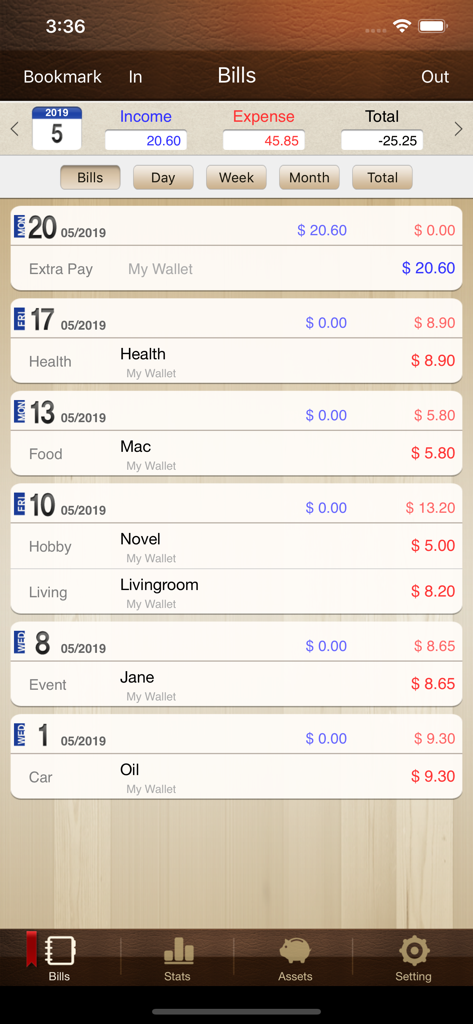
Monthly transaction list and expense tracking in the Money Manager Classic app

Monthly transaction list and expense tracking in the Money Manager Classic app

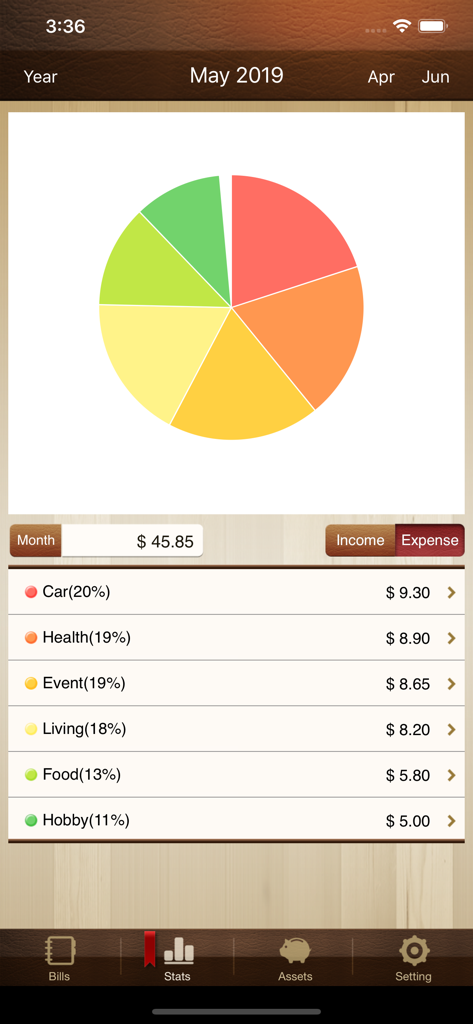
Pie chart and categorized list of monthly expenses in the Money Manager Classic app interface.

Pie chart and categorized list of monthly expenses in the Money Manager Classic app interface.

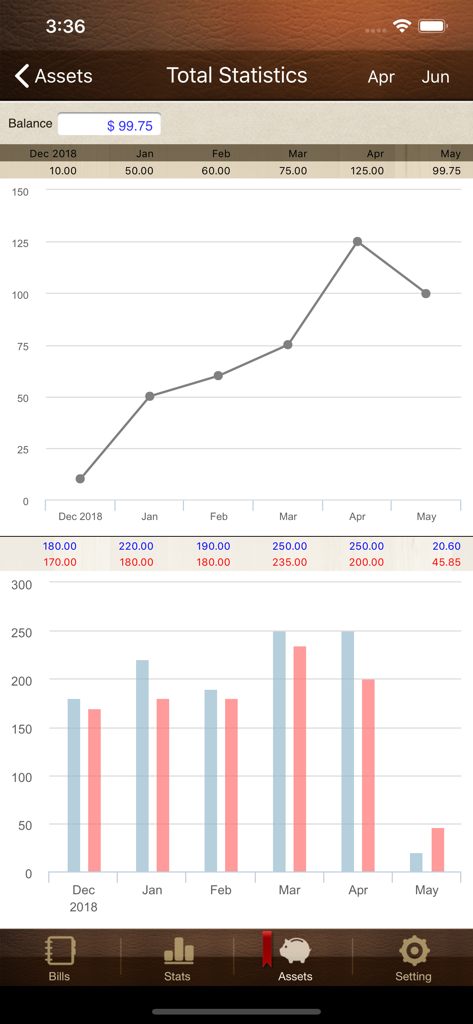
Financial statistics screen in Money Manager Classic app featuring a line graph for monthly balances and a bar chart comparing income and expenses.

Financial statistics screen in Money Manager Classic app featuring a line graph for monthly balances and a bar chart comparing income and expenses.

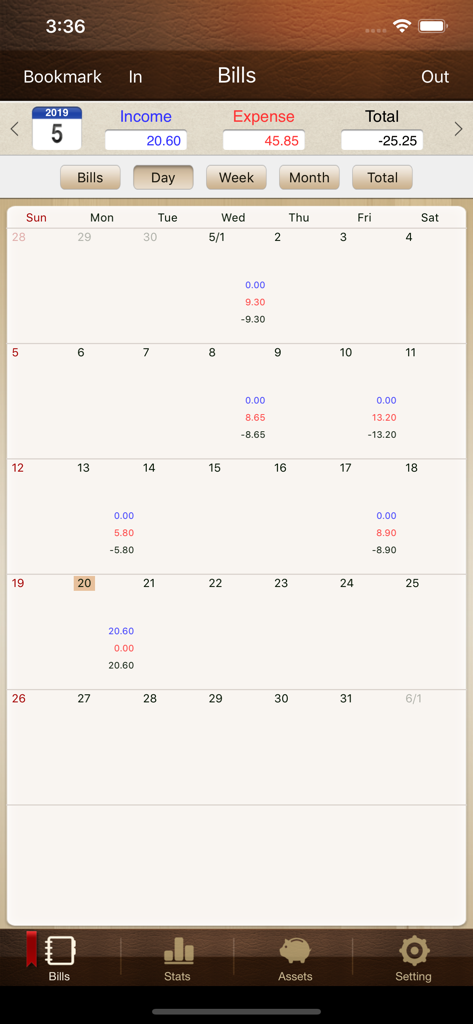
Money Manager Classic monthly calendar showing income and expense totals

Money Manager Classic monthly calendar showing income and expense totals

Professional Wealth Management for the Methodical Mind

The tools that make this app stand out, trusted by 188K+ users.

⚖️

Double-Entry Bookkeeping

Apply professional accounting logic to your personal life. Every transaction is balanced between assets and expenditures, ensuring your net worth is accurate to the penny.

💻

PC Editing & Excel Export

Reconcile your accounts on the big screen. Connect via Wi-Fi to manage data on your desktop and export detailed reports to Excel for your own private archives.

💳

Complex Asset Management

Master your cash flow with dedicated tracking for credit cards, settlement dates, and automated recurring transfers for insurance, loans, and salaries.

Loved by users worldwide

Trusted by 188K+ people who love this app.

"

"As a CPA, I have high standards for financial tracking. This app is the only one that correctly implements double-entry bookkeeping on a mobile interface. The PC editing function via Wi-Fi is a lifesaver for my end-of-month reconciliations, allowing me to manage complex transactions much faster than on a touchscreen."

Robert D., Financial Consultant
"

"I’ve been using Money Manager Classic for over eight years to manage my family's budget. It is stable, private, and doesn't bombard me with ads or credit card offers. The Excel export feature makes tax season incredibly simple, and I love that I can track my recurring insurance and utility payments with such precision."

Sarah L., Small Business Owner

About the app

Everything you need to know about Money Manager Classic.

Description

We provide two version for iOS (Money Manager Next, Money Manager Classic). Next version (Blue Icon) is the later version which offers, even more, functionalities than Classic version (Brown Icon). That is why we recommend using Next version. Classic version is also good. “Money Manager” is an optimized application for personal asset management. ※ PC editing function You can view ‘“Money Manager” application by Wi-Fi or 3G. You can see the data sorted by date, category and asset group on the screen of your PC. In addition, you can see fluctuations of your asset indicated by graphs on your PC. ※ Applying double entry bookkeeping It facilitates efficient asset management. It does not just record your money coming in and out of your account but deposits your money into your account as soon as your income is input and draws money from your account as soon as your expenditure is input. ※ Budget management function You can manage your budget. It shows your budget and expenditure by a graph so you can see the amount of your expenditure against your budget quickly. ※ Card / Debit Card management function Entering a settlement date, you can see payment amount and outstanding payment at asset tab. You can arrange the automatic debit by simply connecting your debit card with your account. ※ Passcode You can check passcode in multitasking state so you can safely manage your account book. ※ Transfer, direct debit and recurrence function Transfer between assets is possible, which makes your asset management more efficient. In addition, you can manage you salary, insurance, term deposit and loan more easily by setting automatic transfer and recurrence. ※ Instant statistics Based on the data entered, you can instantly see your expenditure by category and changes between each month. And you can see change of your assets and income/expenditure indicated by a graph as well. ※ Bookmark function You can easily input your frequent expenditures all at once by bookmarking them. ※ Backup / Restore You can make and view backup files in Excel file and backup / restore is possible. ※ Choice of currency – you can freely choose your currency. ※ Other functions - Change of starting date - Calculator function (Amount > upper right button) - Sub Category ON-OFF function

Latest Version

3.2.36

Size

44.8 MB

First Released

Oct 6, 2010

Take Command of Your Wealth with Professional Precision

Join thousands of methodical optimizers using the classic, reliable standard for double-entry bookkeeping and detailed asset management.

Download on App StoreDownload on Google Play