Money Manager (Remove Ads)

Money Manager (Remove Ads)

Download on App StoreDownload on Google Play
Spark by MWM logo
Logo of Money Manager (Remove Ads)

Money Manager: Professional Financial Control for Every Detail

Take command of your household accounts with double-entry bookkeeping, advanced data visualization, and complete privacy. The ad-free, professional-grade ledger designed for the detail-oriented spender who values precision over automation.

Publisher

Realbyte Inc.

Category

Finance

Downloads

498K+

User Rating

4.8/5

Total Ratings

48K+

Locales

19

Your Finances, Visualized

Discover the interface used by 498K+ users.

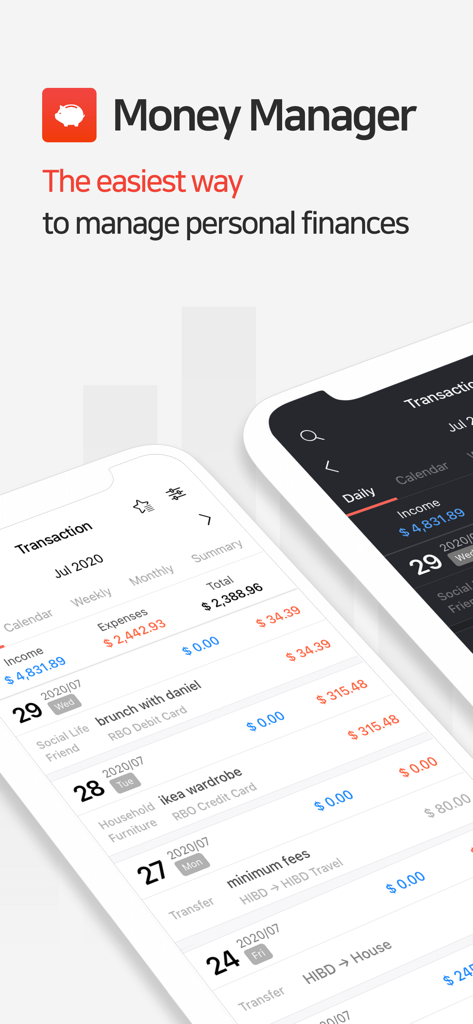
Money Manager app interface showing detailed transaction history and budget tracking on mobile devices.

Money Manager app interface showing detailed transaction history and budget tracking on mobile devices.

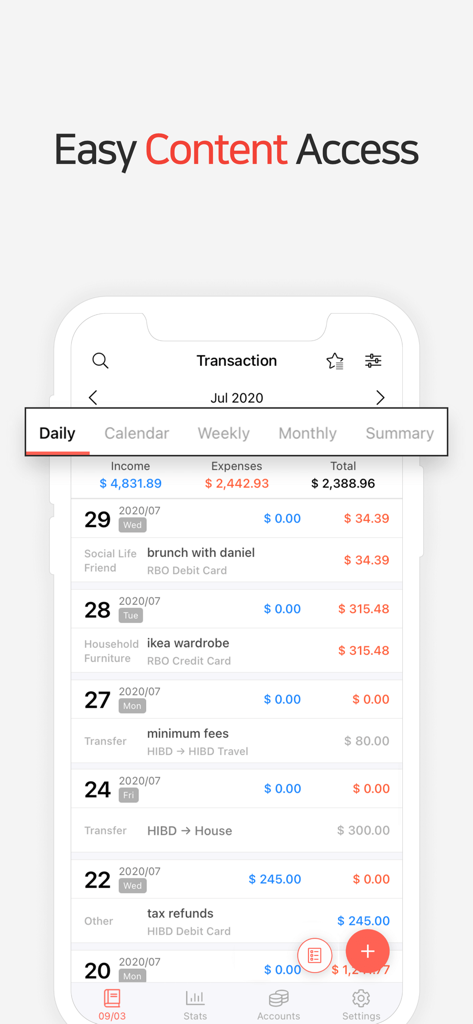
Daily transaction list in the Money Manager app showing income and expenses for the month

Daily transaction list in the Money Manager app showing income and expenses for the month

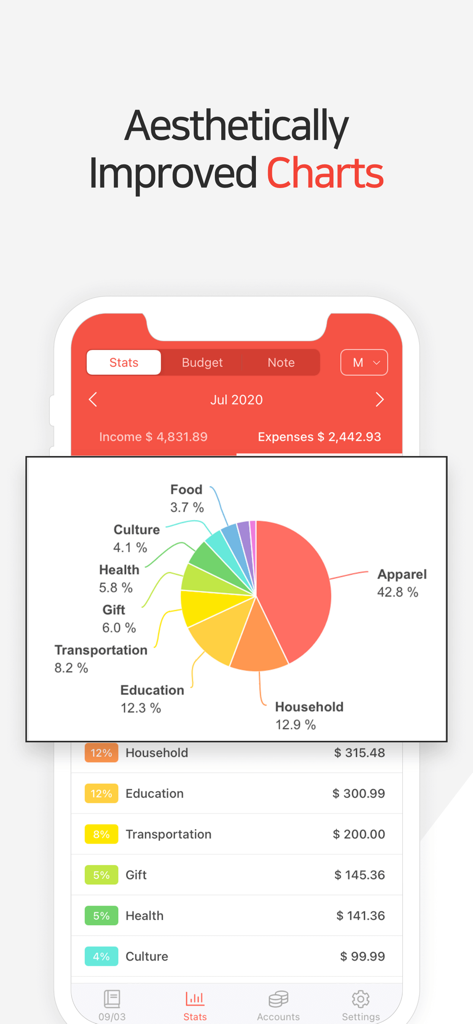
Money Manager app interface displaying an expense pie chart and categorized spending statistics

Money Manager app interface displaying an expense pie chart and categorized spending statistics

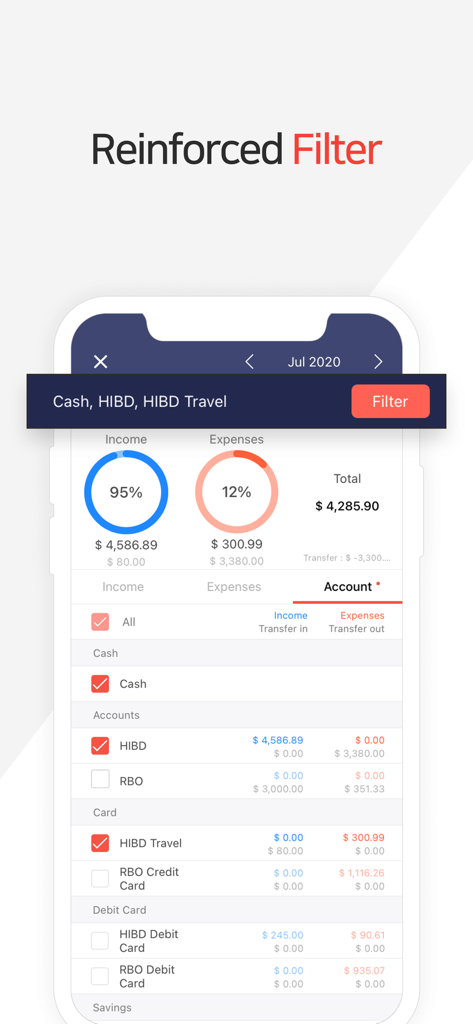
Money Manager app screen showing the reinforced filter feature for tracking income and expenses across specific bank accounts and cards.

Money Manager app screen showing the reinforced filter feature for tracking income and expenses across specific bank accounts and cards.

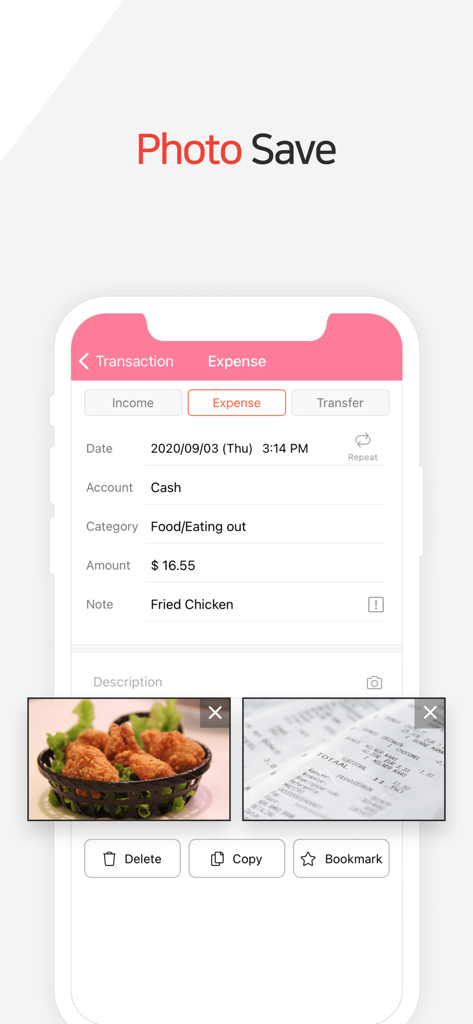
Money Manager app interface showing a food expense with attached photos of the meal and receipt

Money Manager app interface showing a food expense with attached photos of the meal and receipt

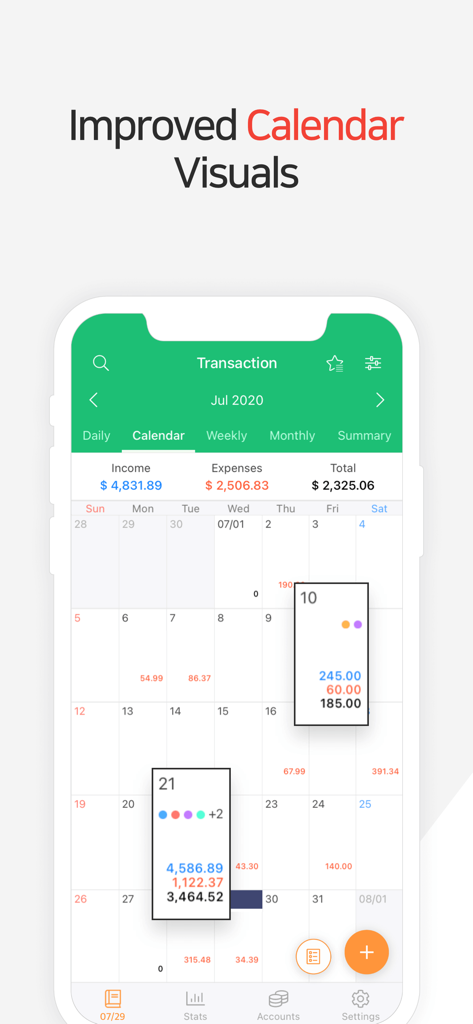
Monthly calendar interface of Money Manager showing daily financial transactions and totals

Monthly calendar interface of Money Manager showing daily financial transactions and totals

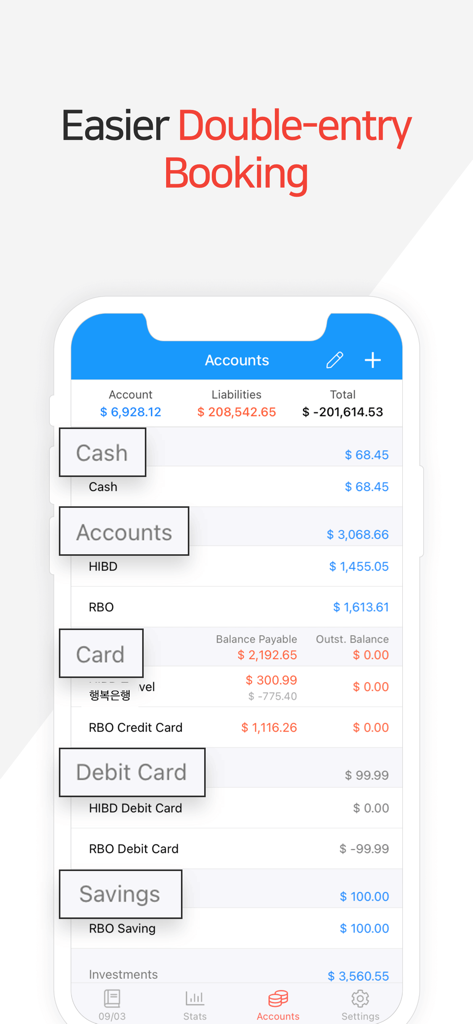
Money Manager app interface showing account balances and double-entry bookkeeping summary

Money Manager app interface showing account balances and double-entry bookkeeping summary

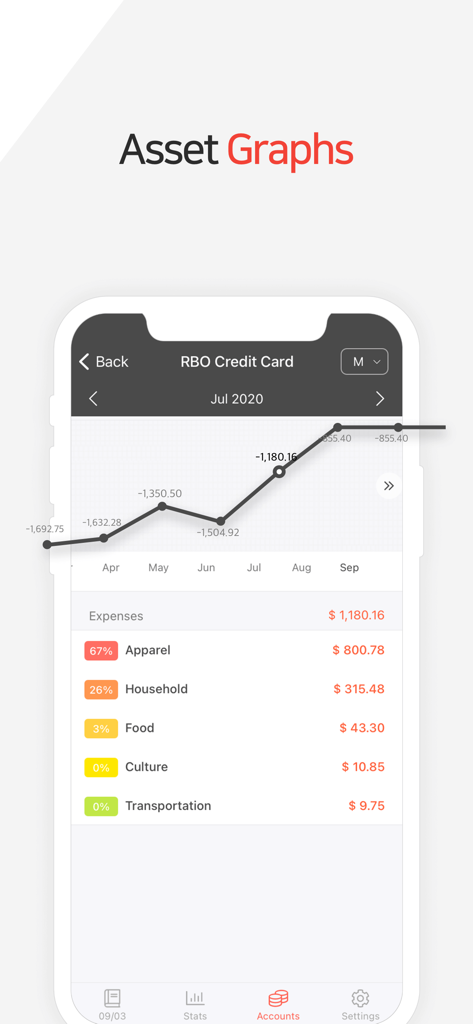
Money Manager app interface showing financial asset graphs and expense categories

Money Manager app interface showing financial asset graphs and expense categories

Master Your Finances with Professional Precision

The tools that make this app stand out, trusted by 498K+ users.

⚖️

Professional Double-Entry System

Ensure your records are perfectly balanced with a system that mirrors professional ledgers for total accuracy.

🔒

Privacy-First Manual Tracking

Avoid risky bank links. Maintain complete control over your data with secure manual entry and private cloud backups.

💻

Advanced PC Data Management

Perform deep financial reviews on your desktop via Wi-Fi while keeping your mobile tracking simple and ad-free.

Loved by users worldwide

Trusted by 498K+ people who love this app.

"

"I've tried every finance app out there, but Money Manager is the only one that offers the precision I need. The double-entry bookkeeping system ensures my accounts actually balance, and I love that I don't have to link my bank accounts to get a clear picture of my finances. It’s professional, private, and incredibly powerful."

Sarah J., Financial Analyst
"

"The PC Manager feature is a total game changer for my monthly reviews. I use the mobile app for quick entries during the day, then use my laptop at the end of the week to analyze the graphs and adjust my budget. Being able to customize categories and change the month's start date makes managing my household expenses so much simpler."

Michael K., Tech Consultant

About the app

Everything you need to know about Money Manager (Remove Ads).

Description

“Money Manager” is an optimized application for personal account management. Household account management is complicated. But we make it simple by simplifying the things that are complex. The default settings will get you started, and once you get used to it, you can alter the settings according to your needs with the highly flexible and customizable functions available. - Super easy and simple to enter data anytime, anywhere. - View your spending tendencies graphically. - View statistics by simply entering the data. - Search and calculator functions. - Set up sub-categories and main categories as necessary. - Manage all your accounts at once. - Use multiple currencies. - Check weekly, monthly, and annual statistics. - Use calendar view. - Use budget planning features to plan weekly, monthly, and annual budgets. - Change the start date of the month. ※ Applying double entry bookkeeping It facilitates efficient account management. Automatic double entry bookkeeping. ※ PC manager function You can view ‘“The New Money Manager” application using Wi-Fi. You can edit and sort the data by date, category or account group on the screen of your PC. In addition, you can see fluctuations of your accounts indicated on graphs on your PC. ※ Budget management function You can manage your budget. It shows your budget and expenditures on a graph so you can compare the number of your expenditures against your budget quickly. ※ Credit Card / Debit Card management function When entering a future payment date, you can see the payment amount and outstanding balance on the accounts page. You can connect your debit card to your accounts so that expenses are automatically recorded under a specific account. ※ Passcode You can specify the desired time lapse before the app requests a passcode. ※ Automatic money transfer and frequency functions You can set up automatic money transfers between your accounts and configure the frequency of those transfers. ※ Sort expenses by the recipient You can sort your expenses by the recipient and view this information graphically. ※ Payment Profiles You can easily enter frequent expenditures by creating payment profiles. ※ Backup / Restore You can backup and restore your data via email, iTunes and iCloud. ※ Multiple currency support – you can have individual entries in multiple currencies, and configure each account to calculate the total balance in your desired currency. Subscription pricing and terms: Money Manager offers auto-renewing monthly subscription at US$2.49/month and an auto-renewing yearly subscription at US$19.99/year to provide you with unlimited access to the Money Manager Data Sync Service while you maintain an active subscription. Payment will be charged to the credit card connected to your iTunes Account when you confirm the initial subscription purchase. Subscriptions automatically renew unless auto-renew is turned off at least 24-hours before the end of the current subscription period. Your account will be charged for renewal within 24-hours prior to the end of the current period, and the cost of the renewal will be identified. You may manage your subscription and auto-renewal may be turned off by going to your Account Settings after the purchase. Read more about our terms and conditions here: https://realbyteapps.com/policy/terms.html Privacy Policy: https://realbyteapps.com/policy/privacy.html

Latest Version

2.12.3

Size

58.5 MB

First Released

Oct 4, 2012

Take Full Control of Your Financial Future

Join over 498,000 power users managing their wealth with the precision of double-entry bookkeeping and zero distractions.

Download on App StoreDownload on Google Play
FAQ

Frequently Asked Questions

Everything you need to know about Money Manager (Remove Ads)

What is Money Manager (Remove Ads)?

Money Manager is an optimized application for personal account management, simplifying household finances by offering easy data entry, graphical spending analysis, and customizable functions.

Does Money Manager support multiple currencies?

Yes, Money Manager supports multiple currencies. Users can have individual entries in different currencies and configure accounts to calculate the total balance in their desired currency.

How does Money Manager help with budget planning?

Money Manager includes budget planning features for weekly, monthly, and annual budgets. It displays your budget and expenditures graphically, allowing quick comparison against your budget.

Can I manage credit and debit cards with Money Manager?

Yes, Money Manager offers Credit Card and Debit Card management. You can see future payment amounts and outstanding balances, and link debit cards for automatic expense recording.

What is the cost of a monthly subscription for Money Manager?

A monthly subscription for Money Manager costs US$2.49/month. This is an auto-renewing subscription providing unlimited access to the Data Sync Service.

Does Money Manager use double entry bookkeeping?

Yes, Money Manager applies double entry bookkeeping. It facilitates efficient account management through automatic double entry bookkeeping.

How can I view my financial data on a PC using Money Manager?

Money Manager offers a PC manager function. You can view, edit, and sort your data by date, category, or account group on your PC screen using Wi-Fi.

How do I back up my data in Money Manager?

Money Manager allows you to backup and restore your data. You can perform these operations via email, iTunes, and iCloud.

Can Money Manager protect my financial information with a passcode?

Yes, Money Manager includes a passcode function. You can specify the desired time lapse before the app requires a passcode for access.

Does Money Manager provide visual charts of spending?

Yes, Money Manager provides graphical views of spending tendencies. It shows statistics and allows users to view fluctuations of accounts indicated on graphs.

Is it possible to sort expenses by recipient in Money Manager?

Yes, Money Manager allows you to sort expenses by the recipient. You can also view this information graphically within the app.

Can I save photos of receipts in Money Manager?

Yes, Money Manager allows users to save photos. The app provides functionality to include images with expense entries, as depicted in the interface.

What is the yearly subscription price for Money Manager?

The yearly subscription for Money Manager costs US$19.99/year. This auto-renewing subscription provides unlimited access to the Data Sync Service.