Network Analyzer Pro

Network Analyzer Pro

Download on App StoreDownload on Google Play
Spark by MWM logo
Logo of Network Analyzer Pro

Network Analyzer Pro: The Ultimate Diagnostic Suite for IT Professionals

Gain complete visibility into your network with advanced LAN scanning, real-time troubleshooting, and professional-grade tools designed for sysadmins and tech-savvy power users.

Publisher

Jiri Techet

Category

Utilities

Downloads

545K+

User Rating

4.8/5

Total Ratings

11K+

Locales

1

Precision Diagnostics at a Glance

Discover the interface used by 545K+ users.

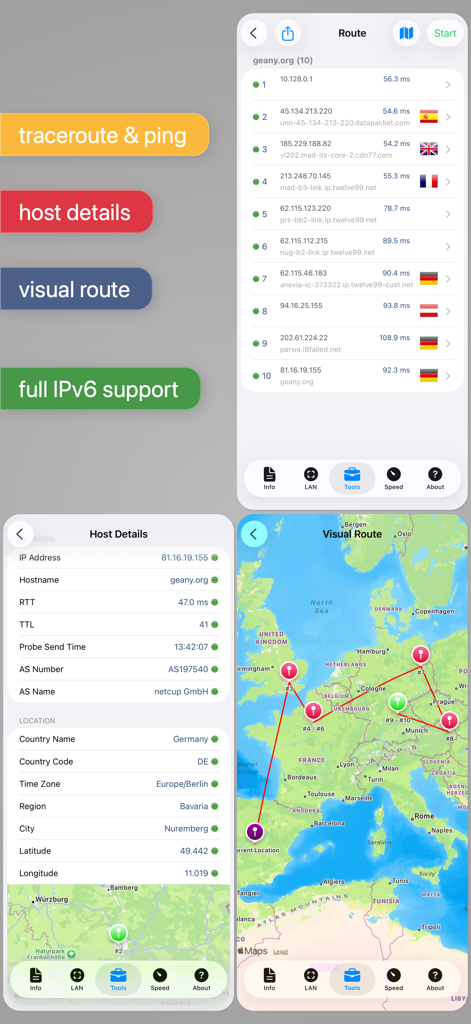
Screenshots of Network Analyzer Pro app showing a traceroute list, host location details, and a visual network route on a map.

Screenshots of Network Analyzer Pro app showing a traceroute list, host location details, and a visual network route on a map.

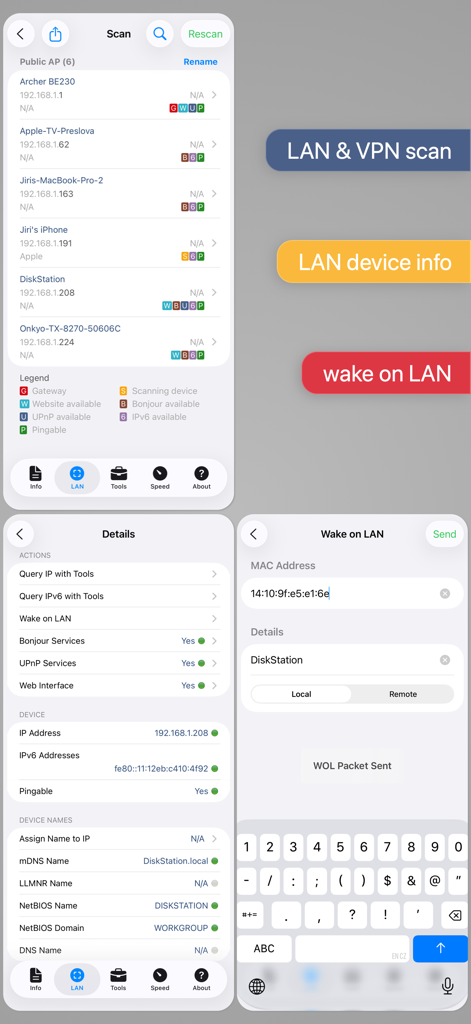
Network Analyzer Pro screenshots showing LAN scanning list, device details with IP and NetBIOS, and the Wake on LAN interface.

Network Analyzer Pro screenshots showing LAN scanning list, device details with IP and NetBIOS, and the Wake on LAN interface.

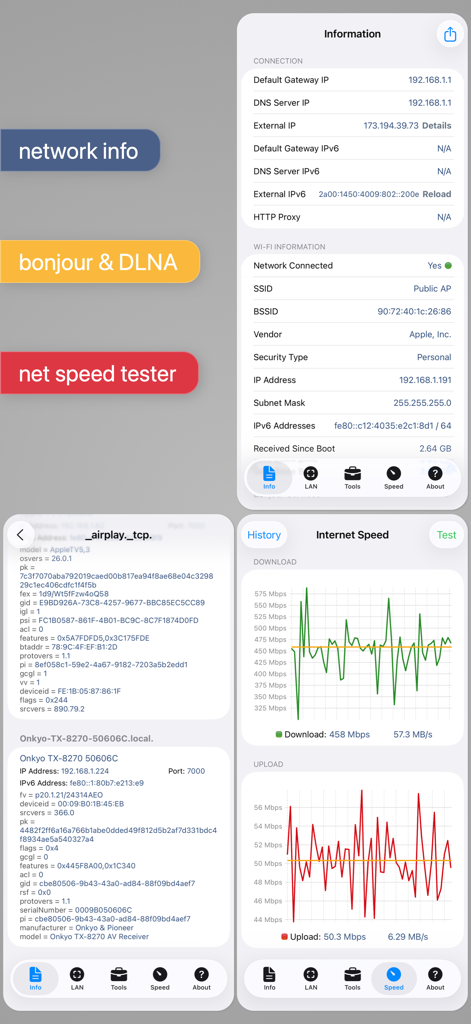
Interface screenshots of Network Analyzer Pro showing network info, service discovery, and speed test graphs

Interface screenshots of Network Analyzer Pro showing network info, service discovery, and speed test graphs

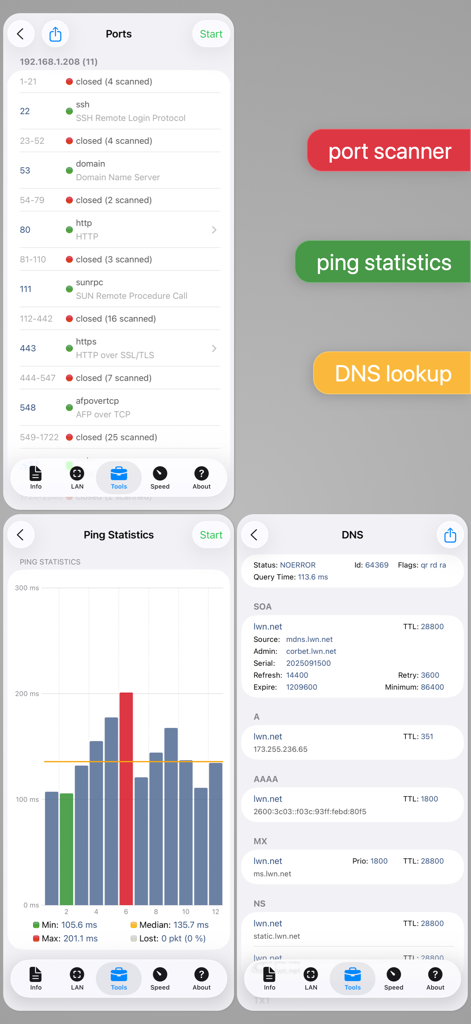
Collage of Network Analyzer Pro screens showing port scanner results, ping statistics graph, and DNS lookup records

Collage of Network Analyzer Pro screens showing port scanner results, ping statistics graph, and DNS lookup records

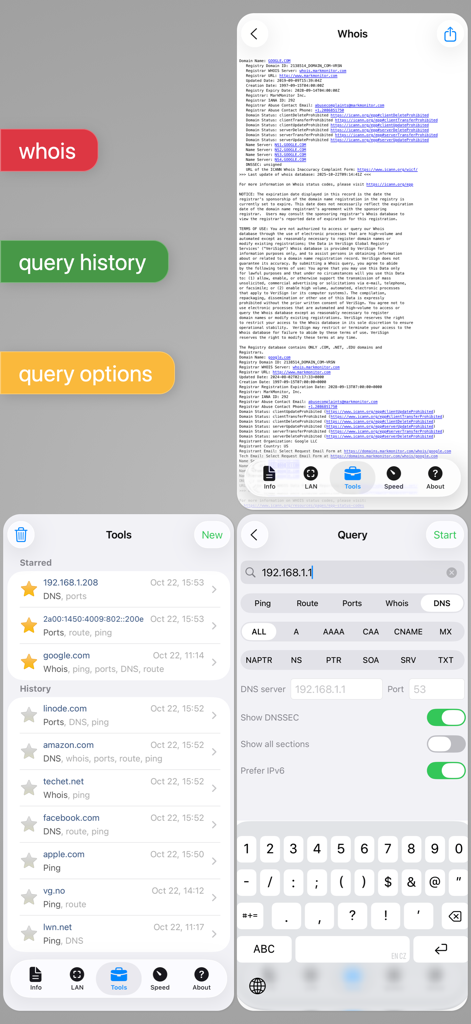
Interface of Network Analyzer Pro showing whois lookup details query history and network diagnostic settings

Interface of Network Analyzer Pro showing whois lookup details query history and network diagnostic settings

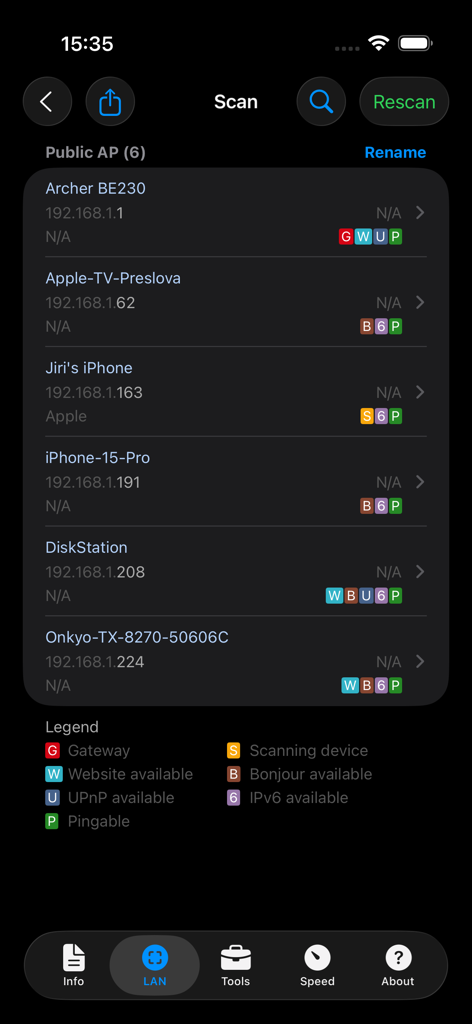
Network Analyzer Pro interface showing a list of discovered LAN devices with IP addresses

Network Analyzer Pro interface showing a list of discovered LAN devices with IP addresses

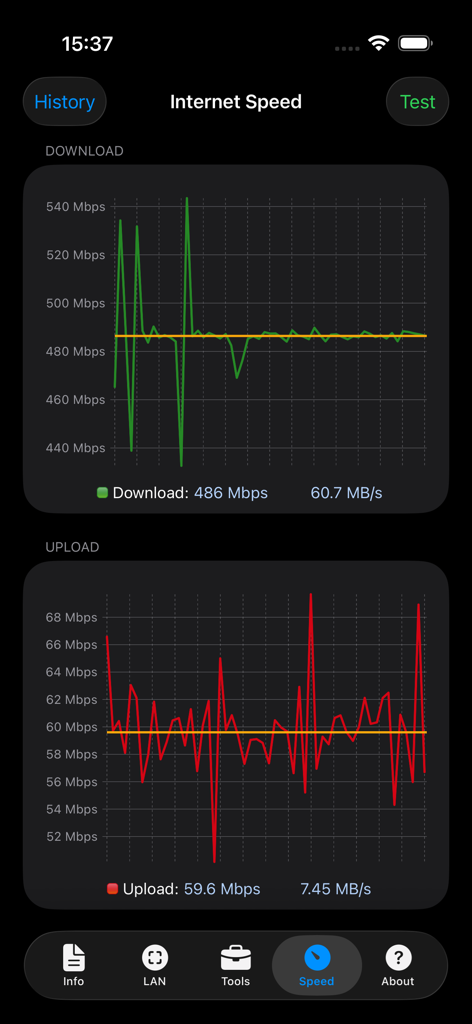
Internet speed test interface of Network Analyzer Pro showing download and upload graphs

Internet speed test interface of Network Analyzer Pro showing download and upload graphs

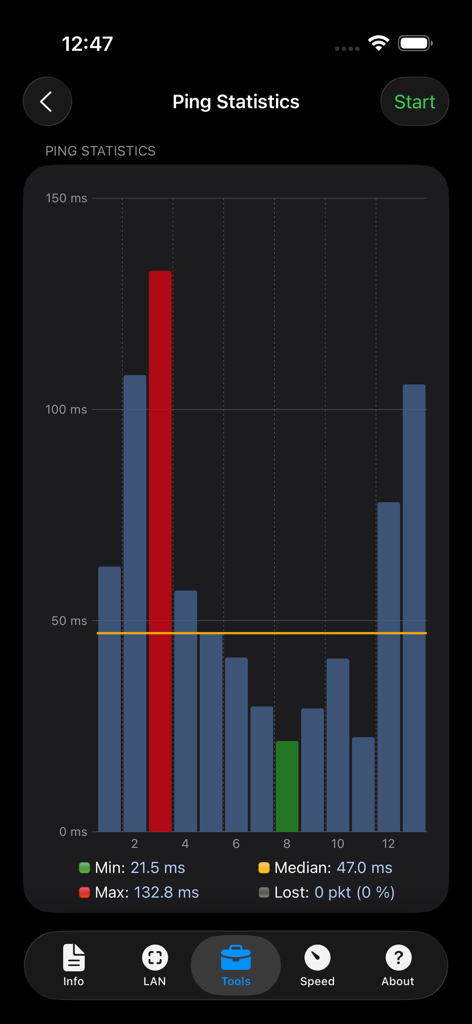
A bar chart screen from the Network Analyzer Pro app showing real-time ping statistics including minimum maximum and median network latency

A bar chart screen from the Network Analyzer Pro app showing real-time ping statistics including minimum maximum and median network latency

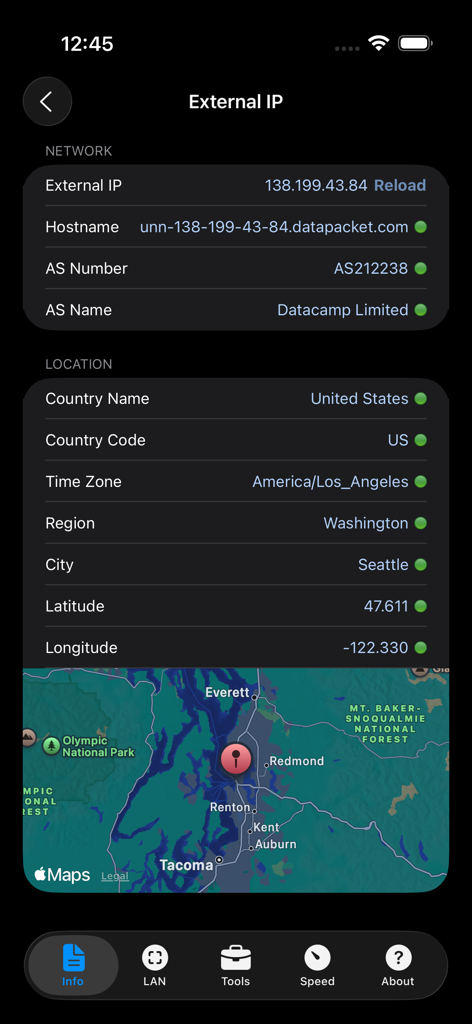
Network Analyzer Pro screenshot showing external IP network details and geolocation map

Network Analyzer Pro screenshot showing external IP network details and geolocation map

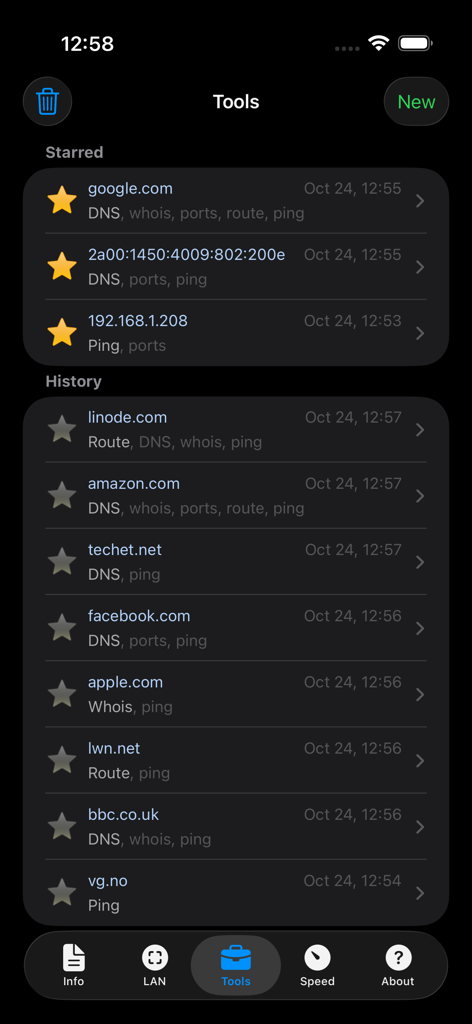
Network Analyzer Pro app interface showing the history and starred list of network diagnostic tools

Network Analyzer Pro app interface showing the history and starred list of network diagnostic tools

Master Your Network with Professional-Grade Tools

The tools that make this app stand out, trusted by 545K+ users.

🔍

Advanced LAN Discovery

Instantly identify every device on your network with detailed IP/MAC addresses, NetBIOS names, and Bonjour services.

Precision Diagnostic Suite

Resolve connectivity issues fast with real-time ping statistics and visual traceroute mapping across the globe.

🛡️

Comprehensive Port Security

Audit your network security by scanning for open, closed, or firewalled ports with full support for IPv4 and IPv6.

Loved by users worldwide

Trusted by 545K+ people who love this app.

"

"As a network administrator, this is the most essential tool in my pocket. Whether I'm performing a quick port scan or troubleshooting latency issues via traceroute, the data is accurate and the interface is incredibly efficient. It has completely replaced the need to lug my laptop into the server room for basic diagnostics."

Marcus Thorne, Senior Network Engineer
"

"I've tried every network utility available, but Network Analyzer Pro is in a league of its own. The LAN scanner is lightning-fast and identifies every smart device in my home with precision. The Wake on LAN and Bonjour discovery features are game-changers for managing my local lab. Worth every penny."

Sarah Jenkins, Tech Enthusiast

About the app

Everything you need to know about Network Analyzer Pro.

Description

An advanced tool for network diagnostics, LAN scanning, and problem detection. Network Analyzer can help you diagnose various problems in your wifi network setup, Internet connectivity, and also detect various issues on remote servers thanks to the wide range of tools it provides. It is equipped with a fast wifi device discovery tool, including all the LAN device's addresses and names, together with the Bonjour/DLNA services they provide. Further, Network Analyzer contains standard diagnostic tools such as ping, traceroute, port scanner, DNS lookup, whois, and Internet speed tester. Finally, it displays various useful information related to your wifi/cell connection. WIFI LAN SCANNER • Detection of all connected network devices (wifi & VPN) • IP addresses of all discovered devices • NetBIOS, mDNS (Bonjour​), LLMNR, and DNS name where available • Pingability test of discovered devices • IPv6 availability and discovered IPv6 addresses • Wake on LAN (WOL) including remote WOL • Scan of custom IP ranges • Filtering and search in the discovered device list PING & TRACEROUTE • Round trip delay including IP address and hostname for every network node • Geolocation data including latitude, longitude, country, city, and time zone • AS number and network name information • Complete trace route visualization on the map • Graphical ping statistics updated in real time • Configurable ICMP/UDP probes for traceroute • Configurable ping payload size • Both IPv4 and IPv6 - selectable PORT SCANNER • Scanning the most common ports or user-specified port ranges • Detection of closed, firewalled, and open ports • Description of the known open port services • Scan of complete port range or user-editable common ports • Both IPv4 and IPv6 - selectable WHOIS • Whois of domains, IP addresses and AS numbers DNS LOOKUP • Functionality similar to nslookup or dig • Support of A, AAAA, CAA, CNAME, HINFO, MX, NS, PTR, SOA, SPF, SRV, SSHFP, TXT records • Decoding and showing DNSSEC records such as DNSKEY, CDNSKEY, RRSIG, NSEC3PARAM, NSEC, NSEC3, DS, CDS, TLSA INTERNET SPEED • Test of both download and upload speeds • Graphical speed test view • Speed test history NETWORK INFORMATION • Default gateway, external IP (v4 and v6), DNS server, HTTP proxy • Wifi network information such as SSID, BSSID, IP address, and subnet mask • Cell network information such as network type • Monitor of wifi, cell and VPN data usage (both sent and received data since the last boot) LOCAL SERVICE DISCOVERY • Bonjour service browser • UPnP/DLNA service and device browser MORE • Full IPv6 support everywhere • History of all performed tasks with the possibility to star the favorite ones • Export by email, AirPrint, and AirDrop for most tools • Light/dark theme • Copy/paste support • Detailed help • Regular updates

Latest Version

9.0.1

Size

9.8 MB

First Released

Sep 18, 2012

Master Your Network with the Professional’s Ultimate Toolkit

Join over 545,000 IT experts and prosumers who rely on Network Analyzer Pro for advanced LAN scanning, diagnostic precision, and total network visibility—anytime, anywhere.

Download on App StoreDownload on Google Play
FAQ

Frequently Asked Questions

Everything you need to know about Network Analyzer Pro

What is Network Analyzer Pro?

Network Analyzer Pro is an advanced tool for network diagnostics, LAN scanning, and problem detection. It helps diagnose issues in your WiFi network setup, Internet connectivity, and on remote servers.

Can Network Analyzer Pro scan for devices on my LAN?

Yes, Network Analyzer Pro features a fast WiFi LAN scanner. It detects all connected network devices, including WiFi and VPN, and lists their IP addresses, NetBIOS, mDNS (Bonjour), LLMNR, and DNS names.

Does Network Analyzer Pro support Wake on LAN (WOL)?

Yes, Network Analyzer Pro supports Wake on LAN (WOL). It allows users to initiate both local and remote WOL for discovered network devices directly from the application interface.

Can I perform a traceroute with Network Analyzer Pro?

Yes, Network Analyzer Pro includes a traceroute tool. It displays round trip delay, IP, hostname for each network node, and visualizes the complete trace route on an interactive map. IPv4 and IPv6 are supported.

What kind of network information does Network Analyzer Pro provide?

Network Analyzer Pro provides details like default gateway, external IP (v4/v6), DNS server, HTTP proxy, and WiFi network specifics (SSID, BSSID, IP address, subnet mask). It also monitors data usage.

Does Network Analyzer Pro include a port scanner?

Yes, Network Analyzer Pro features a port scanner. It scans common or user-specified port ranges, detecting closed, firewalled, and open ports. It also describes known open port services for both IPv4 and IPv6.

Can Network Analyzer Pro test internet speed?

Yes, Network Analyzer Pro includes an Internet Speed Tester. It measures both download and upload speeds, presenting graphical real-time views and maintaining a history of all speed test results.

Does Network Analyzer Pro offer full IPv6 support?

Yes, Network Analyzer Pro provides full IPv6 support across all its functionalities. This includes LAN scanning, ping, traceroute, port scanning, and displaying IPv6 addresses where available.

How can Network Analyzer Pro help diagnose network problems?

Network Analyzer Pro diagnoses network problems using a wide range of tools. These include LAN scanning, ping, traceroute, port scanner, DNS lookup, whois, and an Internet speed tester.

What details does Network Analyzer Pro show for discovered LAN devices?

Network Analyzer Pro shows details such as IP addresses, NetBIOS, mDNS (Bonjour), LLMNR, and DNS names for all discovered LAN devices. It also performs a pingability test and indicates IPv6 availability.

Does Network Analyzer Pro provide geolocation data for network hops?

Yes, Network Analyzer Pro's traceroute tool provides geolocation data for every network node. This includes latitude, longitude, country, city, time zone, AS number, and network name information.

Can Network Analyzer Pro lookup DNS records?

Yes, Network Analyzer Pro includes a DNS lookup tool. It supports various record types such as A, AAAA, CNAME, MX, NS, PTR, SOA, SPF, SRV, TXT, and can decode DNSSEC records.

Is there a history feature in Network Analyzer Pro?

Yes, Network Analyzer Pro maintains a history of all performed tasks. Users can also star their favorite tasks for quick access later, streamlining repeated diagnostics.