ParkHouston

ParkHouston

Download on App Store
Spark by MWM logo
Logo of ParkHouston

ParkHouston: The Smarter, Stress-Free Way to Park and Pay

Skip the meter and manage your session from your phone. Whether you are commuting downtown or heading to a game, reserve spots in advance and extend your time remotely to avoid tickets.

Publisher

Parkmobile USA, Inc

Category

Navigation

Downloads

585K+

User Rating

4.8/5

Total Ratings

7K+

Locales

2

Smarter Parking at a Glance

Discover the interface used by 585K+ users.
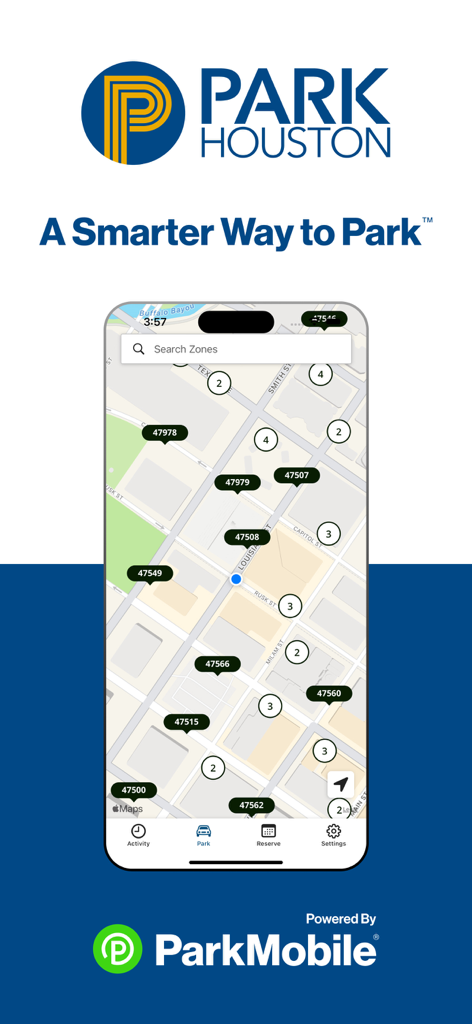
ParkHouston app interface showing a map of city parking zones and search feature

ParkHouston app interface showing a map of city parking zones and search feature

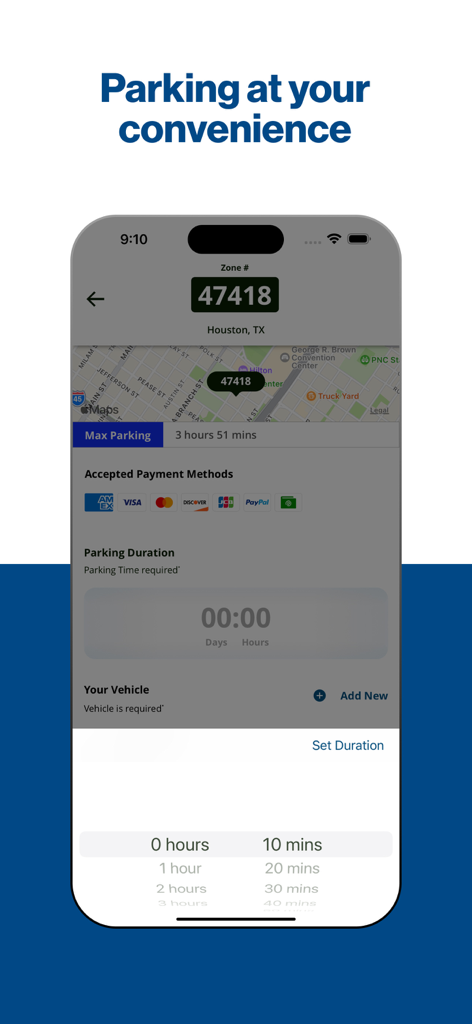
Smartphone screen of the ParkHouston app showing a map of Houston and a parking duration selector

Smartphone screen of the ParkHouston app showing a map of Houston and a parking duration selector

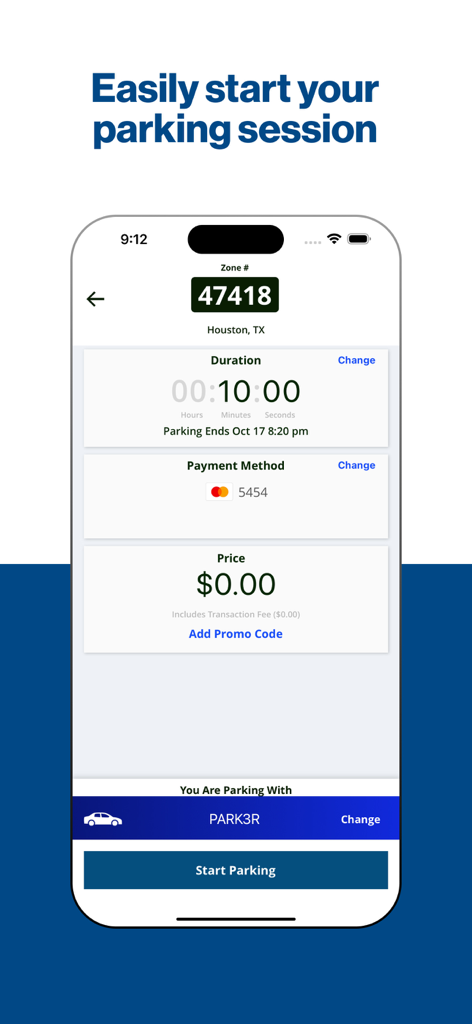
ParkHouston app interface for starting a parking session showing zone number duration and payment method

ParkHouston app interface for starting a parking session showing zone number duration and payment method

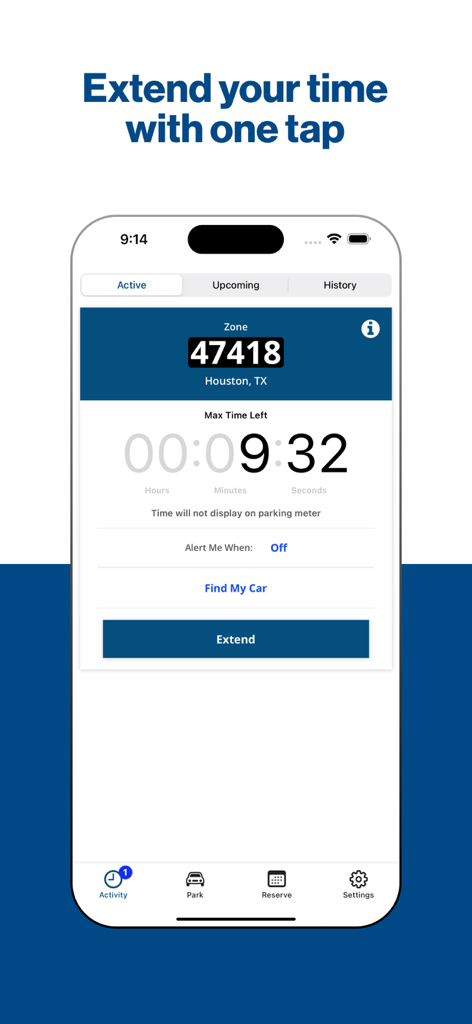
ParkHouston app screen showing a countdown timer for an active parking session and a button to extend the time.

ParkHouston app screen showing a countdown timer for an active parking session and a button to extend the time.

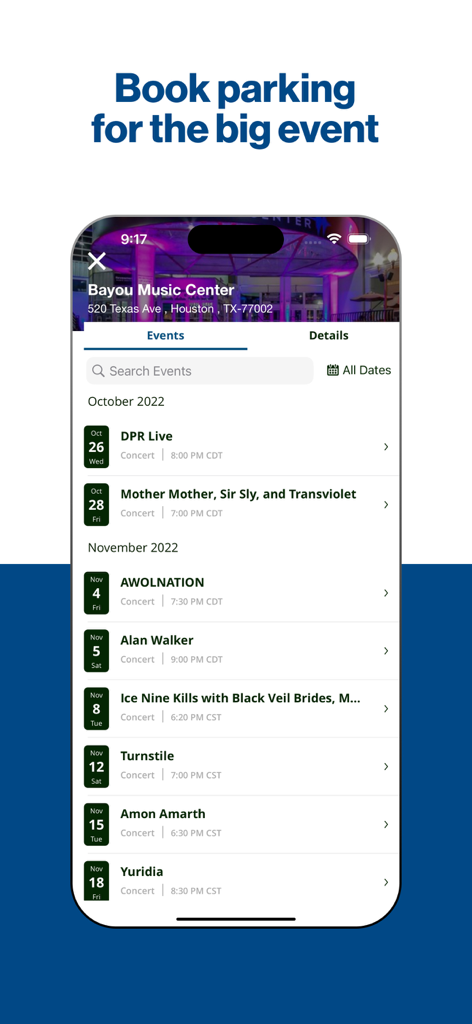
ParkHouston app interface displaying a list of upcoming events at Bayou Music Center for parking reservations

ParkHouston app interface displaying a list of upcoming events at Bayou Music Center for parking reservations

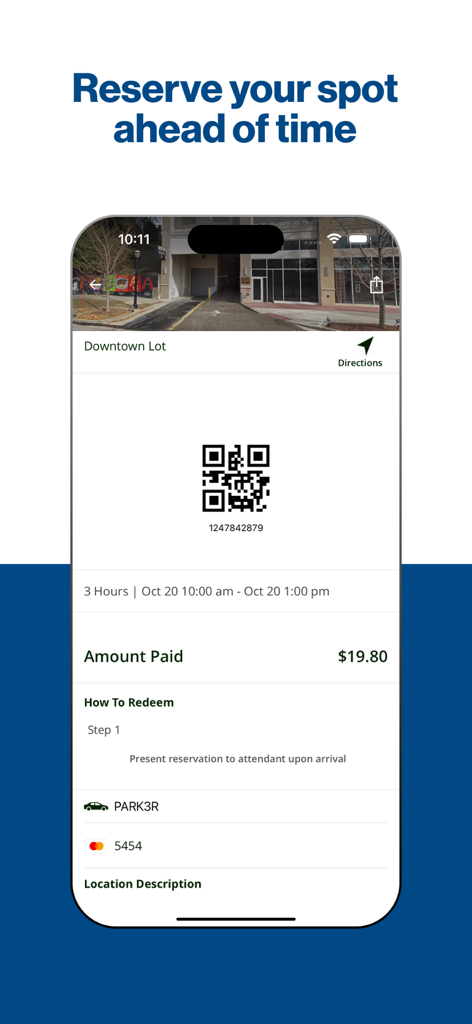
ParkHouston app screen showing a parking reservation confirmation with a QR code and payment details for a downtown lot

ParkHouston app screen showing a parking reservation confirmation with a QR code and payment details for a downtown lot

Park Like a Pro in Houston and Beyond

The tools that make this app stand out, trusted by 585K+ users.

📱

Skip the Meter, Stay in Control

Pay for street or garage parking directly from your phone. Receive expiration alerts and extend your time remotely to avoid costly tickets.

🗓️

Reserve Your Spot in Advance

Take the stress out of event days. Book your parking ahead of time for sports, concerts, or airport trips to guarantee your space.

🇺🇸

Seamless Nationwide Coverage

Use ParkHouston in over 500 cities coast-to-coast. Whether you're in Downtown Houston or traveling for business, your parking is covered.

Loved by users worldwide

Trusted by 585K+ people who love this app.

"

"ParkHouston has been a total game-changer for my daily commute downtown. I no longer have to cut client meetings short or run out in the Houston heat to feed a meter. The remote extension feature and expiration alerts have saved me from dozens of potential tickets. It is hands-down the most useful app on my phone."

Sarah Jenkins, Corporate Attorney
"

"I use this app every time we head to Minute Maid Park or the Museum District. Being able to reserve a spot ahead of time takes all the stress out of weekend traffic. Plus, the 'Find My Car' feature is a lifesaver when you are trying to navigate back to your spot after a long game with the family!"

Marcus Thompson, Houston Native & Sports Fan

About the app

Everything you need to know about ParkHouston.

Description

The ParkHouston app, powered by ParkMobile, gives you a smarter way to park in Houston. Easily pay for on-street and off-street parking right from your mobile device. You can also reserve parking ahead of time in lots, garages, venues, airports, and universities across the country. You can use the ParkHouston app in over 500 other cities across the country, including Boston, San Francisco, Washington, D.C., Atlanta, Chicago, Miami, New Orleans, Dallas, St. Louis, Minneapolis, Pittsburgh, Philadelphia, and more. Why Use ParkHouston? • Skip the meter and easily pay for parking from your mobile device • Extend your parking duration remotely from the app • Get alerts so you know when your parking session is going to expire • Reserve parking spots ahead of time to save time and money • Use the app in over 3000 locations coast-to-coast including venues, airports, and universities How to Set Up Your Account • Download the ParkHouston app and create an account with your email address and password • Enter your license plate number and the state where your vehicle is registered • Add your method of payment and start using the ParkHouston app How It Works On-Street and Off-Street Parking: • Enter the zone number on the posted signs around the meter • Select the amount of time you want to park and confirm your information • Touch the “Start Parking” button to begin your parking session • Extend time in the app if you are running late Parking Reservations: • Search for the area where you want to park and select the specific parking location • Choose the date/time and complete your reservation • Follow the instructions in your confirmation to redeem at the parking facility App Features • Customizable notifications delivered via email, text, and/or app • Save your favorite parking locations for next time • Store up to five cars in your account • “Find my car” feature directs you back to the location where you parked • Turn-by-turn directions to the parking garage where you reserved your spot • Multiple payment methods available About ParkMobile ParkMobile, LLC is the leading provider of parking payment solutions in the United States, helping over 40 million people easily find, reserve, and pay for parking from their mobile devices. Looking for Help? At ParkMobile, we’re serious about customer service. We process nearly 500,000 parking transactions every day and we know that every now and then, something might go wrong. If you have an issue, we will do everything we can to make it right. Our customer service is 24/7/365. If you need help, here’s how to get in touch with us: Web: https://ParkMobile.io/ Email: helpdesk@ParkMobile.io Online Help Center: https://ParkMobile.zendesk.com/hc/en-us Video Tutorials: https://www.youtube.com/playlist?list=PLkFsfUAHrnUc5jOm9XtjOmmJQt4YTTCyA Twitter: https://twitter.com/ParkMobile Facebook: https://www.facebook.com/ParkMobile/

Latest Version

25.22.0

Size

77.7 MB

First Released

May 5, 2017

Ready to Park Smarter in Houston?

Join over 585,000 drivers who skip the meter, extend time remotely, and avoid tickets. Download ParkHouston today and experience frictionless parking across the city.

Download on App Store
FAQ

Frequently Asked Questions

Everything you need to know about ParkHouston

What is the ParkHouston app used for?

The ParkHouston app, powered by ParkMobile, enables users to easily pay for on-street and off-street parking and reserve parking spots in advance directly from their mobile device.

How do I pay for parking using the ParkHouston app?

To pay for parking with the ParkHouston app, enter the zone number from posted signs, select your desired parking duration, confirm the information, and tap “Start Parking”.

Can I extend my parking session with the ParkHouston app?

Yes, you can extend your parking duration remotely from the ParkHouston app. It also provides alerts to notify you before your parking session expires.

Where can I use the ParkHouston app besides Houston?

The ParkHouston app can be used in over 500 other cities across the country, including Boston, San Francisco, Washington, D.C., Atlanta, Chicago, and Miami, and over 3000 locations nationwide.

How do I set up my account in the ParkHouston app?

To set up your ParkHouston app account, download the app, create an account with your email and password, enter your license plate number and state, then add your method of payment.

What payment methods does the ParkHouston app accept?

The ParkHouston app accepts multiple payment methods. Specific accepted methods include American Express, Visa, Discover, and PayPal.

Can I reserve parking spots in advance with the ParkHouston app?

Yes, the ParkHouston app allows you to reserve parking spots ahead of time. You search for the area, select the location, choose the date/time, and complete your reservation.

Does the ParkHouston app provide directions to my reserved parking spot?

Yes, the ParkHouston app provides turn-by-turn directions to the parking garage where you have reserved your spot.

How many vehicles can I store in my ParkHouston app account?

The ParkHouston app allows you to store up to five cars in your account for convenient parking management.

What if I need customer service for the ParkHouston app?

ParkMobile provides 24/7/365 customer service for the ParkHouston app. You can get in touch via web, email at helpdesk@ParkMobile.io, their online help center, video tutorials, Twitter, or Facebook.