Photo Eraser - Remove Objects

Photo Eraser - Remove Objects

Download on App Store
Spark by MWM logo
Logo of Photo Eraser - Remove Objects

Photo Eraser - Remove Objects: Perfect Your Shot with AI Magic

Effortlessly delete photobombers, power lines, and clutter. Powered by Generative AI to reconstruct flawless backgrounds and create the aesthetic you deserve in just one tap.

Publisher

AI Photo Editor Lab SRL

Category

Photo & Video

Downloads

7M+

User Rating

4.6/5

Total Ratings

40K+

Locales

14

The Magic Behind the Lens

Discover the interface used by 7M+ users.
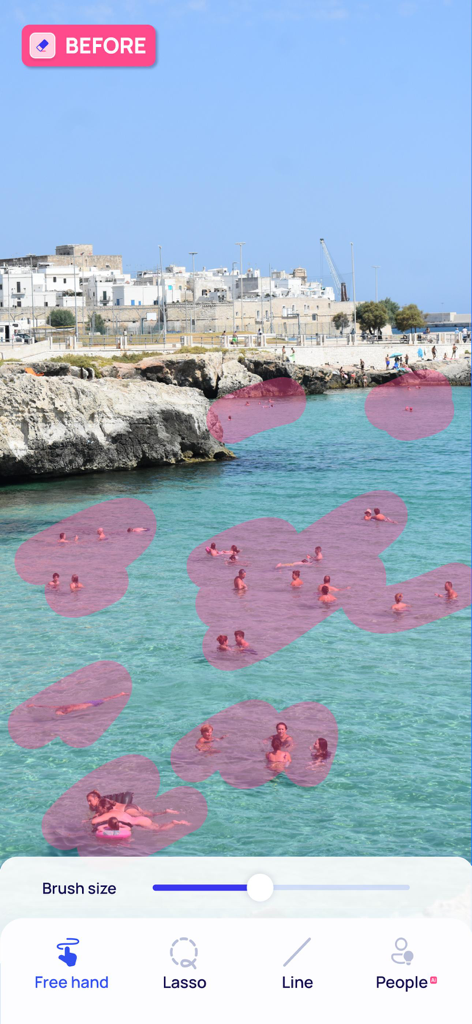
Photo editing app interface showing a beach scene with multiple people highlighted in pink for automatic removal using AI tools

Photo editing app interface showing a beach scene with multiple people highlighted in pink for automatic removal using AI tools

Photo Eraser app interface showing a clean coastal landscape after object removal with editing tools at the bottom

Photo Eraser app interface showing a clean coastal landscape after object removal with editing tools at the bottom

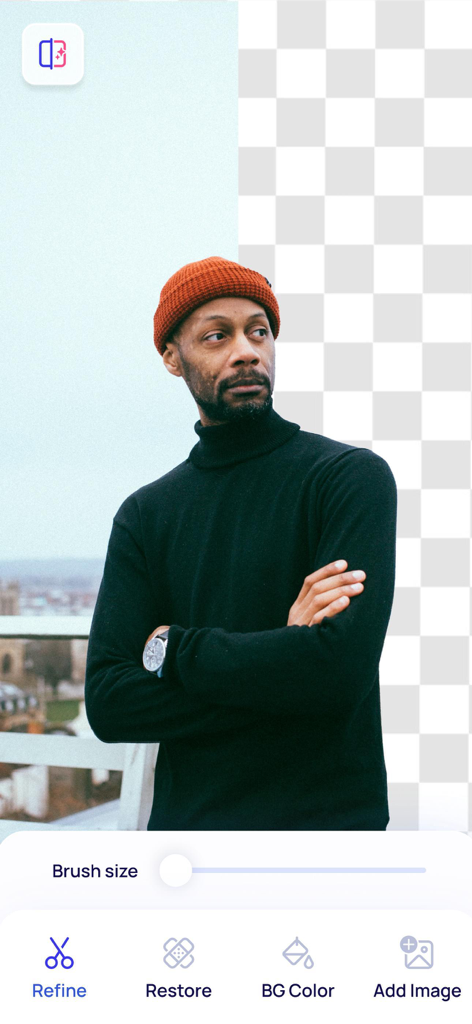
AI background removal tool showing a man in an orange beanie isolated from a city background with a transparent grid

AI background removal tool showing a man in an orange beanie isolated from a city background with a transparent grid

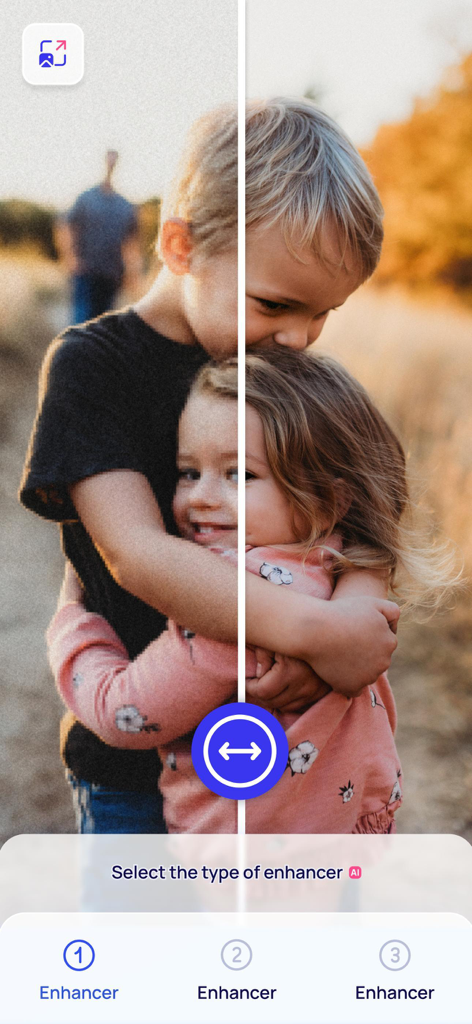
Before and after comparison of a blurry photo of children being sharpened with the AI enhancer tool

Before and after comparison of a blurry photo of children being sharpened with the AI enhancer tool

AI facial retouching interface showing before and after portrait comparison with editing tools for facial features

AI facial retouching interface showing before and after portrait comparison with editing tools for facial features

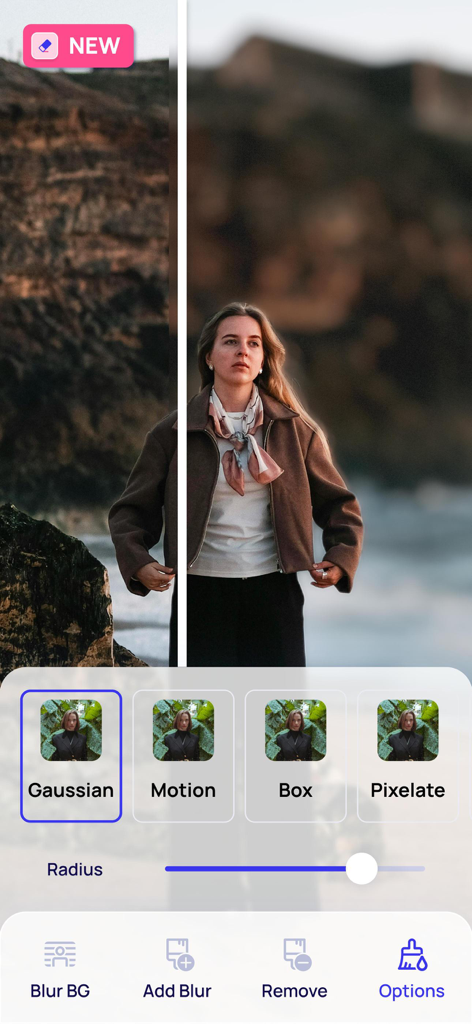
A side by side comparison showing the background blur feature in a photo editing app

A side by side comparison showing the background blur feature in a photo editing app

Photo editing app screen showing sky and lighting adjustment options

Photo editing app screen showing sky and lighting adjustment options

Smartphone screenshot of Photo Eraser app demonstrating the AI sky replacement feature with a sunrise theme.

Smartphone screenshot of Photo Eraser app demonstrating the AI sky replacement feature with a sunrise theme.

AI person detection interface in Photo Eraser app showing hikers selected for removal

AI person detection interface in Photo Eraser app showing hikers selected for removal

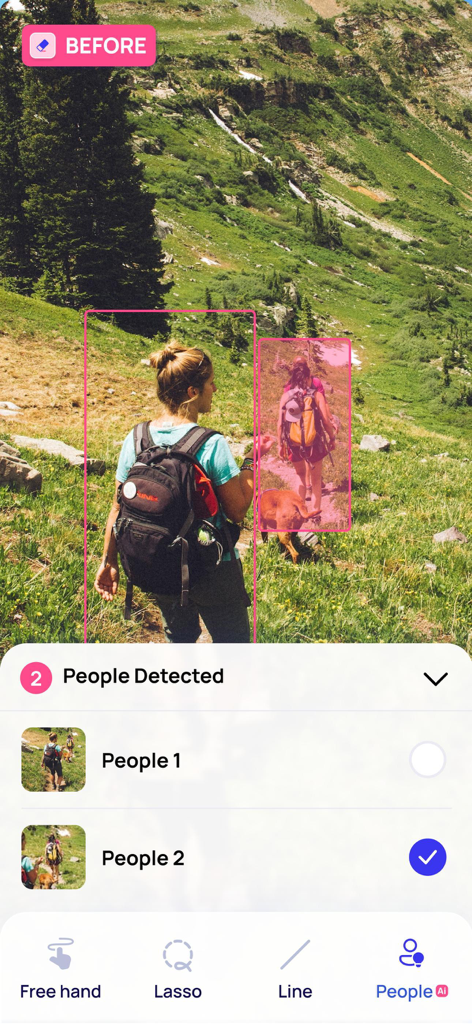
Screenshot of the Photo Eraser app showing a woman on a hiking trail with an AI tool detecting people for removal.

Screenshot of the Photo Eraser app showing a woman on a hiking trail with an AI tool detecting people for removal.

Clean Up Your Feed in Seconds

The tools that make this app stand out, trusted by 7M+ users.

🪄

Erase Unwanted Guests

Instantly remove photobombers and objects while our AI seamlessly fills the background for a natural, invisible finish.

🏙️

Remove Visual Clutter

Use smart detection to eliminate power lines, cables, and messy backgrounds that ruin your perfect travel aesthetic.

Enhance Every Detail

From unblurring low-quality shots to skin retouching, make every memory look high-definition and instantly post-ready.

Loved by users worldwide

Trusted by 7M+ people who love this app.

"

"I took a stunning photo at the Grand Canyon, but it was cluttered with tourists and power lines. The AI Super Eraser worked like magic—it didn't just blur them, it reconstructed the background perfectly! My travel photos finally look professional and clean."

Maya Jenkins
"

"As a full-time reseller on Poshmark, presentation is everything. This app is a game-changer for my listings. The Remove Background tool is incredibly precise, and I can quickly erase any distractions to make my products stand out. It saves me hours of editing."

David Sterling

About the app

Everything you need to know about Photo Eraser - Remove Objects.

Description

Powered by advanced AI technology, Photo Eraser not only removes unwanted objects from your pictures but also seamlessly reconstructs the background to give you that perfect shot you've always desired. No more distractions in your photos! With Photo Eraser's cutting-edge erase elements function, you can effortlessly eliminate any unwanted object, person or background clutter from your images. The app's AI capabilities ensure that the area previously occupied by the removed item is filled in with an accurate and natural-looking background, making the edit invisible. The Photo Eraser feature comes equipped with a range of intuitive tools designed to speed up the editing process, ensuring you achieve professional-quality results in just a few taps: - AI Super Eraser: Leverage advanced Generative AI models to reconstruct intricate backgrounds seamlessly, removing unwanted elements while maintaining a natural and cohesive appearance. - AI Magic Object Detection: The AI detection feature automatically identifies objects and people that you may want to remove. This intelligent detection capability saves you time and effort. - Lines Detection: Photo Eraser has a lines detection feature specifically designed to remove cables or power lines from your images. - Free Hand and Lasso Tools: For more control over the editing process, the app also provides standard free hand and lasso tools, allowing you to precisely select and remove unwanted items from your pictures. Photo Eraser also offers additional features: - AI Expand: Extend the boundaries of your images with ease, using AI to fill the extra space with context-aware, visually harmonious elements for a natural-looking expansion. - AI Transform: Leverage cutting-edge Generative AI to add, modify, or replace objects in your photos seamlessly, creating visually stunning and natural-looking edits. Transform: Leverage cutting-edge Generative AI to add, modify, or replace objects in your photos seamlessly, creating visually stunning and natural-looking edits. - Remove Background: A highly precise tool for eliminating or personalising the background from your images. - AI Filters: Apply unique filters such as CV Style for professional polish, Wedding Theme for a romantic touch, or Cartoon Effect for a fun and creative look. - Photo Enhancer: Improve and restore the quality of blurred images, turning less-than-perfect shots into clear, sharp, and high-quality photos. - Change the Sky: A feature that allows to transform the sky in your pictures, recreating the mood and aesthetic of your scenes with just a few taps. - Retouch Feature: Blemishes and pimples can be quickly and easily removed, leaving your skin looking flawless. - Advanced Cropping: It lets you effortlessly frame your shots in the most visually appealing way. Experience the magic of AI-powered photo editing with Photo Eraser. Transform your pictures into professional-quality images. With Photo Eraser, you can create picture-perfect moments that truly stand out. Subscribe to access to premium app features; subscription details are the following: • Length: weekly • Your payment will be charged to your iTunes Account as soon as you confirm your purchase • You can manage your subscriptions and turn off auto-renewal from your Account Settings after the purchase • Your subscription will renew automatically, unless you turn off auto-renew at least 24 hours before the end of the current period • The cost of renewal will be charged to your account in the 24 hours prior to the end of the current period • When canceling a subscription, your subscription will stay active until the end of the period. Auto-renewal will be disabled, but the current subscription will not be refunded • Any unused portion of a free trial period, if offered, will be forfeited when purchasing a subscription Terms of Use: https://www.apple.com/legal/internet-services/itunes/dev/stdeula/. If you have any questions please contact us: photoeraser.help@gmail.com

Latest Version

3.7

Size

140.6 MB

First Released

Jun 14, 2019

Ready to create your perfect shot?

Join 7 million creators who use our AI to erase photobombers, fix blurry memories, and make every photo look professional in just one tap.

Download on App Store
FAQ

Frequently Asked Questions

Everything you need to know about Photo Eraser - Remove Objects

What does Photo Eraser - Remove Objects do?

Photo Eraser - Remove Objects uses advanced AI to remove unwanted objects, people, or background clutter from pictures. It seamlessly reconstructs the background to achieve a perfect shot.

How does Photo Eraser - Remove Objects remove unwanted items?

Photo Eraser - Remove Objects uses AI Super Eraser for background reconstruction, AI Magic Object Detection for automatic identification, and Lines Detection. It also includes Free Hand and Lasso tools for precise selection.

Does Photo Eraser - Remove Objects reconstruct backgrounds after object removal?

Yes, Photo Eraser - Remove Objects uses advanced Generative AI models to seamlessly reconstruct intricate backgrounds after removing unwanted elements. This maintains a natural and cohesive appearance.

Can Photo Eraser - Remove Objects automatically detect objects for removal?

Yes, Photo Eraser - Remove Objects features AI Magic Object Detection. This capability automatically identifies objects and people you may want to remove, saving time and effort during the editing process.

Can Photo Eraser - Remove Objects remove lines from photos?

Yes, Photo Eraser - Remove Objects has a dedicated lines detection feature. This tool specifically removes cables or power lines from your images, enhancing the overall clarity of your photos.

How does Photo Eraser - Remove Objects remove image backgrounds?

Photo Eraser - Remove Objects offers a highly precise tool for eliminating or personalizing the background from your images. Users can choose to remove the background entirely or modify it.

Does Photo Eraser - Remove Objects include a photo enhancer?

Yes, Photo Eraser - Remove Objects includes a Photo Enhancer feature. It improves and restores the quality of blurred images, transforming less-than-perfect shots into clear, sharp, high-quality photos.

Can Photo Eraser - Remove Objects change the sky in photos?

Yes, Photo Eraser - Remove Objects offers a "Change the Sky" feature. This allows users to transform the sky in their pictures, recreating the mood and aesthetic of scenes with just a few taps.

Does Photo Eraser - Remove Objects offer photo retouching?

Yes, Photo Eraser - Remove Objects includes a Retouch Feature. This allows users to quickly and easily remove blemishes and pimples, ensuring skin looks flawless in their pictures.

How do I manage my Photo Eraser - Remove Objects subscription and auto-renewal?

You can manage your Photo Eraser - Remove Objects subscription and turn off auto-renewal from your iTunes Account Settings after purchase. Your subscription renews automatically unless turned off 24 hours before the period ends.

What is the length of a Photo Eraser - Remove Objects subscription?

The Photo Eraser - Remove Objects subscription length is weekly. The cost of renewal is charged to your account in the 24 hours prior to the end of the current period.

What happens when I cancel my Photo Eraser - Remove Objects subscription?

When canceling a Photo Eraser - Remove Objects subscription, it remains active until the end of the current period. Auto-renewal is disabled, but the current subscription will not be refunded.

Do I lose my free trial if I purchase a Photo Eraser - Remove Objects subscription?

Yes, any unused portion of a free trial period for Photo Eraser - Remove Objects, if offered, will be forfeited when purchasing a subscription.

What is the AI Expand feature in Photo Eraser - Remove Objects?

The AI Expand feature in Photo Eraser - Remove Objects extends image boundaries. It uses AI to fill the extra space with context-aware, visually harmonious elements, resulting in natural-looking expansion.

What does the AI Transform feature do in Photo Eraser - Remove Objects?

The AI Transform feature in Photo Eraser - Remove Objects leverages Generative AI to add, modify, or replace objects in photos. It creates visually stunning and natural-looking edits seamlessly.

Can I apply AI filters in Photo Eraser - Remove Objects?

Yes, Photo Eraser - Remove Objects allows users to apply unique AI Filters. Examples include CV Style for professional polish, Wedding Theme for a romantic touch, or Cartoon Effect for a fun look.

How can I contact support for Photo Eraser - Remove Objects?

You can contact support for Photo Eraser - Remove Objects by emailing photoeraser.help@gmail.com for any questions or assistance.

Is Photo Eraser - Remove Objects safe to use for photo editing?

Photo Eraser - Remove Objects is designed for photo editing. It operates by modifying image data locally or through AI services. The app adheres to Apple's standard End User License Agreement.

Does Photo Eraser - Remove Objects have advanced cropping tools?

Yes, Photo Eraser - Remove Objects includes Advanced Cropping. This feature lets you effortlessly frame your shots in the most visually appealing way to optimize your image composition.